Modernflyouts: Bug:-Maximum Brightness is set to 100 but is only shown as 16 when increasing brightness
The maximum is 100 according to windows 10 but is only shown as 16 in the flyout which is inaccurate
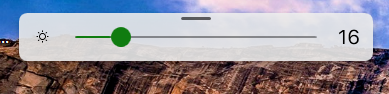 - flyout brightness
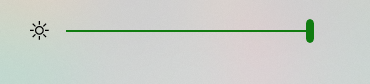 - action center brightness
 TheDarkKnight2168
All 12 comments
What laptop or tablet device are you using?
 ShankarBUS
on 13 Dec 2020
ShankarBUS
on 13 Dec 2020
Laptop running on windows 10- Dell XPS Sent from Mail for Windows 10 From: UmashankarSent: Sunday, December 13, 2020 8:37 PMTo: ModernFlyouts-Community/ModernFlyoutsCc: The Dark Knight; AuthorSubject: Re: [ModernFlyouts-Community/ModernFlyouts] Bug:-Maximum Brightness is set to 100 but is only shown as 16 when increasing brightness (#301) What laptop or tablet device are you using?—You are receiving this because you authored the thread.Reply to this email directly, view it on GitHub, or unsubscribe.
TheDarkKnight2168
on 14 Dec 2020
its a dell xps laptop running on windows 10 (UWP App ver)
TheDarkKnight2168
on 14 Dec 2020
Do you have battery saver turned on or any other brightness limiting features enabled?
 WinstonSepruko
on 14 Dec 2020
WinstonSepruko
on 14 Dec 2020
no everything is fine but still the bug is occuring
TheDarkKnight2168
on 14 Dec 2020
Some devices have different brightness levels.
My previous laptop had a brightness level of 7. Which is insanely lower than yours. This was one of the reasons I didn't support brightness flyout at first.
But my current one has 100 brightness levels.
The current WMI methods we use makes this bug unavoidable.
I may need to find another method to control laptop monitor brightness. Sorry mate, I feel your inconvenience.
Until I fix this issue, it's better for you to turn off the brightness module so that the built-in one would be shown instead.
ShankarBUS
on 14 Dec 2020
How does the default flyout take the value? From what source?
 Cyberdroid1
on 17 Dec 2020
Cyberdroid1
on 17 Dec 2020
Might be some private or internal API. @ADeltaX, do you know something?
I remember you even reversed the private APIs for Night Light.
So you must know this one too.
I'm asking you this because DShell would definitely have a way to control the display brightness.
ShankarBUS
on 17 Dec 2020
Can confirm the similar behavior on HP x360 1030 G4 but mine limits to 77. Also the steps in which the brightness levels increase/decrease is random.
i.e., 1,7,15,23.31,38,46,53,61,70,77
 vijjusri14
on 19 Dec 2020
vijjusri14
on 19 Dec 2020
Oh yes. I have faced this sometimes, jumping in tables of 7, but goes till 100. It sometimes eventually fixes itself, but it is quite a recurring issue.
Cyberdroid1
on 19 Dec 2020
Power saver mode may cause it change by a delta of 7. #86
Turning off power saver will change the delta back to 10.
ShankarBUS
on 19 Dec 2020
@ShankarBUS Battery saver mode is off and yet the delta is random, although when I turn on battery saver the max value is limited to 45.
vijjusri14
on 21 Dec 2020
Related issues
 Poopooracoocoo
·
4Comments
Poopooracoocoo
·
4Comments
 elenmerbau
·
5Comments
elenmerbau
·
5Comments
 luojunyuan
·
3Comments
luojunyuan
·
3Comments
 privacyguy123
·
3Comments
privacyguy123
·
3Comments
 S1ROZHA
·
4Comments
S1ROZHA
·
4Comments
Most helpful comment
Some devices have different brightness levels.
My previous laptop had a brightness level of 7. Which is insanely lower than yours. This was one of the reasons I didn't support brightness flyout at first.
But my current one has 100 brightness levels.
The current WMI methods we use makes this bug unavoidable.
I may need to find another method to control laptop monitor brightness. Sorry mate, I feel your inconvenience.
Until I fix this issue, it's better for you to turn off the brightness module so that the built-in one would be shown instead.