Modernflyouts: Brightness slider displayed incorrectly during battery saver
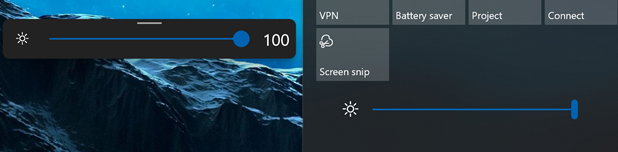
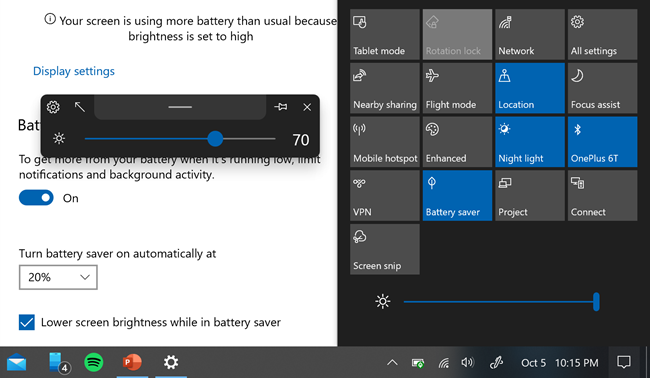
Battery saver limits maximum screen brightness in Windows 10. The flyout shows the absolute screen brightness, not an amount relative to the amount limited by battery saver. This is not in line with how Windows displays it in the old popup/action center.
In other words - screen brightness goes from 0-100. Battery saver turns on, screen brightness goes from 0-70. Windows displays this brightness of 70 as 70/70*100 = 100, while the new flyout displays and caps to 70.
Could this be made consistent with the Windows behavior? The maximum brightness may be gettable from https://docs.microsoft.com/en-us/windows/win32/api/highlevelmonitorconfigurationapi/nf-highlevelmonitorconfigurationapi-getmonitorbrightness
 OGordon100
All 2 comments
Before battery saver (working as expected)
After battery saver + limiting brightness (windows is relative, modern flyouts is absolute)
OGordon100
on 5 Oct 2020
AHH that's a nice catch.
Thanks for reporting this mate!
We can easily do this just have to change the max value of the slider to the max value of the brightness (which could be fetched through WMI)
But I hard coded the values to be in range of 0 - 100.
I will improve the brightness flyout in v0.9
 ShankarBUS
on 6 Oct 2020
ShankarBUS
on 6 Oct 2020
Related issues
 S1ROZHA
·
4Comments
S1ROZHA
·
4Comments
 Cyberdroid1
·
4Comments
Cyberdroid1
·
4Comments
 luojunyuan
·
3Comments
Cyberdroid1
·
4Comments
luojunyuan
·
3Comments
Cyberdroid1
·
4Comments
 DanRotaru
·
3Comments
DanRotaru
·
3Comments
Most helpful comment
Before battery saver (working as expected)

After battery saver + limiting brightness (windows is relative, modern flyouts is absolute)
