Mne-python: ENH: Support dockerized FreeSurfer installations
Describe the problem
The vast majority of scientists I work with use Windows computers. However, parts of MNE's source estimation stack rely on FreeSurfer, which is only available for Linux and macOS. This issue is preventing a number of my colleagues from switching to MNE-Python.
Describe your solution
Currently, FreeSurfer operations are carried out by concatenating a list of arguments and passing these to the respective FreeSurfer command line tool. This, obviously, will work only if FreeSurfer has been installed, so Windows is excluded _per se_.
To extend support to the Windows platform, I suggest to add support for containerized FreeSurfer installations, specifically for Docker images: Instead of invoking a FreeSurfer subprocess on the host machine, MNE-Python would execute the operation inside a Docker container. For example, instead of calling mri_watershed -T1 -useSRAS ... we'd call something along the lines of docker run -it -d mne/FreeSurfer mri_watershed -T1 -useSRAS ... Of course, we'd also need to map host directories to the appropriate places inside the container.
The user, then, would only need to acquire a FreeSurfer license file and install Docker; the rest could be done automatically. Incidentally, this would work on _all_ platforms.
To allow switching between the local installation and the container, a kwarg freesurfer_backend could be added to the relevant Python function signatures: freesurfer_backend='native' (or 'local') uses the host installation, and freesurfer_backend='docker' uses the Docker container (and first pulls the image, if necessary). Might even be worthwhile to allow for different Docker images, e.g., docker_image='mne/FreeSurfer-extended:latest'
There is already a FreeSurfer image on Docker Hub which could serve as a base, and inspiration could be drawn from the FreeSurfer BIDS App.
Describe possible alternatives
The FreeSurfer BIDS App already dockerizes FreeSurfer for processing of BIDS-compliant data; however, currently it's a "stand-alone" thingy without integration into MNE-Python.
If the idea of a dockerized FreeSurfer is generally liked, it might be worthwhile to discuss whether adding a new, thin abstraction layer between MNE-Python and FreeSurfer could be of advantage in case we'd like to add support for additional FreeSurfer backends later on. For example, on Windows 10, Windows Subsystem for Linux (WSL) seems like an almost natural choice.
 hoechenberger
All 30 comments
@hoechenberger this seems like a great initiative! Would you be able to work on it?
To allow switching between the local installation and the container, a kwarg freesurfer_backend could be added to the relevant Python function signatures: freesurfer_backend='native' (or 'local') uses the host installation, and freesurfer_backend='docker' uses the Docker container (and first pulls the image, if necessary). Might even be worthwhile to allow for different Docker images, e.g., docker_image='mne/FreeSurfer-extended:latest'
How about a single new kwarg freesurfer_backend=None that supports:
None, which means useMNE_FREESURFER_BACKENDconfig (see below)'local': a system command (current behavior, and the default if MNE_FREESURFER_BACKEND is not set, so it will effectively stay the default)'docker': alias for some suggested image (hopefully the official one is good enough)dict(kind='docker', image='XYZ')(add later, hopefully YAGNI to start)
This is future compatible with any other backends we need to add, as well as any new docker options we need.
To make things easy for people, a MNE_FREESURFER_BACKEND config var can be used. Thus Windows people can do mne.set_config('MNE_FREESURFER_BACKEND', 'docker') (or in the dict case some JSON string like '{kind: "docker", image="XYZ"}', etc.) once and then everything should just automatically work in MNE-Python calls without them ever having to set freesurfer_backend in their calls (though they can override things if they want).
Of course, we'd also need to map host directories to the appropriate places inside the container.
I am a docker novice so this might not be relevant -- but most, if not all, FreeSurfer calls we do currently operate in a _TempDir anyway. Any operations that do not can probably be made to do so, and after the call we copy the output files to where we actually want them to live on the host machine. So this mapping can hopefully also be automated, i.e., for each call we do:
- map tempdir to image
- operate in the image within the tempdir
- copy to file from tempdir to destination dir on host
- unmap tempdir from image
 larsoner
on 4 Dec 2019
larsoner
on 4 Dec 2019
@larsoner I agree with everything you've said. :) I'd like to give it a shot, however I'm quite busy these days so cannot promise anything!
hoechenberger
on 4 Dec 2019
Tagging @nandmone
hoechenberger
on 4 Dec 2019
I am a docker novice so this might not be relevant -- but most, if not all, FreeSurfer calls we do currently operate in a
_TempDiranyway. Any operations that do not can probably be made to do so, and after the call we copy the output files to where we actually want them to live on the host machine. So this mapping can hopefully also be automated, i.e., for each call we do:
- map tempdir to image
- operate in the image within the tempdir
- copy to file from tempdir to destination dir on host
- unmap tempdir from image
Yes this should be doable, only thing is that at least on macOS Docker needs to be explicitly granted privileges to create these directory mappings, so we'll have to see how that would work with temp dirs. Are the name and location of that temporary directory fixed?
hoechenberger
on 4 Dec 2019
Are the name and location of that temporary directory fixed?
Generally they are random. We could make them fixed, but if it's the case that on OSX you need to grant on a dir-by-dir basis, we might want to force people on that platform to specify a scratch directory to use. Like:
freesurfer_backend=dict(kind='docker', work_dir='/home/larsoner/temp')
If work_dir is unspecified (None), it will try to use a tempdir. This will fail on OSX but we can make the error informative. That way people on Linux and Windows don't have to worry about it, and OSX people will know to set it and correspondingly set permissions or whatever.
larsoner
on 4 Dec 2019
If
work_diris unspecified (None), it will try to use a tempdir. This will fail on OSX but we can make the error informative. That way people on Linux and Windows don't have to worry about it, and OSX people will know to set it and correspondingly set permissions or whatever.
Ok I'll try to look into this, maybe this is also a non-issue with recent Docker releases, idk. Cannot remember the last time I had to manually grant access to anything on my Mac, but that sure used to be the case a year or two back.
hoechenberger
on 4 Dec 2019
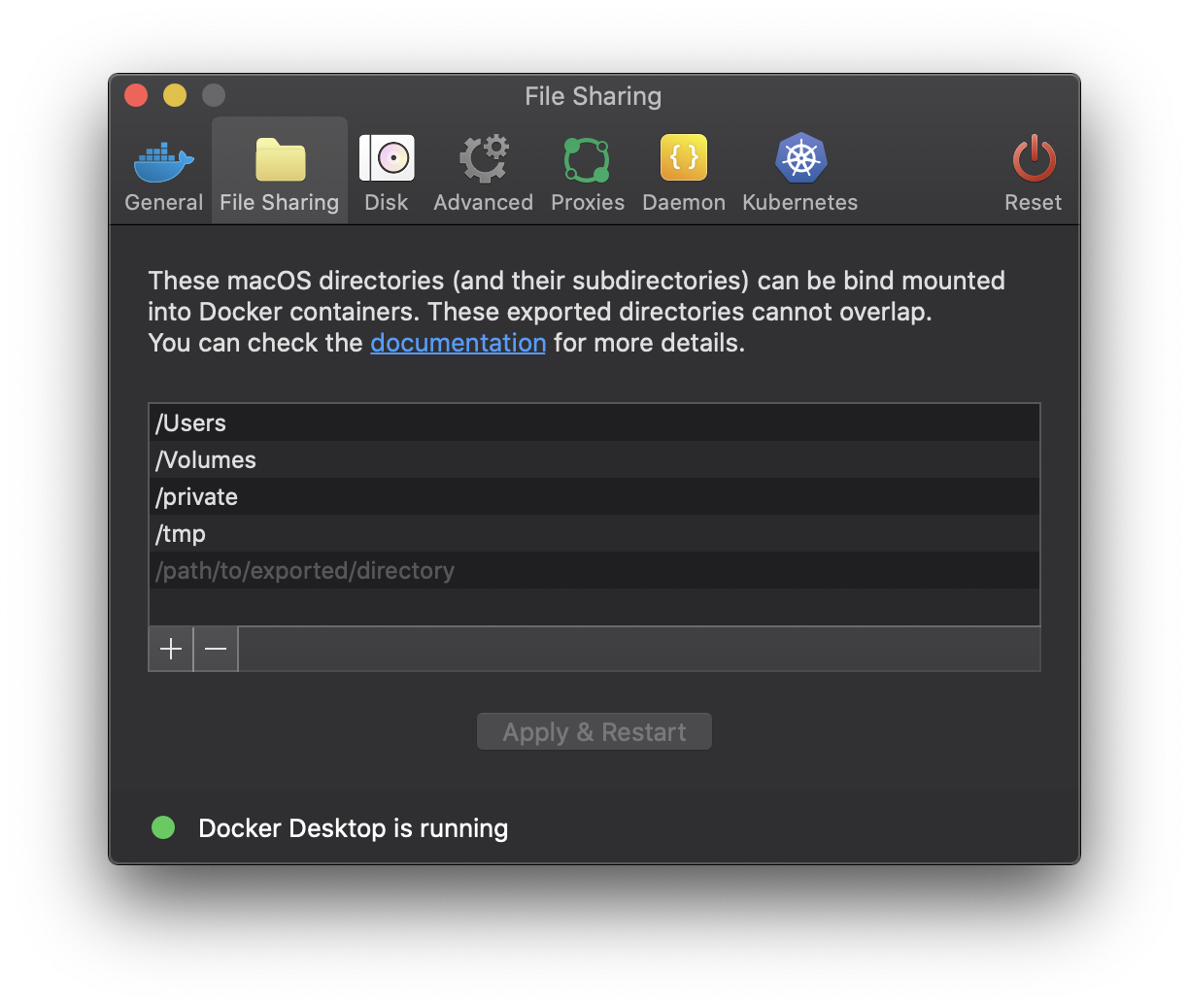
These are the directories that can be exposed from host to container by default in my Docker installation – I didn't add anything manually there:
hoechenberger
on 4 Dec 2019
/tmp is probably where tempdirs are created, so maybe we won't need to do anything special. Let's see if we can get it to work without needing to set a work_dir and if we need to add it later we can.
larsoner
on 4 Dec 2019
Todo (feel free to edit / add entries):
- [ ] create Docker image (or use existing one, if suitable)
- [ ] if we created a new image, publish it on Docker Hub
- [ ] add
MNE_FREESURFER_BACKENDsetting
- [ ]
'docker'will also require specification of FreeSurfer license file location, so I guess we'll have to go with the "dictapproach" from the start
- [ ]
- [ ] add
freesurfer_backendkwarg
I will check out existing Docker images and build a new one if necessary this weekend (i.e. will start working on the first two points)
hoechenberger
on 4 Dec 2019
thx @hoechenberger for looking into this.
another option for those on windows 10 is to use the ubuntu console builtin maybe? can neurodebian packages which offer freesurfer than be used on windows 10?
cc @yarikoptic
 agramfort
on 4 Dec 2019
agramfort
on 4 Dec 2019
That would be the WSL approach I mentioned :) would be interesting to know whether that might be a viable approach indeed!
hoechenberger
on 4 Dec 2019
Fwiw Unfortunately we don't have freesurfer in NeuroDebian yet
 yarikoptic
on 5 Dec 2019
yarikoptic
on 5 Dec 2019
Fwiw a wild idea: some windows savvy user could come up with a collection of powershell scripts for each freesurfer command of interest, which would call out to dockerized freesurfer with all needed bind points and paths translations. This could be useful beyond mne-python, and would require no changes to it, just instructions to dump that set of scripts in the PATH.
yarikoptic
on 5 Dec 2019
thanks an interesting idea @yarikoptic !
@buildqa can chat with FreeSurfer folks if they would consider this option to help windows users?
agramfort
on 5 Dec 2019
Quick update, I was busy last weekend finalizing a paper revision, and handed over my work computer to Apple support today (2018 MacBook Pro, guess what… keyboard issue). I _will_ work on this, but it might take another couple days or even a week until I will be getting to it.
hoechenberger
on 9 Dec 2019
There is someone working at Corticometrics maintaining a docker image that can run Freesurfer on CentOS - but one issue is that to run the Freeview GUI you need X forwarding which to my knowledge docker cannot do - and many people want to run fFeeview. There has been some talk about re-writing freeview to work in a browser environment, but there is nothing official about this. One thing we are trying to do to make the entire freesurfer distribution (including freeview) available to windows users - is to install the freesurfer distribution in the Ubuntu shell which can be run on Windows 10. I have just started to create CentOS RPM installers (which our colleague at coritocmetrics successfully installed in a docker container). But for the Ubuntu install that would need to be a .deb package I believe, which is on my list to try and create. But you could try the CentOS .rpm file from the dev branch - though I should probably make one that excludes freeview (as it should install fewer packages and keep the docker image smaller).
 buildqa
on 10 Dec 2019
buildqa
on 10 Dec 2019
Just as an aside - you can see what Apple would give you for a trade-in on your MacBook Pro here, https://www.apple.com/shop/trade-in and select Mac. If it's a 2018 model you might get enough back to make it worth while to buy the new 16" MacBook Pro which has returned to the scissors keyboard, with a real escape key. I tried one at an Apple store and it has a better feel compared to the earlier models with no escape key. The new 16" model is at a minimum a 6 core i7, or if you start configuring the higher end model, you can pick a lower end 8 core i9 chip - which you will not see as a CPU option if you start with configuring the base model with the 6 core i7. But I don't think Apple targeted Mojave (10.14 or even earlier revs) of Mac OS to run on this hardware, so it will come with Catalina installed (10.15) and I have not read anything about being able to run 10.14 or older releases on it.
buildqa
on 10 Dec 2019
@buildqa MNE does not need freeview to work. MNE-Python calls freesurfer
commands from python system calls. If we have the FS commands working in
the path on windows without changing any python code it would be perfect.
>
agramfort
on 10 Dec 2019
We are running HNN with X-forwarding in docker, I'm surprised to learn that it does not work ...
 jasmainak
on 10 Dec 2019
jasmainak
on 10 Dec 2019
@larsoner I started working on this and I'm wondering how to deal with FREESURFER_HOME
when using the docker backend. Would it even make sense to let users specify a FREESURFER_HOME that's different from what's shipping with the docker container? As in, allow users to use the docker backend, but have FREESURFER_HOME point to a local directory on the host (and bind-mount the relevant subdirectories in the container)
If the answer is "no, wouldn't make sense", I wonder if we even need an MNE_FREESURFER_BACKEND config, or whether we could simply make use of FREESURFER_HOME to imply the backend too -- or would that be confusing as we'd be abusing a FreeSurfer-specific environment variable to change MNE settings/behavior?
tl;dr: How to treat FREESURFER_HOME in case the docker backend is used?
Edit
This question is also relevant bc currently in many places, we check if FREESURFER_HOME is set and raise if that's not the case (see e.g. #7195). So even when using the docker backend, we either will have to set FREESURFER_HOME to something, or, well, simply not raise if it's unset while we're using the docker backend :)
Edit2
My current gut feeling is that, when the docker backend is used, we should set FREESURFER_HOME to the default value used inside the docker container (/opt/freesurfer)
hoechenberger
on 12 Jan 2020
My current gut feeling is that, when the docker backend is used, we should set FREESURFER_HOME to the default value used inside the docker container (/opt/freesurfer)
That sounds reasonable to me. I still like the idea of having MNE_FREESURFER_BACKEND as the config var to control how we call freesurfer. And when it's docker or whatever, we can ignore the user's choice of FREESURFER_HOME since we know what it needs to be to use that backend.
larsoner
on 12 Jan 2020
There are various freesurrer commands/C files that expect to do a getenv("FREESURFER_HOME") and will error out if it is not defined. Many users define FREESURFER_HOME in their shell init file (and then use that to set SUBJECTS_DIR = $FREESURFER_HOME/subjects and put $FREESURFER_HOME/bin in their PATH). One of our dev partners has used the freesurfer dev CentOS rpm to setup their docker container to run freesurfer (including freeview - which I think you do not need). On a base CentOS7 system the rpm tools installed about 25 packages for the freesurfer-7-0.0.x86_64.rpm, but in the docker container about 100 packages got installed. I think this is partly because freeview needs all the X , graphics and other related packages. But I could make a "freesurfer light" RPM sans freeview if that would help (and you would like to use a linux installer). I do not yet have a Ubuntu installer and am working on the Mac .pkg file.
buildqa
on 13 Jan 2020
Thanks for your help, @buildqa! I already have a working Docker image (slightly modified the one officially supplied by FreeSurfer), so no need for any packaging required at this time. Regarding the FREESURFER_HOME variable, of course I would always set it inside the Docker container; my question was just how to treat the variable set on the _host_ computer :) Currently I‘m just following @larsoner‘s suggestion of ignoring the host‘s variable and simply setting it correctly inside the container. All working great so far.
Will share my results in a couple of days; still in a very early stage due to time constraints.
hoechenberger
on 13 Jan 2020
Just FYI, so far the RPM's/linux installers put the distribution under the /usr/local/freesurfer path that has been used in the past with release 6 - with the added distinction that there will be a rev number, e.g., /usr/local/freesurfer/7.0.0 and for the Mac installer /Applications/freesurfer/7.0.0. Once FREESURFER_HOME and SUBJECTS_DIR are set, then most people source $FREESURFER_HOME/SetUpFreeSurfer.sh if you are running bash, and for csh/tcsh source SetUpFreeSurfer.csh. Some folks do an export/setenv for those 2 env variables followed by the source command for SetUpFreeSurfer.[c]sh script - all in their shell init file. From testing on Mac OS Catalina the shell built in variable OSTYPE now returns bsd44 instead of darwin which has required some scripts to be modified.
buildqa
on 14 Jan 2020
@hoechenberger bumping to 0.21 as we'll need time to test this one
larsoner
on 4 Mar 2020
Sure, sorry I didn't manage to work on this – I did start but then got caught up having to do too many other different things. Will pick this up again for sure, hopefully soon and with permission of @agramfort ;)
hoechenberger
on 4 Mar 2020
I just wanted to note the Freesurfer 7 beta 1 release has been out for a bit, and in addition to the compressed tar archives and Mac .pkg installer, there are now .rpm installers for CentOS6+7, and an Ubuntu 18.04 VM with both the Fressrufer 6 and 7 beta 1 releases installed plus the tutorial data.
dev7 beta 1 release
https://surfer.nmr.mgh.harvard.edu/fswiki//dev7beta1
Ubuntu 18 VM
https://surfer.nmr.mgh.harvard.edu/fswiki/VM_67
Hope everyone is staying safe and well during this time of COVID-19
buildqa
on 23 Mar 2020
Removing the 0.21 milestone for this
larsoner
on 31 Aug 2020
Just FYI, as of the freesurfer 7.1.1 release, there is now a container with the release on docker hub. I will check, but I think this is the link, https://hub.docker.com/r/freesurfer/freesurfer We should be updating this going forward with releases. (We still also support downloading the rpm and tar files for CentOS 6, 7 and 8 from the freesurfer download web pages).
buildqa
on 31 Aug 2020
Yep, I saw this too. This makes things super simple for us, actually.
hoechenberger
on 31 Aug 2020
Related issues
 rob-luke
·
51Comments
hoechenberger
·
33Comments
rob-luke
·
51Comments
hoechenberger
·
33Comments
 cbrnr
·
80Comments
cbrnr
·
80Comments
 choldgraf
·
42Comments
choldgraf
·
42Comments
 kingjr
·
35Comments
kingjr
·
35Comments
Most helpful comment
Thanks for your help, @buildqa! I already have a working Docker image (slightly modified the one officially supplied by FreeSurfer), so no need for any packaging required at this time. Regarding the FREESURFER_HOME variable, of course I would always set it inside the Docker container; my question was just how to treat the variable set on the _host_ computer :) Currently I‘m just following @larsoner‘s suggestion of ignoring the host‘s variable and simply setting it correctly inside the container. All working great so far.
Will share my results in a couple of days; still in a very early stage due to time constraints.