Ml-agents: get BuildFailedException when I build with setting that target plaform is Linux
Describe the bug
I can build with setting that target platform is Linux when I used ML-Agent (version = 0.10.1).
However, I get a BuildFailedException when I tried building with ML-Agent (version = 0.14.1).
To Reproduce
Steps to reproduce the behavior:
- set package ML-Agent (version 0.14.1)
- Set Build setting like a below screenshot.

- Build
- See error
Console logs / stack traces
BuildFailedException: Burst compiler (1.1.1) failed running
stdout:
Burst requires gcc/clang toolchains to be correctly installed in order to build a standalone player for Linux with X64_SSE4
Unable to find /usr/bin/clang or /usr/bin/gcc, is the gcc/clang toolchain installed?
stderr: ...
Screenshots

Environment (please complete the following information):
- OS + version: Windows 10
- _ML-Agents version_: ML-Agents v0.14.1
- _TensorFlow version_: 1.7.0
- _Environment_: 3DBall
 or350
or350
All 14 comments
Hi,
Burst cross-compilation (in your case from Windows to Linux) does not work with the version that you have installed. This is installed through our dependency on the Barracuda package.
This inability to cross-compile is a known limitation of the Burst package at the version installed.
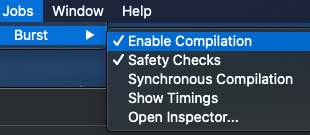
You can disable burst compilation from the Jobs -> Burst menu to work around this issue.
I am going to close this for now as this is not an issue with ML-Agents.
 surfnerd
on 26 Mar 2020
surfnerd
on 26 Mar 2020
disabling compilation does not have any effect. So it is impossible to build to Linux from Windows or are there any other workarounds?
 AsadJeewa
on 8 Apr 2020
AsadJeewa
on 8 Apr 2020
what do you mean? Do you still get a burst error? Or do you get another error?
surfnerd
on 8 Apr 2020
If you have Unity 2019.1+ you can disable burst per platform in the Unity Project settings.
surfnerd
on 8 Apr 2020
I am using Unity 2019.2.5f1 and I still get burst error even when I have disabled burst.


AsadJeewa
on 9 Apr 2020
I have a project that I have been working on (Windows 10). Now that I have good results, I want to scale it and perform multiple runs on a high performance computer remotely i.e a Linux system, So I need to cross-build. Your assistance is greatly appreciated.
AsadJeewa
on 9 Apr 2020
Hi @AsadJeewa,
Could you try to open up the Project settings by going to the menu -> Edit -> Project Settings... and disable burst for linux from there?
surfnerd
on 9 Apr 2020

You mean here? I did this and it still gives exactly the same BuildFailedException
AsadJeewa
on 9 Apr 2020
Another user had the same issue:
https://forum.unity.com/threads/ive-disabled-burst-compiling-with-mono-still-get-burst-compilation-errors.795810/
AsadJeewa
on 10 Apr 2020
Hi @AsadJeewa,
I'm reaching out to the Burst team now. I'll get back to you when I get a response.
surfnerd
on 10 Apr 2020
Thank you so much. Really appreciate it.
AsadJeewa
on 10 Apr 2020
Hey @AsadJeewa,
According to the Burst team, this is a knew issue with Burst 1.1. We just updated barracuda on our master branch which updates the Burst dependency. This will allow you to disable it and not see the compile errors. You can try it out now by checking out our master branch and trying to build for Linux with Burst disabled. Unfortunately, the fix for cross-compilation with Burst won't be available until they release the 1.3 version of their package.
You could also install the 0.6.3-preview Barracuda package into your project until you update ml-agents after the next release to get the Burst plugin update.
Let me know if you run into any issues with these workarounds.
surfnerd
on 11 Apr 2020
Thank you very much. I upgraded and it successfully builds when I disable Burst.
AsadJeewa
on 11 Apr 2020
This issue is fixed in master since we are on barracuda 0.6.3. I will close this now and please reopen if the issue persists.
surfnerd
on 23 Apr 2020
Related issues
 likeygame
·
38Comments
likeygame
·
38Comments
 atapley
·
22Comments
atapley
·
22Comments
 syigzaw
·
20Comments
syigzaw
·
20Comments
 alexchacon2341
·
30Comments
alexchacon2341
·
30Comments
 mikecann
·
27Comments
mikecann
·
27Comments
Most helpful comment
Hi @AsadJeewa,
Could you try to open up the Project settings by going to the menu -> Edit -> Project Settings... and disable burst for linux from there?