Ml-agents: The type or namespace name [] could not be found. Are you missing an assembly reference?
I'm probably doing something wrong. As soon as I import ML-agents to a project assets I got several errors:
_Assets/ML-Agents/Scripts/Batcher.cs(4,7): error CS0246: The type or namespace name `Google' could not be found. Are you missing an assembly reference?
Assets/ML-Agents/Scripts/CommunicatorObjects/UnityToExternalGrpc.cs(10,24): error CS0234: The type or namespace name Tasks' does not exist in the namespaceSystem.Threading'. Are you missing an assembly reference?
Assets/ML-Agents/Scripts/RpcCommunicator.cs(1,7): error CS0246: The type or namespace name `Grpc' could not be found. Are you missing an assembly reference?
Assets/ML-Agents/Scripts/RpcCommunicator.cs(4,24): error CS0234: The type or namespace name Tasks' does not exist in the namespaceSystem.Threading'. Are you missing an assembly reference?_
The steps are the following:
1) Create a new project
2) Drag the ml-agentsunity-environmentAssetsML-Agents directory into the project assets.
3) The errors are found in the console tab.
Can you help me identify what I'm doing wrong?
 ivenzor
All 8 comments
Hi ivenzor,
you are probably following the tutorial Making a New Learning Environment as I was just doing myself, stumbled across the same errors.
What you do to fix them, follow some of the steps in the previous Basic Guide, especially step 5:
- For each of the platforms you target (PC, Mac and Linux Standalone, iOS or Android):
i. Option the Other Settings section.
ii. Select Scripting Runtime Version to Experimental (.NET 4.6 Equivalent or .NET 4.x Equivalent)
iii. In Scripting Defined Symbols, add the flag ENABLE_TENSORFLOW. After typing in the flag name, press Enter.
Worked for me
 TomRockroot
on 6 Jul 2018
TomRockroot
on 6 Jul 2018
Thanks for your reply. I guess you are correct.
Yesterday I created a new project to test the roller ball example and it's very likely I forgot to do those steps again in the new project. I will check today and will let you know.
Thanks for the feedback.
ivenzor
on 6 Jul 2018
In plugins/protobuffer right click on google.protobuf and click reimport.... you might need to restart Unity
 traveltrousers
on 7 Jul 2018
traveltrousers
on 7 Jul 2018
It was as stated by TomRockroot: on the new project I forgot to set again the step 5 from the basic guide.
I'm now going to close this issue. Thanks for the help.
ivenzor
on 7 Jul 2018
Hi,
I'm encountering this issue with Unity 2018.2.1f1.
I've created a new project, create my hierarchy as following :
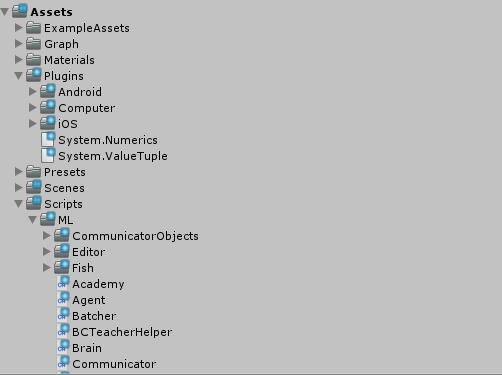
The plugins folder is the same ML-Agents Plugins's folder.
The Script/ML contains all the ML-Agents Scripts needed to make ML-Agents works.
I've reproduced the 5 steps as TomRockroot mentionned but still have this issue.
Any idea what is wrong? Thanks
 GreatHawkeye
on 30 Jul 2018
GreatHawkeye
on 30 Jul 2018
Same
 BartMartner
on 3 Aug 2018
BartMartner
on 3 Aug 2018
Hi ivenzor,
you are probably following the tutorial Making a New Learning Environment as I was just doing myself, stumbled across the same errors.What you do to fix them, follow some of the steps in the previous Basic Guide, especially step 5:
- For each of the platforms you target (PC, Mac and Linux Standalone, iOS or Android):
i. Option the Other Settings section.
ii. Select Scripting Runtime Version to Experimental (.NET 4.6 Equivalent or .NET 4.x Equivalent)
iii. In Scripting Defined Symbols, add the flag ENABLE_TENSORFLOW. After typing in the flag name, press Enter.Worked for me
Hey,
what version of Unity are you using? In Unity 2018.3.0f2 (official release) i cannot pick .NET 4.6 for scripting runtime version.

What can I be missing?
P.S Since its hidden on the screenshot my API Compatibility level is set to .NET 4x (the only other option is .NET Standard 2.0
I have following frameworks installed:

What can be out of ordinary?
 oddEventHorizon
on 17 Dec 2018
oddEventHorizon
on 17 Dec 2018
This thread has been automatically locked since there has not been any recent activity after it was closed. Please open a new issue for related bugs.
![lock[bot] picture](https://avatars1.githubusercontent.com/in/6672?v=4&s=40) lock[bot]
on 2 Jan 2020
lock[bot]
on 2 Jan 2020
Related issues
 alexchacon2341
·
30Comments
alexchacon2341
·
30Comments
 mikecann
·
27Comments
mikecann
·
27Comments
 lukemadera
·
25Comments
lukemadera
·
25Comments
 beardordie
·
58Comments
beardordie
·
58Comments
 sunrui19941128
·
33Comments
sunrui19941128
·
33Comments
Most helpful comment
Hi ivenzor,
you are probably following the tutorial Making a New Learning Environment as I was just doing myself, stumbled across the same errors.
What you do to fix them, follow some of the steps in the previous Basic Guide, especially step 5:
i. Option the Other Settings section.
ii. Select Scripting Runtime Version to Experimental (.NET 4.6 Equivalent or .NET 4.x Equivalent)
iii. In Scripting Defined Symbols, add the flag ENABLE_TENSORFLOW. After typing in the flag name, press Enter.
Worked for me