Mkdocs-material: Admonition: side effect of collapsed note with mermaid2 diagram
Note: Sorry for the misfiling, as it is only a cross referenced issue on fralau/mkdocs-mermaid2-plugin#8 . I would not want to call it a bug and the problem is in a customization (plugin). Actually, it's one heck of a boundary case, but it might be interesting because of what we could learn from it 😄.
Material is becoming more or less a de facto standard with mkdocs. Perhaps we would need a specific category for these inevitable INTERACTION issues between material and other downstream extensions and plugins, i.e. where it is not at a question of any "bug" on either side, but rather to coordinate our efforts in order to improve interoperability? This might also be an opportunity to attract good will people with a wide range of skill sets?
Here is the short description: the combination of Adminition collapsible notes + mermaid2 diagram does work, while collapsed notes + mermaid2 diagram does not work.
???+ note "Collapsable but open"
    ```mermaid
    graph TD
    A[Client] --> B[Load Balancer]
    ```
??? note "Collapsed"
    ```mermaid
    graph TD
    A[Client] --> B[Load Balancer]
    ```
According to tests performed by the person who reported the issue, the html page served by mkdocs serve differs in heigh and viewbox between the "collapsible" and "collasped cases".
-    <details class="note" open="open">
?                                ----
+     <details class="note" open="">
? +
-         <summary>Collapsable but open</summary>
?                         --- ^^^^^^^^^
+         <summary>Collapsed</summary>
?                          ^
-         <div class="mermaid" data-processed="true"><svg id="mermaid-159781860xxxx" width="187.546875"
?                                                                                            ----- ---
+         <div class="mermaid" data-processed="true"><svg id="mermaid-159781860xxxx" width="16"
-                 xmlns="http://www.w3.org/2000/svg" height="181" viewBox="0 0 187.546875 181">
?                                                             ^^           ^^^  ----- ---  ^^
+                 xmlns="http://www.w3.org/2000/svg" height="16" viewBox="-8 -8 16 16">
?                                                             ^           ^^^^^     ^
Though I am a little out of my depth here, it intuitively makes sense. My working hypothesis is that when the user is trying to "uncollapse" the note in the browser, something should happen also to the diagram that is inside, which is not happening.
The code of the mermaid2 plugin does not interfere with those CSS parameters. My previous experience (with SuperFences) is, however, that a tweak is sometimes neeeded in the plugin so that it correctly catches the ball.
If you have any hints, thoughts or comments, let me know?
A lot of more information is available on: fralau/mkdocs-mermaid2-plugin#8
 fralau
All 32 comments
Thanks for reporting. I'd call it an enhancement, as you want to improve extension support. I have Mermaid integration on my list of things I want to document as part of the user reference guide. I'll come back to this problem, as soon as I manage to get some time. Unfortunately, there's other stuff I must address first.
 squidfunk
on 19 Aug 2020
squidfunk
on 19 Aug 2020
This is a problem with the default mermaid loader. I actually mention this in the SuperFences documentation. It is why I use my own loader for my documents. It is not specific to details, but also occurs with any element that hides its content, like tabs.
 facelessuser
on 19 Aug 2020
facelessuser
on 19 Aug 2020
@facelessuser I should get used to it, but your doc is once again pretty amazing. Is it this the part you are referring to?
https://facelessuser.github.io/pymdown-extensions/extensions/superfences/#uml-diagram-example
To save me a little "figuring out", what is the exact function of the (javascript) loader and where does it get called?
I could certainly package those tweaks in the mermaid plugin. I could also integrate the specific arguments your recommend to the initialize function.
I looks like mermaid2 is following in your footsteps, only with a more "packaged" approach...
fralau
on 19 Aug 2020
@fralau, I've never looked into exactly what Mermaid is doing, only that I had this issue, and is why I manually load the content by first disabling auto load and then manually load via this loader (which is executed by this). Doing this, I have no issues. I'm not sure if I'm doing something drastically different? Or if it is somehow related to the timing of when the load occurs, or where we attach the element to be rendered before inserting it under our desired location.
Some notes: in this script, I look for content in <pre><code> blocks, but that is just because I like to have code blocks as the fallback in case something goes wrong (I think it looks nicer). Using Mermaid's default expectation of <div> loads fine with this approach as well, I just don't use <div> in my personal docs.
You can also ignore this block which goes into details about the quirks of different diagrams, as Mermaid uses different techniques to render diagrams causes quirks specific to diagram types. We patch one issue, but not all.
facelessuser
on 19 Aug 2020
I have my docs running with the latest Mermaid 8.7.0 now. It now renders fine again in tabs and details. I think the new setup is pretty solid now.
Another thing I started doing is encapsulating the diagrams in shadow doms to keep the IDs they use from leaking. Since they didn't always use unique IDs, this caused problems sometimes if you hid one element, and it came before another that used the same IDs. Fencing them off into shadow DOMs seems to have eliminated all the issues I had in that regard.
I've documented all that I do and my reasoning here: https://facelessuser.github.io/pymdown-extensions/extras/mermaid/. This should help people dig through my custom setup and hopefully better understand what and why I do what I do. I even go into which diagrams I think are reasonable to use and which don't play as nice with on-demand rendering.
facelessuser
on 21 Aug 2020
Thanks for sharing! I'll revisit it and write something up.
EDIT: I love the new Admonition title styles in your dark mode!
squidfunk
on 21 Aug 2020
EDIT: I love the new Admonition title styles in your dark mode!
Thanks! I thought they looked a bit better. I never 100% loved the old dark admonition headers. In a dark theme, they always look...muddy. I figured that just letting the header accent color make the icon and accent line pop would look better, and for me they do.
One thing the current Mermaid solution doesn't do is allow dynamic theme changes. You'd have to reload the page with the current implementation.
I figure we could always just hide away the original source content and maybe provide a reload that could be called on theme change so we could get at the original source, rerender, and replace the old render with the updated style.
I think once Material supports scheme toggling, I may look into this more.
facelessuser
on 21 Aug 2020
Okay, I had to scratch the itch. Mermaid can now detect color changes by creating an observer event that watches for when data-md-color-scheme attribute changes on body.
The only other thing in my solution that could be changed is to make the scheme to Mermaid config a bit more generic. Mine is hardcoded, but we could just look at the value in data-md-color-scheme and then index into our config object with that name. I guess if none are found, you could just use default.
facelessuser
on 21 Aug 2020
Okay, the solution is now pretty generic for Material. It'll use whatever scheme name is provided in data-md-color-scheme and attempt to find it in the config object, if not, it'll use some sane default. It'll reload if the scheme changes. I think at this point, my site should be able to toggle over to from dark to light without issues once that is in. Hopefully, this Mermaid work can be easily leveraged by others.
That's it, I need to focus on some real work 🙂.
@squidfunk If/when you get around to documenting Mermaid for MkDocs, just ping me if you have questions, or even if you come up with some better ways/ideas to handle things.
facelessuser
on 21 Aug 2020
@facelessuser
Okay, I had to scratch the itch.
I can relate to that 🙂
Mermaid can now detect color changes by creating an observer event that watches for when
data-md-color-schemeattribute changes onbody.
This is a nice touch.
fralau
on 22 Aug 2020
I've been playing around with Mermaid and finally have a good proof of concept for an integration which works in conjunction with the mkdocs-minify-plugin and will adjust to the chosen color palette, including dark mode:

It doesn't use any plugins besides Superfences and will be activated just by including the Mermaid JavaScript. No configuration required albeit overrides will be possible.
My testing shows that this does also solve the original issue (not working as part of details).
squidfunk
on 31 Dec 2020
It's pretty ! If you tell me where it is, I'll be happy to look at the code and I can throw it into the mermaid2 plugin, I will gladly do it (the plugin basically packages what can be done separately).
fralau
on 31 Dec 2020
I'm afraid it's tightly coupled to Material for MkDocs (because of the native color integration), so I guess it doesn't really make sense to integrate this into the plugin 🤨 Also, the only thing users will need to do is to add one line to extra JS and configure Superfencs accordingly.
Furthermore, your plugin doesn't work with mkdocs-minify-plugin, which the new native integration does.
squidfunk
on 31 Dec 2020
Actually the plugin should work if it uses code blocks. Only Div blocks get mangled by minimizing.
I'm interested to see what you are doing differently. I personally found tucking the render in the shadow DOM to be the best way to work around the many quirks of Mermaid. Using code blocks was ideal for me to navigate around minimizing and such.
Styling I can see being tied specifically to material. Curious how many diagrams types you tried to support.
facelessuser
on 31 Dec 2020
Styling I can see being tied specifically to material. Curious how many diagrams types you tried to support.
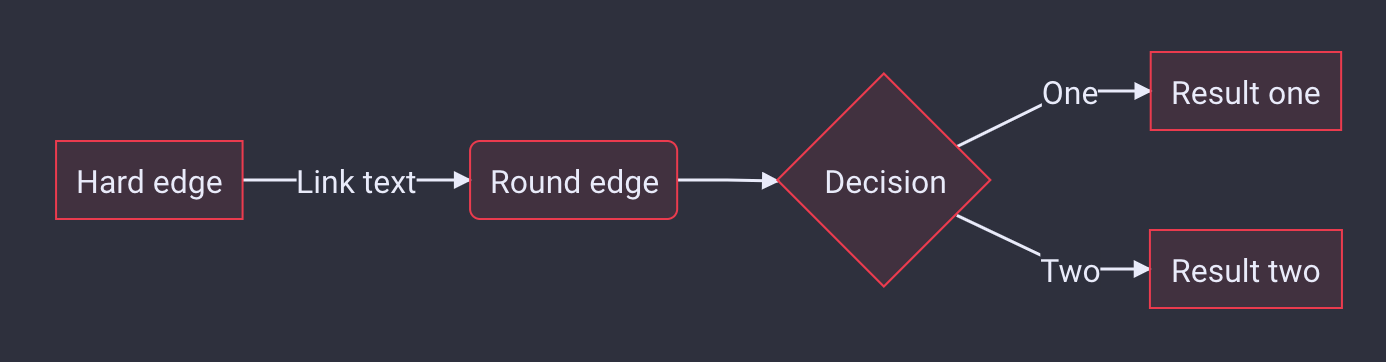
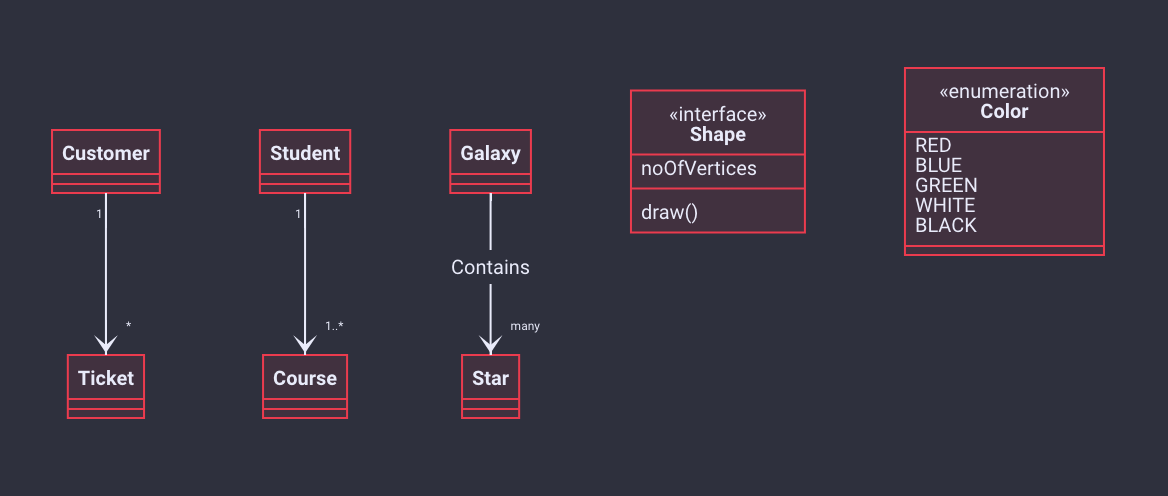
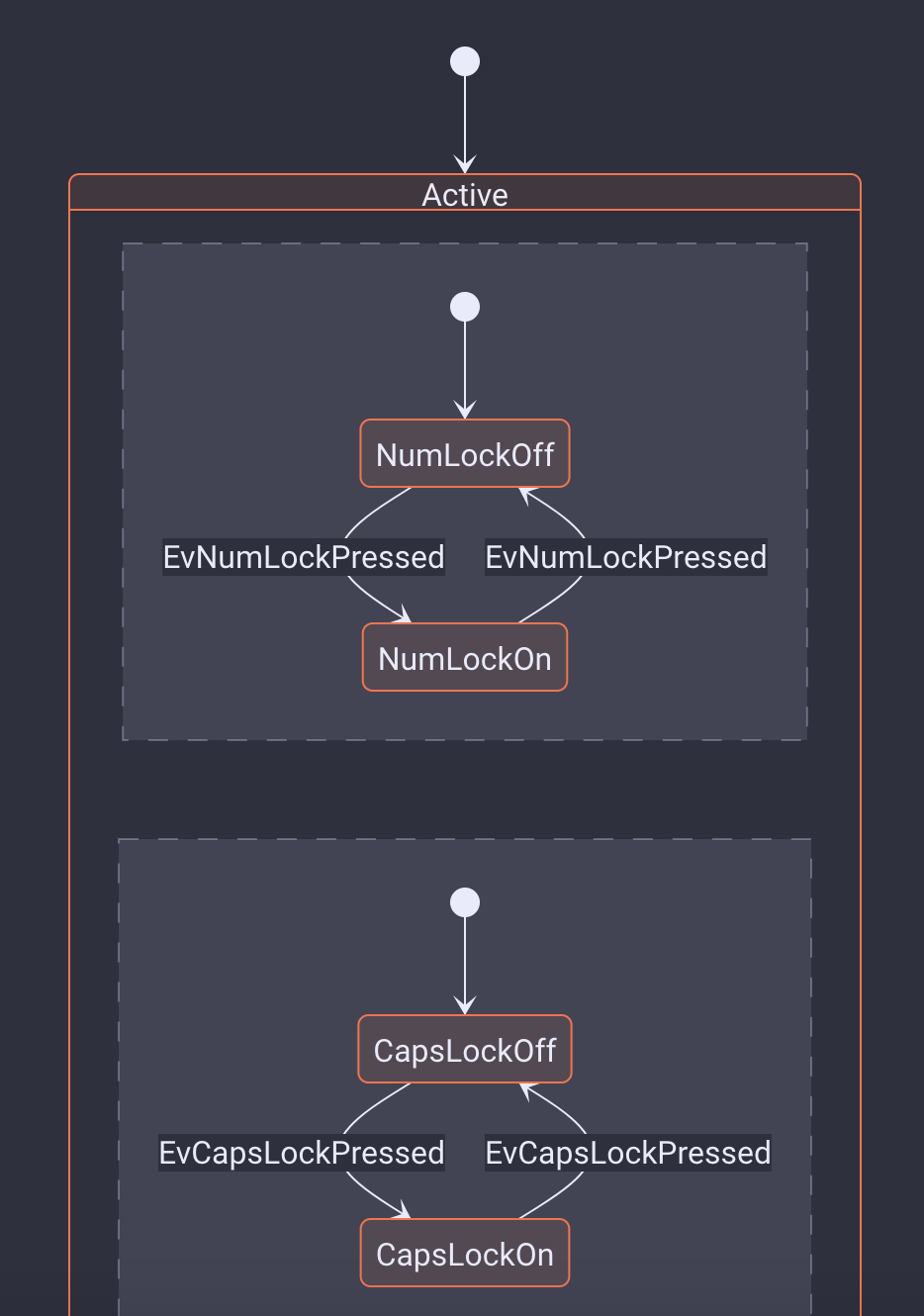
I'm adding support for all of them (at least trying to). I've got flowcharts, class diagrams and state diagrams working:
squidfunk
on 31 Dec 2020
I'm intrigued that I might be able to abandon a lot of my styling support. Even now, every once in a while, Mermaid will tweak something and I'll have to go back in and dig around to update something.
facelessuser
on 31 Dec 2020
I just bumped into another reason why a native and deep integration makes sense - I now have it successfully running _with instant loading_ and _without the need for any config or extra JS_. When there's a mermaid block in the source, the theme will automatically inject the necessary JavaScript and set Mermaid up itself 😊
squidfunk
on 1 Jan 2021
Okay, so I'm going to close this issue, as I more or less hijacked it. I'll create a new issue.
squidfunk
on 1 Jan 2021
Sounds good. How easy will custom color themes be? Currently, I just use Mermaid's config to theme, will Mermaid theming just go through the do Mermaid config still?
facelessuser
on 1 Jan 2021
Super easy. As you can imagine I'm monkey-patching the super ugly Mermaid CSS with CSS variables (i.e. overriding it), which can then easily be customized with extra CSS. By default they will use the accent colors but can be overridden with extra CSS. I found no better way as Mermaid.js is pretty much a brick in terms of modular library architecture, but it works reasonably well.
squidfunk
on 1 Jan 2021
New issue: #2170
squidfunk
on 1 Jan 2021
@squidfunk
Cool, I used to build my own Mermaid CSS from their source, which used to be a bit of a pain to maintain, that is why I much prefer using their config and feeding in CSS through that. They also reworked their themeing, so using the theme options in config makes way more sense.
As I recall, they injected their theme into each SVG...though you may be able to do it globally. I know there are other side effects.
Are you wrapping the SVG in shadow DOMs? Or are you letting their IDs bleed out. If you don't wrap in shadow DOMs, they also use shared IDs that, if defined in a details for instance that is hidden, will cause those referenced IDs to disappear else where. As far as I can tell, wrapping in shadow DOMs is a must.
facelessuser
on 1 Jan 2021
Cool, I used to build my own Mermaid CSS from their source, which used to be a bit of a pain to maintain, that is why I much prefer using their config and feeding in CSS through that. They also reworked their themeing, so using the theme options in config makes way more sense.
I don't want to do a custom build and keep stuff in sync, so I just use the regular Mermaid build as hosted on unpkg.com. I know that stuff might break when upgrading to new versions, but for now, the Mermaid version is tied to the theme so there should be no problem for now. However, that's still the prototype and I want to loosen restrictions at some point.
As I recall, they injected their theme into each SVG...though you may be able to do it globally. I know there are other side effects.
That is correct and not easy to override globally as they scope all styles to the diagram #id, thus all selectors start with an #id selector. As Material for MkDocs doesn't use IDs, we would have to set all styles using !important declarations, because specificity wouldn't allow for anything else. Thus, I'm providing kind of "adapter" styles, which set the respective SVG properties to custom variables that can be changed more easily and allow to use the Material color palette.
Are you wrapping the SVG in shadow DOMs? Or are you letting their IDs bleed out. If you don't wrap in shadow DOMs, they also use shared IDs that, if defined in a details for instance that is hidden, will cause those referenced IDs to disappear elsewhere. As far as I can tell, wrapping in shadow DOMs is a must.
The Mermaid CSS is quite frankly the ugliest I've seen in a long time. It's very, very inconsistent (casing, scoping, use of qualifiers). Their use of redundant IDs doesn't really surprise me, but thanks for pointing that out. For now, I'm just injecting stuff regularly, but it should be easy to swap that out for Shadow DOM if it proves to be feasible. Using Shadow DOM would also not allow for global styling BTW, except if you'd inject a custom stylesheet into each component, but I guess it makes even more sense to stick to the injected style to be able to easily encapsulate stuff into Shadow DOM. How's browser support for that by now?
squidfunk
on 1 Jan 2021
@squidfunk , @facelessuser This is flying a little over my head, and I am perhaps overstepping... but if the Mermaid CSS could stand some improvement, perhaps that would be the way to go ?
I realize the ecosystem around MkDocs is complicated and varied; but perhaps it might be a good idea to open the issue on Mermaid's github repo, and point out the good work you have already done? My best guess is that their CSS has grown up organically and no one has been tidying it up lately. Perhaps they would be glad to "lease" it to you for a little while; and for you, no longer having to work around it and fixing it the way you want, would save some time ?
fralau
on 1 Jan 2021
Issues with Mermaid are not related to CSS, it is related to the way they assign IDS that pollute the ID space, the way they reuse them and browsers identify them (only the first).
The reason I don't use global CSS and instead use their config to specify the CSS is that I isolate the diagrams in the Shadow DOM.
My concern is avoiding Material implementing diagrams in a way that doesn't address the issues that I've already addressed and add conflicts to my existing workaround. I am hoping Material can address the same issues, providing a way to customize CSS in a sane manner, and I can just drop my implementation. I rather have one working solution than two conflicting solutions.
facelessuser
on 1 Jan 2021
How's browser support for that by now?
Shadow DOMs seem to work in most modern browsers. Firefox, Chrome, Safari, Edge. Probably not IE.
facelessuser
on 1 Jan 2021
I realize the ecosystem around MkDocs is complicated and varied; but perhaps it might be a good idea to open the issue on Mermaid's github repo, and point out the good work you have already done? My best guess is that their CSS has grown up organically and no one has been tidying it up lately. Perhaps they would be glad to "lease" it to you for a little while; and for you, no longer having to work around it and fixing it the way you want, would save some time ?
The problem is that this would mean significant changes to Mermaid's codebase which will introduce breaking changes. Also, as far as I can tell from my research, the necessary changes for a general solution would be of gargantuan scale, touching a lot of code, as each graph type defines the styles in a different way and styling and markup and intertwined. Some types even use attribute styles, which makes things even more challenging. As Mermaid is super popular, I expect this project to move very slowly, so given the impact of those changes, it'll probably take months until they land in production. As an example, see https://github.com/mermaid-js/mermaid/issues/1318 which @facelessuser reported that is still unresolved after 9 months. Furthermore, I have no interest in maintaining those changes upstream, so I better try to work around some of its issues. Essentially, I'm moving work into the core of Material which would otherwise have to be done by authors/users. When Mermaid adopts a compatible approach (e.g. CSS variables), I'll happily adjust and throw out the necessary monkey patches.
My concern is avoiding Material implementing diagrams in a way that doesn't address the issues that I've already addressed and add conflicts to my existing workaround. I am hoping Material can address the same issues, providing a way to customize CSS in a sane manner, and I can just drop my implementation. I rather have one working solution than two conflicting solutions.
One single, working solution is my goal.
squidfunk
on 1 Jan 2021
I realize the ecosystem around MkDocs is complicated and varied; but perhaps it might be a good idea to open the issue on Mermaid's github repo, and point out the good work you have already done?
Yeah, as @squidfunk said, I've created an issue, and while there as been a handful of comments, no serious design, collaboration, or guidance has taken place yet. I would consider doing a pull request (even though it is out of my comfort zone, and the code can be a little confusing) if some serious discussion on the approach actually began in the issue thread, but that has not yet happened yet, and I don't feel like wasting time on an approach that may get turned down.
In the end, it was much easier for me to use my own loader to just wrap the content in a shadow DOM to isolate the SVG stuff, and then use their config to inject my styling. It was self contained, and easy to just update the config if I had to tweak styling in the future.
I know @squidfunk has a desire to use an easy, global CSS approach that can be overriden with extra_css using modern CSS variables, which is really cool, and if he pulls it off, I'm all for it. I don't recall all the difficulties providing styles outside the shadow DOM for inside the shadow DOM or vice versa. The only time I've used the shadow DOM is for my Mermaid solution, and I haven't touched it since I got it working. And, honestly, I don't see how to work around the innate of Mermaid without using shadow DOMs.
Since I use the Mermaid config to configure my custom styles, it embeds the style directly into each SVG, so it is under the shadow DOM. I use variables, but they are defined in each SVG: https://github.com/facelessuser/pymdown-extensions/blob/master/docs/src/markdown/_snippets/uml.txt#L9.
I'll be the first to admit, while I can usually make happen what I want in a web environment (with enough bubble gum, popsicle sticks, and duct tape 🙃), I am far from a web designer, so I am happy and excited to see how @squidfunk approaches this 🙂. Also, excited about the prospect that I don't have to directly support a solution moving forward 😏.
facelessuser
on 1 Jan 2021
I'll be the first to admit, while I can usually make happen what I want in a web environment (with enough bubble gum, popsicle sticks, and duct tape 🙃), I am far from a web designer, so I am happy and excited to see how @squidfunk approaches this 🙂. Also, excited about the prospect that I don't have to directly support a solution moving forward 😏.
@facelessuser I learnt today, thanks to this thread, about "Shadow DOM" (and if my understanding is correct, it breaks the "cascading" part of CSS in some parts... introducing a software equivalent of the subsidiarity principle?).
I'm also not a web designer and I also fave the same duct tape / steel wire approach (by ignorance and necessity, not by free choice). But the modularity of the ecosystem and the complementarity of competences is what makes this experiment fascinating.
I confess, I have had difficulty in my mind to even separate @facelessuser's pymdown extensions, from @squidfunk's work on Material. I need to draw myself diagrams to understand how the pieces fit together 😕. Adding the fact that (following a an enhancement request, allowed to create pluglets on mkdocs-macros (which are minisize plugins based themselves based on an mkdocs plugin) ... as well as, generally, on Material and pymdown extensions, themselves based on Markdown and the extensions....
YAML, Plugins, CSS, Jinja2, Shadow Doms, Markdown extension, pluglets: all this things are meant to foster the subsidiarity principle, so that people can branch off and do their thing.
Wow, MkDocs looks like an organic Meccano construction set that self-constructs, with pieces whirring in all directions.
This is not a bad reality, and I even like this "united in diversity" thing, because it does have potential for organic growth: by capitalizing on the various self-generated energies (typical bottom-up drive to change). But I guess (as in the case of Mermaid, which seems a _de facto_ standard for representing diagrams) it's sometimes useful to gather a little the strands, or at least to start enumerating them...
We might need some gentle gardening ? 🤔
fralau
on 3 Jan 2021
@facelessuser I learnt today, thanks to this thread, about "Shadow DOM" (and if my understanding is correct, it breaks the "cascading" part of CSS in some parts... introducing a software equivalent of the subsidiarity principle?).
I mean, I guess? Maybe? I look at it more like sandboxing. It just separates the Shadow DOM HTML from the parent HTML. This means styles in the parent don't affect the shadow DOM and styles in the Shadow DOM don't affect the parent. It just puts a wall around the shadow DOM.
I confess, I have had difficulty in my mind to even separate @facelessuser's pymdown extensions, from @squidfunk's work on Material.
Python Markdown converts Markdown to HTML.
Pymdown Extensions extends or overrides parts of Python Markdown to allow for enhanced and/or non-standard conversion of Markdown to HTML (things like Details are non-standard).
Pymdown Extensions does not provide any CSS styling for HTML or any JavaScript translations that occur in browsers at runtime. For instance, while someone could conceivably write a Python library to convert LaTeX style math equations to HTML, and it could be created as a Python Markdown extension, one does not currently exist (at least not that I am aware of), and most people rely on MathJax which is a JavaScript library.
MkDocs takes converted HTML and puts it into HTML templates for sites. It performs the automation of the work of calling Python Markdown on your Markdown docs and inserting them into themes that provide the templates. It also crosslinks the files so things like navigation links work sanely.
Themes (like Material), which provide the templates, provide navigation, headers, footers, menus, general styling, etc. They can provide JavaScript to do fancy, at runtime stuff, and provide styles to the HTML to give your site it's particular feel.
MkDocs plugins hook into MkDocs and can alter the collected meta data of MkDocs that affects the outcome of the generated site (exclude files, include other files, preprocess a file before sending it to Python Markdown, post-process a file after sending it to Python Markdown, etc. This is where I think things can get a little confusing.
Since MkDocs plugins have access to the page content (not the page) just like Python Markdown, people sometimes use it to do work that could be done in Python Markdown extensions. MkDocs plugins do not have access to the content at the various Markdown conversion steps that occur in Python Markdown, so it isn't really good for providing special Markdown syntax (though some do with varying levels of success and failure via pre-processing or post-processing). The one good thing about MkDocs plugins is that you have site context. In Python Markdown you have greater control of the Markdown conversion at its various steps but have no site context, or at least none unless it is injected into the content as metadata via some MkDocs plugin during the pre-processor step.
Hopefully, this helps to some degree understanding the relationship of Markdown converting, Markdown extensions, site generation, site styling, and site generation plugins.
facelessuser
on 3 Jan 2021
@facelessuser,
Hopefully, this helps to some degree understanding the relationship of Markdown converting, Markdown extensions, site generation, site styling, and site generation plugins.
Yes, it definitely helps. I appreciated:
- the assertion that extensions do not meddle with css and Javascript
- and the part on plugins, and how they should not be confused with extensions.
So much so, that perhaps someone ought to put it together as a kind of map ? I had been thinking for a while about a consensual document that would serve as a kind of glue of all these technologies? I hesitate to commit to such a task, for two reasons: first, because I don't want to steal a prerogative that would perhaps belong legitimately to someone else; and secondly because I have so many things on the back burner...
In any case, your write-up is already a good reference point.
fralau
on 3 Jan 2021
@facelessuser
Since MkDocs plugins have access to the page content (not the page) just like Python Markdown, people sometimes use it to do work that could be done in Python Markdown extensions. MkDocs plugins do not have access to the content at the various Markdown conversion steps that occur in Python Markdown, so it isn't really good for providing special Markdown syntax (though some do with varying levels of success and failure via pre-processing or post-processing). The one good thing about MkDocs plugins is that you have site context. In Python Markdown you have greater control of the Markdown conversion at its various steps but have no site context, or at least none unless it is injected into the content as metadata via some MkDocs plugin during the pre-processor step.
On that particular aspect, I had the opportunity to think a lot about the difference between extensions, and what the macros would bring. My line of thinking is that extensions constitute an expansion (or dialectal forms) of standard markdown. It was quite obvious, since the release of John Gruber's canonic description in 2004 that its vocabulary and grammar would be a little too limited for practical use.
The system of extensions seems thus a sensible (and indispensable) way to extend the language, e.g. with tables. On the other hand it has to remain a relatively slow and consensual evolution; i.e. one cannot go ahead and throw out a new extension in the wild, without checking whether it would fit in the accepted koine (the accepted linguistic norm) of Markdown, or at least a recognized dialect like, e.g. github. Otherwise that extension would remain an obscure _patois_ and likely remain confined or die by itself.
So, IMHO, adding an extension to Markdown requires more than pure technical skill. It requires thoughtful consideration about how to add a meaningful construct to the language, without bloating it needlessly, or breaking its consistency (typically by breaking other extensions). I have so much respect for extensions, that I have not attempted to climb that hill yet...
The system of macros I developed has another purpose entirely. Their are used (as you mentioned under plugins) as contextual additions (specific to the MkDocs project). In practice they are often used to fetch site-specific data to insert in the website (e.g. by reading files, formatting them, etc.).
I _do_ use them also to extend the language (in a manner of speaking): typically to display git information, or to show a youtube video by just indicating its url. That could _conceivably_ be done by a Markdown extension; but git or youtube are too specific things too be inserted into a language, and this would quickly bloat the language. This is the old case for creating functions instead of adding language constructs). Plus I am only walking again the same path that most wikis, from Mediawiki to Dokuwiki and Confluence, have been walking two decades ago, to extend their own markup languages to meet specific needs.
And certainly, it could be done by a specific plugin (and has been done in the case of git). But there is one of sensible way of doing it: by using a templating language such as Jinja2. And if two plugins both use that same technique, they will be likely to mutually neutralize each other (be incompatible and break mkdocs serve/build process)... Which is why having a single "mini-framework" such as mkdocs-macros made sense, since since it would play the role of arbiter, and would allow a virtually unlimited number of macros to coexist.
I realize the discussion has apparently drifted away quite far from Mermaid -- in that case, it seems that using a mix of javascript made sense (and thus we are in @squidfunk's province of Material). Another approach would be to create png images and serve them; but they would be "dead", i.e. without hyperlinks. All in all, the javascript approach seems to have prevailed, despite its complications (css and al.).
If I may invoke your clemency on my Mermaid2 plugin, it is an experiment in putting together the css and javascript behind the hood, without the user having to anything but to declare the plugin; and when things get complicated, to drive things directly from the 'mkdocs.yml' file, which can be quite cool actually 🙂.
fralau
on 3 Jan 2021
Related issues
 ghost
·
3Comments
ghost
·
3Comments
 ngtrian
·
3Comments
ngtrian
·
3Comments
 HerbFargus
·
4Comments
HerbFargus
·
4Comments
 NJAldwin
·
3Comments
NJAldwin
·
3Comments
 oliverschwendener
·
4Comments
oliverschwendener
·
4Comments