Mkdocs-material: Missing syntax highlighting for code blocks
Description
There is no syntax highlighting in code blocks.
Expected behavior
I expect markdown code blocks to have syntax highlighting (like the default mkdocs theme does).
Example markdown code block:
``` javascript
function add(a, b) {
    return a + b
}
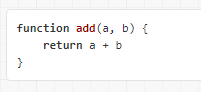
Syntax highlighting in default mkdocs theme:
Actual behavior
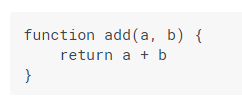
If I use this mkdocs theme there is no syntax highlighting in code blocks:
Steps to reproduce the bug
- Add a code block to your markdown file
- Install the latest version of Material with pip:
pip install mkdocs-material - Add the following line to mkdocs.yml:
theme: 'material' - Run the built-in dev-server:
mkdocs serve - Open up
http://127.0.0.1:8000/in the browser
Package versions
- Python: 3.6.1
- MkDocs: 0.16.3
- Material: 1.8.0
Project configuration
site_name: Code Demo
theme: material
System information
- OS: Windows 10 1703
 oliverschwendener
All 4 comments
Did you install Pygments and activate CodeHilite extension in your theme?
http://squidfunk.github.io/mkdocs-material/extensions/codehilite/
 max-ci
on 4 Aug 2017
max-ci
on 4 Aug 2017
Please read the docs:
http://squidfunk.github.io/mkdocs-material/extensions/codehilite/
 squidfunk
on 4 Aug 2017
squidfunk
on 4 Aug 2017
The thing is: if you install mkdocs-material via pip, it SHOULD install Pygments for you, as it is specified as a dependency. Please check if Pygments is/was installed. If not, we can look into it.
squidfunk
on 4 Aug 2017
Yes Pygments was installed with mkdocs-material. I just forgot to add
markdown_extensions:
  - codehilite
to my mkdocs.yml. Sorry for that & Thanks!
oliverschwendener
on 4 Aug 2017
Related issues
 yogeshbeniwal
·
4Comments
yogeshbeniwal
·
4Comments
 yannduran
·
4Comments
yannduran
·
4Comments
 dbdevtop
·
4Comments
dbdevtop
·
4Comments
 nikramakrishnan
·
3Comments
nikramakrishnan
·
3Comments
 lupupitkanen
·
4Comments
lupupitkanen
·
4Comments
Most helpful comment
Did you install Pygments and activate CodeHilite extension in your theme?
http://squidfunk.github.io/mkdocs-material/extensions/codehilite/