Mkdocs-material: Allow to embed the TOC into the left-hand navigation
__I checked that...__
- [x] ... the documentation does not mention anything about my idea
- [x] ... to my best knowledge, my idea wouldn't break something for other users
- [x] ... there are no open or closed issues that are related to my idea
Description
This is a proposal for a much-requested feature to:
- ... embed the TOC as part of the sidebar, i.e. show it on the left
- ... remove the TOC from the right for additional space
Use Cases
Some users prefer to have a wider content area than Material currently offers.
__This feature will be part of the sponsor edition and later merged back into the community edition ☺️__
See #1801 for details.
Screenshots / Mockups

 squidfunk
All 16 comments
I like this idea, I have had requests for a wider content area if possible.
 MikeyMJCO
on 19 Jul 2020
MikeyMJCO
on 19 Jul 2020
@MikeyMJCO Wider than what is shown in the screenshot?
squidfunk
on 19 Jul 2020
I guess we could also add another option to additionally increase the overall width:
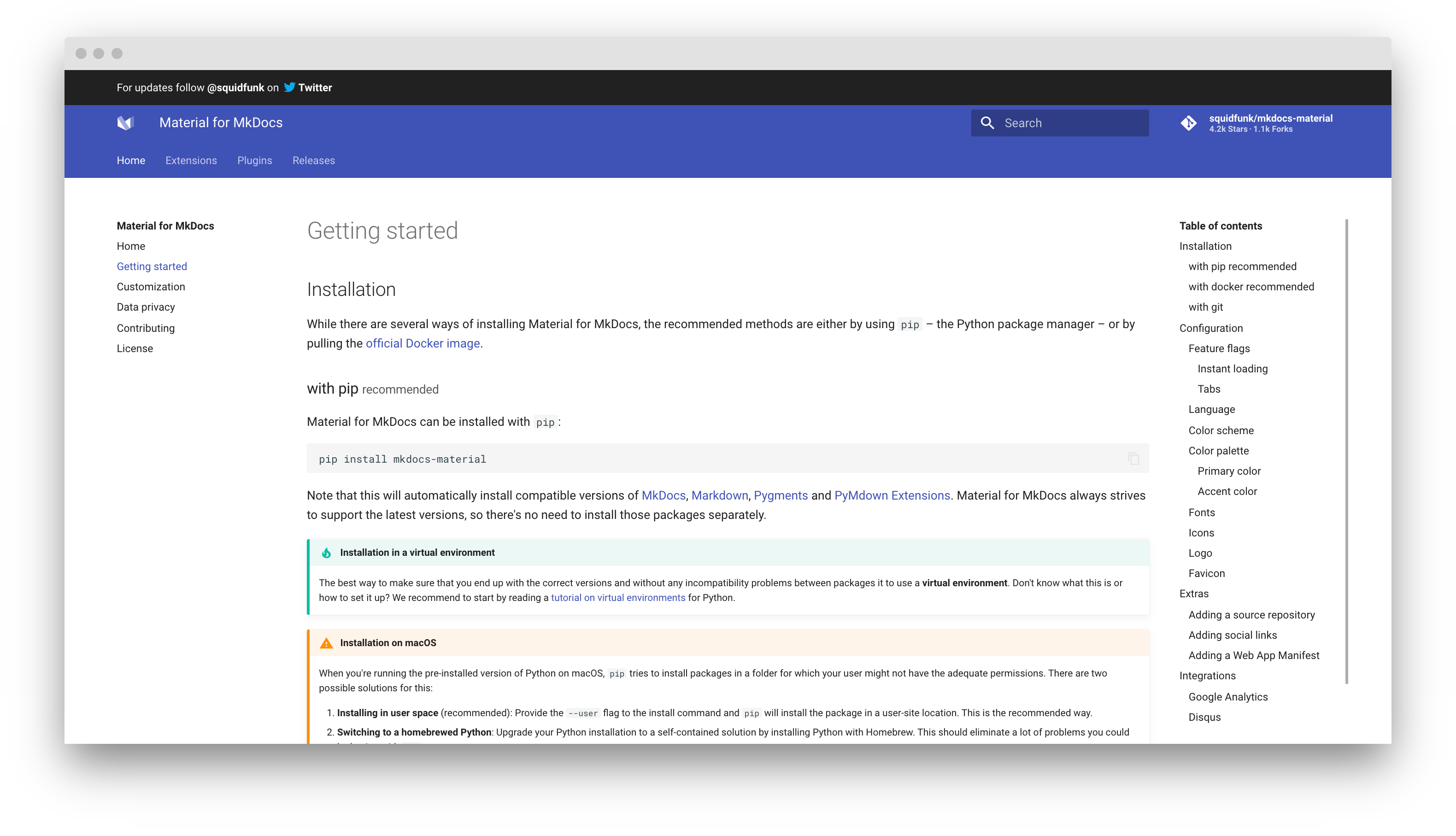
The aim of this proposal is to collect some feedback before I start implementing it.
squidfunk
on 19 Jul 2020
It is good idea.
This implementation can include 3 parts:
- Possibility to increase wide of content area
- Hide TOC panel
- Hide TOC panel and show TOC in navigation
 Kanaduchi
on 22 Jul 2020
Kanaduchi
on 22 Jul 2020
@Kanaduchi 2. is already possible and documented in the new docs:
https://deploy-preview-1735--mkdocs-material-preview.netlify.app/setup/setting-up-navigation/#toc_depth
squidfunk
on 22 Jul 2020
@Kanaduchi 2. is already possible and documented in the new docs:
https://deploy-preview-1735--mkdocs-material-preview.netlify.app/setup/setting-up-navigation/#toc_depth
Can we do it only on particular page? Example - I have several pages without any headers. And on the right I see empty column. So I do not need right-side panel on such pages
Kanaduchi
on 22 Jul 2020
@Kanaduchi
I think it should be added as templates, they are very easy to set and can be added to particular page.
to set you would just add
template: another_type_of_page.html
---
Regular text of docs...
@squidfunk
I would really love an empty template, which could be used as an index page.
 pktiuk
on 27 Jul 2020
pktiuk
on 27 Jul 2020
With this we could acheive even something like this (first example which came into my mind) or similar to this - even without these filled with color spaces on top (I don't know how to name them) it could give good effect.
pktiuk
on 27 Jul 2020
@pktiuk that's correct, essentially everything of the theme can be changed by overriding it. However, most authors don't bother and want to have good defaults/options, so this issue collects some ideas to provide that.
I would really love an empty template, which could be used as an index page.
What do you mean by empty? You can create an empty template by not extending the base template. Other than that, I recommend you take a look at the landing page template of the official documentation. All moving parts are put into blocks, so overriding it is quite easy.
squidfunk
on 28 Jul 2020
@squidfunk
By empty, I mean without TOC and Table Of Pages. Just a plain sheet with default top bar.
Other than that, I recommend you take a look at the landing page template of the official documentation. All moving parts are put into blocks, so overriding it is quite easy.
I know, that there is a homepage for documentation, but I don't think that reverse-engineering is a good way for "casual" users, most of them just want to use this theme with minor tweaks according to official documentation ok MkDocs.
Moreover, I am one of these casuals, that's why I have chosen MkDocs. I just don't have knowledge to mess with templates.
I have found information about templates and Meta-Data in official MkDocs site, and later I checked if this theme supports templates (I couldn't find anything in docs).
I think these templates as a way of customization would be more consistent with regular MkDocs usage.
pktiuk
on 28 Jul 2020
In my use case it would be particularly valuable if the with of the page track the width of the browser window, regardless of whether navigation was on the left or the right. In my use case I have tables that are both long and wide, and so a) the content in the rightmost columns is hidden, and b) you have to scroll to the bottom of the table to find the scroll bar, scroll to the right to see the right-most columns, and then try to scroll back up to the right row. This is VERY painful and almost unusable. See for example: https://secure-device-onboard.github.io/docs/latest/protocol-specification/protocol-data-types/#composite-types
 TomBarnes
on 9 Sep 2020
TomBarnes
on 9 Sep 2020
Tables are always a problem for responsive layouts. They may not be the ideal components for your use case. Have you tried using definition lists?
squidfunk
on 9 Sep 2020
I'm not familiar with Definition Lists. Looks like it might be just what I've been looking for both for this problem and for other document conversion challenges. I will investigate further. Thanks for the suggestion.
TomBarnes
on 9 Sep 2020
The table of contents can now be configured to be automatically hidden when empty:
theme:
  features:
    - toc.autohide
This will stretch the remaining content to the whole width.
__EDIT__: Autohiding was removed in favor of the manual flags explained in the next comment, as it's a more predictable and flexible approach.
squidfunk
on 19 Sep 2020
Material for MkDocs Insiders now allows us to do the following:
__Hide table of contents__:
---
hide:
  - toc
---

# ...
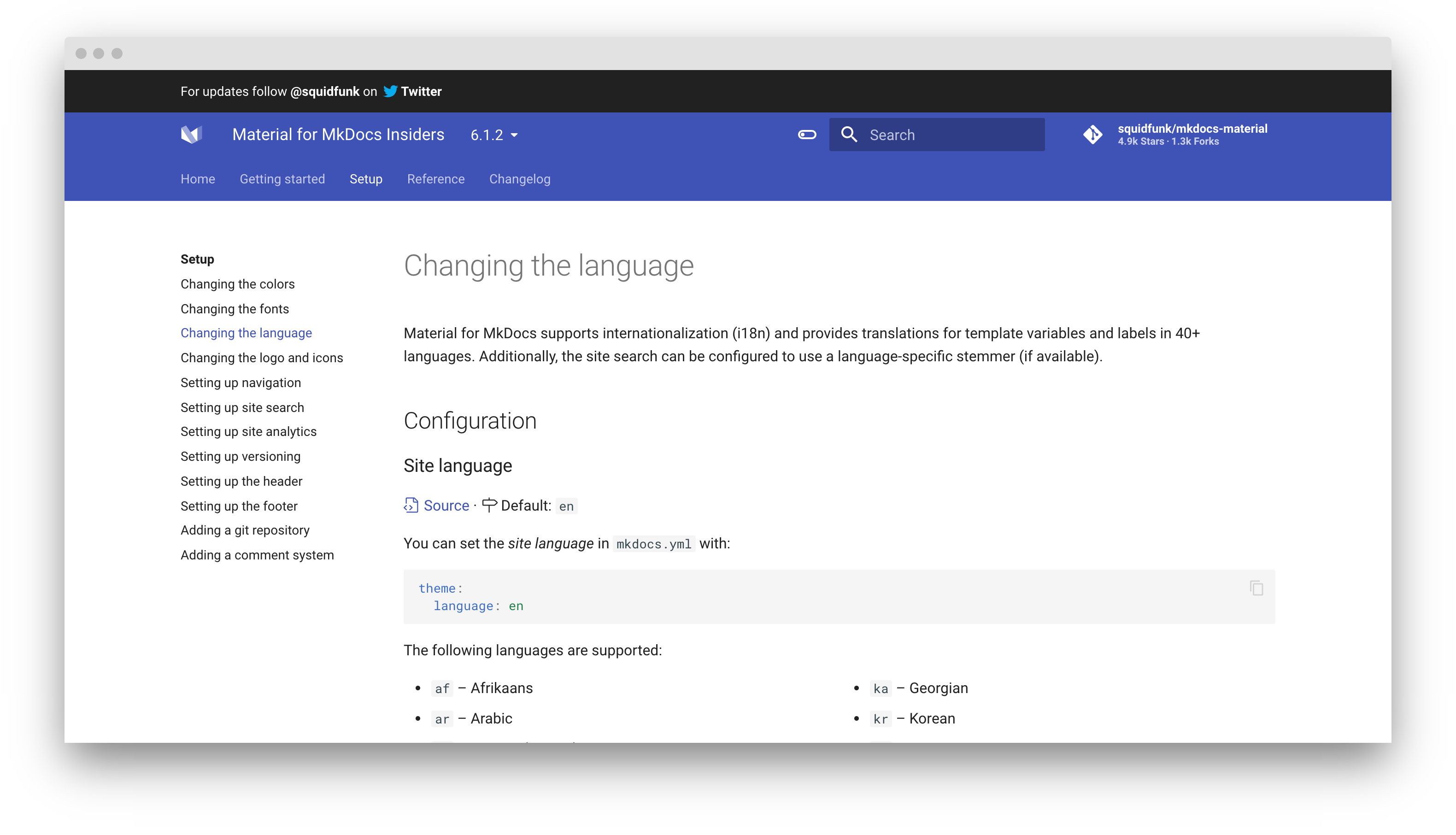
__Hide navigation__:
---
hide:
  - navigation
---

# ...
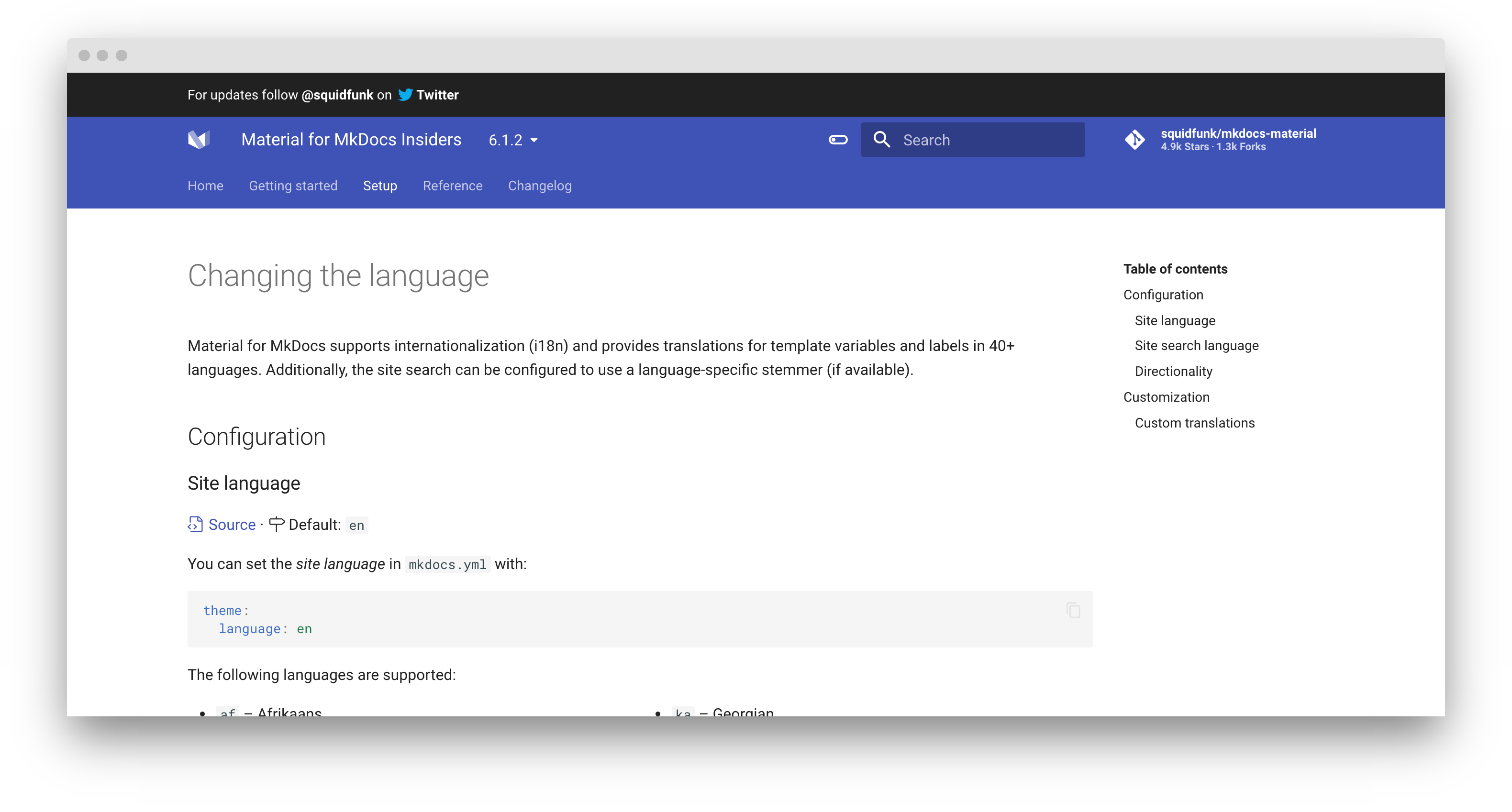
__Stretch to full width__ (= hide both):
---
hide:
  - navigation
  - toc
---

# ...

I'm also working on providing an option to show the table of contents in the navigation – should land pretty soon!
squidfunk
on 7 Nov 2020
Insiders 1.10.0 adds support for integrating the table of contents into the navigation:
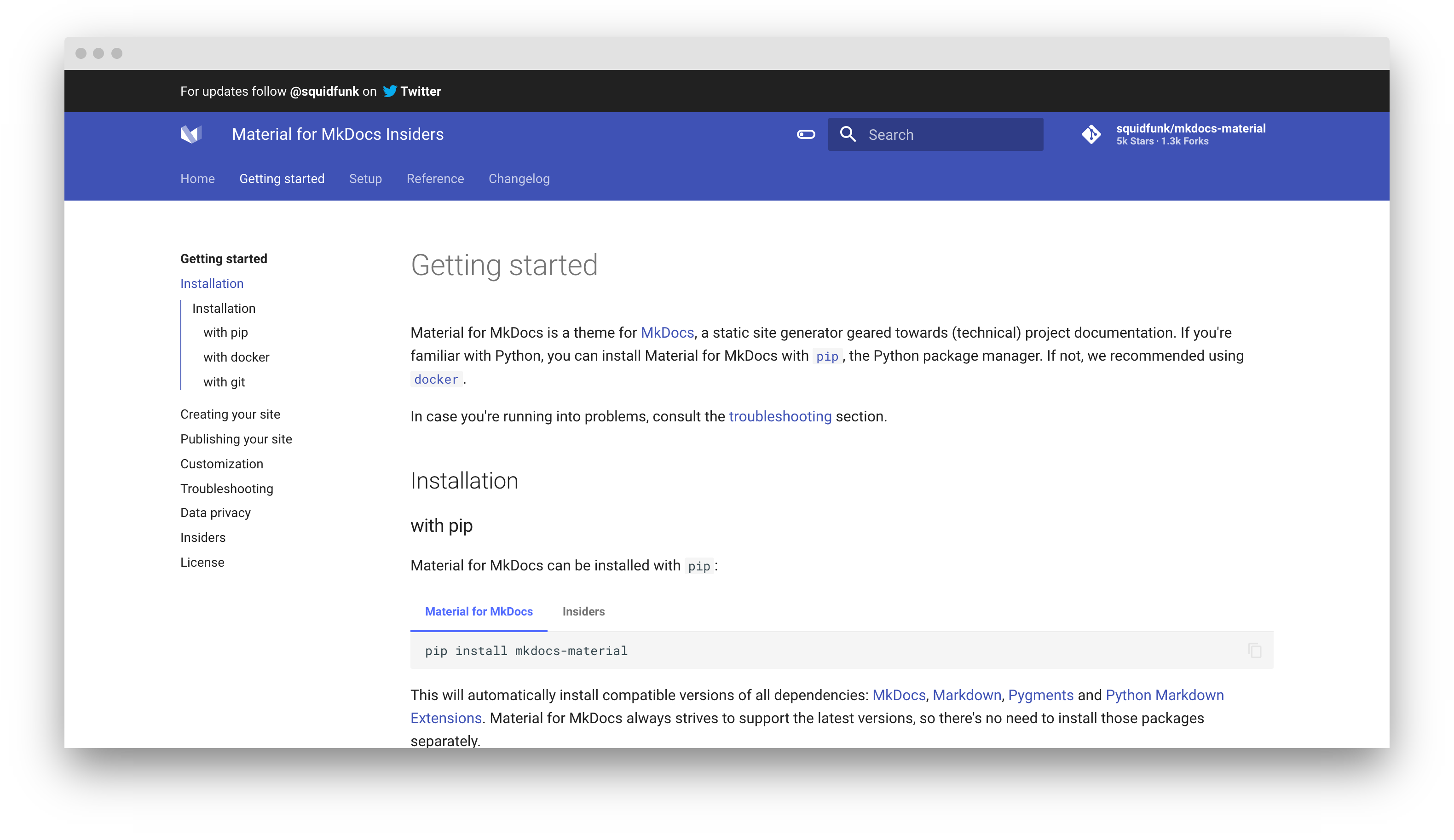
Furthermore, I added some documentation on how to increase the overall width of the theme with 2-3 lines of CSS. This resolves all points discussed in this issue! 😊
squidfunk
on 15 Nov 2020
Related issues
 nikramakrishnan
·
3Comments
nikramakrishnan
·
3Comments
 atmarx
·
4Comments
atmarx
·
4Comments
 oliverschwendener
·
4Comments
oliverschwendener
·
4Comments
 yogeshbeniwal
·
4Comments
yogeshbeniwal
·
4Comments
 bborysenko
·
4Comments
bborysenko
·
4Comments
Most helpful comment
It is good idea.
This implementation can include 3 parts: