Mkdocs-material: Instant loading sometimes causes 404s on assets (e.g. images)
First, thank you for the awesome work!
__I checked that...__
- [X] ... the documentation does not mention anything about my problem
- [X] ... the problem doesn't occur with the default MkDocs template
- [X] ... the problem is not in any of my customizations (CSS, JS, template)
- [X] ... there are no open or closed issues that are related to my problem
Description
I do have pages with several pictures on pages which are in subfolders.
When features instant is set in mkdocs.yml, some of the images may not display. In the DevTools console, I see 404 errors in the network tab. I also see the 404 errors in mkdocs stdout.
Refreshing the page does display the images.
Expected behavior
Images should display without having to refresh.
Actual behavior
Images do not display (not systematically), and getting 404 errors in the DevTools Network tab.
Steps to reproduce the bug
- Have a site structured like this, with instant:
docs/
  folder1/
    README.md
    pic1.png
    pic2.png
    pic3.png
  folder2/
    README.md
    pic4.png
    pic5.png
    pic6.png
  README.md
- Serve locally
mkdocs serve - Observe 404 errors
Package versions
- Python:
python --version: 3.7.5 - MkDocs:
mkdocs --version; mkdocs, version 1.1 - Material:
pip show mkdocs-material | grep -E ^Version: version 5.1.1
Project configuration
site_name: "Test"
site_description: "Testing"
theme:
  name: material
  features:
    - tabs
    - instant
  icon:
    logo: material/cloud
    repo: fontawesome/brands/github
  include_search_page: false
  search_index_only: true

  plugins:
  - search
  - awesome-pages:
      collapse_single_pages: true

markdown_extensions:
  - meta
  - admonition
System information
- OS: Windows10, WSL (Linux Subsystem / Ubuntu)
- Browser: reproducible in Chrome, MS Edge, Firefox
 ojacques
All 22 comments
Unfortunately, I'm very tight on time, could you provide a repository with an example that reproduces the issue?
 squidfunk
on 24 Apr 2020
squidfunk
on 24 Apr 2020
@squidfunk - absolutely. There you go:
mkdocs-test.zip
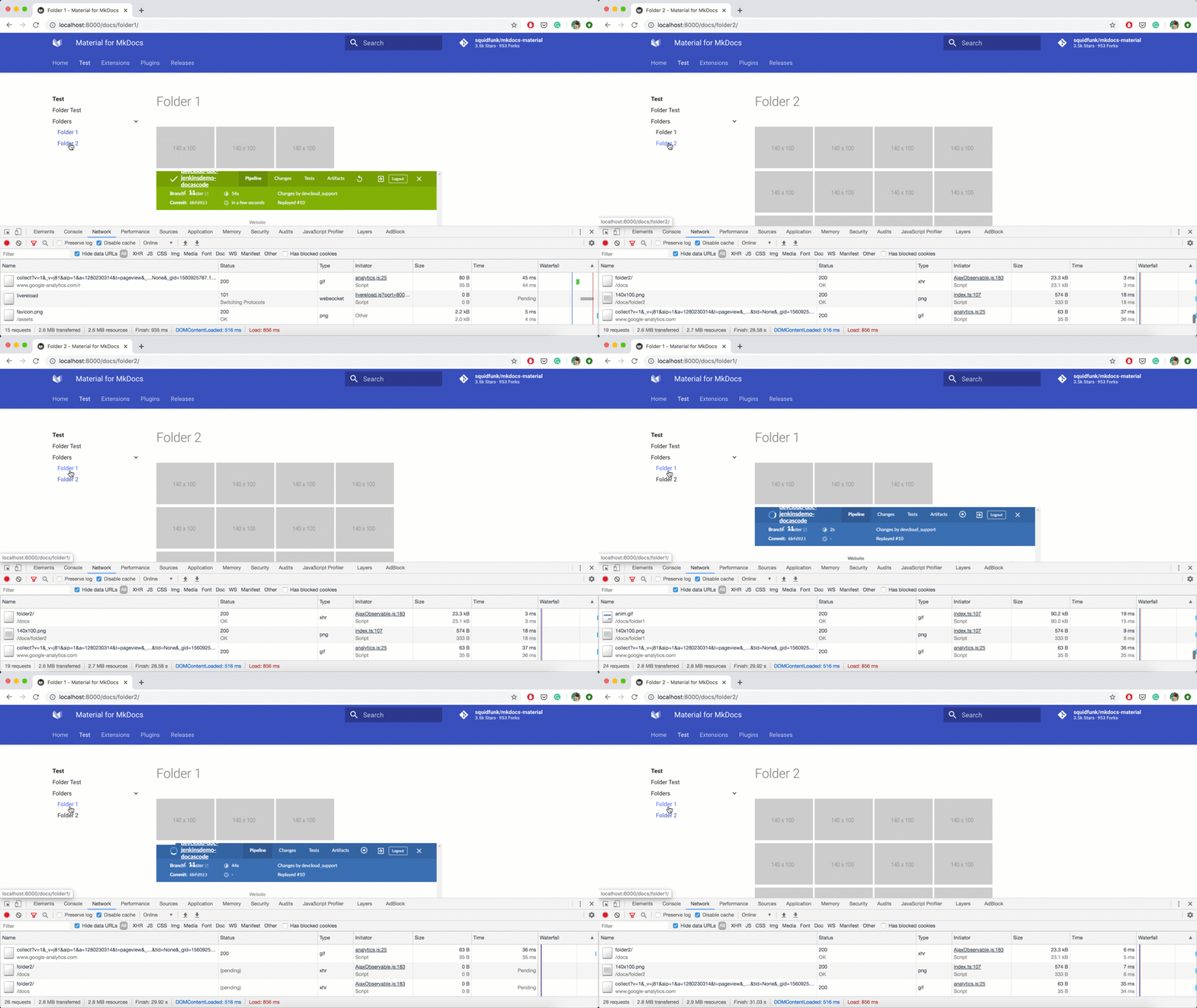
Switching between folder1 and folder2 will trigger 404 errors. At least it does for me.
Maybe the trigger is the size of the images. Without adding the animated gif, I could not reproduce with the small images.
ojacques
on 24 Apr 2020
Thanks! I'll look into it, but, unfortunately, it might take some time. In the meantime, you may disable instant loading.
squidfunk
on 24 Apr 2020
In the meantime, you may disable instant loading.
Yes, I was happy to see that this could be turned off. This is what I did for my docs and all is 👍.
Thank you. Stay safe 🙏
ojacques
on 24 Apr 2020
I can't reproduce your problem. Activating instant loading works perfectly for me, the images are loaded, I see no 404s.
squidfunk
on 3 May 2020
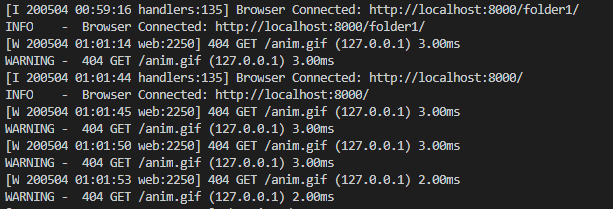
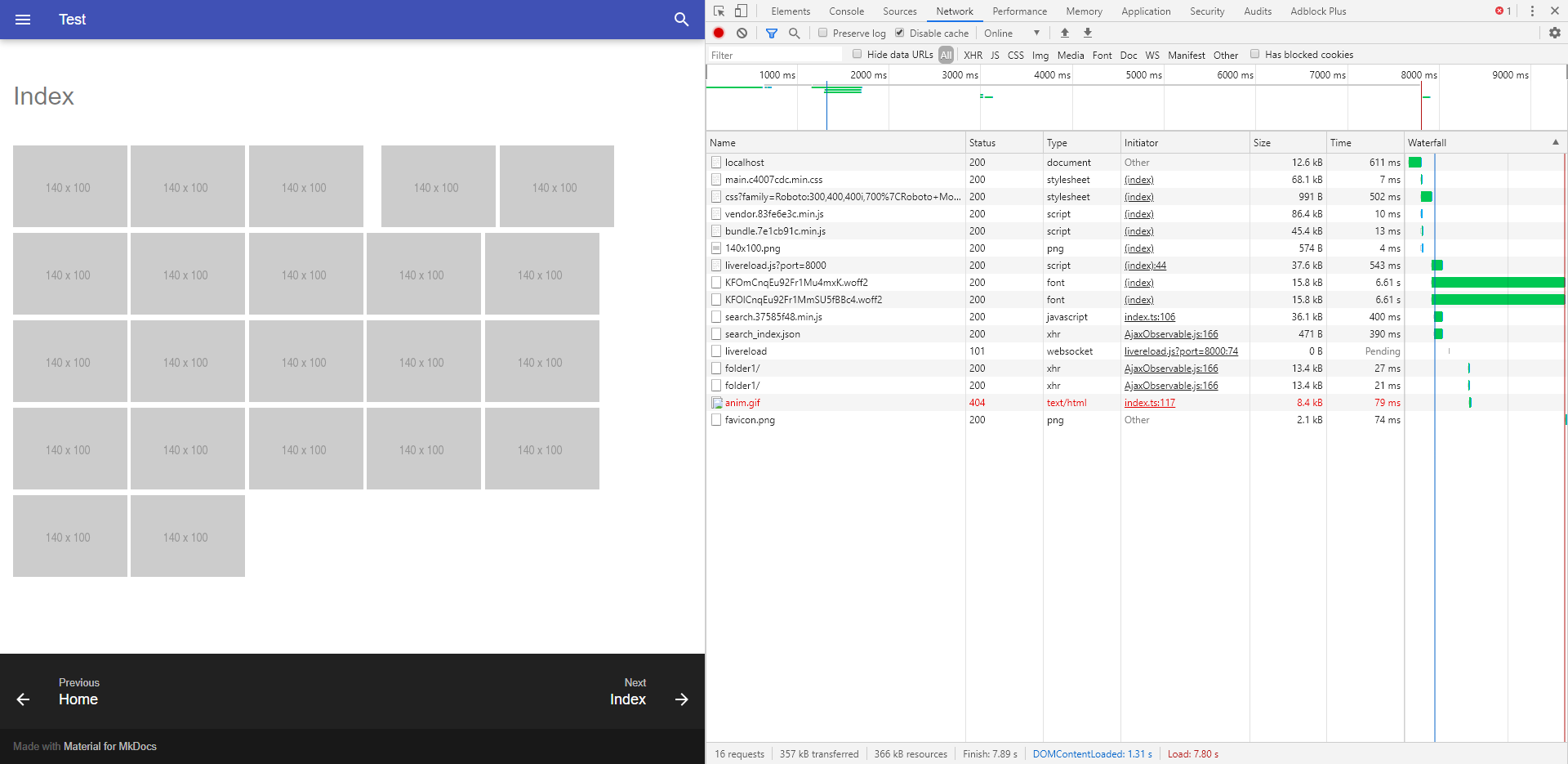
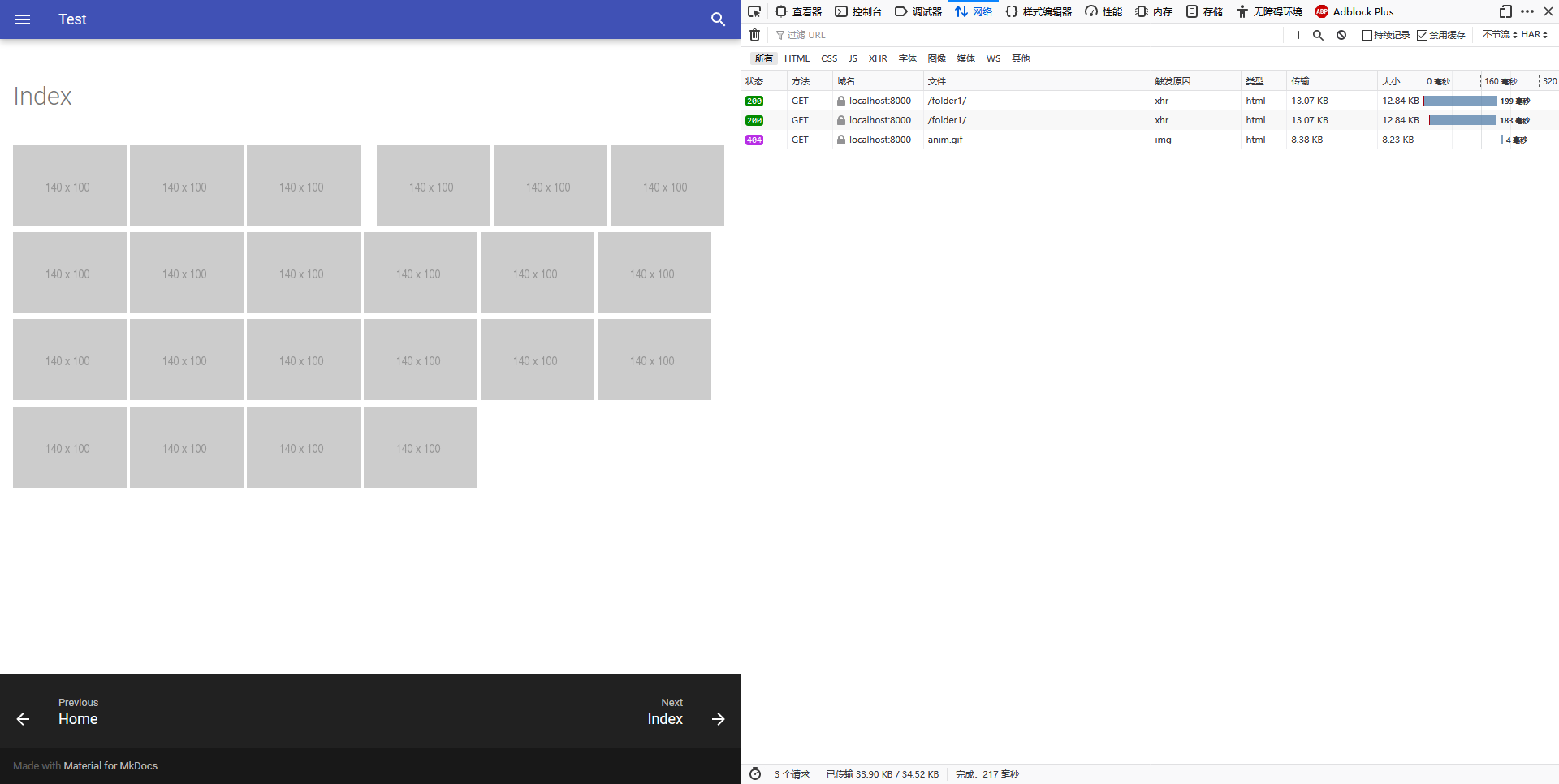
I tried Firefox and Chrome, and did get some 404s.
Versions:
Chrome: 81.0.4044.129
Firefox: 75.0
Python: 3.7.0
MkDocs: 1.1
Material: 5.1.4
Screenshots:
 Mi11et
on 3 May 2020
Mi11et
on 3 May 2020
Well, I cannot reproduce it. Tested on macOS, but that should make no difference.
squidfunk
on 3 May 2020
This could be the same problem that I mentioned on Gitter where my videos did not load on first page load but did after a refresh. @ojacques If you F5 the page when the problem occurs, do they show up fine?
 Stanzilla
on 4 May 2020
Stanzilla
on 4 May 2020
@Stanzilla they should load, as instant loading is first used on navigation. Again, if somebody manages to provide a case that is _reproducible_, I'm happy to investigate. I can't, as can be seen in the gif.
squidfunk
on 4 May 2020
@squidfunk that's how I repro, go to https://docs.coregames.com/tutorials/vfx_tutorial/ then click "Video Tutorial" and then "Making a Pistol Shooter". Videos won't load. If you go to https://docs.coregames.com/tutorials/videos/pistol_shooter/ directly, they load.
Stanzilla
on 4 May 2020
Unfortunately, I need a minimal reproducible case to debug.
squidfunk
on 4 May 2020
@Stanzilla still, not reproducible. Are you all running the latest version? Nevermind. I didn't read about the videos. How are you embedding them?
It shouldn't happen, and theoretically, it also __can't happen__ how instant loading is implemented:
However, I'm not saying that there isn't a bug hiding somewhere in the code, but the behavior is synchronized now.
squidfunk
on 9 May 2020
https://github.com/ManticoreGamesInc/platform-documentation/blob/development/src/assets/javascripts/manticore.js#L29 + https://github.com/ManticoreGamesInc/platform-documentation/blob/development/src/tutorials/videos/pistol_shooter.md
Stanzilla
on 10 May 2020
You need to re-trigger initialization at DOMContentSwitch
squidfunk
on 10 May 2020
I tried again, and still get 404 errors, on the gifs for this simple project. I can reproduce it on Chrome 81.0.4044.138 and Edge 81.0.416.72.
Python: 3.7.5
MkDocs: 1.1
Material: 5.1.6
What is interesting is that the gif that is retrieved from folder1/index.md is in folder1. When I get a 404, it indicates the gif is not found, but from folder2 (the folder I come from): it tried to get the picture from folder2/
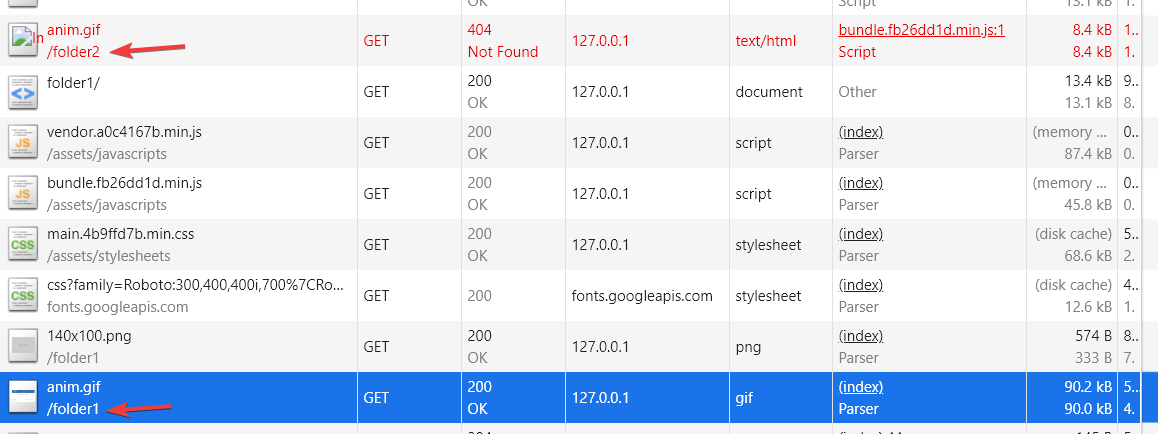
In other words, the context (path?) that is used to get the image is the path from which I come from (navigated away).
I tried the original site, and I have the same issue: when I get a 404, the picture was attempted to be fetched from the folder where I came from.
Hope this makes sense.
ojacques
on 10 May 2020
That is strange, as I described the process shouldn't make that possible. The document is not evaluated until the path was changed. After the new path was pushed onto the history, the document is parsed and the paths are evaluated in the context of the new URL. This is the exact behavior I'm seeing. No errors.
squidfunk
on 10 May 2020
Can this be closed? Actually I’m still struggling to reproduce it. If somebody could provide a self-contained repository which shows the error, we can fix it, but without a reproducible case this issue is a dead-end.
squidfunk
on 19 May 2020
I don't know what to say. I can reproduce it with the zip file above, and I had to remove instant loading for my site for it to work.
Feel free to close: I have a workaround. But instant does not work for me on the multiple mkdocs sites I manage.
ojacques
on 19 May 2020
I would love to fix it, if I’d be able to reproduce it. I hope you understand that my spare-time is limited and I cannot invest more time into this topic without a reproducible case. Also, there seem to be very few people suffering from this problem. Maybe, somebody manages to provide a reproducible case in the future but your zip works perfectly for me.
squidfunk
on 19 May 2020
Also note that instant loading is still considered experimental 🐣
squidfunk
on 19 May 2020
The latest master contains a potential fix (see https://github.com/squidfunk/mkdocs-material/pull/1813#issuecomment-683414948) for this problem. I was finally able to reproduce it in Firefox and after applying the fix, the images load consistently. Could anyone of you who experiences this problem try the latest master? If it works, I can issue a release straight away.
pip install git+git://github.com/squidfunk/mkdocs-material.git
The mentioned fix was confirmed to work and just released as part of 5.5.12.
squidfunk
on 31 Aug 2020
Related issues
 oliverschwendener
·
4Comments
oliverschwendener
·
4Comments
 michael-nok
·
3Comments
michael-nok
·
3Comments
 bborysenko
·
4Comments
bborysenko
·
4Comments
 madrus
·
3Comments
madrus
·
3Comments
 lupupitkanen
·
4Comments
lupupitkanen
·
4Comments