Mkdocs-material: Chrome breaks layout if system language is Chinese
Description
Only chrome meet the bug,safari and firefox are correct.
the case include my "mkdocs serve" and your "https://squidfunk.github.io/mkdocs-material/"
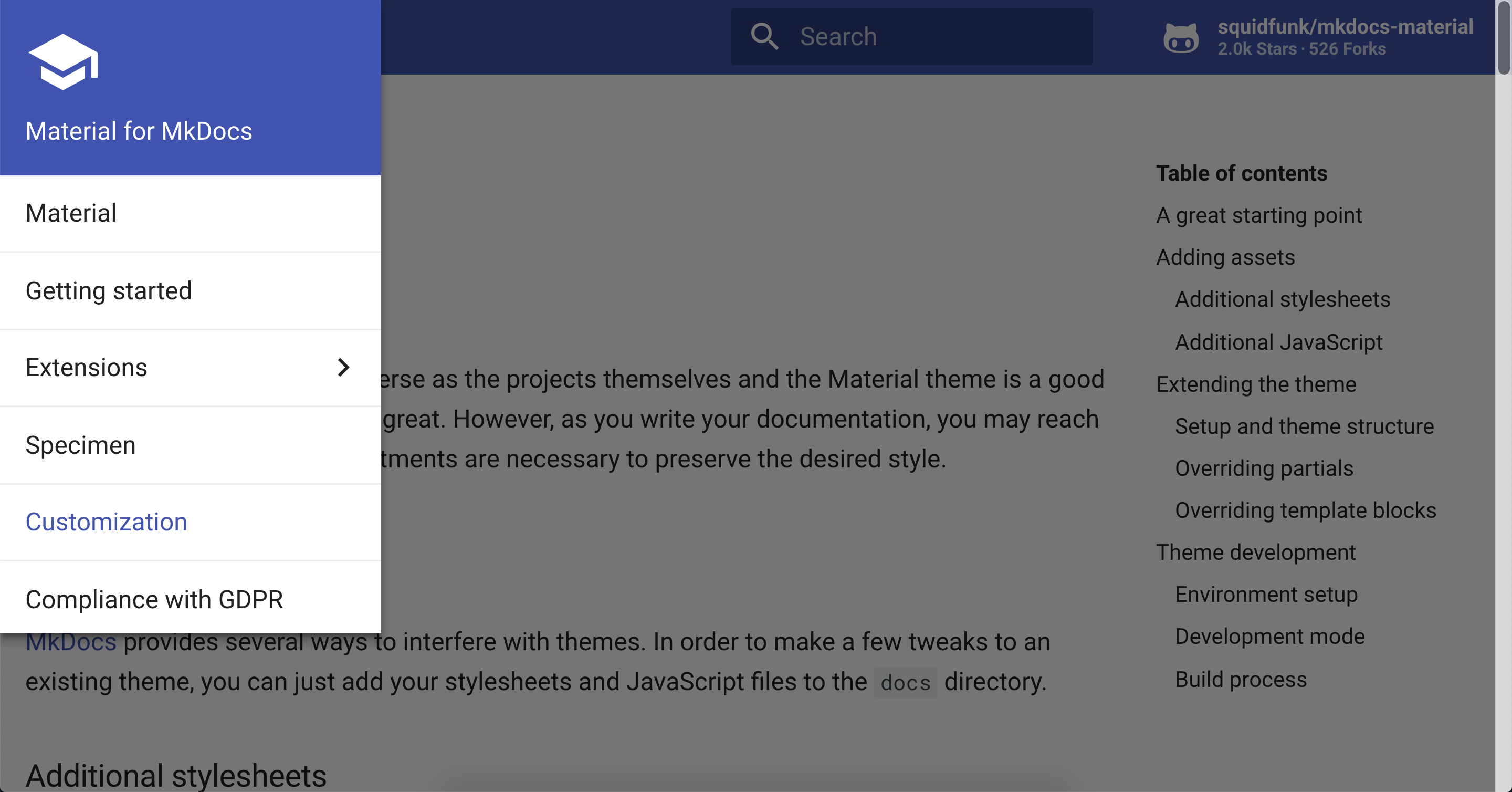
this is chrome:

this is firefox:

Package versions
- Python:
2.7.10 - MkDocs:
1.0.4 - Material:
3.0.6
Project configuration
site_name: My Docs
theme:
  name: material
System information
- OS: macos 10.13.4
- Browser: chrome
 cyent
cyent
All 39 comments
I'm gonna need a little more than this. What resolution does this happen, for example? Please, please, please stick to the issue template when reporting new issues and provide everything that is necessary to reproduce the issue.
 squidfunk
on 2 Nov 2018
squidfunk
on 2 Nov 2018
I mean, in the chrome, some size display correct, some size have problem. Now, I take 3 screenshots in another windows computer,the chrome version is 70.0.3538.67.
Now, let me visit https://squidfunk.github.io/mkdocs-material/getting-started/
screenshot 1:the same as mobilephone,it is correct

screenshot 2:the size is bigger than screenshot 1,it is correct
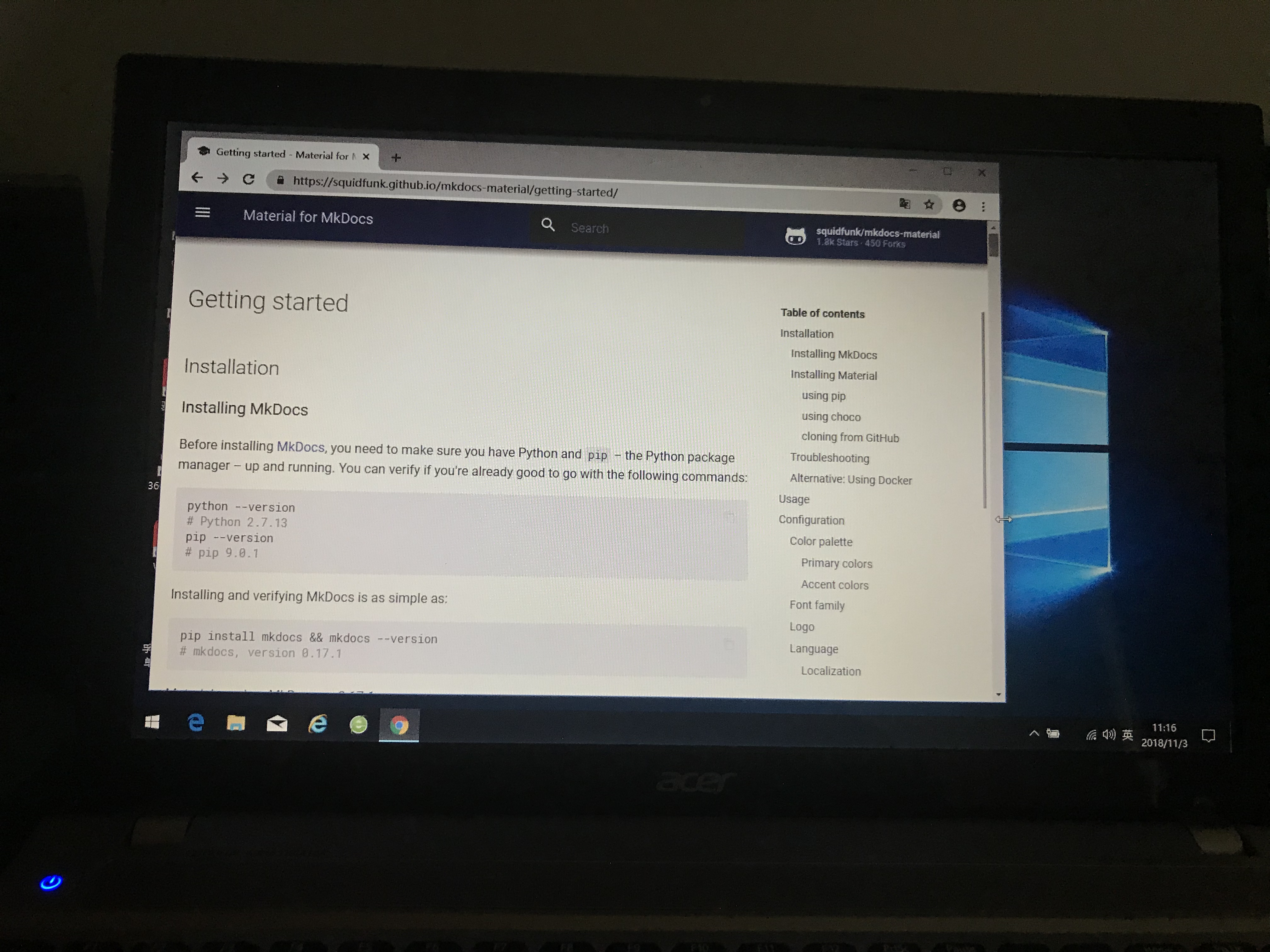
screenshot 3:the size is bigger than screenshot 2,it has problem:I can't see the Right sidebar fully

So, Mkdocs-material does not fit perfectly into multiple sizes in chrome browser.
cyent
on 3 Nov 2018
I'm afraid I cannot reproduce this. Is this the latest Chrome version? Somebody experiencing the same problem?
squidfunk
on 3 Nov 2018
eh, eh, actually, the problem appear at least 1.5 years(at that time, I just learn mkdocs-material)...
You can try turn up the brower size slowly
cyent
on 3 Nov 2018
As said before, I'm not able to reproduce it on Chrome macOS. It's very strange that this is happening for you. Maybe somebody else has experienced the same, we need a way to reproduce it.
squidfunk
on 3 Nov 2018
other people's computer still the problem. But,
Oh, yeah, I know how to reproduce it.
Test 1: when chrome brower size is 1219px * 368px, it display ok.
Test 2: when chrome brower size is in (1220px - 1436px) * 368px, it display abnormal.
So, you can reproduce it in exmaple 1300px * 368px.

cyent
on 7 Nov 2018
Still (macOS, latest Chrome):

squidfunk
on 7 Nov 2018
Windows 10, latest Chrome here @ 1300x368
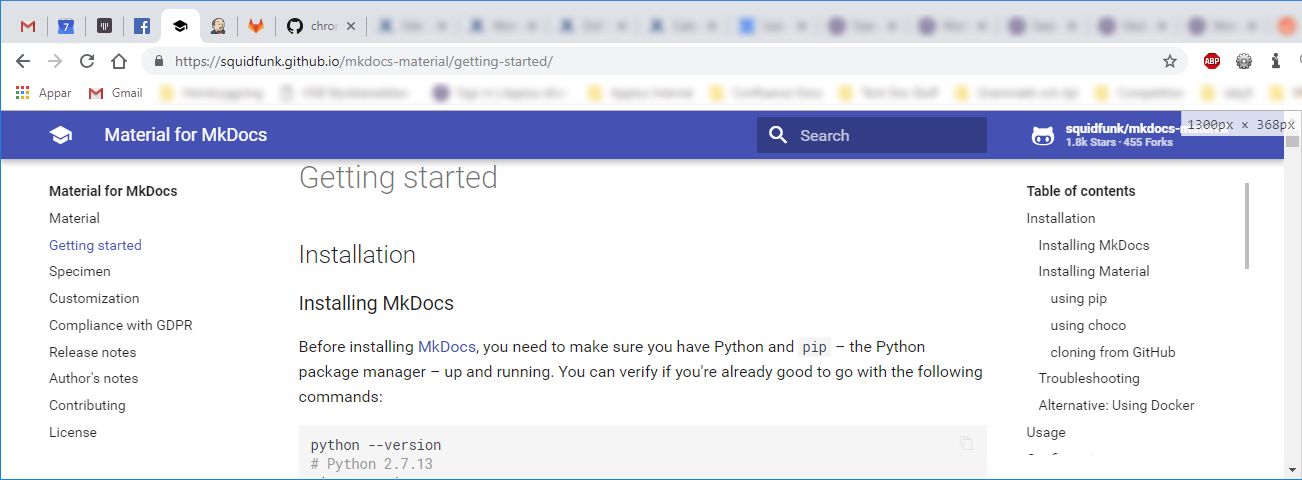
Edit: Also now tried this on Win 10 with Firefox (latest), Vivalid (latest), and Microsoft Edge, all with the same expected working results.
 martinbira
on 7 Nov 2018
martinbira
on 7 Nov 2018
I reinstall the latest chrome, but the problem still exists, these days I will try a few more times in more other peoples.
cyent
on 7 Nov 2018
I can reproduce it, it is the OS Language(not chrome Language).
When the os language is chinese simplified, it will reproduce the problem
When the os language is english, it is very ok.
example macos
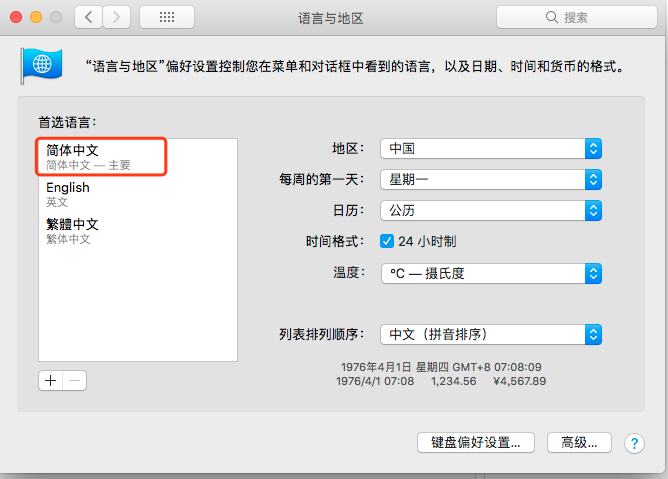
If you set it like this, you can reproduce it. (I haven't tried it on Windows yet)
cyent
on 9 Nov 2018
Thanks for investigating! However, when I change my system language to Chinese I'm unable to use my computer 😐
squidfunk
on 9 Nov 2018
Can maybe somebody else using Chinese as a system language reproduce (or even debug) it?
squidfunk
on 9 Nov 2018
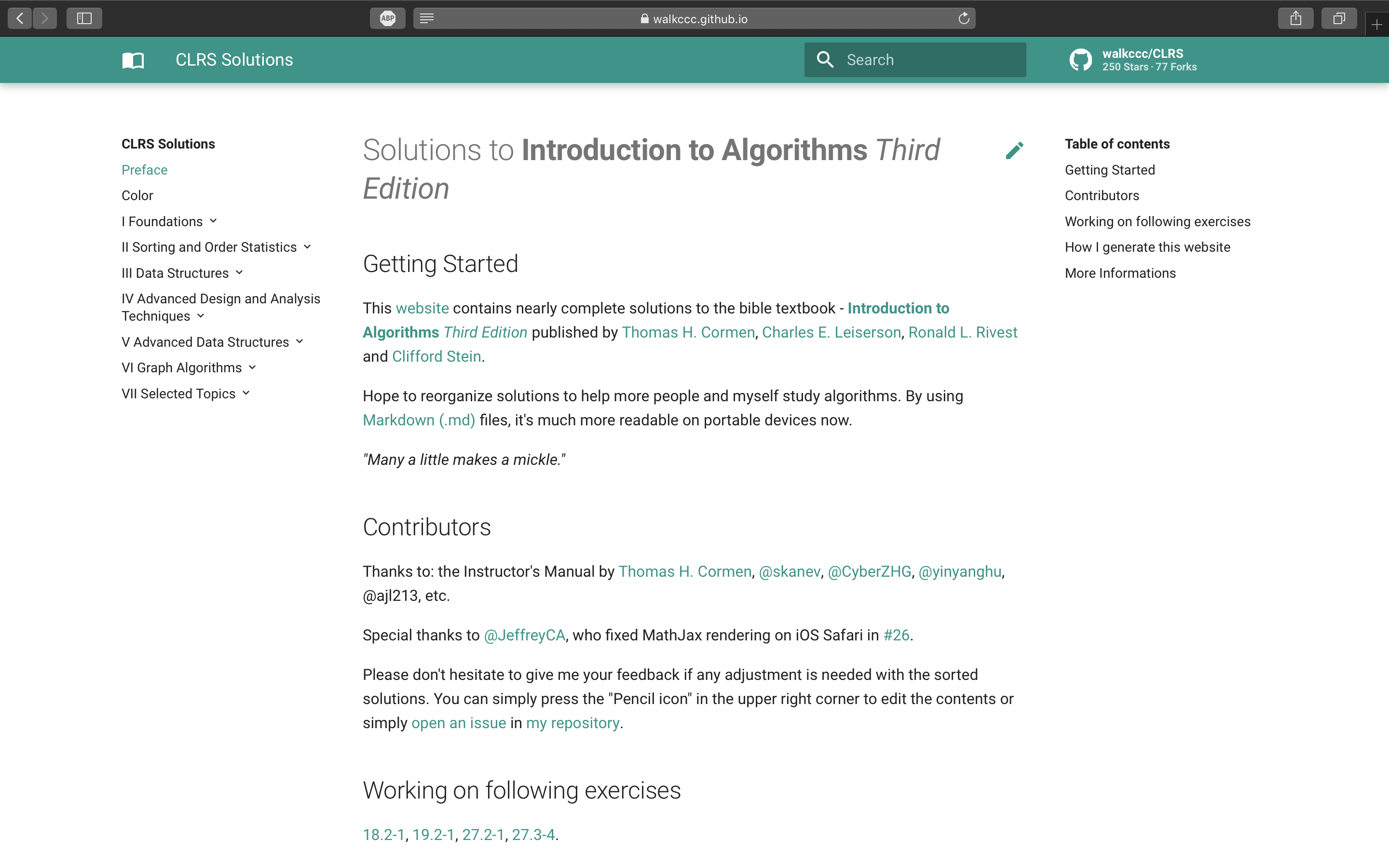
- In MacBook Pro 13" (2013 mid) with resolution = 2560 * 1600, there's the same issue in Chrome.
- In MacBook Pro 15" (2017 mid) with resolution = 2880 * 1800, it's kind of awkward in Chrome but it's normal in Safari.
Following are the comparisons in different browsers and screen sizes:
13" model (Chrome)
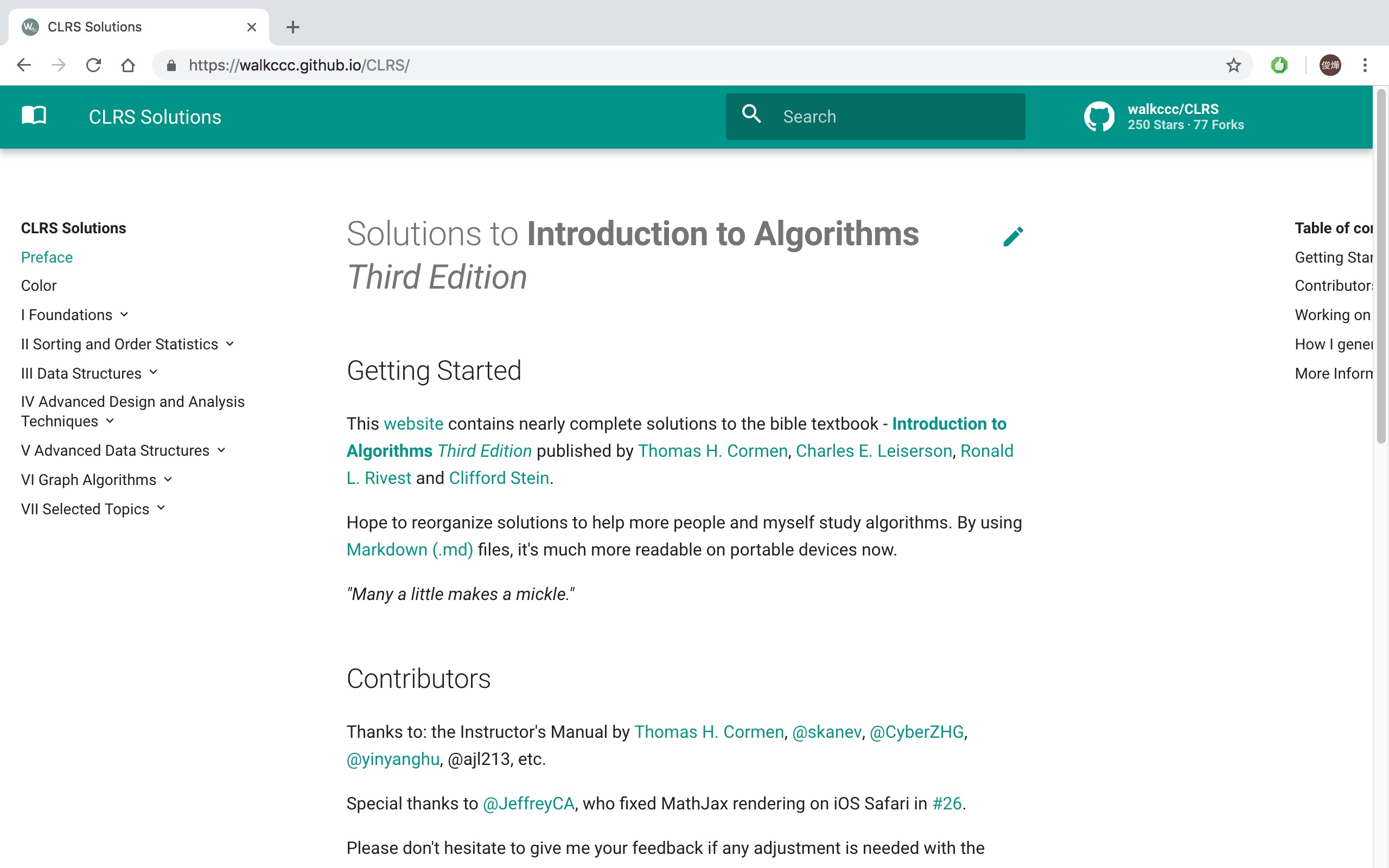
15" model (Chrome, full screen)

15" model (Safari)
 walkccc
on 9 Nov 2018
walkccc
on 9 Nov 2018
Well, this has to be induced by some deeper cause than OS language or Notebook model. We need to find the cause and fix it. Assistance would be great from the people who can reproduce this error, because up to now I can't. A great start would be looking at the DOM, the specs/properties of the elements and see if there's something applied that makes it break.
squidfunk
on 10 Nov 2018
Closing, as its still not reproducible. If somebody manages to debug (and maybe fix it) you are most welcome to submit a PR.
squidfunk
on 17 Nov 2018
I can reproduce the problem with Chrome on macOS:

The margin-left of md-sidebar--secondary is set to the wrong value.
 smancill
on 4 Feb 2019
smancill
on 4 Feb 2019
@smancill - did you use browser zoom? What's your base font size?
squidfunk
on 4 Feb 2019
The base font size is the browser default (medium, 16pt).
And no zoom (even though the above screenshot in responsive mode was at 75%).
Here is another one, this time at 100%:

By the way, my system language is Spanish but I changed it to English and the problem was still present.
smancill
on 4 Feb 2019
Still, I cannot reproduce it on Chrome macOS. What the...
squidfunk
on 4 Feb 2019
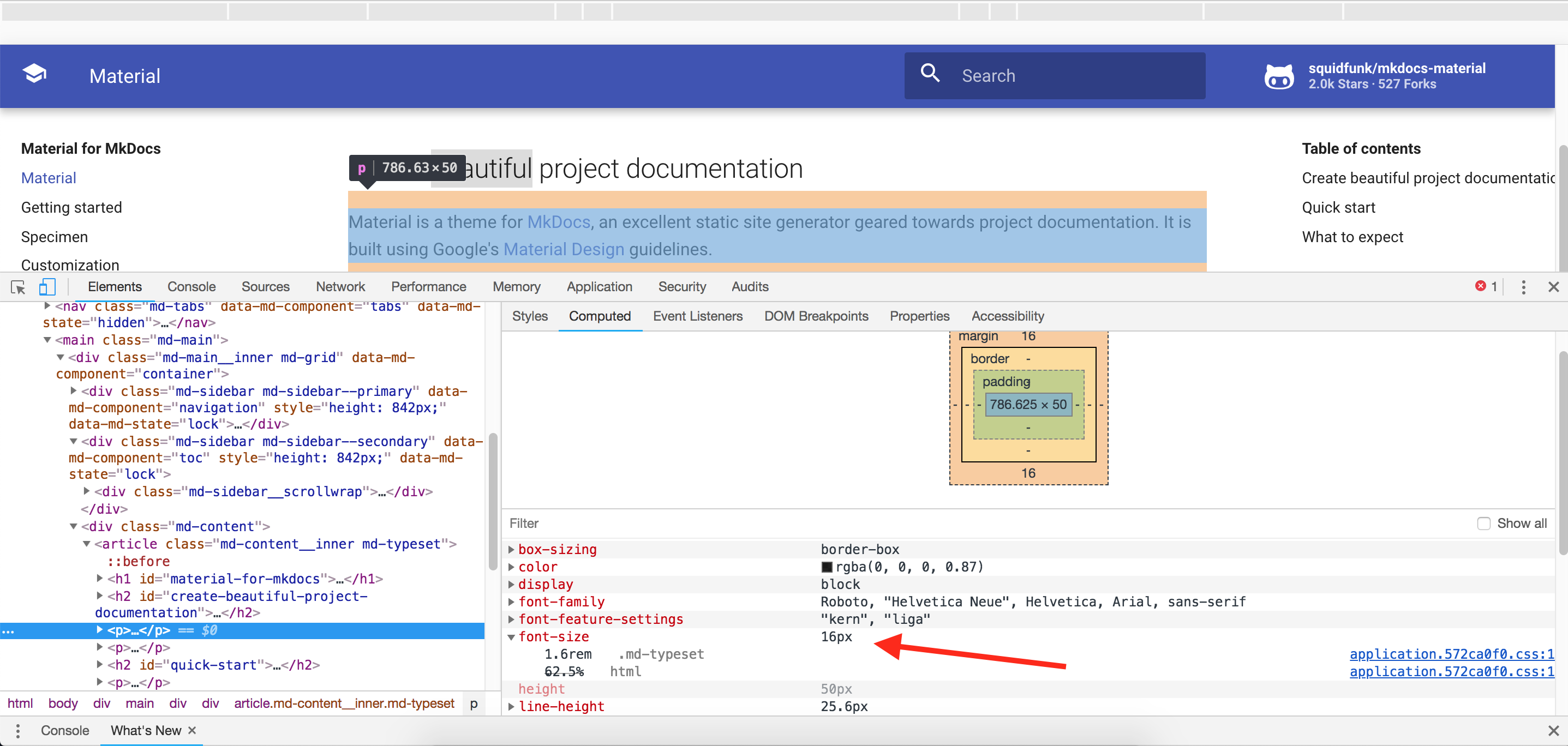
Ok, The problem is that font-size is set to 12px in Chrome for the sidebar, while in Firefox is properly set to 10px. Then all the rem-based sizes are displayed incorrectly in Chrome.

But I do have all the font sizes in Chrome set to the default recommended _medium_ size (16px).
Also, the size in pixels for all text elements is actually the same in both Chrome and Firefox:
smancill
on 4 Feb 2019
Awesome, thanks! Setting the minimum font size to 12px I can finally reproduce it! For me the value was set to 6px and I never tweaked it, so it should not be the default I guess. I will see if we can do something about it, but I would consider it an edge case.
squidfunk
on 4 Feb 2019
I actually found another issue with Chrome if reducing the minimum font size still doesn't work. There is a hidden setting in Chrome that I cannot change from the preferences panel UI:
$ jq '.' ~/Library/Application\ Support/Google/Chrome/Default/Preferences | grep font_size
      "default_fixed_font_size": 13,
      "default_font_size": 16,
      "minimum_font_size": 10,
      "minimum_logical_font_size": 10,
I had both minimum_font_size and minimum_logical_font_size set to 12, but from the UI I can only change minimum_font_size to 10, and minimum_logical_font_size was still at 12 and the problem still persisted.
I had to quit Chrome, edit the preferences file manually to set minimum_logical_font_size to 10 and finally the layout was correct.
smancill
on 4 Feb 2019
@cyent and @walkccc - can you please look into your minimum font size settings and verify whether the issue persists if you set it to 10px?
squidfunk
on 9 Feb 2019
I think the issue still persists. Changing the font-size doesn't affect the layout.
font-size: 10px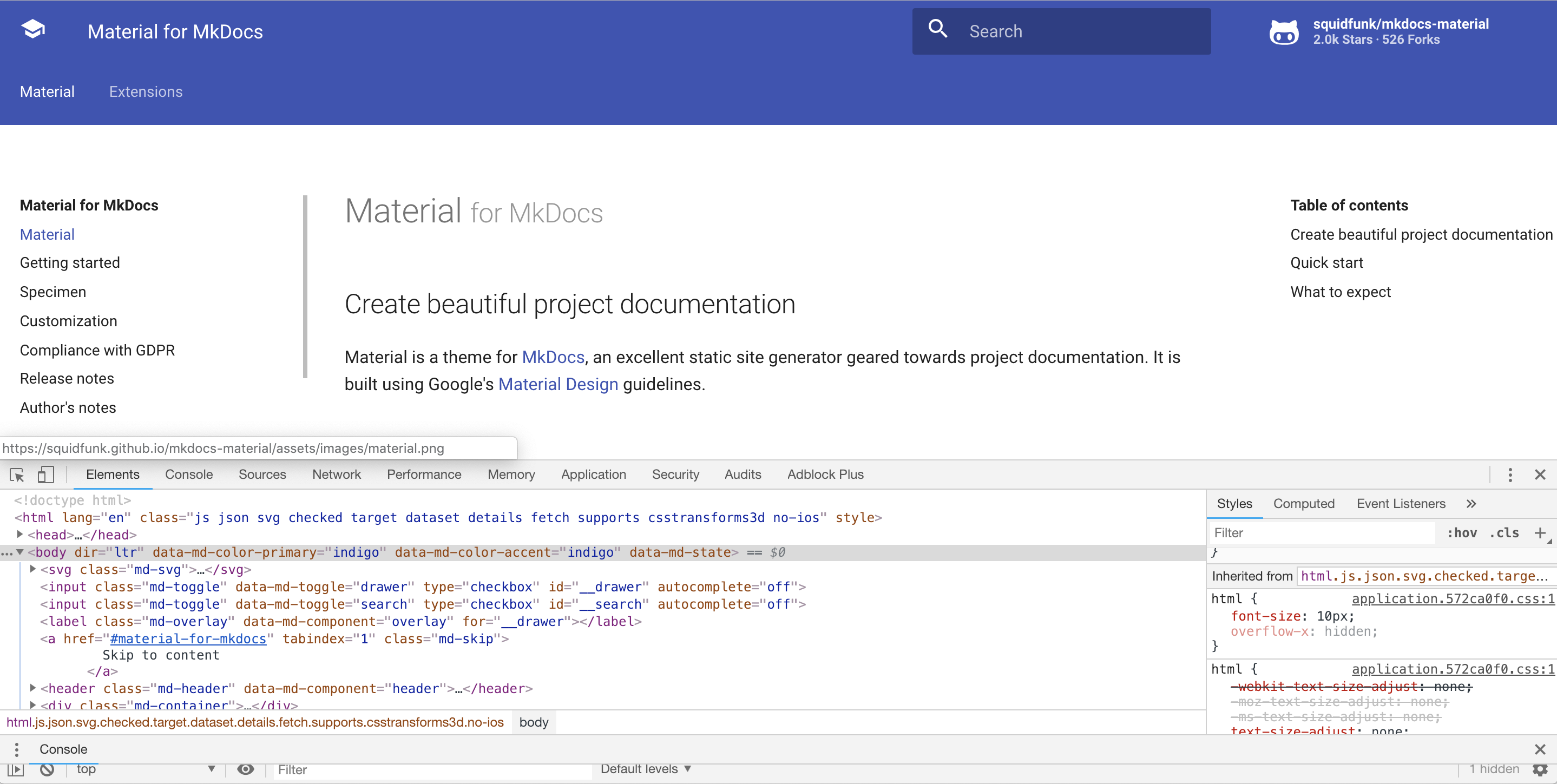
font-size: 12px
walkccc
on 10 Feb 2019
@walkccc you have to set the font size within Chrome settings, not DevTools. However @smancill research led to an unresolved issue I found which may explain why the issue for some users only appears for Chinese:
By default, chrome sets the minimum font size as 1px for most UI locale, but for some special UI locale like Simp/Trad Chinese, Japanese, Korea and Thai, Chrome uses 10px/12px as default minimum font size. That is why Chrome does not display font which size is less than 12px in Chinese UI.
squidfunk
on 10 Feb 2019
OS language = Trad Chinese.
Very small

Small

Medium (Recommended)
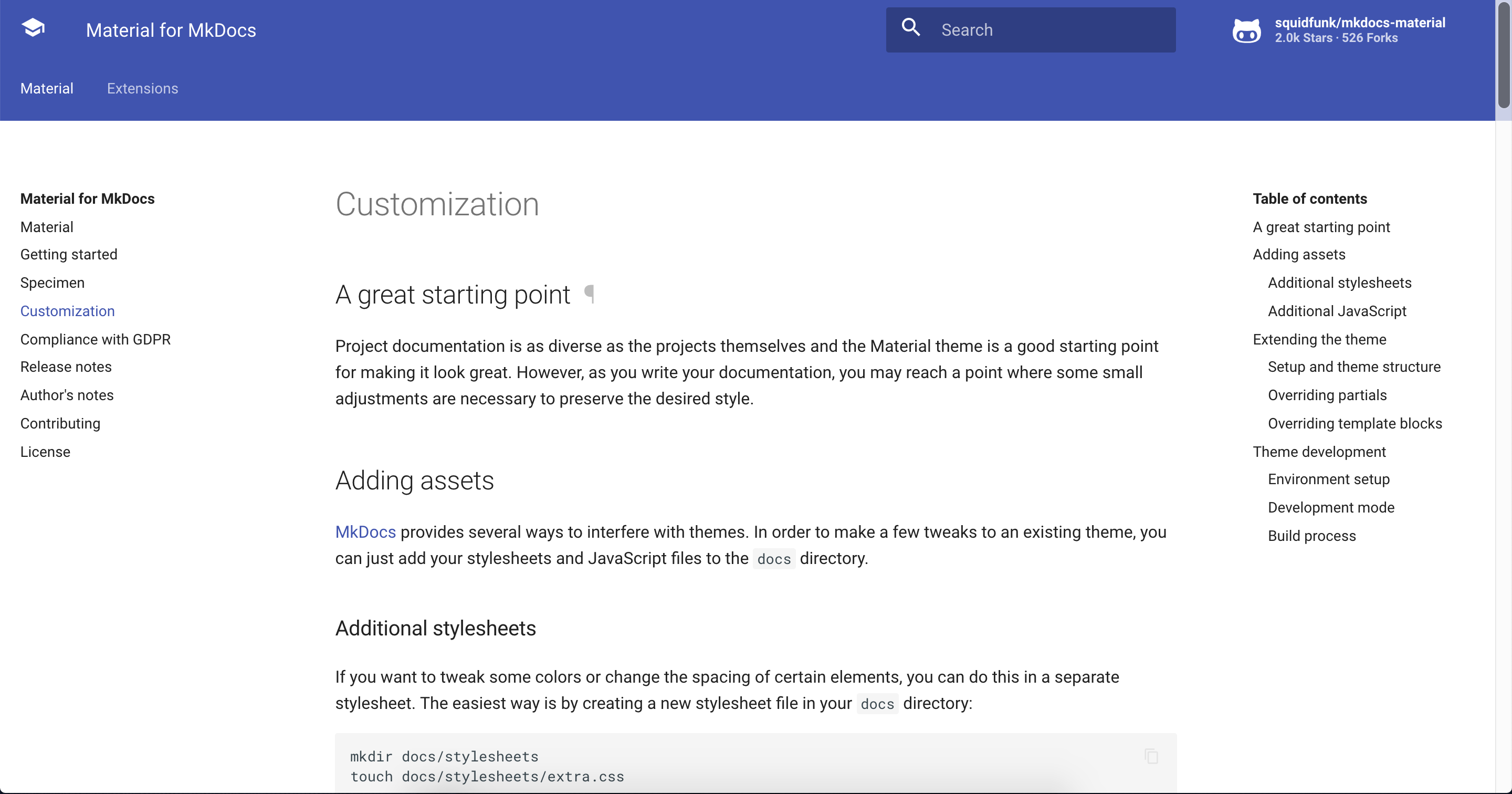
Big

Very big
walkccc
on 10 Feb 2019
Thanks, I will see if we can fix it somehow.
squidfunk
on 10 Feb 2019
Only Chinese should be affected, as Material sets the root font size to 10 for an efficient usage of rem (see here):
Set the default minimum font size webkit pref to 12 for Chinese and 10 for ja,ko,ar and th.
squidfunk
on 10 Feb 2019
So, the problem is definitely triggered by the fact that the minimal font size for Chinese cannot be smaller than 12. The issue was reported 9 (!!!) years ago and still remains present in Chromium and Chrome, see here and here.
This year-standing "fix" in Chrome greatly hinders accessibility. Material puts a huge effort in being as accessible as possible by defining every dimension in rem or em and Media Queries in em. If a user has set a bigger base font size (like it would be practical for elderly people), the whole page will just appear as if it is zoomed. This ensures that the layout always looks as intended. The problem is that a minimal font size of 12 breaks all rem values, as the factor is now 1.2 and not 1.0. However, the minimal font size does not seem to impact the base font size for the Media Query computations, as they stay at their positions which is the reason why the sidebar is way of the screen (Media Query now triggers too early).
We could try to provide a "good enough" experience by somehow working around this issue in the CSS or base all computations on a base font size of 12 (and not 10) which would require some rewriting of the SASS code (probably using a helper function). The problem will persist if a user sets the minimal font size to a value larger than 12. It is not fixable with the current architecture without sacrificing accessibility.
I really do not want to lock out the whole Chinese community and I'm really shocked that such a fundamental issue remains unsolved for such a long time, impacting a huge part of the world's population. Refactoring all rem values to be based on a factor of 1.2 to catch the minimal font size for Chinese will lead to regressions for users which applied customizations in rem, as their calculations are now off. This is a tricky issue.
squidfunk
on 10 Feb 2019
I'm afraid I cannot reproduce this. Is this the latest Chrome version? Somebody experiencing the same problem?
So, the problem is definitely triggered by the fact that the _minimal font size_ for Chinese cannot be smaller than
12. The issue was reported 9 (!!!) years ago and still remains present in Chromium and Chrome, see here and here.This year-standing "fix" in Chrome greatly hinders accessibility. Material puts a huge effort in being as accessible as possible by defining every dimension in
remoremand Media Queries inem. If a user has set a bigger _base font size_ (like it would be practical for elderly people), the whole page will just appear as if it is zoomed. This ensures that the layout always looks as intended. The problem is that a _minimal font size_ of12breaks allremvalues, as the factor is now1.2and not1.0. However, the _minimal font size_ does not seem to impact the _base font size_ for the Media Query computations, as they stay at their positions which is the reason why the sidebar is way of the screen (Media Query now triggers too early).We could try to provide a "good enough" experience by somehow working around this issue in the CSS or base all computations on a _base font size_ of
12(and not10) which would require some rewriting of the SASS code (probably using a helper function). The problem will persist if a user sets the _minimal font size_ to a value larger than12. It is not fixable with the current architecture without sacrificing accessibility.I really do not want to lock out the whole Chinese community and I'm really shocked that such a fundamental issue remains unsolved for such a long time, impacting a huge part of the world's population. Refactoring all
remvalues to be based on a factor of1.2to catch the _minimal font size_ for Chinese will lead to regressions for users which applied customizations inrem, as their calculations are now off. This is a tricky issue.
I encountered the same problem today. And thank you for your efforts on fixing this bug!
 masterstevelu
on 11 Feb 2019
masterstevelu
on 11 Feb 2019
I tried to write something up in a few tweets about this problem and would kindly ask everybody to retweet it, so we maybe get some attention by the Chrome dev team: https://twitter.com/squidfunk/status/1095246562664607744
squidfunk
on 12 Feb 2019
Looks like I have good news – I just pushed a potential workaround in 20074843 and 946f4f1 to master. The gist:
- Move all
remcalculations to a new helper functionpx2remand define all values inpx. The helper function will take thepxvalue and return the appropriateremvalue using the base font-size. - Double the base font-size on the
htmlelement from 62.5% (=10px) to 125% (=20px) and adjustpx2remaccordingly. This works around the problem that Chrome will internally change10pxto12pxand should work for a minimal font size of up to20px. - Reset the base font size to
10pxby defining0.5remon thebody, so that implicit inline spacing is as it was before.
My testing shows that the issue is indeed fixed. The site looks exactly the same when I set the minimal font size to 12px so if my theory is correct it should now work for Chinese systems.
The change is already deployed to the live site, so everyone experiencing the problem please visit https://squidfunk.github.io/mkdocs-material/ to check if the problem is gone
Before:

After:

If we come to the conclusion that the issue is fixed, the next steps are:
- I would kindly ask somebody to review commit 20074843 which changes
0.4remtopx2rem(4px)etc. I double checked and it seems that I made no mistakes but there are A LOT of changes, so it's always better to double check. - I will issue a major release, i.e. version 4, because this change has the potential to break some projects using customization. If a project uses
remvalues, the resulting values are now twice as big. From my experience only very few people userem, so it shouldn't break a lot of projects, but it still has the potential to do so.
What. A. Journey.
I think we're all much wiser now and it seems that we're actually the first discovering the problem of minimal font size in respect to rem values.
squidfunk
on 12 Feb 2019
@masterstevelu @walkccc @cyent @smancill – could someone of you please verify, whether the issue is now gone when visiting the official Material docs?
squidfunk
on 13 Feb 2019
@masterstevelu @walkccc @cyent @smancill – could someone of you please verify, whether the issue is now gone when visiting the official Material docs?
The bug is fixed on my Chrome. Thannk you!
masterstevelu
on 13 Feb 2019
@squidfunk Hi Martin, when can I use your newest build if I install it using pip?
masterstevelu
on 13 Feb 2019
It's gone!
walkccc
on 13 Feb 2019
Awesome! As described above, I would like someone to review 200748430 before I will issue a new major release. We need to make sure that all rem units were correctly converted to px:
0.1rem=>px2rem(1px)0.9rem=>px2rem(9px)1rem=>px2rem(10px)1.1rem=>px2rem(11px)24.2rem=>px2rem(242px)- etc.
If we missed something, it will break some projects down the line. Better safe than sorry. I will prepare the release notes and upgrade instructions, so we can issue a new release as soon as we're sure we won't break anything.
squidfunk
on 13 Feb 2019
I don't see any mistakes in https://github.com/squidfunk/mkdocs-material/commit/2007484306d00906f4ab9e1981d35d4d7eb0b6ab
 max-ci
on 13 Feb 2019
max-ci
on 13 Feb 2019
Released as part of 4.0.0! I want to thank you all for your effort on helping fix this issue. Material should now finally look as it it should in China :-)
squidfunk
on 13 Feb 2019
Related issues
 madrus
·
3Comments
madrus
·
3Comments
 yogeshbeniwal
·
4Comments
yogeshbeniwal
·
4Comments
 NJAldwin
·
3Comments
NJAldwin
·
3Comments
 dbdevtop
·
4Comments
dbdevtop
·
4Comments
 danierutu
·
3Comments
danierutu
·
3Comments