Mkdocs-material: Script injection vulnerability in search component
Description
If any of your markdown documents contain script injection examples such as the following:
<style onload='alert("You executed this bit of JS");'></style>
You'll trigger a script injection attack on yourself when the document shows up in the search result.
Expected behavior
I would expect mkdocs-material to not inject user-generated input straight into the DOM. This is happening due to the use of {{ __html }} in the search result component.
Actual behavior
It triggers an injection attack.
Steps to reproduce the bug
_You can download a minimal working example here or follow the guide below_
Put the following anywhere in a document and write a search query that finds the document
```
<style onload='alert("You executed this bit of JS");'></style>
```
or
`<style onload='alert("You executed this bit of JS");'></style>`
Package versions
I'm using verison 3.0.5 of the docker image
Project configuration
site_name: 'Example of injection'

theme:
  name: 'material'

nav:
  - Home: index.md
System information
- OS: macOS
- Browser: Chrome
 mads-hartmann
All 13 comments
Yes, changes to documentation should always be reviewed. As MkDocs provides static documentation, there is no risk of MkDocs being exploited dynmically to inject scripts (unless you are using MkDocs "serve" as your server -- don't do that). But assuming you had a third party Markdown extension that slipped in injecting of malicious scripts into your documents via an update, MkDocs provides a plugin API that could allow you to run post processing on your HTML and sanitize it.
I personally do not feel it is MkDocs job to keep us safe, but simply to provide automated document building and deployment. I feel it is reasonable to expect the user to write, or use a 3rd party Mkdocs sanitizer extension.
 facelessuser
on 25 Oct 2018
facelessuser
on 25 Oct 2018
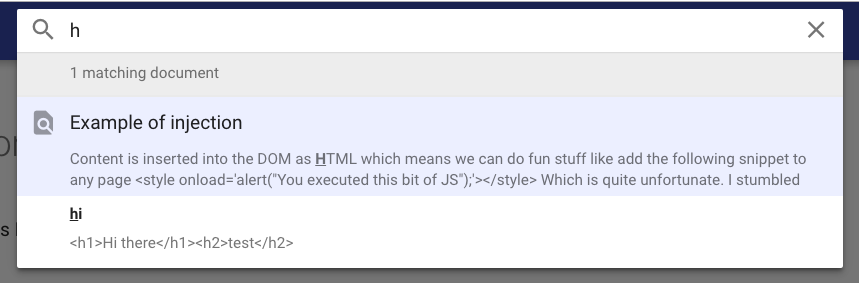
@facelessuser In this case it's an internal document that describes how to avoid script injection, and as such has examples of script injection in the text.
Here's another example. Say you're documenting some HTML
```
<h1>Hi there</h1><h2>test</h2>
```
This will be rendered in the search results like so:

I don't think mkdocs should sanitise all the user input but it would be nice if it didn't inject the contents of code blocks into the DOM. I'd be happy if search completely ignored anything inside of code blocks :)
mads-hartmann
on 25 Oct 2018
Oh, that is interesting...
facelessuser
on 25 Oct 2018
Well, technically, it's not user-generated input because it is built from Markdown files. However, I share your concerns regarding this problem. I will see if we can mitigate this, because code should actually not be executed.
 squidfunk
on 26 Oct 2018
squidfunk
on 26 Oct 2018
@squidfunk Thanks 👍
mads-hartmann
on 26 Oct 2018
I can confirm the bug. Really interesting. Have you tested if the other themes (especially the default themes) are vulnerable too?
squidfunk
on 26 Oct 2018
Just pushed a fix. Could you check the latest master and see, if this solves your problem? The text of the title and body of a section are now escaped upon indexing.
squidfunk
on 26 Oct 2018
@squidfunk Works like a charm 👍
mads-hartmann
on 26 Oct 2018
Great, I'll prepare a release.
squidfunk
on 26 Oct 2018
Released as part of 3.0.6.
squidfunk
on 26 Oct 2018
I'm not entirely sure it's related, but it looks like it could be, so I'd like to re-open this issue.
Now, when an indented code block contains escapable characters such as <, they seem to be escaped not only in the search index, but also in the rendering. This still works for code blocks indentified by triple-backquotes, though.
For instance, the following code block:
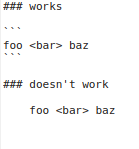
renders like this:

 kcgthb
on 8 Nov 2018
kcgthb
on 8 Nov 2018
What the... the handling of code blocks depends on indentation? Oh man, ... that is indeed very strange. However, if they're also escaped in the content / search it looks more like a problem for the Markdown parser.
squidfunk
on 9 Nov 2018
Are you talking about this bug https://github.com/Python-Markdown/markdown/issues/746?
The bug has been fixed, but we are still waiting for an official release. It snuck in with the newest 3.0 release, but it will be fixed in the next release.
facelessuser
on 9 Nov 2018
Related issues
 bborysenko
·
4Comments
bborysenko
·
4Comments
 dbdevtop
·
4Comments
dbdevtop
·
4Comments
 ghost
·
3Comments
ghost
·
3Comments
 atmarx
·
4Comments
atmarx
·
4Comments
 Timber232
·
3Comments
Timber232
·
3Comments
Most helpful comment
Are you talking about this bug https://github.com/Python-Markdown/markdown/issues/746?
The bug has been fixed, but we are still waiting for an official release. It snuck in with the newest 3.0 release, but it will be fixed in the next release.