Mkdocs-material: Internal page links to HTML elements go to the wrong position
Description
If I have an HTML element:
<tr><td class="val" id="foobar">FOOBAR</td><td class="desc">
and I have a link to that element elsewhere on the same page:
<a href="../blabla/#foobar">FOOBAR</a>
The page scrolls to that element, but the top of the element itself is hidden behind the navigation bar. This is different from the behavior seen with Markdown links (and the links in the navigation bar).
Expected behavior
The page should scroll to the element, and element should start below the top bar.
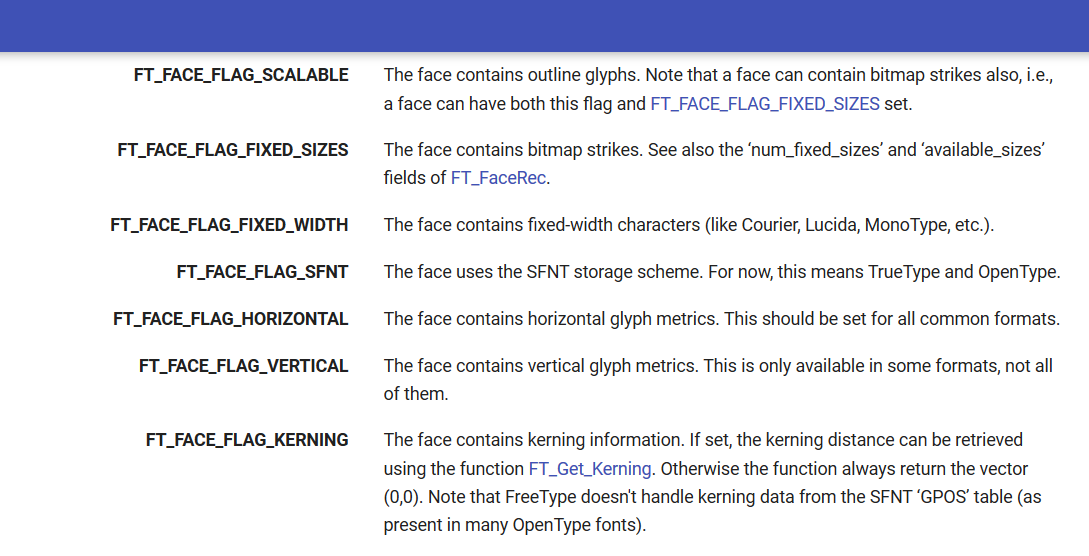
See FT_FACE_FLAG_SCALABLE on top of page.
Actual behavior
The element remains hidden behind the top bar.
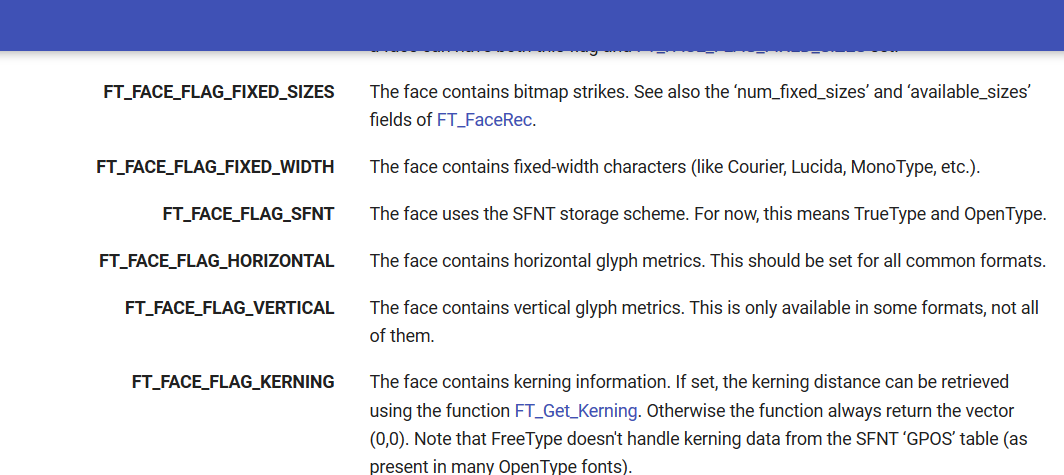
FT_FACE_FLAG_SCALABLE is behind the top bar.
Steps to reproduce the bug
- Create a long page with HTML elements that have IDs.
- Create a link to an HTML element elsewhere on the page. (use
- Click on the link.
Currently I am using a custom Javascript snippet to workaround this (available at https://nikramakrishnan.github.io/freetype-site/javascripts/extra.js)
Package versions
- Python:
Python 2.7.15 - MkDocs:
version 0.17.3 - Material:
Version: 2.7.3
Project configuration
The website can be viewed at https://nikramakrishnan.github.io/freetype-site/ft2-toc/
The repository is at nikramakrishnan/freetype-site
The bug could be reproduced at https://nikramakrishnan.github.io/freetype-site/ft2-base_interface/#ft_encoding by clicking on any link in the code block. (if extra.js is disabled, which has the workaround).
System information
- OS: Windows 10
- Browser: Firefox Developer Edition 61.0b11 (64-bit)
 nikramakrishnan
All 12 comments
This is because elements which you scroll to from right sidebar and footnotes have pseudo elements with top padding and negative margin to offset top navigation. I think you can't achieve that for table cells. You can achieve your goal when your targeted elements display property are set to block.
For example you could do this:
<div id="target-element" class="target-element"></div>
<a href="#target-element"></a>
.target-element:before {
  display: block;
  margin-top: -.8rem;
  padding-top: .8rem;
  content: "";
}
I think the only way is your JavaScript additional code.
 max-ci
on 8 Jun 2018
max-ci
on 8 Jun 2018
We had a generic margin/offset for all elements that define an id but we dropped it due to problems with specific components. You could achieve (untested) it with:
.md-typeset [id] {
  display: block;
  margin-top: -.8rem;
  padding-top: .8rem;
  content: "";
}
I think it was due to the necessity of display: block for this to work.
 squidfunk
on 8 Jun 2018
squidfunk
on 8 Jun 2018
Closing this as not fixable - as written before, we had generic handling that didn't work with all configurations. We could probably implement a JavaScript-based solution for this, but it's not a priority.
squidfunk
on 10 Jun 2018
You could achieve (untested) it with:[...]
This does not seem to work, even with display:block. Also, the table in question does not behave properly with it.
I think the only way is your JavaScript additional code.
I am not very keen on including jQuery in the documentation pages just to fix this, but it seems like this is the only option I have right now.
nikramakrishnan
on 10 Jun 2018
Getting the offset right cross-browser without JavaScript is really, really tricky. I fiddled with it a lot and there's no perfect solution that works for all cases. This is why we reverted it in the first place and scoped it to the headlines.
squidfunk
on 10 Jun 2018
@nikramakrishnan you can easily change your code to pure JavaScript and you don't have to use jQuery
max-ci
on 10 Jun 2018
@nikramakrishnan you can easily change your code to pure JavaScript and you don't have to use jQuery
I am not very sure how I can achieve this with pure JavaScript. Could you please help me out?
nikramakrishnan
on 12 Jun 2018
// Offset top helper
function offsetY(elem) {
    if(!elem) elem = this;
    var y = elem.offsetTop;
    while (elem = elem.offsetParent) {
        y += elem.offsetTop;
    }
    return y;
}

var links = document.getElementsByTagName('a');
for(var i = 0; i < links.length; i++) {
    links[i].onclick = function (event) {
        var o = document.getElementById(this.hash.substr(1));
        if(this.href.indexOf(window.location.pathname) > -1) {
            event.preventDefault();
            var sT = offsetY(o) - document.getElementsByClassName('md-header')[0].clientHeight;
            window.location.hash = this.hash;
            window.scrollTo(0, sT);
        }
    }
}
Thank you! This works perfectly😄. Do you think this can be directly included in material?
nikramakrishnan
on 12 Jun 2018
I don't know, it's up to @squidfunk. This code is definitely not bulletproof. Maybe with some changes it could be included.
max-ci
on 12 Jun 2018
I'm doing a huge refactoring in refactor/typescript and may integrate it at a later point, but no estimations, sorry.
squidfunk
on 12 Jun 2018
Thanks for the fix on this, @max-ci! Found (and think I fixed) one edge case that was behaving oddly: when on the root page (e.g. http://127.0.0.1:8000/), the left-side nav links and any in-content links to other pages would not work. As far as I can tell, this was because the event was be erroneously attached to them as well.
I think it's fixed with one tweak. Where you used the following conditional:
if(this.href.indexOf(window.location.pathname) > -1) {
I modified it to be:
if(this.origin + this.pathname == window.location.origin + window.location.pathname) {
Quick testing shows your adjusted Y-scroll behavior still works great, and the root-page nav link does as well.
Adding here for the google to find, and to thank you for a great quick solution to our Y-scrolling problem!
 philhagen
on 23 Jul 2019
philhagen
on 23 Jul 2019
Related issues
 HerbFargus
·
4Comments
HerbFargus
·
4Comments
 NJAldwin
·
3Comments
NJAldwin
·
3Comments
 yannduran
·
4Comments
yannduran
·
4Comments
 atmarx
·
4Comments
atmarx
·
4Comments
 40huo
·
3Comments
40huo
·
3Comments