Mkdocs-material: Using Text as Logo.
Note: There is another issue Text instead of logo in the template header, but the solution there didn't solve my problem.
I installed mkdocs and mkdocs-material both through pip. The official docs are suggesting me to create a new file my-site/partials/header.html and make the required changes, but it didn't work for me. There are two ways to install the theme, either through pip or by cloning the theme repo. I think the overriding partials method explained in the user-guide is applicable when we actually clone the repo, or am I missing something?
And @squidfunk, Thank you so much for the awesome work!
 DevotionGeo
All 5 comments
Hi,
I have Material installed through pip and overriding partials is working fine for me.
Maybe show us your folder structure and configuration file.
 max-ci
on 23 Feb 2018
max-ci
on 23 Feb 2018
Thank You @makshh for the response!
Following was my folder structure when I tried to override the default header.
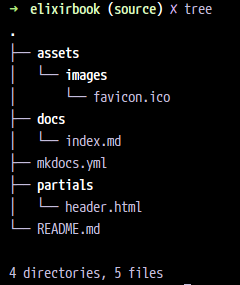
DevotionGeo
on 23 Feb 2018
https://squidfunk.github.io/mkdocs-material/customization/#setup-and-theme-structure
Reference the Material theme as usual in your mkdocs.yml, and create a _new folder_ for overrides, e.g. theme, which you reference using _custom_dir_.
https://squidfunk.github.io/mkdocs-material/customization/#overriding-partials
In order to override the footer, we can replace the footer.html partial with our own partial. To do this, create the file partials/footer.html in the _theme_ directory. MkDocs will now use the new partial when rendering the theme. This can be done with any file.
- You need to create a folder (call it for example
theme) inside your project (on the same level as assets folder). - Move your partials folder to new theme folder.
- You also need to set
custom_dir: 'theme'in theme options in your configuration file.
max-ci
on 23 Feb 2018
Thank You @makshh , the custom_dir setting in the mkdocs.yml worked for me.
DevotionGeo
on 24 Feb 2018
Closing this as solved. Thanks @makshh for answering this one!
 squidfunk
on 24 Feb 2018
squidfunk
on 24 Feb 2018
Related issues
 bborysenko
·
4Comments
bborysenko
·
4Comments
 dbdevtop
·
4Comments
dbdevtop
·
4Comments
 michael-nok
·
3Comments
michael-nok
·
3Comments
 nikramakrishnan
·
3Comments
nikramakrishnan
·
3Comments
 yogeshbeniwal
·
4Comments
yogeshbeniwal
·
4Comments
Most helpful comment
https://squidfunk.github.io/mkdocs-material/customization/#setup-and-theme-structure
https://squidfunk.github.io/mkdocs-material/customization/#overriding-partials
theme) inside your project (on the same level as assets folder).custom_dir: 'theme'in theme options in your configuration file.