Mkdocs-material: Active page highlight not working with default palette
Description
The active page highlight color doesn't work when using the color by default by not declaring the palette configuration. You are required to declare the palette colors for active page to work.
Expected behavior
The active page highlight should work when not explicitly declaring the palette. It should use the colors by default.

Actual behavior
The active page highlight doesn't work when not explicitly declaring the palette.
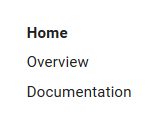
Steps to reproduce the bug
- Create any MkDocs website using material theme
- Do not set the palette
- Run
mkdocs serveand see the active link not being highlighted
Package versions
- Python: Python 3.6.1
- MkDocs: mkdocs, version 0.17.2
- Material: Version: 2.6.0
Project configuration
Just remove the palette configuration from the mkdocs.yml
System information
- OS: Windows 10
- Browser: Chrome, Firefox, Edge
bug
 ovasquez
All 2 comments
That is indeed a regression. Thanks for reporting, will provide a fix.
 squidfunk
on 11 Feb 2018
squidfunk
on 11 Feb 2018
Fixed in 94acf18d5dfe72969304a0c37ddd1866aa55ce02, another regression, thanks for reporting. Really need to set up visual regression testing.
squidfunk
on 11 Feb 2018
❤1
👍1
Was this page helpful?
0 / 5 - 0 ratings
Related issues
 madrus
·
3Comments
madrus
·
3Comments
 HerbFargus
·
4Comments
HerbFargus
·
4Comments
 Timber232
·
3Comments
Timber232
·
3Comments
 40huo
·
3Comments
40huo
·
3Comments
 bborysenko
·
4Comments
bborysenko
·
4Comments
Most helpful comment
Fixed in 94acf18d5dfe72969304a0c37ddd1866aa55ce02, another regression, thanks for reporting. Really need to set up visual regression testing.