Mjml: Hero Image not rendering on Outlook 2016
<mjml>
<mj-head>
<mj-attributes>
<mj-text align="left" color="#fff" font-size="15px" line-height="1.5" font-family="roboto"/>
<mj-section background-color="#373737" />
</mj-attributes>
</mj-head>
<mj-body background-color="#e4e4e4">
<mj-section background-color="#e4e4e4">
<mj-column width="30%" vertical-align="middle">
<mj-image align="center" href="#" align="left" src="#" />
</mj-column>
<mj-column width="70%" vertical-align="middle">
<mj-text font-family="arial" align="center" color="#373737"><p style="font-size:10px;">UNIVERSITY OF MARS | FEB 2019</p></mj-text>
</mj-column>
</mj-section>
<mj-hero mode="fixed-height"
height="469px"
background-width="450"
background-height="469px"
background-url="https://www.fireflyorthoses.com/wp-content/uploads/37.png">
<mj-text padding-top="40%"
font-size="45px"
line-height="1"
align="center"
padding-top="70px"
font-weight="900"><a style="text-shadow:3px 3px #838383; font-family:brandon grotesque; letter-spacing:3;">KEEP IN TOUCH</a></mj-text>
<mj-button padding-top="2%"
background-color="#fff"
color="#fb4f14"
inner-padding="10px"
font-size="19px"
href="www.google.ie" align="center">
JOIN THE MAILING LIST
</mj-button>
</mj-hero>
<mj-section>
<mj-column width="80%">
<mj-image width="200%" padding-top="10%" src="https://www.google.com/url?sa=i&source=images&cd=&cad=rja&uact=8&ved=2ahUKEwjh-Kfx1szgAhUNQxUIHS5HCBQQjRx6BAgBEAU&url=https%3A%2F%2Fpngimage.net%2Flogo-placeholder-png-4%2F&psig=AOvVaw1Zio4OabCYKE56Tis3NQdu&ust=1550833285664519" />
<mj-text>
<p>Hi [firstname, fallback=there]</p>
<p>Lorem ipsum dolor sit amet, consectetur adipiscing elit, sed do eiusmod tempor incididunt ut labore et dolore magna aliqua. Ut enim ad minim veniam, quis nostrud exercitation ullamco laboris nisi ut aliquip ex ea commodo consequat. </p>
<p>Lorem ipsum dolor sit amet, consectetur adipiscing elit, sed do eiusmod tempor incididunt ut labore et dolore magna aliqua. Ut enim ad minim veniam, quis nostrud exercitation ullamco laboris nisi ut aliquip ex ea commodo consequat. </p>
<p>Best Wishes,</p>
<p align="left">John | Company </p>
</mj-text>
</mj-column>
</mj-section>
<mj-section background-color="#e4e4e4">
<mj-column width="80%">
<mj-text align="left"><p style="font-size:13px; color:#808080;">Lorem ipsum dolor sit amet, consectetur adipiscing elit, sed do eiusmod tempor incididunt ut.</p> </mj-text>
</mj-column>
</mj-section>
<mj-section background-color="#e4e4e4" padding="0 0 0 0">
<mj-column>
<mj-text align="center" color="grey">
COMPANY NAME
</mj-text>
</mj-column>
</mj-section>
<mj-section background-color="#e4e4e4">
<mj-column>
<mj-text align=center color="grey" font-size="13">
<preferences>subscription preferences</preferences> | <unsubscribe> unsubscribe</unsubscribe>
</mj-text>
</mj-column>
</mj-section>
</mj-body>
</mjml>
Describe the bug
A clear and concise description of what the bug is.
To Reproduce
Steps to reproduce the behavior:
- Create a file with this MJML code:
<mjml>...</mjml> - Render it to HTML by doing '...'
- Send the HTML to an email address with '...'
- See error
Expected behavior
The email is rendering correctly on webclients, including outlook's webclient, but not on Outlook 2016 on desktop.
MJML environment (please complete the following information):
- OS:
- MJML Version 4.0.0
- MJML tool used - MJML App]
Email sending environment(for rendering issues):
- Campaign Monitor
Affected email clients (for rendering issues):
- Email Client Outlook
- OS: Windows
Screenshots

 cly3
cly3
All 9 comments
Hi @cly3, i can't reproduce the issue, i tested your code on emailonacid and it renders fine :
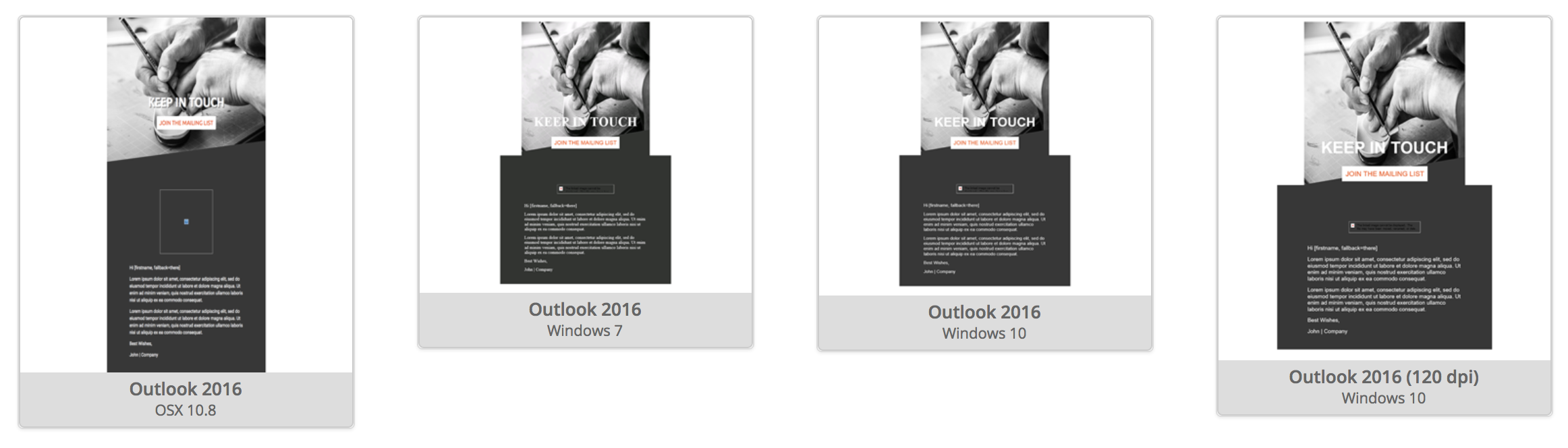
What is your test flow exactly ? On a real device ? How did you send the email ?
 kmcb777
on 21 Feb 2019
kmcb777
on 21 Feb 2019
thanks for getting back to me @kmcb777. I work off Mac OS but I'm testing on colleague's windows pc which is running Microsoft Office 365 Business. Maybe this runs a different version of Outlook?
cly3
on 21 Feb 2019
As you're sending through campaign monitor, try send it with putsmail.com it might be campaign monitor altering the HTML
 iRyusa
on 21 Feb 2019
iRyusa
on 21 Feb 2019
@iRyusa – afraid the results are the same, even when sent through PutsMail.
cly3
on 21 Feb 2019
I see that you have some padding un % those are not supported on outlook try with some px maybe :/
But at this point i don't really know what's going on as litmus test/eoa test shows up fine, any chance that you're altering the output html ?
Edit: I see that you're using * MJML Version 4.0.0, can you try with a more recent version like 4.3.0 on the try it live ?
iRyusa
on 21 Feb 2019
Any update on this ? Did you try with latest version ?
iRyusa
on 27 Feb 2019
Closing for now, feel free to reopen if you have more information to share
iRyusa
on 18 Mar 2019
I can reproduce this issue as well
i get a background image that doesn't render.
I'm using the online live editor.
Looks find in everything except Outlook 2016.
Here is the mjml'
<mj-hero background-color="#f1f2f5" background-url="https://www.abcdefg.com/img-email/banner-help.png" padding="20px" background-height="220px">
and here is the output HTML.
<!--[if mso | IE]>
      </td>
    </tr>
  </table>

    <table
       align="center" border="0" cellpadding="0" cellspacing="0" role="presentation" style="width:600px;" width="600"
    >
      <tr>
        <td  style="line-height:0;font-size:0;mso-line-height-rule:exactly;">
          <v:image
             style="border:0;height:220px;mso-position-horizontal:center;position:absolute;top:0;width:0px;z-index:-3;" src="https://www.abcdefg.com/img-email/banner-help.png" xmlns:v="urn:schemas-microsoft-com:vml"
          />
  <![endif]-->
<div style="margin:0 auto;max-width:600px;">
  <table border="0" cellpadding="0" cellspacing="0" role="presentation" style="width:100%;">
    <tr style="vertical-align:top;">
      <td background="https://www.abcdefg.com/img-email/banner-help.png" style="background:#f1f2f5 url(https://www.abcdefg.com/img-email/banner-help.png) no-repeat center center / cover;background-position:center center;background-repeat:no-repeat;padding:20px;vertical-align:top;"
        height="-40">
        <!--[if mso | IE]>
    <table
       border="0" cellpadding="0" cellspacing="0" style="width:600px;" width="600"
    >
      <tr>
        <td  style="">
  <![endif]-->
Any help would be greatly appreciated!
 crashworx
on 23 Jun 2019
crashworx
on 23 Jun 2019
hey, i found a little hack to solve this issue. In the vml tags, you have to play with these attributes:
origin="0.5, 0" position="0.5, 0"
after some tests, its gonna work with (depends also on image-size):
origin="1, 0" position="1, 1"
Additionally, you also have to remove the background-color #fffff on the next couple div tags.
<!--[if mso | IE]>
<table align="center" border="0" cellpadding="0" cellspacing="0" class="" style="width:630px;" width="630" >
<tr>
<td style="line-height:0px;font-size:0px;mso-line-height-rule:exactly;">
<v:rect style="width:630px;" xmlns:v="urn:schemas-microsoft-com:vml" fill="true" stroke="false">
<v:fill origin="0.5, 0" position="0.5, 0" src="image.jpg" color="#ffffff" type="tile" />
<v:textbox style="mso-fit-shape-to-text:true" inset="0,0,0,0">
<![endif]-->
<div style="background:#ffffff url(image.jpg) top center / auto no-repeat;Margin:0px auto;max-width:630px;">
<div style="line-height:0;font-size:0;">
<table align="center" background="image.jpg" border="0" cellpadding="0" cellspacing="0" role="presentation" style="background:#ffffff url(image.jpg) top center / auto no-repeat;width:100%;">
 m-kaddatz
on 17 Jul 2019
m-kaddatz
on 17 Jul 2019
Related issues
 yumyo
·
25Comments
yumyo
·
25Comments
 hadifarnoud
·
22Comments
hadifarnoud
·
22Comments
 lookfirst
·
20Comments
lookfirst
·
20Comments
 jaypeedevlin
·
51Comments
jaypeedevlin
·
51Comments
 arnaudbreton
·
23Comments
arnaudbreton
·
23Comments
Most helpful comment
I can reproduce this issue as well
i get a background image that doesn't render.
I'm using the online live editor.
Looks find in everything except Outlook 2016.
Here is the mjml'
<mj-hero background-color="#f1f2f5" background-url="https://www.abcdefg.com/img-email/banner-help.png" padding="20px" background-height="220px">and here is the output HTML.
Any help would be greatly appreciated!