Hi Guys,
Firstly - thanks for the great work in building mjml, it makes my life so much easier!
I'm not sure if this is possible or if it's already planned.
Currently, using <mj-button> with href results in the text on the button being linked, but not the button itself. For a large button with small text, this results in a large area that's not clickable.
Is it possible to change how the button links work so that the entire button is a link, rather than just the text?
 jaypeedevlin
All 51 comments
Hi there,
I believe this is not implemented because of how older outlook behave. It could be done with some Outlook conditionnals but it will add so much overhead.
 iRyusa
on 23 Aug 2016
iRyusa
on 23 Aug 2016
Really great to hear this is considered. This is arguably quite an important feature. Buttons will almost exclusively be used as call to actions. Missed presses _could_ be quite impactful to the success of emails.
 joshuabaker
on 24 Oct 2016
joshuabaker
on 24 Oct 2016
+1. The current button markup does not work for large call to actions.
 websirnik
on 24 Nov 2016
websirnik
on 24 Nov 2016
This would definitely be a nice feature. I will have to use clickable images as a workaround.
 sbefort
on 15 Feb 2017
sbefort
on 15 Feb 2017
Hey guys, we have an update on this. While we were hopeful we'd be able to release this in v3.3.3 and despite the great help of the community, we couldn't find a solution that would work everywhere (Outlook, webmails, mobile email clients...) and for all kinds of buttons (single-lined, multi-lined...).
You can see the discussion here: https://github.com/mjmlio/mjml/pull/668
We'll leave this issue open as we'd love as much as you all have a fully clickable button that works! Contributions welcome, as always.
 ngarnier
on 26 May 2017
ngarnier
on 26 May 2017
My workaround is to set the <a> inside as display:block. This then fills the entire <td> as long as the padding on sides isn't too big. Even though it doesn't fill the entire button it does create a bigger clickable area and it doesn't seem to cause problems.
 kalfooza
on 14 Sep 2017
kalfooza
on 14 Sep 2017
Yeah this would definitely be nice! But just checked a couple of emails, and it seems that many other systems are struggling with this as well..
FWIW: mails from Facebook and Zapier have fully clickable button inside. And something tells me they'll work in every client. So all we have to do is reverse engineer how they did it, right? :stuck_out_tongue_closed_eyes:
 hugopeek
on 25 Oct 2017
hugopeek
on 25 Oct 2017
I've just checked a Facebook mail, from a quick look it's a TABLE wrapped
in an A, this will break in some clients.
Kind Regards,
:----------------------------:
Dale McConnell
On 25 October 2017 at 10:34, Hugo Peek notifications@github.com wrote:
Yeah this would definitely be nice! But just checked a couple of emails,
and it seems that many other systems are struggling with this as well..FWIW: mails from Facebook and Zapier have fully clickable button inside.
And something tells me they'll work in every client. So all we have to do
is reverse engineer how they did it, right? 😝—
You are receiving this because you are subscribed to this thread.
Reply to this email directly, view it on GitHub
https://github.com/mjmlio/mjml/issues/359#issuecomment-339255938, or mute
the thread
https://github.com/notifications/unsubscribe-auth/AKxLOCTEedOqXr7rt_d4RqVZFrsmMqQ4ks5svvKRgaJpZM4Jnymo
.
 dalefish
on 25 Oct 2017
dalefish
on 25 Oct 2017
Yeah having a table inside an a makes Desktop Outlook's button a totally unclickable
iRyusa
on 25 Oct 2017
Zapier seems to have the <a> inside a table:
<table style="border-collapse:collapse" cellspacing="0" cellpadding="0" border="0">
<tbody>
<tr>
<td style="font-family:"Open Sans",Helvetica,Arial,sans-serif;border-radius:4px" bgcolor="#499DF3" align="center">
<a class="m_9192...68883confirm-cta"
href="https://zapier.com/goto/..."
style="color:#499df3;font-size:14px;color:#ffffff;text-decoration:none;border-radius:4px;padding:13px 40px 13px 40px;display:inline-block;border-top:1px solid #499df3;"
target="_blank"
data-saferedirecturl="https://www.google.com/...">View
More Updates</a>
</td>
</tr>
</tbody>
</table>
But I think that means the button won't have padding in some versions of Outlook, right?
Found this also: https://buttons.cm/. But that adds a ton of VML code, which if I read correctly elsewhere is what you are trying to avoid, right? Understandable btw..
But I guess that's what Facebook is doing to make it work?
hugopeek
on 25 Oct 2017
Yes, Outlook will totally ignore the padding on a.
The main issue on the VML button is you cannot use them inside a section with background because you can 't nest VML
iRyusa
on 25 Oct 2017
Hi, is there anything new about this?
 bertho-zero
on 4 Jul 2018
bertho-zero
on 4 Jul 2018
I do not know if it's compatible, but this patch works for me:
<mjml>
  <mj-head>
    <mj-attributes>
      <mj-button inner-padding="0" />
    </mj-attributes>
    <mj-style inline="inline">
      .btn-link a {
        display: inline-block;
        padding: 10px 25px;
        border-radius: 3px;
      }
    </mj-style>
  </mj-head>
  <mj-body>
    <mj-section>
      <mj-column>
        <mj-button href="https://google.fr" css-class="btn-link">
          Test
        </mj-button>
      </mj-column>
    </mj-section>
  </mj-body>
</mjml>
Testable here: https://mjml.io/try-it-live/rkuGus9G7
bertho-zero
on 4 Jul 2018
That would have no effect on clients that don't support padding on a tags,
the root of the issue.
On 4 Jul 2018 22:04, "Kévin Berthommier" notifications@github.com wrote:
I do not know if it's compatible, but this patch works for me:
.btn-link a {
display: inline-block;
padding: 10px 25px;
border-radius: 3px;
}
Test
Testable here: https://mjml.io/try-it-live/rkuGus9G7
—
You are receiving this because you commented.
Reply to this email directly, view it on GitHub
https://github.com/mjmlio/mjml/issues/359#issuecomment-402551738, or mute
the thread
https://github.com/notifications/unsubscribe-auth/AKxLOO3obN2JzbAlPw1nz9drZIKn9WXNks5uDR_ZgaJpZM4Jnymo
.
dalefish
on 4 Jul 2018
Isn’t designing emails just lovely. 😄
 silvenon
on 4 Jul 2018
silvenon
on 4 Jul 2018
🛍Zalando has fully clickable buttons in their newsletters, so I checked source code of one of their emails and it seems that they are doing something like this:
<mj-style inline>
  .button-td {
    font-family: -apple-system,BlinkMacSystemFont,'Segoe UI',Helvetica,Arial,sans-serif,'Apple Color Emoji','Segoe UI Emoji','Segoe UI Symbol';
    font-size: 14px;
    text-align: center;
    color: #ffffff;
    font-weight: bold;
    text-decoration: none;
    border: 0;
    line-height: 50px;
    height: 50px; /* I was trying to add height: 50px; to remove extra space in outlook but it doesn't work */
    border-radius: 3px;
  }

  .button-a {
    text-decoration: none;
    color: #ffffff;
    line-height: 50px;
    height: 50px; /* I was trying to add height: 50px; to remove extra space in outlook but it doesn't work */
  }
</mj-style>

<mj-raw>
  <table border="0" cellpadding="0" cellspacing="0" width="270" align="center">
    <tbody>
      <tr>
        <td height="50" width="270" bgcolor="royalblue" align="center" class="button-td">
          <a class="button-a" href="#" target="_blank">
            <div>Something...</div>
          </a>
        </td>
      </tr>
    </tbody>
  </table>
</mj-raw>
That works almost everywhere but Outlook 😗
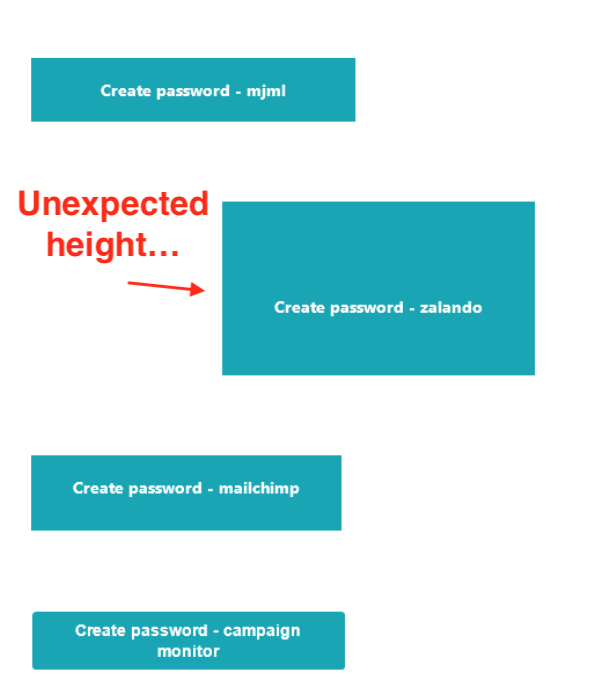
https://mjml.io/try-it-live/SkfQy6qzX
At the moment from my tests only https://buttons.cm/ is really bulletproof solution.
@iRyusa Could you explain this a bit more?
The main issue on the VML button is you cannot use them inside a section with background because you can 't nest VML
 hinok
on 5 Jul 2018
hinok
on 5 Jul 2018
VML is required for background images on Outlook, so the solution from button.cm won't work when you place a button over a background image.
ngarnier
on 5 Jul 2018
@hinok does adding this work? (Source)
<!--[if gte mso 9]>
  <style type="text/css">
    /* Your Outlook-specific CSS goes here. */
    .button-td { height: auto; }
    .button-a { height: auto; }
  </style>
<![endif]-->
I took a look at this around a year ago, and without using VML, it's probably not possible to make buttons that can work well multi-line. But as long as the buttons only need to be one or two short words it's doable with approach 4 from this article:
https://litmus.com/blog/a-guide-to-bulletproof-buttons-in-email-design
 Maistho
on 5 Jul 2018
Maistho
on 5 Jul 2018
Seeing it's still an issue, I'll just leave this here:

Using mso-padding-alt is a solution to keep the button looking the same in Outlook, while modern email clients can use the padding on the anchor tag. Note the values: vertical padding needs to be reduced.
 cossssmin
on 31 Jul 2018
cossssmin
on 31 Jul 2018
I think we did test it, and had an issue with this version where the buttons can be slightly bigger than expected in some Outlooks that will apply both padding & mso-padding-alt. I wonder if resetting the mso-padding-alt in the anchor to 0 would fix it. It's a good suggestion @hellocosmin 🤔
Maybe @kmcb777 can give it a try for next release ?
iRyusa
on 31 Jul 2018
Hmm, didn't think about resetting the mso-padding-alt on the anchor, will test that out 👍
Other things like line height or mso-line-height-rule can also mess with it. Honestly, I didn't tinker _too_ much - just wanted a decent fallback for Outlook, not pixel perfection everywhere :)
cossssmin
on 31 Jul 2018
@kmcb777 Excited to see this mso-padding-alt commit! Any updates on testing it? Is there still hope this might be merged?
 tylerhunt
on 23 Aug 2018
tylerhunt
on 23 Aug 2018
@tylerhunt there is hope, yes :) it seems to render fine on all clients, but it still needs testing, for example in the last attempt for full clickable buttons they were unclickable on some clients
 kmcb777
on 23 Aug 2018
kmcb777
on 23 Aug 2018
This to me is like vital. Its bad UX to have a component designed to make click area bigger not do just that. I dont think anyone denies that, but should this be a top priority?
 mikecreuzer
on 27 Nov 2018
mikecreuzer
on 27 Nov 2018
Well, it's not like it's an easy job.
We'll do what we can to test the solution provided @hellocosmin to have a working beta as soon as possible.
You should know that if you already worked on fully clickable button, how hard it is to make it render good everywhere (even on older Word Based Outlook).
iRyusa
on 27 Nov 2018
It's bad UX, but the buttons in Mailchimp do the same, for example.
Does this affect all versions of Outlook or just some years? @iRyusa you said above ( second comment ) the difficulty is making it compatible across older versions of Outlook?
I'm wondering, depending upon if there are other similar compatibility issues, that it might not be worth doing something like browserslist, but for email clients, and give some control of rendering options, since I know 0% of our clients are using Outlook 2010 or whatever it might be.
Maybe this has already been considered!
 dphrag
on 27 Nov 2018
dphrag
on 27 Nov 2018
It's bad UX indeed, but it's the email world.
Every year the rendering engine behind Outlook desktop switch from IE to Word, so even latest version of Outlook was having issue where the button won't be clickable at all with provided solution from now.
It's not only Outlook, we had previous fix that broke totally roundcube based email clients too.
We have to test further more that mso-padding-alt and moving the padding into the a would not break any client (in rendering AND clicking), it would be catastrophic to have a regression in one of both part.
iRyusa
on 27 Nov 2018
Adding a border around the link seems to solve the padding problem in Outlook.
<td align="center" style="border-radius: 3px;" bgcolor="#000000">
<a href="#" target="_blank" style="font-size: 16px; font-family: Helvetica, Arial, sans-serif; color: #ffffff; text-decoration: none; border-radius: 3px; padding: 14px 26px; border: 1px solid #000000; display: inline-block;">My Button</a>
</td>
With this I can make fully clickable buttons.
 Namorr
on 28 Nov 2018
Namorr
on 28 Nov 2018
I don't really understand what does it solve @Namorr ?
Edit: Word based Outlook doesn't support padding on a element, so I don't see how a border would fix it ?
iRyusa
on 28 Nov 2018
Using a padding + border approach on buttons works just fine for me on every email clients.
Explained here :
https://litmus.com/blog/a-guide-to-bulletproof-buttons-in-email-design
Namorr
on 28 Nov 2018
Try to add a br inside the button with a border, it totally breaks the design (padding is applied on each "line" inside the button instead of the whole anchor block. That's why we can't rely on this technique
iRyusa
on 28 Nov 2018
@Namorr Besides the <br> issue, with this, your button padding won't be 14px 26px as you defined it in your example - it will still collapse to Outlook's maximum 'border width'. Depending on the amount of padding used in your original button design, this can result in a _very_ different looking button for Outlook.
If you really want your buttons to look and work the same across all email clients, your only choice will be VML-based buttons, like those from buttons.cm.
cossssmin
on 28 Nov 2018
you will also get troubles if you set the button width, and the text is long and becomes multiline.
vml buttons are nice, but nesting vml inside vml doesn't work well so this would be a problem in mjml since vml is already used for background images on section, wrapper and hero
kmcb777
on 28 Nov 2018
@kmcb777 Just tested your commit and it seems to work perfectly (full size button links in all clients, and falls back to current behavior in Outlook). Either way, it seems like an improvement over the current implementation. Any idea when/if we could expect this in a release?
 caseyjhol
on 25 Jan 2019
caseyjhol
on 25 Jan 2019
Did the test include regional webmails like gmx?
On Fri, 25 Jan 2019, 20:45 Casey Holzer <[email protected] wrote:
@kmcb777 https://github.com/kmcb777 Just tested your commit and it
seems to work perfectly (full size button links in all clients, and falls
back to current behavior in Outlook). Either way, it seems like an
improvement over the current implementation. Any idea when/if we could
expect this in a release?—
You are receiving this because you commented.
Reply to this email directly, view it on GitHub
https://github.com/mjmlio/mjml/issues/359#issuecomment-457701767, or mute
the thread
https://github.com/notifications/unsubscribe-auth/AKxLOI5C7mrQqYTGfa_w6Vzixm8_PBGUks5vG17kgaJpZM4Jnymo
.
dalefish
on 25 Jan 2019
We forgot to say that currently, 4.4.0-beta.1 is available to test with https://github.com/mjmlio/mjml/issues/359#issuecomment-409159120 @cossssmin proposal.
Feel free to give it a try and feedback !
iRyusa
on 18 Mar 2019
We forgot to say that currently, 4.4.0-beta.1 is available to test with #359 (comment) @cossssmin proposal.
Feel free to give it a try and feedback !
Doesn't appear to be fixed in the beta either? At least in Gmail on Chrome.
 robertgaal
on 25 Apr 2019
robertgaal
on 25 Apr 2019
With that many information it will be easy to know what’s going on :)
Can you share a bit of context (html sent/how did you send the email/ markup used/...) ?
On 25 Apr 2019, at 13:58, Robert Gaal notifications@github.com wrote:
We forgot to say that currently, 4.4.0-beta.1 is available to test with #359 (comment) @cossssmin proposal.
Feel free to give it a try and feedback !
Doesn't appear to be fixed in the beta either? At least in Gmail on Chrome.
—
You are receiving this because you were mentioned.
Reply to this email directly, view it on GitHub, or mute the thread.
iRyusa
on 25 Apr 2019
Sure thing!
Here's the button:
<mj-button href="{{accept_url}}" height="46px" font-size="16px" inner-padding="5px" color="#fff" background-color="#003A8F" width="100%" border-radius="5px" font-weight="500">Accept</mj-button>
HTML:
<table border="0" cellpadding="0" cellspacing="0" role="presentation" style="border-collapse:separate;width:100%;line-height:100%;">
                              <tr>
                                <td align="center" bgcolor="#003A8F" role="presentation" style="border:none;border-radius:5px;cursor:auto;height:46px;padding:5px;background:#003A8F;" valign="middle">
                                  <a href="{{accept_url}}" style="background:#003A8F;color:#ffffff;font-family:sans-serif;font-size:16px;font-weight:500;line-height:120%;Margin:0;text-decoration:none;text-transform:none;" target="_blank"> Accept </a>
                                </td>
                              </tr>
                            </table>
robertgaal
on 25 Apr 2019
@robertgaal Cédric answered you on the Slack, it's a different issue. I quote him:
@robert Now all the 'inner-padding' is clickable, which is better than just the text. In beta.2 (soon) they will be fully clickable when their width is defined in
px, but when defined in%it will still be just the inner-padding
ngarnier
on 25 Apr 2019
I think you have an issue with your beta install, and still probably using the older mjml button package. You should remove any mjml install ( global and local ) and reinstall the beta.
On 25 Apr 2019, at 14:30, Robert Gaal notifications@github.com wrote:
Sure thing!
Here's the button:
Accept intro HTML:
Accept intro Result:
https://www.dropbox.com/s/mxjism1n1fozoyp/Screen%20Recording%202019-04-25%20at%2014.28.50.mov?dl=0
—
You are receiving this because you were mentioned.
Reply to this email directly, view it on GitHub, or mute the thread.
iRyusa
on 25 Apr 2019
I've fixed my install, so thanks for the heads up. The button is indeed not fully linked but at least with inner-padding the area around the text is just a little more clickable. I'll change the button to simply use a flexible width, using inner-padding to make it completely clickable. Looking forward to beta.2!
robertgaal
on 26 Apr 2019
I took the version on the "next" branch and see that the fix for full width when working with px is working. But the button is still not fully clickable when using height, the upper and bottom part which are not part of the text are not clickable, any work planned on it?
 amidudu
on 1 May 2019
amidudu
on 1 May 2019
I think this is the best we can do at this point.
On Wed, May 1, 2019 at 6:21 PM amidudu notifications@github.com wrote:
I took the version on the "next" branch and see that the fix for full
width when working with px is working. But the button is still not fully
clickable when using height, the upper and buttom part which are not part
of the text are not clickable, any work planned on it?—
You are receiving this because you were mentioned.
Reply to this email directly, view it on GitHub
https://github.com/mjmlio/mjml/issues/359#issuecomment-488330913, or mute
the thread
https://github.com/notifications/unsubscribe-auth/AAELHTN2FUYHLC626UEQ6DLPTG7QXANCNFSM4CM7FGUA
.
iRyusa
on 1 May 2019
I think that most of the use cases for buttons contains only one line of text, if this can ease on finding a bullet proof solution I would think it's worth creating one-liner-button component or expose attribute on the current implementation.
amidudu
on 2 May 2019
We want to cover as many case as possible with mj-button. Creating multiple components for a single purpose (buttons) would totally ruin the idea that each component can be use safely (or with a clean and decent fallback that doesn't ruin the design).
If https://buttons.cm/ or any border / padding based buttons technique are fine for you, you can just do your own component. It's not that hard to implement it.
iRyusa
on 2 May 2019
@kmcb777 it has a bug. If you set width="100%" to button, it won't be clickable fully. <a> doesn't inherit width.
 f0rmat1k
on 23 Jul 2019
f0rmat1k
on 23 Jul 2019
@f0rmat1k Hi, as said in the changelog : Fully clickable when width is in px, when width is in % only the inner-padding is clickable. It's still much better than before.
Unfortunately we can't do better until box-sizing: border-box is supported on all email clients.
kmcb777
on 23 Jul 2019
Hi everyone, just checking, as far as I can track from the conversation, it should be possible to have the whole button clickable when only using inner-padding.
However, this is what's compiled on my side:
<td align="center" bgcolor="#cc2128" role="presentation" style="border:none;border-radius:25px;cursor:auto;mso-padding-alt:15px 30px;background:#cc2128;" valign="middle">
  <p style="display:inline-block;background:#cc2128;color:#ffffff;font-family:'Roboto', sans-serif;font-size:15px;font-weight:normal;line-height:120%;margin:0;text-decoration:none;text-transform:none;padding:15px 30px;mso-padding-alt:0px;border-radius:25px;"> Login to your account </p>
</td>
It gets rendered in a p tag and the p tag's style has a rule:
mso-padding-alt:0px
I have this in my head:
<mj-attributes>
    <mj-button border-radius="25px" background-color="#cc2128" inner-padding="15px 30px" font-size="15px"></mj-button>
</mj-attributes>
And this is the button implementation:
<mj-button href="https://example.com">Login to your account</mj-button>
 thebeard
on 26 Sep 2019
thebeard
on 26 Sep 2019
Hey, if I change button width in CSS, it becomes not fully clickable :
Take look at mobile version here: https://mjml.io/try-it-live/HyM1F1JY8
@iRyusa Is there any way around?
 ProdigyMaster
on 23 Apr 2020
ProdigyMaster
on 23 Apr 2020
Related issues
 valstu
·
3Comments
valstu
·
3Comments
 ghost
·
4Comments
ghost
·
4Comments
 zarikadzer
·
3Comments
zarikadzer
·
3Comments
 theVannu
·
3Comments
theVannu
·
3Comments
 fmauNeko
·
3Comments
fmauNeko
·
3Comments
Most helpful comment
Really great to hear this is considered. This is arguably quite an important feature. Buttons will almost exclusively be used as call to actions. Missed presses _could_ be quite impactful to the success of emails.