Mjml: border-radius does not apply to mj-column or mj-section border
Bug description
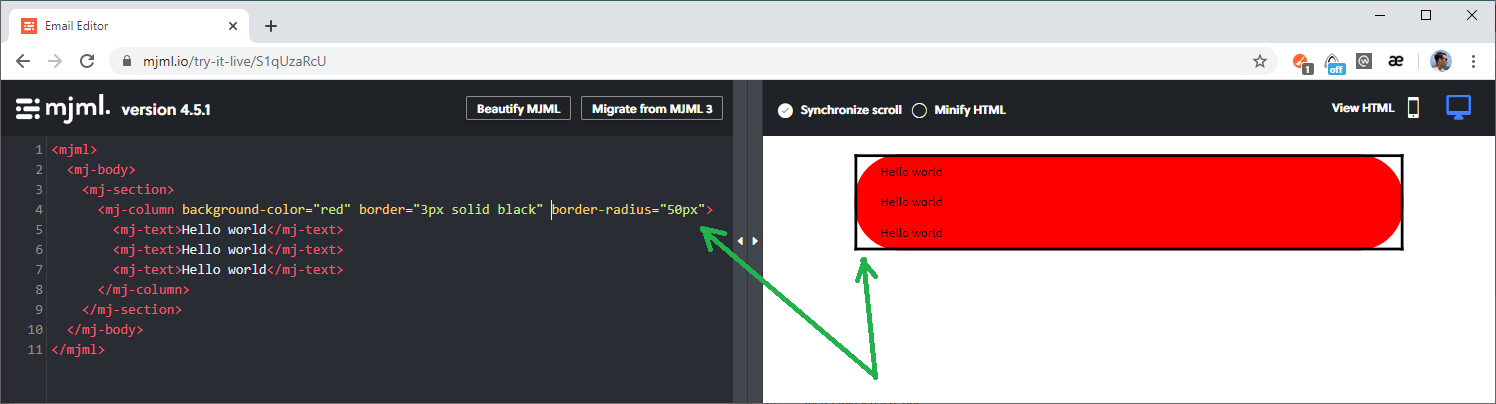
mj-column and mj-section are not enabled to setup border-radius correctly due to default border-collapse style.
How to reproduce
Steps to reproduce the behavior:
- Create a file with this MJML code:
<mjml>
  <mj-body>
    <mj-section>
      <mj-column background-color="red" border="3px solid black" border-radius="50px">
        <mj-text>Hello world</mj-text>
        <mj-text>Hello world</mj-text>
        <mj-text>Hello world</mj-text>
      </mj-column>
    </mj-section>
  </mj-body>
</mjml>
- Render it to HTML or just open live demo: https://mjml.io/try-it-live/S1qUzaRcU
- Background has rounded, but border has not.
Expected behavior
mj-column/mj-section should be able to have rounded border.
MJML environment:
- MJML Version [any]
Screenshots
Additional
I guess that the best solution is to allow users decide if they want to use border-collapse attribute for column/section or not.
 zarikadzer
All 3 comments
border-collapse does fix some weird behavior in Outlook (ex: horizontal/vertical white line) so it's here to stay by default. You should use a css-class+inline if you want to override that behavior.
 iRyusa
on 17 May 2020
iRyusa
on 17 May 2020
@iRyusa, it's ok, but how I can solve my issue? I've tried your advice, but it does not work.
https://mjml.io/try-it-live/SJqcioyiU
Please, show me an example of how I can set up border radius to section or column.
zarikadzer
on 18 May 2020
mj-class only target mj-attribute and there's no style attribute on mj-column so there's no way it could work like that.
ex: https://mjml.io/try-it-live/H18Og0kj8
iRyusa
on 18 May 2020
Related issues
 lucasnantonio
·
4Comments
lucasnantonio
·
4Comments
 bensreed
·
3Comments
bensreed
·
3Comments
 rumbogs
·
3Comments
rumbogs
·
3Comments
 sinsunsan
·
4Comments
sinsunsan
·
4Comments
 theVannu
·
3Comments
theVannu
·
3Comments
Most helpful comment
mj-classonly target mj-attribute and there's nostyleattribute on mj-column so there's no way it could work like that.ex: https://mjml.io/try-it-live/H18Og0kj8