Mixedrealitytoolkit-unity: "SerializedObjectNotCreatableException: Object at index 0 is null exceptions" when configuring scene for Hololens 1
Describe the bug
Configuring the MixedReality Toolkit with cloned default Hololens 1 profile produces 48 exceptions on start each are:
"SerializedObjectNotCreatableException: Object at index 0 is null exceptions"
from various parts of MRTK.
After build the scene is not working as intended: the whole scene is fixed in front of the user and follows the user when turning around.
To reproduce
- Create new unity projcet
- Add MRT through UPM
- Add new Scene
- Add mrtk to scene
- On the MixedRealityToolkit asset select the DefaultMixedRealityToolkitConfigurationProfile
The same bug is present when using the Hololens1 profile, cloning it, and fixing the broken default profiles with no luck. The same is also true for hololens 2
Expected behavior
Default Hololens 1 profile should work out of the box for hololens 1
Screenshots

Your setup (please complete the following information)
- Unity Version 2020.1.6
- MRTK Version 2.5.0
Target platform (please complete the following information)
- HoloLens 1
- HoloLens 2
Additional context
profiles.zip The configuration I tried to use.
Using 2.4.0 the default Hololens 1/2 settings worked as expected
 KuraiAndras
All 21 comments
Can you click on any of those messages in the console and post the resulting call stack please?
 keveleigh
on 2 Oct 2020
keveleigh
on 2 Oct 2020
Thanks for filing this. We are investigating.
 davidkline-ms
on 2 Oct 2020
davidkline-ms
on 2 Oct 2020
Ok, so I cloned the repo on another computer, and it seems to work just fine. I can check on my other machine which produced the errors on Monday. Maybe it was just some weird caching error in Unity?
Edit: I tried the build on a hololens 1 emulator, and it produces the same error. I get this output from the build within the emulator https://pastebin.com/p76DgBuB
KuraiAndras
on 2 Oct 2020
I have tried it again on my work computer, and could not reproduce the errors in the editor, although, the camera issue is still present when running on the HoloLens 1.
KuraiAndras
on 5 Oct 2020
Maybe it was just some weird caching error in Unity?
Sometimes, I find it helpful to delete the Library folder and let Unity recreate it. It pulls fresh copies of the packages too.
This one is up next on my backlog. Hope to have an idea of what you are seeing soon.
davidkline-ms
on 6 Oct 2020
@KuraiAndras, I wanted to give an update on where I am investigating this (my apologies for the delay, i got prempted). Based on your original screen shot, I tried running using the Default HoloLens 1 profile in the editor using the following configuration:
- Unity 2019.4.12f1
- MRTK Foundation package (2.5.0) via UPM
- Windows Mixed Reality package (4.2.3) via UPM
- Enable Virtual Reality in Player settings
- DefaultHoloLens1ConfigurationProfile
I did not receive any errors re: broken profiles (I would be very interested to learn what you are seeing here). Also, i had no errors in the console.
My next step will be to deploy to a HoloLens 1 and confirm i see no debug messages and that i can walk around the cube (rather than the image being statically locked).

davidkline-ms
on 9 Oct 2020
@davidkline-ms
This is what I see when I select the DefaultHoloLens1ConfigurationProfile:

Starting the application with the default profile:

KuraiAndras
on 9 Oct 2020
Version stuff:
- Unity 2020.1.8
- MRTK 2.5.0 via UPM
- Windows XR Plugin via UPM 3.3.1 (I can't seem to find the Windows Mixed Reality package your mentioned?)
- Enabled Virtual reality in player settings
KuraiAndras
on 9 Oct 2020
Ahhh. thank you for the corrections. I will test again!
davidkline-ms
on 9 Oct 2020
(I can't seem to find the Windows Mixed Reality package your mentioned?)
That package was deprecated in Unity 2019 and removed in 2020.1
davidkline-ms
on 9 Oct 2020
Sorry, i did not want to close the issue, I pressed the wrong button
KuraiAndras
on 9 Oct 2020
I JUST realized.... Our default profiles are designed for Unity 2018.4 users (and 2019.4 when using the legacy XR pipeline).
2020.1 no longer supports that and the XRSDK profiles are required.... Let me confirm which we have and ensure we have a full set.
davidkline-ms
on 9 Oct 2020
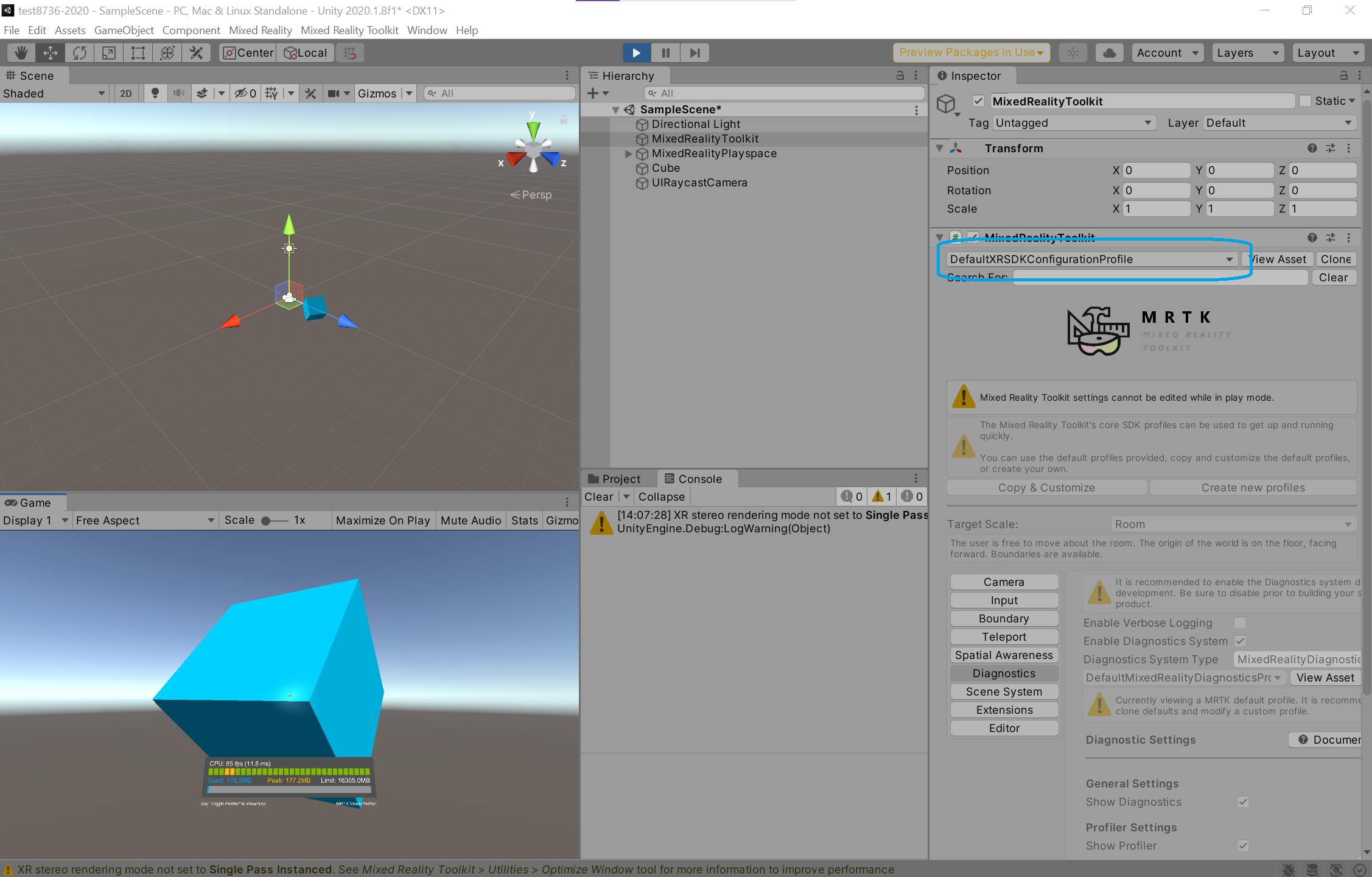
@KuraiAndras, can you try using the DefaultXRSDKConfigurationProfile? The diagnostics system will not launch by default (I modified the profile on my project and will enable it in my PR).
davidkline-ms
on 9 Oct 2020
the warning i have is that i did not set my rendering to single pass instanced and is not related to what you are seeing
davidkline-ms
on 9 Oct 2020
In the editor I no longer get warnings or errors, I'll try a build with the HoloLens emulator.
KuraiAndras
on 9 Oct 2020
@KuraiAndras Here's some additional information about MRTK on 2020 with the new XR pipeline: https://microsoft.github.io/MixedRealityToolkit-Unity/Documentation/GettingStartedWithMRTKAndXRSDK.html
keveleigh
on 9 Oct 2020
I will definitely create HoloLens 1 and HoloLens 2 versions of the XRSDK default profile, thought the umbrella one should work (just has more features enabled by default)
davidkline-ms
on 9 Oct 2020
@keveleigh Here the documentation seems to have screenshots from older versions, the current settings are named slightly differently (eg: its now not Microsoft.MixedReality.Toolkit.WindowsMixedReality but Microsoft.MixedReality.Toolkit.XRSDK.WindowsMixedReallity)
Edit: scratch this, the pictures are right. Confused the pictures, i'm just tired
KuraiAndras
on 9 Oct 2020
@davidkline-ms I tried the build in the hololens 1 emulator and it works! Thank you.
What will be the resolution of this? Will you provide a different default setting in 2.5.1?
KuraiAndras
on 9 Oct 2020
I will provide mirrors of the DefaultHoloLens*ConfigurationProfile assets for XRSDK as a convenience.
Glad it is working for you!
davidkline-ms
on 10 Oct 2020
On second thought, we are going to update our documentation with additional HoloLens guidance for XRSDK based projects.
davidkline-ms
on 10 Oct 2020
Related issues
 matatabi-ux
·
3Comments
matatabi-ux
·
3Comments
 dustin2711
·
3Comments
dustin2711
·
3Comments
 brean
·
3Comments
brean
·
3Comments
 jimstack
·
3Comments
jimstack
·
3Comments
 overedge
·
3Comments
overedge
·
3Comments