Mixedrealitytoolkit-unity: Blur and ripple at edges on head movement
Describe the bug
I have HP Mixed Reality Headset and trying to develop an application using Unity Project version 2019.3 and MRTK . There is a blur and ripple on edges when camera is rotating. Problem only occur on Unity projects
To reproduce
- Create Unity Project v2019.3.06f
- Install MRKT packages
- Mixed Reality Toolkit -> Add to Scene and Configure
- Play
Expected behavior
Default hub scene of Windows does not have these problems. It only occur on unity project and MRKT examples
Your setup (please complete the following information)
- Unity Version [2019.3.06f]
- MRTK Version [v2.3.0]
Target platform (please complete the following information)
- WMR immersive (HP Mixed Reality Headset)
 anilozfuttu
All 6 comments
I tried quite a lot to get some attention on bugs MR Portal related, but from my experience it's not being worked on anymore. If you use SteamVR and run the editor with OpenVR aktive, you'll get the same experience but with proper rendering
 Alexees
on 18 Feb 2020
Alexees
on 18 Feb 2020
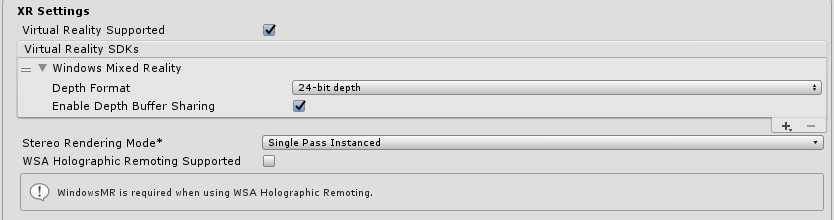
Do you have depth buffer sharing turned on under Edit > Project Settings > Player > XR Settings?
 keveleigh
on 18 Feb 2020
keveleigh
on 18 Feb 2020
@keveleigh Yes it is turned on
XR settings are;
anilozfuttu
on 20 Feb 2020
Can you test without depth buffer sharing enabled and see if it still repros? We've had some issues in the past around it causing visual issues like this. Also, which version of Windows are you running?
keveleigh
on 20 Feb 2020
Problem solved after disabling Depth Buffer Sharing. Thank you keveleigh
anilozfuttu
on 21 Feb 2020
If possible, can you file a Feedback Hub report while running with the depth buffer on? We should get this reported on our side so we can investigate the issue! Running with the depth buffer shouldn't cause rendering issues.
keveleigh
on 21 Feb 2020
Related issues
 reillydonovan
·
3Comments
reillydonovan
·
3Comments
 jimstack
·
3Comments
jimstack
·
3Comments
 markgrossnickle
·
3Comments
markgrossnickle
·
3Comments
 provencher
·
3Comments
provencher
·
3Comments
 StephenHodgson
·
3Comments
StephenHodgson
·
3Comments
Most helpful comment
Can you test without depth buffer sharing enabled and see if it still repros? We've had some issues in the past around it causing visual issues like this. Also, which version of Windows are you running?