Mixedrealitytoolkit-unity: MRTK 2.2 : Grid Object Collection : inverse layout naming and unexpected Num Rows/Columns variable change
Describe the bug
"Row then Column" layout actually behave like "Column then Row" and vice-versa
and "num rows" means "num columns"
Bug2:
It's not possible to specify Num Columns = 2 when having a "Column then Row" layout with 6 childs.
repro : add a grid object collection with 6 child cubes, set type to 'child order', set "layout to column then row", set num column to 2, click on "Update Collection" => observe that num columns instantly changes to 3.
(same for having num rows of 3 with row then column layout, it changes back to 2 when clicking on Update Collection)
_couldn't reproduce this one afterwards_
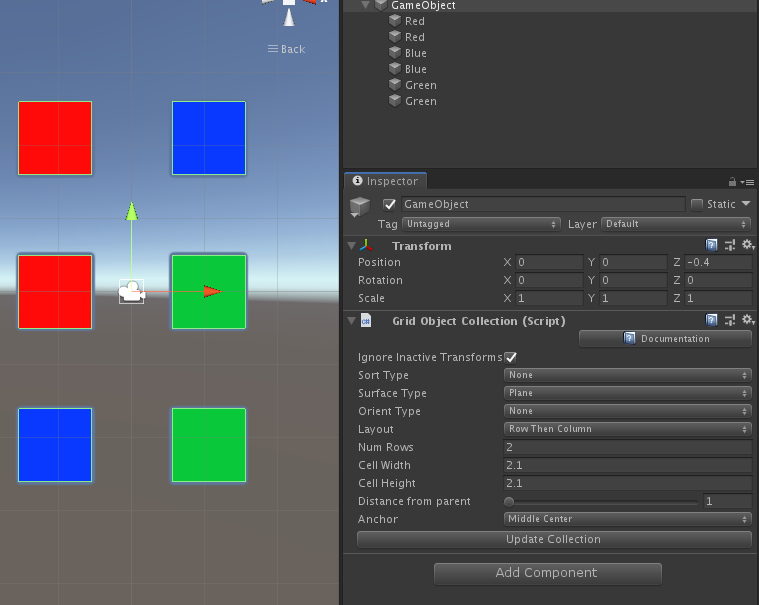
To reproduce
Steps to reproduce the behavior:
- Create a grid object collection
- Add some child elements
- Choose child order and "row then column" layout
- Click on update collection
- Observe
Expected behavior
- "Column then Row" should behave like in mrtk 2.1
- "Row then column" should first put elements in the row (until "Num Columns" is reached), then in column (and vice-versa)
- "Row then column" should display "Num columns" property (and not "Num rows") and vice-versa
Screenshots
If applicable, add screenshots to help explain your problem.
Your Setup (please complete the following information)
- Unity Version [2018.4.13f1]
- MRTK Version [v2.2 stabilization]
Additional context
wasn't sure, but asked 4 people around, and we all agreed :p
 gilbdev
All 22 comments
@julenka
gilbdev
on 3 Dec 2019
also with this bug, updating existing project to 2.2 breaks all current grid object collection.
gilbdev
on 3 Dec 2019
I will have a look. To clarify: do you expect “columns then rows” to lay out first horizontally, then vertically? So if you have children 1 - 6 with columns 2, rows 3 do you expect:
1 2
3 4
5 6
I’ll double check that this is the layout you end up with.
Also can you describe a bit more how upgrading breaks your layouts? Want to make sure I’m testing the scenario you have.
Finally, there was a recent bug I fixed with layout, what date of stabilization did you check?
 julenka
on 3 Dec 2019
julenka
on 3 Dec 2019
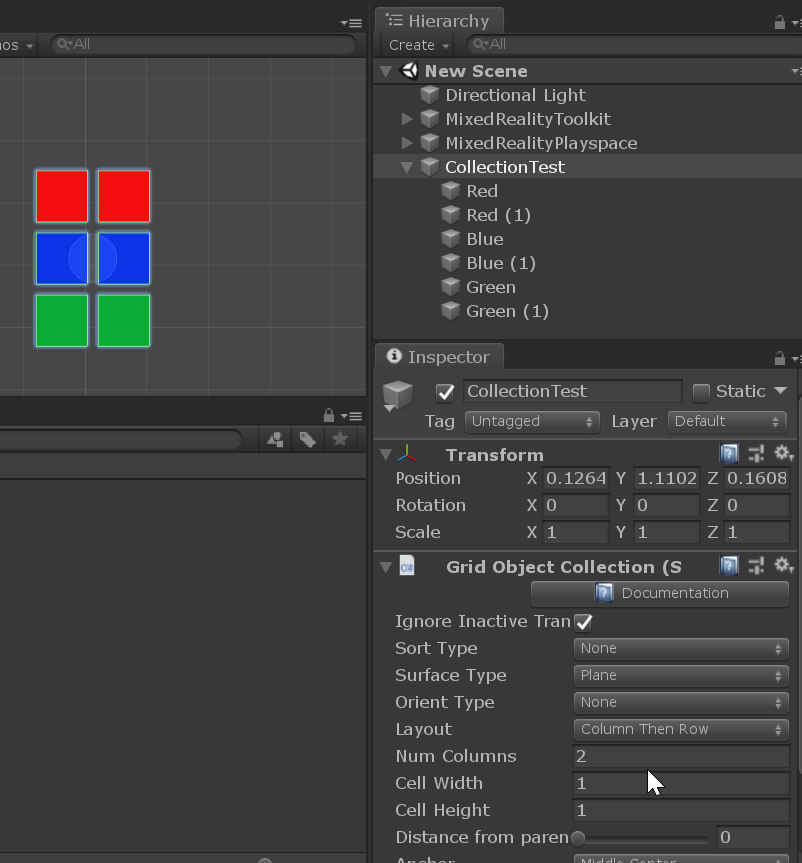
@gilbdev this is not reproducing for me in latest 2.2 stabilization.
output with 6 items, columns then rows layout, columns 2:
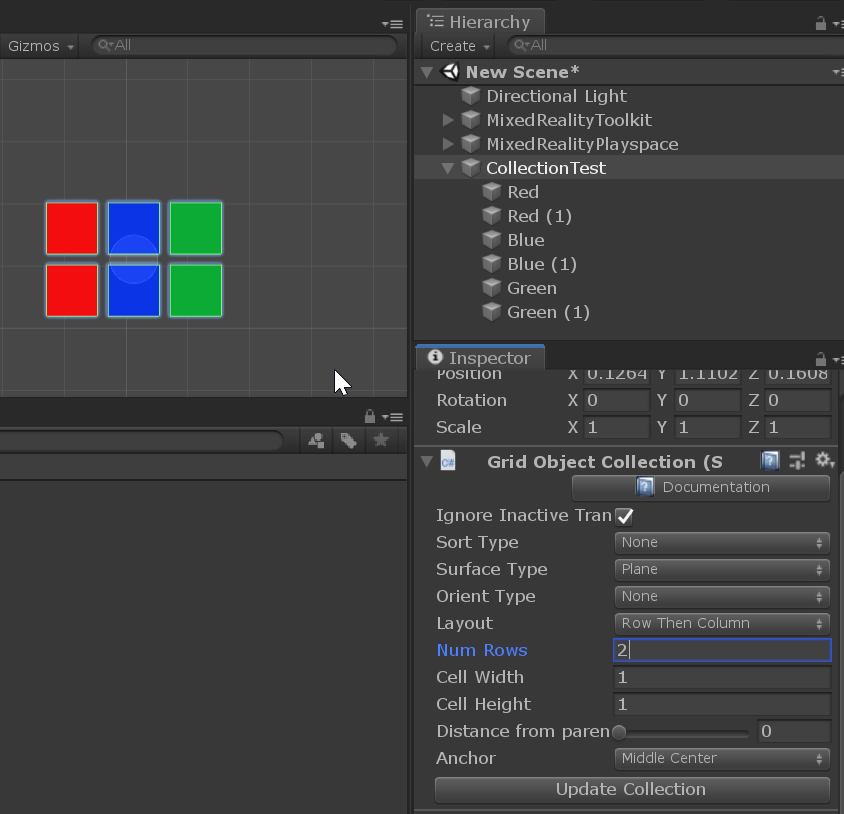
output with 6 items, rows then columns layout, rows 2:
julenka
on 3 Dec 2019
Closing as not repro for now, my guess is this was fixed by #6753
- 6 items, column then row, columns == 2, then update collection correctly lays out children (see pictures above) and does not modify columns.
- 6 itmes, row then column, columns == 2, update collection correctly lays out children (see pictures)
julenka
on 3 Dec 2019
- i updated this morning (b06c01b8ff53e6c0b8a7da0c290602913d025808), so this is after your last fix.
i expect "column then row" to lay out first vertically and then horizontally, so with columns = 2(rows =3) :
1 4
2 5
3 6
and " row then columns" with rows = 3(column =2) would give :
1 2
3 4
5 6
"row then columns" with rows = 2 would give :
1 2 3
4 5 6
Thinking about it, maybe the "column then row" should display the 'Rows' var, and not the 'Columns' ? (or rephrased : the current "Column then Row" is in fact implemented under the "Row Then Column" enum)
(be sure to double check with other people, i start ot get lost with the naming now ((o)).((o))
- regarding breaking current grids :
this is a bit tricky because previous version was not implementing both "row then column" and "column then row" so the layout variable is somehow irrelevant.
and most of my use cases are dynamically arranged in code (the prefab only contains the grid object collection with zero children, we add children in code and call update collection)
and,as their was no 'column' property, we had to compute rows with a modulo .. so ..
except adding a warning in mrtk 2.2 migration notes, i don't see a viable solution without having people modify data or code to amtch the new (better ^^) implementation.
maybe be as close as possible to the initial "column then rows" implementation (with Rows property displayed as suggested above)
one simple static scenario i have :
a 3x3 buttons grid with "Columns then Rows" and Rows = 3
mrtk 2.1 :
1 4 7
2 5 8
3 6 9
in mrtk 2.2: this give :
1 2 3
4 5 6
7 8 9
without modifying.
diff for this grid collection gives :
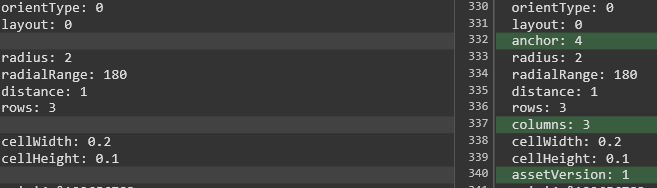
i think this is all realted to the first issue.
gilbdev
on 3 Dec 2019
@julenka please reconsider flipping the names.
when reading "Column then Row", we expect to dispatch the children first on a column, until it reaches "Num Rows", then next child gets to the second column.
- This was the case in previous implementation (mrtk 2.1).
- This is not the case in your example above.
gilbdev
on 3 Dec 2019
Okay, it sounds like this bug is regarding terminology. In 2.1 and before, ColumnThenRow and RowThenColumn were actually giving almost identical layout (which was not correct) and also had several layout bugs, which is likely the cause of the confusion. I will write a bit more when I get to the office (on a plane now), but how do you feel about me adding some documentation clarifying the terminology?
To make sure we are on the same page, most UX coding conventions I’ve seen define rows as this:
Row 1
Row 2
Row 3
Columns go horizontally. If we have a grid like this:
Abcdef
Ghijkl
Then the letter “e” is in row 1, column 5. Does that make sense?
julenka
on 3 Dec 2019
@gilbdev I’m curious if your definition of rows and columns is matching mine.
julenka
on 3 Dec 2019
Yes, this is mainly terminology.
We agree on the definition of row and column.
I've edited the expected behavior in initial post.
gilbdev
on 3 Dec 2019
this is definitely confusing to me. i created 4 sets of 3 color cubes. when i say columns first, i expect the matching colors to all be in the same vertical column... this is my output
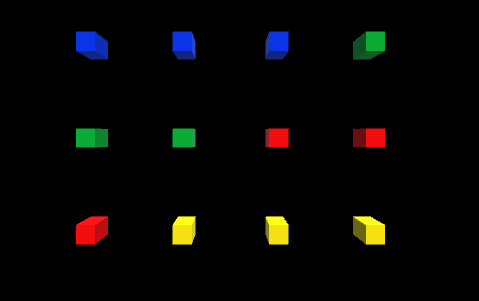
I would have called the above 'row then column'
 davidkline-ms
on 3 Dec 2019
davidkline-ms
on 3 Dec 2019
Is the intent to write to each column first, then wrap to the next row?
davidkline-ms
on 3 Dec 2019
vs 'fill the column, then proceed to the next in the row"? (which is how i interpreted it)
davidkline-ms
on 3 Dec 2019
Since there are two interpretations for how the grid should be filled, we invetigate adding a help box or tooltip to the inspector that describes the implemented behavior. For example:
"Column then row places an object in each column until Num columns is reached, then it proceeds to the next row."
davidkline-ms
on 4 Dec 2019
Help box would help.
My major concern is about being backward compatible with existing 2.1 grids.
and currently, the behavior is changing between 2.1 and 2.2 for the default implementation which was "Column then row" with "Rows" property.
So even with the addition of an help box, this would still break existing code.
(can be reproduced by creating a grid under 2.1 and migrating it to 2.2 and test that by clicking on update collection without other changes the layout doesn't change)
gilbdev
on 4 Dec 2019
@julenka, thoughts on the behavior change? was it intentional?
davidkline-ms
on 4 Dec 2019
Ok, now I have understood where the imcomprehension comes from !
When reading "Column then Row", it can mean :
- Incrementing column index until num column is reach, then increment row index (and reset column index to 0)
- Target column 1 and in that column, add rows until num rows is reached before starting next column
MRTK 2.1 uses the second definition and new MRTK 2.2 uses the first one.
If you want to keep the first definition, a simple change to avoid behavior change would be to change the LayoutOrder enum by switching RowThenColumn and ColumnThenRow (as enum is serialized as an int) (and of course go thourgh examples and prefabs to readapt)
I've tested it in my projects and this way, my grid collection keeps behaving the same as before.
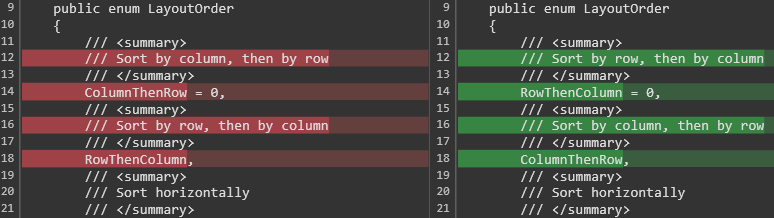
This would still required a migrating note though (in case some code does access the Rows property when the ColumnThenRow layout is used).
I've also noted that the new anchor system is based on NumRows /NumColumns and does not take the number of children into account (so when having NumColumns=3 with only 2 elements and anchor=MiddleCenter, this is centered based on 3 elements, and not 2), not sure if this is something you want to change, as this can totally be a wanted feature.
gilbdev
on 4 Dec 2019
Hi @gilbdev great explanation of the misunderstanding. I want to clarify one thing:
MRTK 2.1 uses the second definition and new MRTK 2.2 uses the first one.
Actually MRTK 2.1 and below would always lay out content first vertically, then horizontally regardless if layout was RowsThenColumns or ColumnsThenRows. This bug was unfortunately a cause of big confusion, we apologize for leaving it in so long. I believe the expected behavior would be for RowsThenColumns to lay out content differently than ColumnsThenRows. The confusion is which one lays out first vertically, then horizontally.
I am planning to do three things to resolve this:
- Update documentation and release notes to clarify layout of RowsThenColumns and ColumnsThenRows via picture diagrams. I should have a PR out for this within a day.
- For people upgrading to 2.2, if they have specified ColumsnThenRows layout, switch their layout to RowsThenColumns. I like your idea of quietly doing this by changing the enum order, but I think it may be more helpful / educational to print a message explaining "switching layout type to rowsthencolumns to ensure layout matches behavior in 2.1". Would you prefer that we do this quietly instead?
- Add tool tip in inspector to explain the layout, like you suggested.
Curious to hear your thoughts. Thank you for raising this issue, by the way.
julenka
on 5 Dec 2019
SGTM' your solution of switching all to rowthencolumn is better as there is only one implementation anyway in 2.1
Maybe to avoid confusion we could rename to "Limit by rows", "Row-limited" or something similar that does not mention both rows and columns.
gilbdev
on 5 Dec 2019
thanks @keveleigh. I accidentally closed this
davidkline-ms
on 5 Dec 2019
Reopening, as #6797 mentioned it was part 1 of 2.
 keveleigh
on 5 Dec 2019
keveleigh
on 5 Dec 2019
both parts fixed and merged. closing :)
davidkline-ms
on 5 Dec 2019
Related issues
 chrisfromwork
·
3Comments
chrisfromwork
·
3Comments
 brean
·
3Comments
brean
·
3Comments
 DanAndersen
·
3Comments
DanAndersen
·
3Comments
 reillydonovan
·
3Comments
reillydonovan
·
3Comments
 overedge
·
3Comments
overedge
·
3Comments