Mixedrealitytoolkit-unity: [dLSR failures] Default MRTK Cursors should not write to depth map. This impacts hologram stabilization
Describe the bug
The default cursor prefab writes to the depth map. This causes interference with Hologram stabilization, especially when using the Eye/GGV Cursor. That is, when using the GGV cursor, stabilization is always incorrect, since what your looking at is being stabilized using the cursor's depth.
Note, when an app is "sharing depth" with unity, Holograms will be stabilized with the app's depth map.
To reproduce
Steps to reproduce the behavior:
- Turn on depth sharing
- Setup HoloLens 2 app to use GGV cursor only
- Remove colliders from your other meshes (not needed, but makes it easier to see problem when cursor doesn't collide with meshes)
- Play app on hololens 2.
- Ensure GGV cursor is visible
- See stabilization of mesh objects, around GGV cursor, is incorrect.
Expected behavior
Hologram stabilization shouldn't be impacted but the cursor
Your Setup (please complete the following information)
- Unity Version (2018 and 2019)
- MRTK Version: v2.0 - v2.1
Target Platform (please complete the following information)
- HoloLens (auto planar LSR will also be incorrect)
- HoloLens 2
 AMollis
All 9 comments
@thalbern, can you please assign this bug to someone on your team? This is impacting stabilization of holograms in our partner applications
AMollis
on 9 Oct 2019
Remove colliders from your other meshes (not needed, but makes it easier to see problem when cursor doesn't collide with meshes)
Is this a common scenario? I feel like in the majority of cases, the cursor is going to raycast against and align with content in the app.
 keveleigh
on 9 Oct 2019
keveleigh
on 9 Oct 2019
Remove colliders from your other meshes (not needed, but makes it easier to see problem when cursor doesn't collide with meshes)
Is this a common scenario? I feel like in the majority of cases, the cursor is going to raycast against and align with content in the app.
Removing coliders not needed, there is still error. But regardless this is impacting partners who render large meshes without colliders (I can follow-up offline with details)
AMollis
on 9 Oct 2019
This issue has been marked as stale by an automated process because it has not had any recent activity. It will be automatically closed in 30 days if no further activity occurs. If this is still an issue please add a new comment with more recent details and repro steps.
![stale[bot] picture](https://avatars3.githubusercontent.com/in/1724?v=4&s=40) stale[bot]
on 7 Mar 2020
stale[bot]
on 7 Mar 2020
This issue has been closed by an automated process because it is stale. If this is still an issue please add a new comment with more recent details and repro steps.
stale[bot]
on 7 Apr 2020
@Cameron-Micka Is this something we can change as a setting on the MRTKStandard shader?
keveleigh
on 9 Apr 2020
On the cursor materials we can disable depth write by changing the render mode to "custom" and then turning off "depth write".
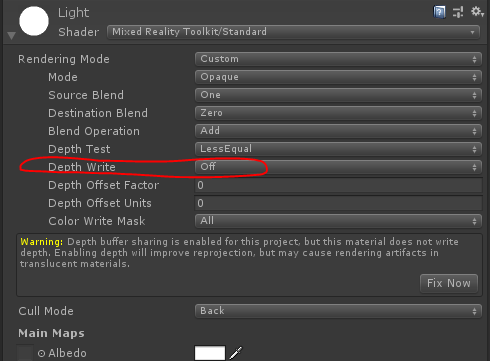
While this might introduce some rendering artifacts on opaque materials, it might look fine as well since the geometry is pretty simple and the material is unlit. Something to try and see how it looks!
 Cameron-Micka
on 9 Apr 2020
Cameron-Micka
on 9 Apr 2020
Removing from 2.5 - looks like a simple enough change, but getting appropriate coverage of it might be hard.
 wiwei
on 1 Sep 2020
wiwei
on 1 Sep 2020
Closing based on conversation with @AMollis where he expressed that the team has improved dLSR since this bug was opened and stabilization is much better now.
 polar-kev
on 25 Sep 2020
polar-kev
on 25 Sep 2020
Related issues
 StephenHodgson
·
3Comments
StephenHodgson
·
3Comments
 MatteoFantasy
·
3Comments
MatteoFantasy
·
3Comments
 provencher
·
3Comments
provencher
·
3Comments
 overedge
·
3Comments
overedge
·
3Comments
 amfdeluca
·
3Comments
amfdeluca
·
3Comments
Most helpful comment
Closing based on conversation with @AMollis where he expressed that the team has improved dLSR since this bug was opened and stabilization is much better now.