Mixedrealitytoolkit-unity: Mouse Pointer does not work
Describe the bug
When enable MousePointer in the Input > Pointer Profile, The mouse cursor is randomly flying around in the screen.
To reproduce
- Go to MRTK Profile > Input > Pointers
- Set 'Nothing' to DefaultController
- Check 'Articulated Hand' in the Mouse Pointer. (Or try Mouse and other inputs)
Expected behavior
Mouse cursor displayed in the game mode and can be controlled with mouse.
Screenshots

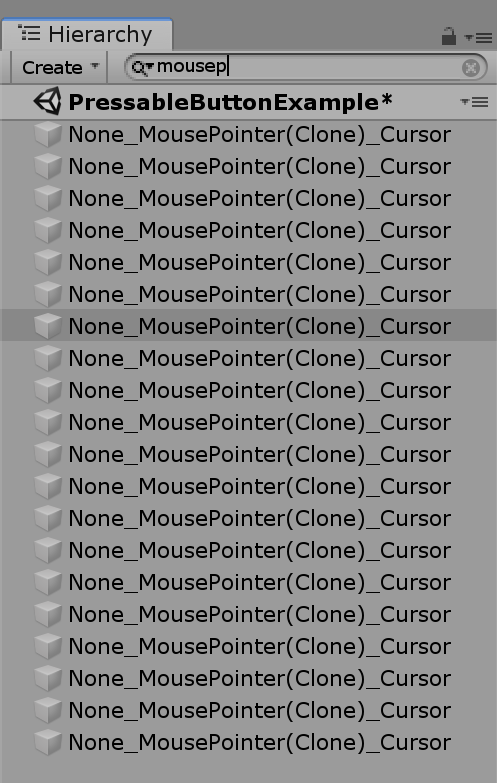
There are multiple cloned MousePointers.
Branch
prelease/stabilization_2.0.0
 cre8ivepark
All 2 comments
Hi @cre8ivepark, to make the mouse pointer work you have to add a new data provider for it in the input profile
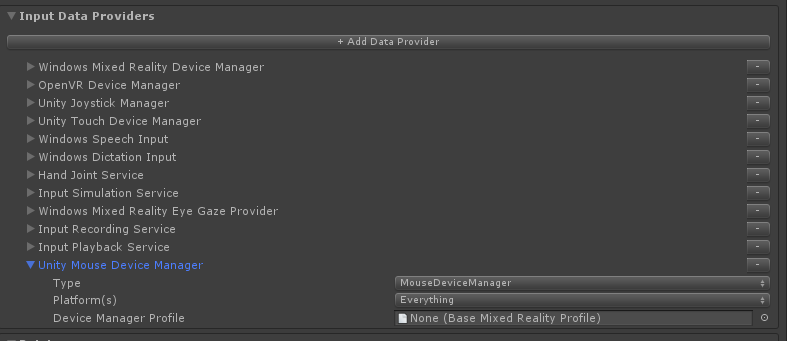
Saying that, I checked the docs and it's not very clear what to do there because we're using different terminology.
Updating docs :)
 thalbern
on 15 Aug 2019
thalbern
on 15 Aug 2019
👍1
opened PR with updated docs
thalbern
on 15 Aug 2019
👍1
Was this page helpful?
0 / 5 - 0 ratings
Related issues
 DanAndersen
·
3Comments
DanAndersen
·
3Comments
 StephenHodgson
·
3Comments
StephenHodgson
·
3Comments
 nuernber
·
3Comments
nuernber
·
3Comments
 overedge
·
3Comments
overedge
·
3Comments
 matatabi-ux
·
3Comments
matatabi-ux
·
3Comments