Mixedrealitytoolkit-unity: MRTK v2 Bounding Box handles not displayed correctly with scaled objects
Describe the bug
Bounding Box handles are not displayed at the right position when the object it is applied to has a different scale for at least one axis.
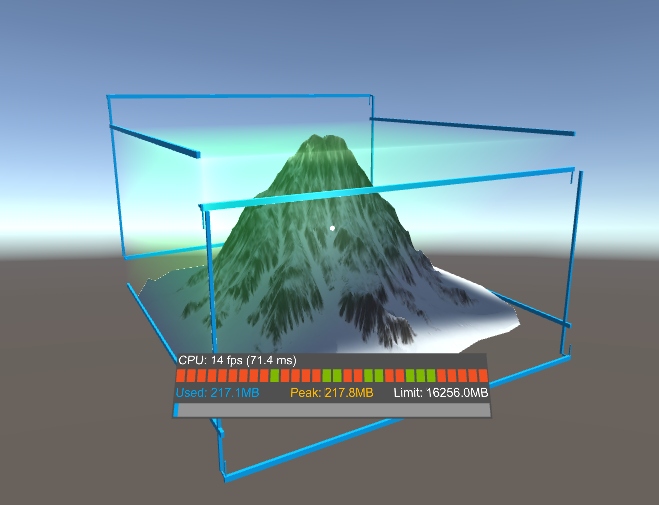
Watch the video here: link
Note: in that video, I illustrate the normal behavior with an even scaling and then I change the scale in the properties so you can see both behaviors, including the wrong one.
To reproduce
Steps to reproduce the behavior:
- In an empty project: Import MRTK
- Add any 3D object
- Add a Bounding Box to the object following docs
- Change the scale value in the Transform for the 3D object for ONE axis only (for instance, x)
- Run the project and move on all axis
You can find an example with that issue here: https://github.com/meulta/MRTK_BoundingBox
(just change the scale of the mountain).
Expected behavior
Uneven scaling of the object should not impact the Bounding Box handle and they should display properly
Screenshots
Your Setup (please complete the following information)
- Unity Version 2018.3.12f1
- MRTK Version v2.0 RC1 refresh
Target Platform (please complete the following information)
- HoloLens 2 (but the issue happens in the player in Unity also)
 meulta
All 6 comments
Editing the object's transform in-editor at runtime while the bounding box is active isn't supported. (Based on your video and scene setup this appears to be what you're doing.) Once the bounding box is active it's the bounding box's job to perform transformations.
We'll make this clearer in the documentation.
Thanks for the detailed bug write-up and example scene.
 Railboy
on 2 May 2019
Railboy
on 2 May 2019
Understand that, but the issue is also happening if you change scale BEFORE running in the editor. The video was just to explain the issue. This is still more than a documentation issue in my opinion.
meulta
on 3 May 2019
Hello, this is still a bug, can you please keep it opened until it is fixed?
meulta
on 3 May 2019
Apologies! Finger slipped on mobile while commenting. We'll take another look and try to repro.
Railboy
on 3 May 2019
I can repro that:
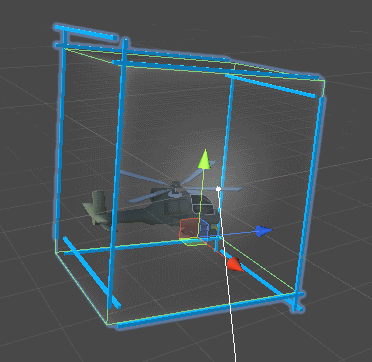
Any initial scale applied to rigRoot's parent, that is the GameObject with the BoundingBox.cs script attached to it, affects the bounding box and produces artifacts as shown in @meulta's screenshot and above. In the example above the Y scale is > 1.
I am not sure this has any influence, but my hierarchy is as follow:
- Target object
- Manipulator object with non-unit scale, components
BoundingBox.csandBoxCollider, and bounding box overridesTarget=parent andCollider=self
- Manipulator object with non-unit scale, components
This is a common pattern I found very useful to be able to have both the manipulator bounding box and other children (generally a 3D model) all parented together as siblings, and be able to transform the root Target to move them together. I do not want to put the bounding box on the root because I need to deactivate it sometimes, without deactivating the rest of the hierarchy (3D model).
 djee-ms
on 6 May 2019
djee-ms
on 6 May 2019
Fixed by #4592
 julenka
on 29 May 2019
julenka
on 29 May 2019
Related issues
 MatteoFantasy
·
3Comments
MatteoFantasy
·
3Comments
 amfdeluca
·
3Comments
amfdeluca
·
3Comments
 dfields-msft
·
3Comments
dfields-msft
·
3Comments
 StephenHodgson
·
3Comments
StephenHodgson
·
3Comments
 markgrossnickle
·
3Comments
markgrossnickle
·
3Comments
Most helpful comment
I can repro that:
Any initial scale applied to
rigRoot's parent, that is theGameObjectwith theBoundingBox.csscript attached to it, affects the bounding box and produces artifacts as shown in @meulta's screenshot and above. In the example above the Y scale is > 1.I am not sure this has any influence, but my hierarchy is as follow:
BoundingBox.csandBoxCollider, and bounding box overridesTarget=parent andCollider=selfThis is a common pattern I found very useful to be able to have both the manipulator bounding box and other children (generally a 3D model) all parented together as siblings, and be able to transform the root
Targetto move them together. I do not want to put the bounding box on the root because I need to deactivate it sometimes, without deactivating the rest of the hierarchy (3D model).