Mixedrealitytoolkit-unity: Play mode not starting, highlighting MixedRealityToolkit gameobject instead
Describe the bug
It sometimes happens that I want to go into play mode, which I can't enter (exits immediately) and MixedRealityToolkit gets a ping.
I dug into where that comes from and it seems that the Active Profile is null then. I have to restart Unity for this to be fixed. Since this is a SerializedField with a proper value in it, I'm puzzled how this can happen.
To reproduce
I do not have steps to reproduce it yet
Expected behavior
The Active Profile never goes null
Screenshots
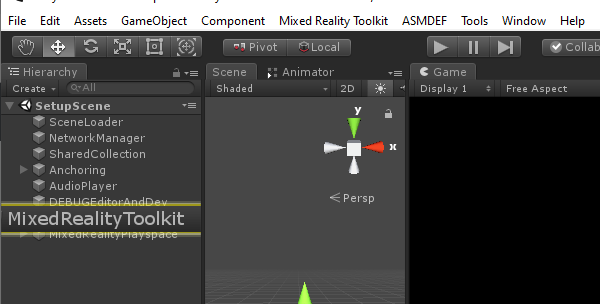
Your Setup (please complete the following information)
- Unity Version 2018.3.13f1
- MRTK Version v2.0
Target Platform (please complete the following information)
- Editor
 Alexees
All 4 comments
I was able to repro this once but I'm not quite sure how I did it.
I dug into where that comes from and it seems that the Active Profile is null then.
Yeah this seems to be the immediate culprit:
if (playModeState == UnityEditor.PlayModeStateChange.ExitingEditMode && activeProfile == null)
{
    UnityEditor.EditorApplication.isPlaying = false;
    UnityEditor.Selection.activeObject = Instance;
    UnityEditor.EditorGUIUtility.PingObject(Instance);
}
I have a suspicion ResetConfiguration is getting called by a dead / dying instance of the toolkit.
 Railboy
on 30 Apr 2019
Railboy
on 30 Apr 2019
I'm able to reproduce this consistently when using git to switch between branches while Unity is open.
- Create a new scene
- Use git to switch to / from prerelease/2019_rc1 / mrtk_development / other major branch
- Let Unity re-import assets and recompile
- Add a MixedRealityToolkit instance using _MixedRealityToolkit/Add to Scene and Configure_
- Select a configuration profile
- Try to enter playmode
The bug happens regardless of which branch I'm in.
Restarting the project or triggering recompilation makes the bug stop.
Railboy
on 30 Apr 2019
Just a headsup, this issue is still relevant today.
I'm using Unity 2019.1.6f and MRTK RC1 Refresh.
I reproduced it like this:
- Add scene with MRTK integration (Playspace + Toolkit)
- Add new scene without MRTK integration (No camera).
- Start the new scene without MRTK integration. Stop it again.
- Go to scene with the MRTK camera implemented
- Try to enter playmode
(Also at step 2, this will trigger an aggressive pop-up telling you to add the MRTK Camera, switching to any other scene using the project manager will reopen this annoying window too. "Don't show this again" does nothing.)
As mentioned earlier, reopening the project temporarily fixes the issue. Using the PlatformSwitcher of the SpectatorView does too.
 Avalin
on 11 Jun 2019
Avalin
on 11 Jun 2019
@Railboy is this fully fixed now? Can this be closed?
 Troy-Ferrell
on 4 Jul 2019
Troy-Ferrell
on 4 Jul 2019
Related issues
 markgrossnickle
·
3Comments
markgrossnickle
·
3Comments
 StephenHodgson
·
3Comments
StephenHodgson
·
3Comments
 reillydonovan
·
3Comments
StephenHodgson
·
3Comments
reillydonovan
·
3Comments
StephenHodgson
·
3Comments
 dfields-msft
·
3Comments
dfields-msft
·
3Comments
Most helpful comment
Just a headsup, this issue is still relevant today.
I'm using Unity 2019.1.6f and MRTK RC1 Refresh.
I reproduced it like this:
(Also at step 2, this will trigger an aggressive pop-up telling you to add the MRTK Camera, switching to any other scene using the project manager will reopen this annoying window too. "Don't show this again" does nothing.)
As mentioned earlier, reopening the project temporarily fixes the issue. Using the PlatformSwitcher of the SpectatorView does too.