Mixedrealitytoolkit-unity: SpectatorViewPlugin.dll not being recognized
Overview
I get these warnings and error trying to implement spectatorview to my project:
Plugins: Failed to load 'Assets/MRTK/MixedRealityToolkit.Extensions/SpectatorView/Plugins/WSA/x86/SpectatorViewPlugin.dll' with error 'Det angivne modul blev ikke fundet.
'.
Microsoft.MixedReality.Toolkit.Extensions.SpectatorView.MarkerDetection.SpectatorViewPluginArUcoMarkerDetector:Start() (at Assets/MRTK/MixedRealityToolkit.Extensions/SpectatorView/Scripts/MarkerDetection/ArUco/HoloLens/SpectatorViewPluginArUcoMarkerDetector.cs:31)
Plugins: Failed to load 'Assets/MRTK/MixedRealityToolkit.Extensions/SpectatorView/Plugins/WSA/x86/SpectatorViewPlugin.dll' with error 'Det angivne modul blev ikke fundet.
'.
Microsoft.MixedReality.Toolkit.Extensions.SpectatorView.MarkerDetection.SpectatorViewPluginAPI:Initialize(Single) (at Assets/MRTK/MixedRealityToolkit.Extensions/SpectatorView/Scripts/MarkerDetection/ArUco/HoloLens/SpectatorViewPluginAPI.cs:60)
Microsoft.MixedReality.Toolkit.Extensions.SpectatorView.MarkerDetection.SpectatorViewPluginArUcoMarkerDetector:Start() (at Assets/MRTK/MixedRealityToolkit.Extensions/SpectatorView/Scripts/MarkerDetection/ArUco/HoloLens/SpectatorViewPluginArUcoMarkerDetector.cs:31)
DllNotFoundException: SpectatorViewPlugin
Microsoft.MixedReality.Toolkit.Extensions.SpectatorView.MarkerDetection.SpectatorViewPluginAPI.Initialize (System.Single markerSize) (at Assets/MRTK/MixedRealityToolkit.Extensions/SpectatorView/Scripts/MarkerDetection/ArUco/HoloLens/SpectatorViewPluginAPI.cs:60)
Microsoft.MixedReality.Toolkit.Extensions.SpectatorView.MarkerDetection.SpectatorViewPluginArUcoMarkerDetector.Start () (at Assets/MRTK/MixedRealityToolkit.Extensions/SpectatorView/Scripts/MarkerDetection/ArUco/HoloLens/SpectatorViewPluginArUcoMarkerDetector.cs:31)
Expected Behavior
No exception thrown when requested SpectatorViewPlugin.dll file is inserted to correct folder.
Actual Behavior
Program does not recognize SpectatorViewPlugin.dll in folder at all.
Steps to reproduce
I first created a project and implemented the Microsoft Mixed Reality Toolkit v2.0.0 Beta 2.
I then cloned the repo so I could add the MixedRealityToolkit.Extensions folder to my project with the SpectatorView support I need.
I followed this: https://github.com/Microsoft/MixedRealityToolkit/tree/master/SpectatorViewPlugin
I realised that inserting the newly made SpectatorViewPlugin.dll among the other files requested from this readme, that my project complained about them being not being x64. I redid this part, inserting x64 in this part: ".\vcpkg install opencv[contrib]:x64-uwp --recurse" and built for Release x64.
I inserted the opencv-files and the dll in this path as the guide suggests: Assets/MRTK/MixedRealityToolkit.Extensions/SpectatorView/Plugins/WSA/x86
I inserted the SpectatorView prefab to the scene and run it, and then I got above errors.
(So to clarify: I did try with x86 first as the guide prescribes first)
Unity Editor Version
2018.3.7.f1
Mixed Reality Toolkit Release Version
Microsoft Mixed Reality Toolkit v2.0.0 Beta 2
 Avalin
All 12 comments
Hello @Avalin ,
My instinct is that you are encountering issues because you placed x64 binaries in the Plugins\WSA\x86 directory. HoloLens is a x86 device, so you will need to build and use an x86 version of SpectatorViewPlugin.dll using the x86 opencv binaries. It may be that when you opened the SpectatorViewPlugin visual studio solution, it defaulted to a x64 build environment. You can change this in the visual studio, make sure that the Solution Configuration is set to Release and that the Solution Platform is set to x86 when building.
When you say that your project complained about these binaries not being x64, was this issue experienced in the Unity editor or in visual studio? If it is an issue in the Unity editor, it may be a problem with how the dll is configured. Viewing the dll in the unity editor's inspector, unselect 'Any platform' and only enable the plugin for 'WSAPlayer'. Also make sure that your CPU is specified as x86 in the platform settings. You may also need to update the Unity Build Settings to use a x86 architecture and HoloLens compared to x64 and Any device.
 chrisfromwork
on 8 Mar 2019
chrisfromwork
on 8 Mar 2019
It's a Unity exception. Visual Studio builds the files just fine. Unity no longer complains about the x64 architecture, but .dlls are still not being loaded.
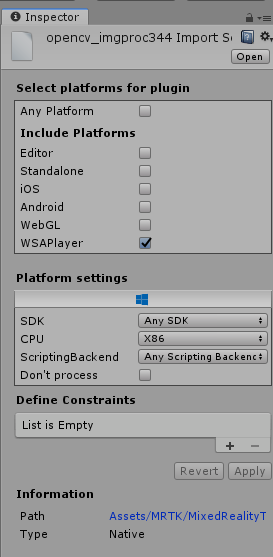
Here's an image illustrating the issue:

My settings

Avalin
on 11 Mar 2019
It looks like you may be using the new spectator view refactor compared to the old spectator view preview? I will forewarn that this code is still undergoing some changes. SpectatorViewPluginApi.cs has some logic in it's onvalidate function that attempts to locate the dll within MixedRealtyToolkit-Unity\MixedRealityToolkit.Extensions\SpectatorView\Plugins\WSA\x86. Given the issues you're hitting, this check seems too aggressive and should probably be removed or updated to search all unity directories for the dll. To get yourself unblocked, you can remove these checks in the onvalidate function. I will open a pull request tomorrow removing them for the feature branch.
You may have already built the correct plugins, but I will call out that for this refactored spectator view code, you need to build and use a Spectator view plugin from the feature/spectatorView branch in the MixedRealityToolkit repo. The master branch in said repo still contains the legacy plugin solution for spectator view preview.
chrisfromwork
on 11 Mar 2019
After looking at this again, it seems like the api dll checks may not be causing your issue. I've updated the pull request to also add a try catch block to the api initialization. It seems more like you may have a spectator view plugin that doesn't align with the extern functions defined in SpectatorViewPluginApi.cs:
https://github.com/Microsoft/MixedRealityToolkit-Unity/blob/41e3feaddb26c1d20c3a6571b7d3500604a314a6/Assets/MixedRealityToolkit.Extensions/SpectatorView/Scripts/MarkerDetection/ArUco/HoloLens/SpectatorViewPluginAPI.cs#L15
Plugin definitions of said externs can be found here:
https://github.com/Microsoft/MixedRealityToolkit/blob/feature/spectatorView/SpectatorViewPlugin/SpectatorViewPlugin/SpectatorViewPlugin/SpectatorViewPlugin.cpp
Do you know if you built SpectatorViewPlugin.dll out of the master branch of MixedRealityToolkit compared to feature/spectatorView? I think that building the master branch and trying to use it with the new spectator view refactor would cause the issue/exceptions you are seeing.
chrisfromwork
on 11 Mar 2019
Ah okay, I initially downloaded the project from the master-branch, then realised the extension with SpectatorView was not included, so I just inserted the .Extensions folder to my master-branch project from the feature/spectatorView branch, (I am trying to make the refactored one work as I would really like the android functionality when it is available).
However I just retried from scratch in a new project
What I did was:
Cloning this branch (feature/spectatorView)
Building and copying all the needed .dll files with VCPKG (Release, x86)
Placing them into the folder at "Assets/MRTK/MixedRealityToolkit.Extensions/SpectatorView/Plugins/WSA/x86"
Made sure all above mentioned settings were set accordingly (WSAPlayer, Platform Settings, Build Settings...)
Ran the example scene included with SpectatorView
And I still get the DllNotFoundException (and if I change it back to allow x64, it will complain about the wrong architecture, so it does in fact "see" the dll file in there, it just won't initialize it as it seems)
Avalin
on 12 Mar 2019
VCPKG will build all of the opencv binaries. VCPKG doesn't compile SpectatorViewPlugin.dll. You will need to manually compile SpectatorViewPlugin.dll by doing the following:
1) Clone https://github.com/Microsoft/MixedRealityToolkit
2) Checkout feature/spectatorView in the MixedRealityToolkit (not the MixedRealityToolkit-Unity repo)
3) Build a x86 Release version of SpectatorViewPlugin in visual studio with the MixedRealityToolkit/SpectatorViewPlugin/SpectatorViewPlugin/SpectatorViewPlugin.sln solution
4) Copy all output binaries into a Plugins\WSA\x86 directory in your unity assets folder (For me, the output binaries are dropped into MixedRealityToolkit\SpectatorViewPlugin\SpectatorViewPlugin\Release\SpectatorViewPlugin\ by visual studio)
This Plugins\WSA\x86 is a special folder defined by unity (https://docs.unity3d.com/Manual/SpecialFolders.html)
I would also make sure that you are using the platform switcher defined on the 'Spectator View' game object in the unity scene. See https://github.com/Microsoft/MixedRealityToolkit-Unity/wiki/Spectator-View-Setup for more information on the platform switcher.
If you have made it past all of this and are still experiencing issues, it may be that your Unity generated visual studio solution isn't picking up the dll correctly. A few things to check:
1) Have you tried deleting and recreating the app/visual studio solution directory created by Unity? Usually this is labeled MixedRealityToolkit-Unity\App or MixedRealityToolkit-Unity\HoloLens. Sometimes unity fails to update the visual studio solution correctly. So deleting and recreating this folder may fix things.
2) After generating your visual studio solution via unity, check to see if SpectatorViewPlugin.dll exists in the output directory (MixedRealityToolkit-Unity\App). If it doesn't and SpectatorViewPlugin.dll exists in an Assets*\Plugins\WSA\x86\ folder, something has likely gone wrong with Unity building/the visual studio solution generation step. You may be able to manually copy all of the dlls created when building MixedRealityToolkit (described above) and add them to the directory containing your unity generated *.vcxproj file (For me, my *.vcxproj file was in MixedRealityToolkit-Unity\App\MixedRealityToolkit). This may work but it is untested.
chrisfromwork
on 12 Mar 2019
Hi @chrisfromwork
Also, thanks for your consistent feedback.
Since the error came from the "Assets/MRTK/MixedRealityToolkit.Extensions/SpectatorView/Plugins/WSA/x86" path, I assumed this was the destined path for the .dll and opencv files (but this was the check you were looking into, right?) I inserted the .dlls to the special Unity folder instead as you suggested "Assets/Plugins/WSA/x86" and alas, the error is still visible as (I assume) it looks for the files in the forementioned path, and not the unity plugins folder. However, after doing all the steps you recently mentioned, I managed to make a build both for HoloLens and my Android device, and they can sometimes (when I'm lucky) pair through a QR code. So despite the .dll-not-initialized-error showing, it _does_ manage to make a connection between the two devices, so I will assume they actually _do_ initialize(?)
It does appear to be very buggy on the Android, (not reliably connecting, and when it does, android phone only sees a still picture of what's in the app) however I suppose it might be due to the fact that this feature is still-in-development, and not necessarily the .dll not initializing properly?
Avalin
on 13 Mar 2019
Yes, I now have a pull request out to remove those checks. We will prevent future developers from hitting this unnecessary error. Thank you for sharing your experience! :)
https://github.com/Microsoft/MixedRealityToolkit-Unity/pull/3602
What type of Android device are you using? Right now this experience is based on a udp broadcast networking component that unblocks the experience but should be improved for real-time/large payloads. Are you attaching the HoloLens and mobile device to the same local network?
When you say the Android device sees a still image of the app, is it a static 3d unity scene that you can move around or a static 2d frame? Spectator view logic doesn't automatically provide content synchronization across devices (animation triggers and times aren't necessarily synchronized). We are working on building a richer sharing story for the MRTK, but it's still in early thinking stages. If it's a static 2d image, it may be that your device doesn't support arcore, but I would think that there may be a more obvious system error for this.
Also, what commit is your spectator view code synced to? Depending on when you manually copied the code some different marker detection fixes have gone in.
chrisfromwork
on 13 Mar 2019
Hi Chris!
I was trying on 2 different devices that should (and now I know, does) support ARCore, "Samsung Galaxy A5 2017", and a "Samsung Galaxy S8". I managed to fix the problem by now, and in case anyone sees this and may go through the same problem: the culprit seemed to be that "Scripting Backend" in "Player Settings" might be set to IL2CPP when building for Android. Setting this to Mono fixed the problem for me. (Just tested with IL2CPP just now, and it works fine. The actual culprit seems to be when I'm exporting to Android Studio and attempting to build from there. It works fine building directly from the Unity editor.) After changing this the AR Camera worked fine, and the Spectator View works as intended on the Android phone. It was a still 2D image frame saying "Waiting for User", with a small picture of a part of the app. At this point, the initial scene loads, and the phone user can see the AR elements that is also within the HoloLens (however not synced to the same positions, but it is still a great starting point)
I still have a few questions in regards to the SpectatorView, in regards to loading a different scene (Loading a new scene on HoloLens does not load the new scene in the SpectatorView device, which I guess makes sense since I'm not broadcasting this change anywhere network-wise?), so more on how to go about sending data from the HoloLens to the mobile device, and syncing their scene view so that the objects in the scene are placed accordingly in the "real world" on both devices (if this makes sense) However, I also feel this is moving away from the initial topic, that by now is fixed (SpectatorView.dll not initializing -> but thanks to your great support they are now) so I'm wondering if it makes more sense to ask about these things elsewhere? (In that case feel free to close this initial issue)
Avalin
on 18 Mar 2019
I have seen some issues with android studio where the camera doesn't initialize correctly. Typically if i deploy through android studio and then restart my device the application will work correctly (I realize that this is a less than ideal workaround) Unfortunately if you want recording to work, you will need to compile through android studio and change the default activity to the custom one provided with spectator view. Unity didn't have a default android recording solution like iOS and various permissions required having a custom activity.
When you say not synced to the same positions, are these game objects at static locations and the cameras are misaligned? Or are these items moving/animating around the scene and aren't synced across devices?
In regards to synchronizing a scene change, currently the spectator view game object isn't tagged to remain loaded across scenes. We should add this function call to the main spectator view experience/SpectatorView.cs: https://docs.unity3d.com/ScriptReference/Object.DontDestroyOnLoad.html
After insuring that the device is kept across scenes, you will need to make sure that the root object transform is applied to your content across scenes. To do this we will need to make the following field public:
https://github.com/Microsoft/MixedRealityToolkit-Unity/blob/25c61feb2979a4b1860495d1415c9c00ed98b2ae/Assets/MixedRealityToolkit.Extensions/SpectatorView/Scripts/SpectatorView.cs#L16
After loading the new scene, whatever content root you have in the new scene will have to get set as the _sceneRoot so that the correct transform gets applied.
In terms of kicking off the scene change, you could create a new serializable object/byte array payload that then is handed across devices via the network pipe. To send data, you can see how the spatial coordinate system does this:
https://github.com/Microsoft/MixedRealityToolkit-Unity/blob/25c61feb2979a4b1860495d1415c9c00ed98b2ae/Assets/MixedRealityToolkit.Extensions/SpectatorView/Scripts/SpectatorView.cs#L118
To see how to receive data, you could look here:
https://github.com/Microsoft/MixedRealityToolkit-Unity/blob/25c61feb2979a4b1860495d1415c9c00ed98b2ae/Assets/MixedRealityToolkit.Extensions/SpectatorView/Scripts/SpectatorView.cs#L93
Likely you would just add whatever scene coordinator you create to the list of things trying to parse incoming data.
One gotcha is that the UDPBroadcastNetworkingService doesn't send a payload every frame but the MarkerSpatialCoordinateService creates a payload every frame, which is a limitation for this networking component. You may have to add some additional logic to give your scene change payload higher priority/require it to send before caching more payloads to broadcast. One thing you could try is changing the SendData declaration to take a priority flag. Then you could add a check here to not overwrite the cached current message if it has a high priority and has not been sent:
https://github.com/Microsoft/MixedRealityToolkit-Unity/blob/25c61feb2979a4b1860495d1415c9c00ed98b2ae/Assets/MixedRealityToolkit.Extensions/SpectatorView/Scripts/Networking/UDPBroadcastNetworkingService.cs#L241
You can then add a flag to BroadcastData() to indicate that the cached current message has been sent/for the networking component to start taking more payloads:
https://github.com/Microsoft/MixedRealityToolkit-Unity/blob/25c61feb2979a4b1860495d1415c9c00ed98b2ae/Assets/MixedRealityToolkit.Extensions/SpectatorView/Scripts/Networking/UDPBroadcastNetworkingService.cs#L245
Given these instructions, it seems like we should address these sorts of capabilities in the codebase. I will try and get some examples out for how to do this.
chrisfromwork
on 18 Mar 2019
I have put out an initial pull request that shows how to do some of these things: https://github.com/Microsoft/MixedRealityToolkit-Unity/pull/3647
There will likely be a wider community discussion on best practices for some of these things. I know we should probably refactor how the marker spatial coordinate service serializes state changes to use a more well understood pattern.
chrisfromwork
on 18 Mar 2019
Closing this issue for now based on a lack of activity. Please reopen this issue in the future if problems persist.
chrisfromwork
on 31 May 2019
Related issues
 rigma
·
3Comments
rigma
·
3Comments
 dustin2711
·
3Comments
dustin2711
·
3Comments
 brean
·
3Comments
brean
·
3Comments
 MatteoFantasy
·
3Comments
MatteoFantasy
·
3Comments
 StephenHodgson
·
3Comments
StephenHodgson
·
3Comments