Mixedrealitytoolkit-unity: Endless Warning and exception for no active Mixed Reality Toolkit in your scene
Overview
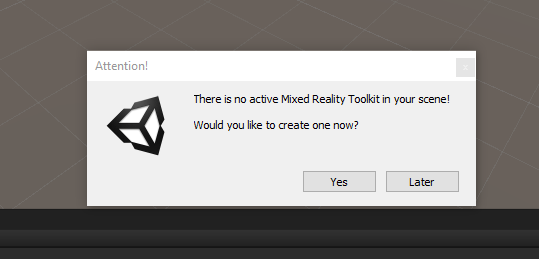
When playing a scene without configuring Mixed Reality Toolkit you will get a warning.
If you click Later the message will immediately pop up again. This will happen endlessly or until you click Run.
If you click on 'Run' it will throw exceptions.
Expected Behavior
No warning, no error. I may not want Mixed Reality Toolkit in my scene. Please do not pop a warning message each time I run a scene that does not have a toolkit configured just because I have a toolkit in the project.
Actual Behavior
This message pops up endlessly:
This error occurs if you hit run:

Steps to reproduce
Create new scene in a project hat has MixedRealityToolkit in the assets. Click run without configuring.
Unity Editor Version
2018.3.6f1
Mixed Reality Toolkit Release Version
Latest from github on release MRTK branch
 markgrossnickle
All 4 comments
Related, and better stated than #3526 .
Thanks!
 davidkline-ms
on 5 Mar 2019
davidkline-ms
on 5 Mar 2019
I've gone through replicating this and it seems a little more serious that this concludes.
Once ANY scene has instantiated any MRTK component that replies on the MRTK Manager, it would seem that something isn't destryed correctly as the MRTK persists in the editor.
Restarting the editor clears the issue.
Replicating
- Create a clean project
- Import MRTK - Ignore or later the VR check
- Start a blank scene and save
- Observe no warnings
- Create a new scene and use the MRTK -> Configure and run scene
- Observe no warnings
- Create another new blank scene and run
- Observe the MRTK warnings appear as if MRTK is being called
- Load the original Blank scene
- Observe the MRTK warnings appear as if MRTK is being called
- Restart Unity
- Load the original Blank scene
- Observe no warnings
So MRTK is not being cleared down somewhere once called.
IF there is ANY MRTK component in the scene, then the behaviour is correct, as the MRTK Manager will create itself if it doesn't exist (removing the MRTK Manager from a scene is not enough, as we add a Gaze manager to the camera as well)
 SimonDarksideJ
on 5 Mar 2019
SimonDarksideJ
on 5 Mar 2019
Somewhat necro-ing an older bug, but this is come up from numerous people - there are cases where people want to have the MRTK around in assets but not necessarily have things in scene (i.e. I can have things in source control and want to do non-MRTK things in an experimentation scene) but this popup keeps coming up.
Scheduling this to fix in GA
 wiwei
on 10 Jun 2019
wiwei
on 10 Jun 2019
Alrighty, got a chance to take a look at this one today. This got removed as part of
https://github.com/microsoft/MixedRealityToolkit-Unity/pull/4035
The warnings now are actually in the MRTK inspectors themselves (for example, if you attach an Interactable to a GameObject but you don't have an MRTK object in the scene, you'll see a warning in the Interactable's inspector, not a intrusive popup.
wiwei
on 13 Jun 2019
Related issues
 amfdeluca
·
3Comments
amfdeluca
·
3Comments
 brean
·
3Comments
brean
·
3Comments
 dfields-msft
·
3Comments
dfields-msft
·
3Comments
 reillydonovan
·
3Comments
reillydonovan
·
3Comments
 DanAndersen
·
3Comments
DanAndersen
·
3Comments
Most helpful comment
I've gone through replicating this and it seems a little more serious that this concludes.
Once ANY scene has instantiated any MRTK component that replies on the MRTK Manager, it would seem that something isn't destryed correctly as the MRTK persists in the editor.
Restarting the editor clears the issue.
Replicating
So MRTK is not being cleared down somewhere once called.
IF there is ANY MRTK component in the scene, then the behaviour is correct, as the MRTK Manager will create itself if it doesn't exist (removing the MRTK Manager from a scene is not enough, as we add a Gaze manager to the camera as well)