Mixedrealitytoolkit-unity: QRTracker reads codes upside down
As shown below, QR Codes have 3 position/orientation elements and an alignment marker, which is _always_ bottom right.
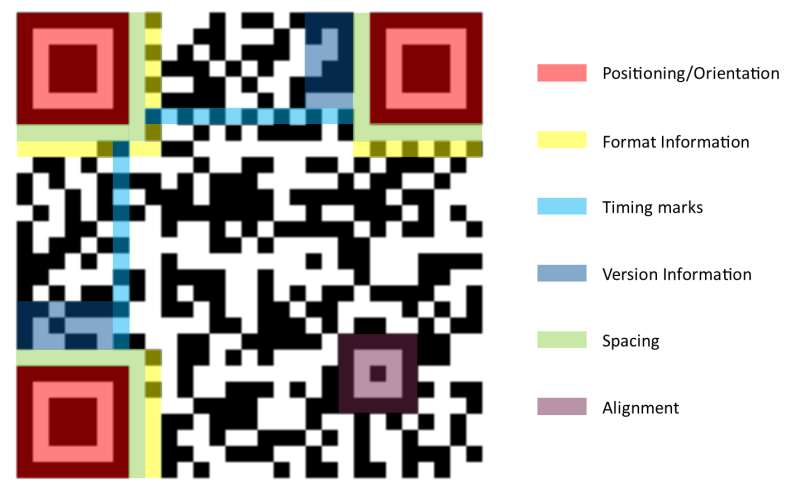
However, when the QR Tracker reads a marker it does so upside-down. It's very apparent in the sample as everything on the QRCode prefab is turned 180 degrees on the x axis to compensate for this, and the entire prefab is also rotated 180 degrees for editing-purposes.
Obviously QR Codes can be any orientation, but the orientation/alignment parts are to then rotate it round during processing to be the correct way up.
You can see an example in Sean's video here where the code is held at the correct orientation (the three big squares are top left, top right, bottom left) but the y-axis arrow is pointing downwards in-engine.
It's a very minor issue, but because all QR codes would be generated with the correct orientation when using a code generator it could very easily cause a lot of confusion so it would be best to fix it sooner rather than later.
I'm not sure it's necessarily reading them rotated, as the x-axis and z-axis are correct (ignoring a debate on which way the +ive z-axis should go relative to the code), so it's just that the y-axis is flipped I guess?
 BenWoodford
All 14 comments
I can't assign people, so tagging the relevant people: @Yoyozilla @chgatla-microsoft
BenWoodford
on 8 Oct 2018
@BenWoodford I was looking into using QR codes in my app. Chose not to go ahead with it because of limited support and need to wrap older libraries. What are you using here, if I may ask? Any links to documentation, tutorial would be greatly appreciated.
 lordlycastle
on 8 Oct 2018
lordlycastle
on 8 Oct 2018
@lordlycastle this is a new feature in WinMR For QR code recognition that provides the spatial position and rotation. It's in the htk_development branch and somewhat experimental.
Doesn't work with Hololens right now.
BenWoodford
on 8 Oct 2018
@BenWoodford, The QR codes are not flipped or read inverse it is just the how a coordinate system is attached to the QR code. Choosing a coordinate system on an object is arbitrary as you mentioned, it is chosen in the platform with x-axis going top-left to top-right, and y axis from top-left to bot-left with origin at the top-left corner of topleft. In platform the z-axis is Right-handed, in unity it is Left-Handed. This might seem a little weird but QR codes can be placed on walls on floor on ceiling on differently oriented planes. So depending on the situations which the app knows or expects and will use those relative transforms to align real world objects to the QR coordinate system.
 chgatla-microsoft
on 8 Oct 2018
chgatla-microsoft
on 8 Oct 2018
Even so, the Unity implementation should really keep up as up, right? If I put a QR code on something the correct way up and it’s upside-down in the app then that really shouldn’t be expected behaviour.
It also makes it a lot more annoying to develop as everything you attach to a QR code has to be flipped 180 on the x
BenWoodford
on 8 Oct 2018
@chgatla-microsoft is it easy to edit the script so that the y axis goes from the bottom-left to the top-left? I'm happy to make edits, as needed so that the y direction is more intuitive for developers. Tagging @BenWoodford
 mr0ng
on 9 Oct 2018
mr0ng
on 9 Oct 2018
What's the verdict on this? I feel like I shouldn't do any work with the tracker right now as the Y-axis may flip at any moment
BenWoodford
on 16 Oct 2018
It is easier to flip it in the script, but it will deviate from other spatial objects (that may come soon). If this is what is needed then the coordinate system should be adjusted inside the tracker, rather in the script. We will keep this in mind for when we update the tracker. The coordinate system was chosen to align with the QR code module axis, keeping in mind as how image axis are defined, we will definitely revisit this decision. We can vote about this soon as to where and how the coordinate system should be attached to the QR code.
chgatla-microsoft
on 16 Oct 2018
Yeah, makes sense. I don't think it necessarily makes sense to do it at a tracker level as everything has different coordinate systems anyway. handling it in the coordinate system script you included with the preview would probably make more sense as you'll be using that for other spatial objects too right?
My matrix maths is terrible so I wouldn't like to tinker with it
Also, other spatial objects eh? 👀
BenWoodford
on 16 Oct 2018
@chgatla-microsoft any update on this? Bit wary of doing anything in an app now that this is release because I may have to suddenly fix the app for any changes made. Could you perhaps have some way of providing the currently system used via the API so that the SpatialGraphCoordinateSystem script knows which way to orient things? Then a fix can be applied to the script as it is, without breaking things down the line.
I think we should probably work out who should handle this and stick with that. Either it's handled at a tracker level (in which case it may interfere with existing solutions) or it's handled in the SpatialGraphCoordinateSystem used by MRTK and that will then need to apply to _all_ Spatial objects that may come in the future, which I assume it would anyway as that seems to be an abstraction for any spatial objects, not just QR codes?
BenWoodford
on 14 Nov 2018
It has been discussed internally and the coordinate system for the QR code is as defined by the platform. Currently there no plan of record to change it. The App has the full flexibility to attach any coordinate systems to the QR code. As almost always there is a transform that the app needs to apply to place the holograms w.r.t the QR codes. We have clearly documented how the coordinate system is attached to a QR code so there is no confusion. We can simplify the AttachtoQRCode script to take a relative transform and orient as needed.
chgatla-microsoft
on 15 Nov 2018
Ideally this would be to extend the SpatialGraphCoordinateSystem to take a relative transform (by default it will be identity) and the orient the coordinate system. Attach to qr code will define a property to take the transform and use it on the SpatialGraphCoordinateSystem.
chgatla-microsoft
on 15 Nov 2018
In which case I would propose that we change the coordinate system in just the Unity implementation to switch to the Unity standard for coordinate systems where up is positive Y, just for the MRTK implementation of this. As long as the coordinate system is not going to change under the hood any time soon then it’s safe to do so. I’ve already applied a 180 X rotation to my working copy of the SpatialGraphCoordinateSystem script which seems to work fine (albeit the origin is still the top corner so I need to shift everything down by the size of the code...) and makes codes have the same local system as Unity’s UI - Y is up, X is right and Z points behind the object.
@chgatla-microsoft will the QR codes be coming out of preview any time soon? Or will they be staying in the preview namespace for a while?
BenWoodford
on 15 Nov 2018
We will be releasing an updated version of QR tracking for HL2. Closing this issue as I think it will be fixed!
 Yoyozilla
on 24 Jul 2019
Yoyozilla
on 24 Jul 2019
Related issues
 provencher
·
3Comments
provencher
·
3Comments
 brean
·
3Comments
brean
·
3Comments
 chrisfromwork
·
3Comments
chrisfromwork
·
3Comments
 rigma
·
3Comments
rigma
·
3Comments
 nuernber
·
3Comments
nuernber
·
3Comments
Most helpful comment
Even so, the Unity implementation should really keep up as up, right? If I put a QR code on something the correct way up and it’s upside-down in the app then that really shouldn’t be expected behaviour.
It also makes it a lot more annoying to develop as everything you attach to a QR code has to be flipped 180 on the x