Mixedrealitytoolkit-unity: When unloading and loading a new scene (Non additive), managers do not reinitialize properly
Does this affect the legacy HoloToolkit (master) or the Mixed Reality Toolkit (mrtk_release)?
mrtk_development
Describe the bug
GazeInput is not registered on Start. RaiseSourceDetected is called in GazeProvider#OnStart but await WaitUntilInputSystemValid does not continue.
When quitting application Assertion fails:
Assertion failed: Gaze was never registered with the Input Manager!
UnityEngine.Debug:Assert(Boolean, String)
Microsoft.MixedReality.Toolkit.SDK.Input.MixedRealityInputManager:RaiseSourceLost(IMixedRealityInputSource, IMixedRealityController) (at Assets/MixedRealityToolkit-SDK/Features/Input/MixedRealityInputManager.cs:521)
Microsoft.MixedReality.Toolkit.SDK.Input.GazeProvider:OnDisable() (at Assets/MixedRealityToolkit-SDK/Features/Input/GazeProvider.cs:343)
To Reproduce
Steps to reproduce the behavior:
- Start a scene with MixedRealityManager and a GazeProvider with Default Cursor
- Cursor is not visible
- Cursor does not appear on object with collider
Actual behavior
Cursor stays in the middle of the head and is inactive
Unity Editor Version
2018.1.9f2
Mixed Reality Toolkit Release Version
vNext (mrtk_development)
Rev: 7c960a6e46c331171900f24e09e3935e6ccc583a
 wassx
wassx
All 23 comments
Tested in a freshly created project with nothing than a cube in the scene, and there it works.
wassx
on 11 Sep 2018
Retested and could reproduce in multiple scene scenarios (Networkmanager loads next scene).
This is related to: https://github.com/Microsoft/MixedRealityToolkit-Unity/issues/2653
Is there a quick workaround please? (e.g. remove the wait and let gracefully re-register the input?)
wassx
on 11 Sep 2018
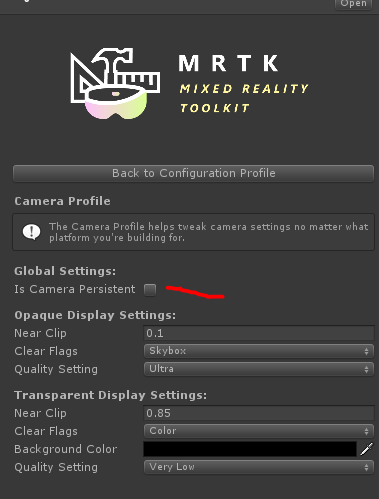
Did you mark the camera as persistent in your camera profile?
 StephenHodgson
on 11 Sep 2018
StephenHodgson
on 11 Sep 2018
Yes, tick is set and camera is not destroyed.
wassx
on 11 Sep 2018
You only have one Mixed Reality Manager and no camera's (marked as main) in your other scenes?
StephenHodgson
on 11 Sep 2018
Yes. Additionally there is an error:
XR: OpenVR Error! OpenVR failed initialization with error code VRInitError_Init_HmdNotFound: "Hmd Not Found (108)"!
despite there is no OpenVr controller mapping set. Don't know if this could be related.
wassx
on 11 Sep 2018
So it happens when you're targeting standalone?
StephenHodgson
on 11 Sep 2018
No, same for UWP build target. Tested in Editor. Scripting Backend is .Net not IL2CPP.
OpenVR Error only with Standalone Target.
wassx
on 11 Sep 2018
When RaiseSourceDetected() is called from GazeProvider#OnStart() I get already the direction vector of: Debug.LogWarning(InputSystem.GazeProvider.GazeDirection); before the WaitUntilInputSystemValid.
wassx
on 11 Sep 2018
Okay, I'll try and figure out a test environment to repro this like we did at the summit.
StephenHodgson
on 11 Sep 2018
I got it running when I replace the WaitUntil with a Coroutine:
        private void RaiseSourceDetected() {
            StartCoroutine(RaiseSource());
        }

        private IEnumerator RaiseSource() {
            while (InputSystem == null) yield return null;
            InputSystem.RaiseSourceDetected(GazeInputSource);
            GazePointer.BaseCursor?.SetVisibility(true);
        }
And in the InputSystemGlobalListener:
        protected virtual void Start()
        {
            if (lateInitialize)
            {
                StartCoroutine(Register());
            }
        }

        private IEnumerator Register() {
            while (InputSystem == null) yield return null;
            lateInitialize = false;
            InputSystem.Register(gameObject);
        }
Let me test this out. I'd like to keep the async. Can you write me a simpler network scene setup I can repro this bug with on one of your banches?
StephenHodgson
on 17 Sep 2018
GazeTest.zip
Totally agree. I attached a simple scene, just open the SampleScene and start. There is a script on the NetworkManager, ("SceneLoad") loading the offline scene.
When in the offline scene you cannot see the cursor and when you stop an exception occurs.
For me it seems like a unity bug with the WaitUntil() due the input system is already there but the waituntil does not continue (maybe wrong instance?).
wassx
on 17 Sep 2018
Can you also post a copy of the exception you're running into please?
StephenHodgson
on 17 Sep 2018
Yeah the old uNET stuff isn't very friendly as they unload everything in the scene. I thought we solved this at the summit by marking the main camera as don't destroy on load (which is optional). I'll take a look after work later today.
StephenHodgson
on 17 Sep 2018
Likely this is an issue with more than just the input manager, but may be something we need to stress test with all managers, so I updated the issue title.
StephenHodgson
on 18 Sep 2018
The error is:
failed: Gaze was never registered with the Input Manager!
UnityEngine.Debug:Assert(Boolean, String)
Microsoft.MixedReality.Toolkit.SDK.Input.MixedRealityInputManager:RaiseSourceLost(IMixedRealityInputSource, IMixedRealityController) (at Assets/MixedRealityToolkit-SDK/Features/Input/MixedRealityInputManager.cs:521)
Microsoft.MixedReality.Toolkit.SDK.Input.GazeProvider:OnDisable() (at Assets/MixedRealityToolkit-SDK/Features/Input/GazeProvider.cs:343)
When putting breakpoints in the RaiseSourceDetected:
When RaiseSourceDetected() is called from GazeProvider#OnStart() I get already the direction vector of:
Debug.LogWarning(InputSystem.GazeProvider.GazeDirection);before the WaitUntilInputSystemValid.
I removed the networkmanager and in the end it boils down that just a SceneManager.LoadScene("offline"); can reproduce the issue.
I'm really curious what's under the hood of WaitUntil() because in the end it's just an IEnumerator too.
wassx
on 18 Sep 2018
GazeTest_basic.zip
Updated example
wassx
on 18 Sep 2018
WaitUntil is unity's built in yield instruction.
StephenHodgson
on 21 Sep 2018
@wassx I was able to fix this by moving the LoadScene to the update and loaded after pressing space bar instead of loading the scene immediately on start.
again, be sure to have the camera profile persistence enabled.
    private void Update()
    {
        if (Input.GetKeyUp(KeyCode.Space))
        {
            SceneManager.LoadScene("offline");
        }
    }
Likely the system breaks bc we load a scene before the whole system has finished starting up.
There's no real way to protect against that, but I suppose we could try to mitigate it by resetting the whole system if a scene load is detected while the MR Manager is doing its internal setup.
We could fix this by making the MR Manager a pure class instead of a GameObject, but then we would loose the hook into the scene's update loop.
StephenHodgson
on 6 Oct 2018
Ok perfect. I moved the MxrManager to the offline scene because the inital master scene does nothing than initializing the networkmanager and our services. The networkmanager automatically switches over to the offline scene where first interactions take place. And there is now the mxrmanager,...
Thank you!
wassx
on 22 Oct 2018
Ok, still had troubles with the offline scene. Now I added a "WaitForSeconds" in the Start of our networkmanager before loading the offline scene. This would be a workaround, but very ugly. Would it be possible to have an event from the MxrMgr when its init is done?
wassx
on 23 Oct 2018
Related issues
StephenHodgson
·
3Comments
 reillydonovan
·
3Comments
reillydonovan
·
3Comments
 ritijain
·
3Comments
ritijain
·
3Comments
 brean
·
3Comments
brean
·
3Comments
 rigma
·
3Comments
rigma
·
3Comments