Mixedrealitytoolkit-unity: vNext: [IL2CPP] deployment failure (DEP0700) "splash screen image cannot be located"
Overview
Error DEP0700: Registration of the app failed. [0x80073CF6] AppxManifest.xml(28,27): error 0x80070002: Cannot install or update package Microsoft.MixedReality.Toolkit_ph1m9x8skttmg because the splash screen image [SplashScreen.png] cannot be located. Verify that the package contains an image that can be used as a splash screen for the application, and that the package manifest points to the correct location in the package where this splash screen image can be found.
Expected Behavior
Can deploy
Actual Behavior
Cannot deploy
Steps to reproduce
- Clone repository
- Open project
- Pick favorite scene
- Build for UWP
- Load sln in VS
- Build/deploy (HoloLens or Immersive Headset)
Unity Editor Version
2018.1.9f1
Mixed Reality Toolkit Release Version
mrtk_development
 davidkline-ms
All 15 comments
Sounds like we didn't set a splash screen in the project settings.
 StephenHodgson
on 23 Aug 2018
StephenHodgson
on 23 Aug 2018
The project looks ok. the asset is there and the manifest looks right... It builds and deploys fine using the .net backend
davidkline-ms
on 23 Aug 2018
Wondering if this might actually be a unity bug. Seems like the asset is copied into the directory properly but not referenced by the generated solution.
StephenHodgson
on 23 Aug 2018
Yes, confirmed, I'm getting this error in an empty project with IL2CPP.
StephenHodgson
on 24 Aug 2018
Is there any workaround for this? I'm not actually using the MR toolkit, but just exported an IL2CPP VS project from Unity and got this error. We'd like to use IL2CPP with Vuforia to have (hopefully) faster tracking speeds.
 Naphier
on 28 Aug 2018
Naphier
on 28 Aug 2018
Open the VS Project and manually set the splash screen in the appx manifest.
StephenHodgson
on 28 Aug 2018
Having posted the below, I found a different workaround for the issue in this thread:
https://forum.unity.com/threads/vs-2017-update-15-8-and-unity-2018-2-cant-deploy.545496/
---Original post follows---
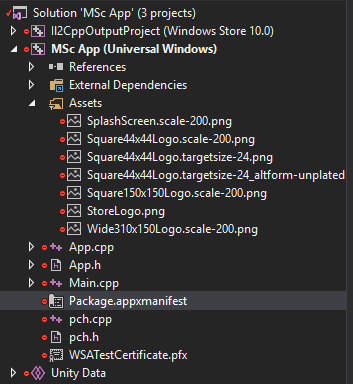
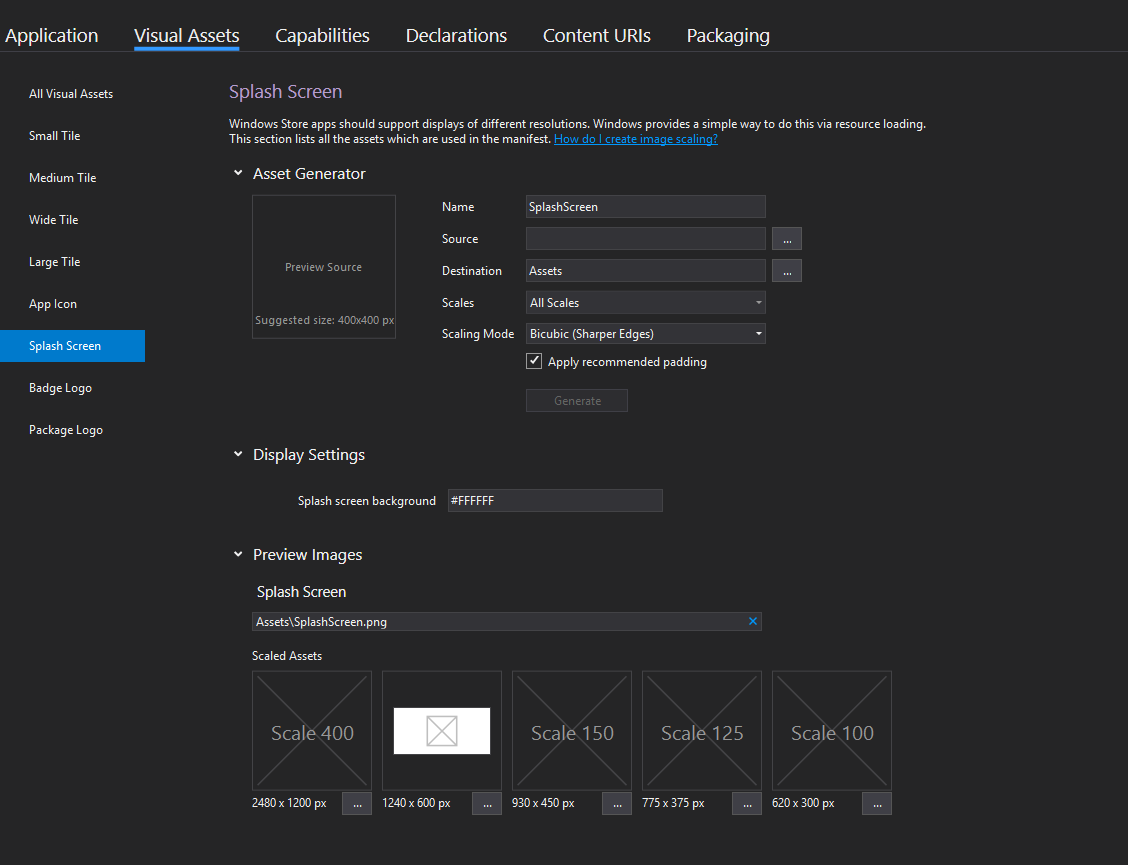
Having the same issue, but no luck with the above workaround. I've reset the splash screen image in the manifest (although it seemed to be set correctly already), and checked the files are in the Assets folder. I even tried copying the Package.appxmanifest file from a .net build folder to the IL2CPP build, but no luck. I am using the MRTK and Vuforia, though I realise this is considered a Unity issue. Can anyone please advise?
Attached are screengrabs of the splash screen settings, and a view of the asset files, in VS.
 StubbornMinion
on 8 Sep 2018
StubbornMinion
on 8 Sep 2018
I'm having this problem on the non-vNext MRTK also, I _think_ its a Unity bug. A way to solve it is:
1) Copy UWP/Proj/Assets/SplashScreen.Scale-200.png to UWP/Proj/Assets/SplashScreen.png
2) Add this "new" SplashScreen.png to the project.
 XPav
on 20 Sep 2018
XPav
on 20 Sep 2018
Here's the Unity bug tracking the splashscreen issue:
https://issuetracker.unity3d.com/issues/uwp-cpp-projects-report-not-having-a-splash-screen-set-which-fails-deployment
There are plans to backport to 2017.4 and 2018.2 but no word on 2018.1.
 Ecnassianer
on 20 Sep 2018
Ecnassianer
on 20 Sep 2018
Here's a work around:
```c#
[PostProcessBuild(2)]
public static void SplashScreenFix(BuildTarget target, string pathToBuild)
{
if (target != BuildTarget.WSAPlayer ||
PlayerSettings.GetScriptingBackend(BuildTargetGroup.WSA) != ScriptingImplementation.IL2CPP)
{
return;
}
        var vcxProj = Directory.GetFiles(pathToBuild, "*.vcxproj", SearchOption.AllDirectories)
            .Where(project => project.IndexOf("il2cppoutputproject", StringComparison.CurrentCultureIgnoreCase) < 0);
        var projects = vcxProj as string[] ?? vcxProj.ToArray();

        Assert.IsTrue(projects != null);
        Assert.IsTrue(projects.Length == 1);

        var vcxProject = projects[0];
        var projXml = XDocument.Load(vcxProject);
        var pngElements = projXml.Descendants().Where(x =>
        {
            var val = x.FirstAttribute?.Value.Contains(".png");
            return val.HasValue && val.Value;
        });

        foreach (var element in pngElements)
        {
            foreach (var child in element.Elements())
            {
                if (child.Name.ToString().Contains("ExcludeFromResourceIndex"))
                {
                    child.Remove();
                }
            }
        }

        projXml.Save(vcxProject);
    }
```
StephenHodgson
on 20 Sep 2018
Thanks much, where should I put this?
XPav
on 21 Sep 2018
Any editor script
StephenHodgson
on 21 Sep 2018
I'm having this problem on the non-vNext MRTK also, I _think_ its a Unity bug. A way to solve it is:
- Copy UWP/Proj/Assets/SplashScreen.Scale-200.png to UWP/Proj/Assets/SplashScreen.png
- Add this "new" SplashScreen.png to the project.
Worked for me, thanks!
 CasaSpider
on 22 Sep 2018
CasaSpider
on 22 Sep 2018
In the Unity 2018.2.9 release should be the fix:
(1073029 (1071331)) - Universal Windows Platform: Fixed "SplashScreen is missing" error when deploying UWP apps with Visual Studio 15.8.
I will update and give it a try.
 rob100
on 26 Sep 2018
rob100
on 26 Sep 2018
An update on this issue from the Unity side, in case anyone else is still hitting it.
It's been fixed in 2018.2 and up and also 2017.4 (LTS) but won't be fixed for 2018.1 as that release is no longer being supported.
If you cannot migrate to one of these releases, the workaround is basically to remove the "
 timkeo
on 9 Oct 2018
timkeo
on 9 Oct 2018
Related issues
 nuernber
·
3Comments
nuernber
·
3Comments
 dustin2711
·
3Comments
dustin2711
·
3Comments
 jimstack
·
3Comments
jimstack
·
3Comments
 markgrossnickle
·
3Comments
markgrossnickle
·
3Comments
 ritijain
·
3Comments
ritijain
·
3Comments
Most helpful comment
Any editor script