Mixedrealitytoolkit-unity: vNext Task: New Interactable Object
Overview
Add new button UI control system which unifies old CompoundButton and InteractiveButtonComponents
Requirements
A list of the required functionality this task requires to implement.
- A interaction system that is easy for designers to create buttons and other interactables with sensory feedback.
- An easy to use inspector that ties everything together
- States for interactables are configurable and easily extended.
- Profiles are a collection of themes paired to game objects.
- Themes allow the designer to assign object property values to states.
- Events are easily extendable at usable in the Inspector.
- Events can also be used by developers using code in optimized way.
- Events may care about states that themes do not.
- Toggle interaction and theming is supported
- Action filtering
- Keyword or voice commands
- Global listening can be enabled
- A collection of basic themes
- A collection of basic events
- A collection of button prefabs to show examples of interaction types
Acceptance Criteria
- [ ] Interactable assets including models, materials, textures, animations
- [ ] Inspector base code for layout, buttons and formatting
- [ ] InspectorFields, used by Event system and themes to allow for adding custom properties to a subclass that are automatically rendered in the inspector.
- [ ] Layout code to make building 3D and responsive buttons easier for designers.
- [ ] State management system using ScriptableObjects and a state logic abstract class allows for easily choosing only the states a designer cares about. A custom logic class can be created and assigned to handle unique edge cases.
- [ ] States are easily configured using the Unity Editor inspectors
- [ ] Profiles in the interactable is a list of Themes paired with the gameObjects they control
- [ ] Themes read in states and allow a designer to assign property values for each state
- [ ] Themes should manipulate transform, Text and shader properties
- [ ] Themes will be saved as ScriptableObjects for easy reuse
- [ ] Themes will have an easy to use inspector
- [ ] Event system that provides some basic functionality through the inspector, but is easily customizable and extendable. For instance default expectation is a click event, but could be extended to handle two handed gestures.
- [ ] Events can monitor Interactable states as well as all registered input events, the event system may care about states that themes do not.
- [ ] Events will have an easy interface for developer to connect to and use, either adding MonoBehavior components to the Interactable object or referencing the interactable from other objects. (in progress)
- [ ] Interactable will combine all the functionality above into one component that is easy to configure.
- [ ] All other functionality is not required (besides states) for a button to work and allow a designer to hook up an onClick event. Unused functionality will be collapsed, but easily discovered.
- [ ] Designers will be able to do basic configuration of the button like assigning a voice command keyword, assigning an action filter or setting the button to global a global listener.
- [ ] Interactables will filter actions and handle controller inputs that are assigned to actions ( in progress)
- [ ] A designer will be able to easily assign themes and game objects in the profiles section.
- [ ] A designer will be able to update theme properties through the interactable's insector or through the theme's inspector.
- [ ] A theme can be assigned to any material property available to the game object.
- [ ] New theme functionality can be easily added by a developer by extending the ThemeBase class.
- [ ] New events or the way states are evaluated can be created by extending the RecieverBase.
- [ ] A MonoBehavior Receiver class will be created to allow developers to easily access interactable states and pointer information.
 cre8ivepark
All 7 comments
2855 branch
Summary
- ScriptableObject contains a list of interaction states and loads a script to evaluate them.
- ScriptableObject for themes, allows the designer to set visual properties to interaction states.
- Event system monitors the Interactable and looks for a defined pattern , like click or hold, when a pattern is found and event is fired
- Interactable brings all these features together to allow designers to create buttons with visual feedback.
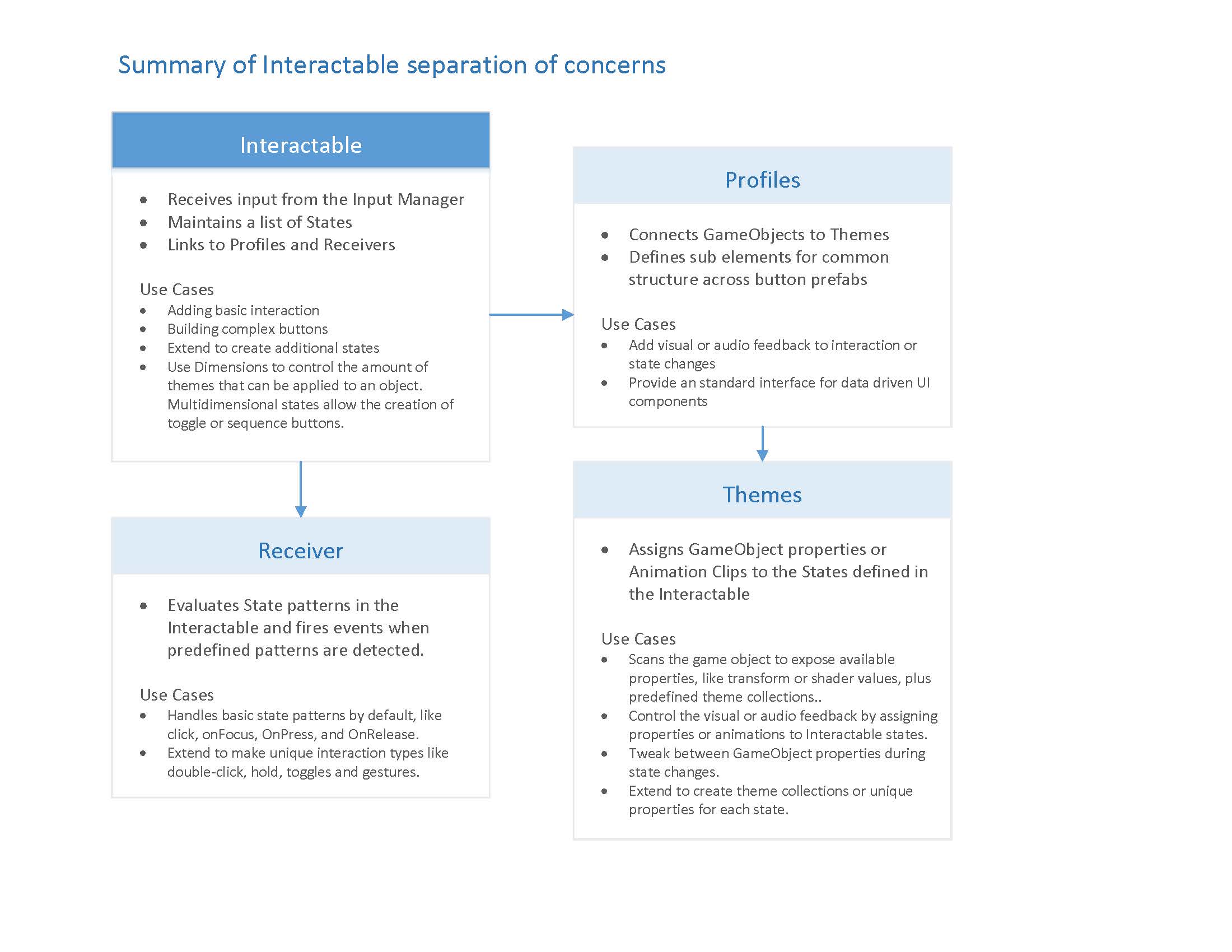
Outline
The overview shows the structure and how each feature can be extended to create all kinds of control types. Profiles define the button elements and connect theme to themes. Events and receivers are extended to handle different input types.
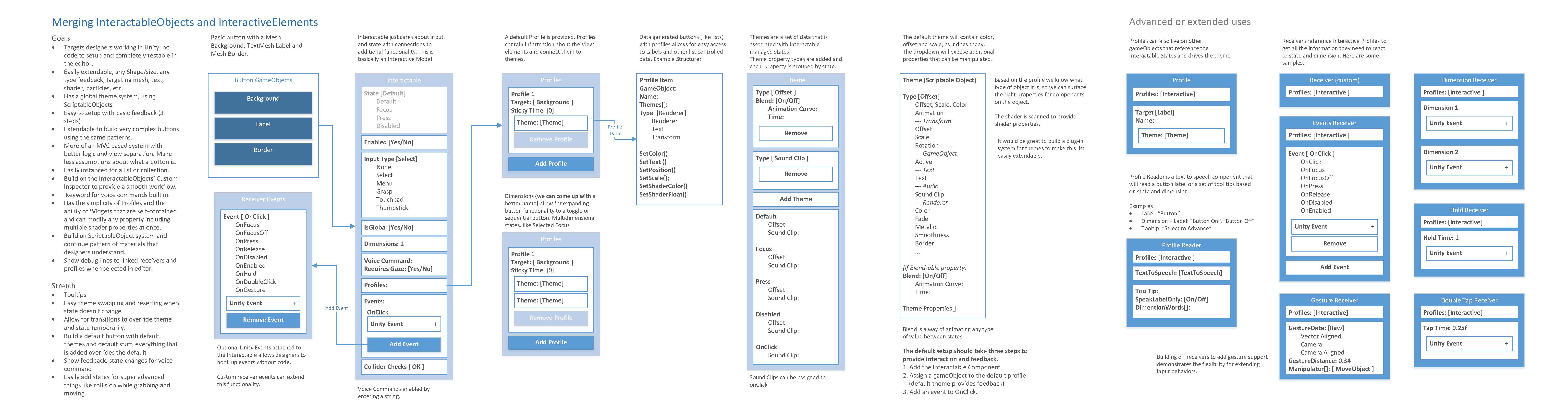
Wireframes
Lastly, the link below is a PowerPoint file with wireframes of the Unity UI flow for building a custom control, setting up feedback and hooking up events. See the notes for details about each screen. I have tested this with designers that have limited Unity exposure to build something that makes sense from the user perspective as well as a technical one.
https://1drv.ms/p/s!AqOxnyip025RjKZMACd5wK3dMC4pgQ
 killerantz
on 17 Sep 2018
killerantz
on 17 Sep 2018
I finished porting the original Interaction Receiver from HTK this morning. I'm setting up a demo scene before I open the PR. It might cover what you need as far as receivers go, potentially you could extend it for UnityEvents, but I know that's up for discussion based on the comments in the open PR.
 radicalad
on 17 Sep 2018
radicalad
on 17 Sep 2018
One potential issue @radicalad , is your reference to the UnityEvents.
Whereas we have implemented a manager specific Event System in MRTK, we have avoided the use of UnityEvents as they create a lot of garbage for the GC and have a lot of overhead.
I'd recommend looking through the Input System code to see how we've implemented events in the MRTK currently.
 SimonDarksideJ
on 18 Sep 2018
SimonDarksideJ
on 18 Sep 2018
@SimonDarksideJ just to clarify, I'm NOT using UnityEvents 😄 . I was just suggesting it may be a good starting point for @killerantz and was referring to the UnityEvents mention here: #2800
radicalad
on 18 Sep 2018
We can still use Unity Events, but I think we just want to try and minimize their use as much as possible.
The main goal is to make sure people can still wire up actions and events in the inspector without writing a single line of code.
 StephenHodgson
on 18 Sep 2018
StephenHodgson
on 18 Sep 2018
I see a large list of items in this acceptance criteria. I think this task needs to be updated to reflect the current status of this feature branch.
CC: @cre8ivepark, @killerantz
StephenHodgson
on 9 Nov 2018
fixed with #3380
 davidkline-ms
on 5 Feb 2019
davidkline-ms
on 5 Feb 2019
Related issues
 rigma
·
3Comments
rigma
·
3Comments
 overedge
·
3Comments
overedge
·
3Comments
 matatabi-ux
·
3Comments
matatabi-ux
·
3Comments
 DanAndersen
·
3Comments
DanAndersen
·
3Comments
 dfields-msft
·
3Comments
dfields-msft
·
3Comments
Most helpful comment
We can still use Unity Events, but I think we just want to try and minimize their use as much as possible.
The main goal is to make sure people can still wire up actions and events in the inspector without writing a single line of code.