Mixedrealitytoolkit-unity: Input Mapping layout needs to be updated to be able to see Input Type config
Overview
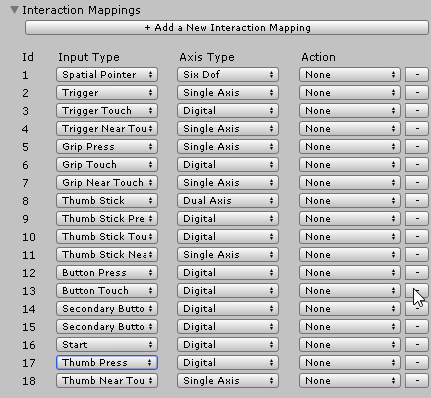
Currently the layout of the Input mapping grid for interactions has equal weight for all three columns. However more space is needed for the input types and possibly the Action.
This the spacing needs to be altered to reduce the width (if possible) to the Axis type and give more space to the other two columns. If possible and reduce the spacing between the columns to give more visibility.
The screenshot below highlights the readability issue with some input types
 SimonDarksideJ
All 6 comments
I was also mulling about what to do here. I was thinking about having it's own specific window with controller images and drop downs for each button. Kinda like any other button mapping UX you'd see in the wild.

 StephenHodgson
on 21 Jul 2018
StephenHodgson
on 21 Jul 2018
I'm a bit puzzled on the second column... Why is there a dropdown for axis type? We cannot change a button from Digital to something else, so why isnt it just a simple text field?
I've seen some pretty straight forward systems on other engines. Perhaps we can do something similar (i'll mock something up "soon")
 davidkline-ms
on 26 Jul 2018
davidkline-ms
on 26 Jul 2018
It'll end up being a simple drop down with actions
StephenHodgson
on 26 Jul 2018
We've been having a lot of discussions on this @davidkline-ms
For Alpha, we're going to disable the "advanced" view where you can create mappings. Instead, you will only be able to configure the actions for the predefined inputs setup for the controllers.
We need more time to review the cases where someone may want to setup their own mappings.
Another thing missing, which will also likely be done in beta, is the filtering of the selected Actions by their AxisType, so only configured actions for a specific action type with the corresponding axis can be selected.
SimonDarksideJ
on 26 Jul 2018
Here's a few concepts for assigning actions I came up with over the weekend.


StephenHodgson
on 20 Aug 2018
This looks fantastic and more along the lines of a real stand out feature of the MRTK. No one else has anything like this (steam comes close)
SimonDarksideJ
on 20 Aug 2018
Related issues
 jimstack
·
3Comments
jimstack
·
3Comments
 provencher
·
3Comments
provencher
·
3Comments
 matatabi-ux
·
3Comments
StephenHodgson
·
3Comments
matatabi-ux
·
3Comments
StephenHodgson
·
3Comments
 amfdeluca
·
3Comments
amfdeluca
·
3Comments
Most helpful comment
We've been having a lot of discussions on this @davidkline-ms
For Alpha, we're going to disable the "advanced" view where you can create mappings. Instead, you will only be able to configure the actions for the predefined inputs setup for the controllers.
We need more time to review the cases where someone may want to setup their own mappings.
Another thing missing, which will also likely be done in beta, is the filtering of the selected Actions by their AxisType, so only configured actions for a specific action type with the corresponding axis can be selected.