Mixedrealitytoolkit-unity: Make the CompoundButtonSpeech.cs available and add CompoundButtonEventTrigger.cs to attach an event to the keyword recognized through speech.
Overview
Make the CompoundButtonSpeech.cs available and add CompoundButtonEventTrigger.cs to attach an event to the keyword recognized through speech.
For the test, I did it in another scene ("SpeechButtonEvent"), but I think it's better to add that "button" to the scene "InteractiveButtonComponents".
It's my first time to submit an issue, please tell me if there are any change that have to be made.
I'm sorry for the poor quality of the scene, I hope it's not that difficult to understand.
Another upgrade possible is to retrieve automatically the keyword from all the compound button currently active on the scene in the "Keyword Dictionnary" of SpeechInputSource.
path: HoloToolkit-Examples/UX/Scenes/SpeechButtonEvent.unity
Project
Expected Behavior
- The button recognize the keyword.
- The button do the event action attach to it after the previous behavior.
Actual Behavior
Nothing happens when the script is attached to a button.
Steps to reproduce
- In a new scene, add the MixedRealityCameraParent, a DirectionalLight, an InputManager and a DefaultCursor.
- Add a gameobject with the component SpeechInputSource.cs in the scene.
- Add another gameobject with the components Collider, Mesh, CompoundButton.cs, CompoundButtonSpeech.cs, CompoundButtonText.cs, CompoundButtonMesh.cs and CompoundButtonEventTrigger.cs.
- Make the button you want as long as you can see it. Then add an action for the Event Trigger and what it should do.
- Add the keyword to be recognized in SpeechInputSource.cs.
Don't forget to apply MixedReality Project Setting!
Unity Editor Version
2018.1.0f2
Mixed Reality Toolkit Release Version
2017.4.0.0 (May 2018)
 Pangels
All 14 comments
Thanks @Pangels ! I'll test out the scene.
 cre8ivepark
on 28 Jun 2018
cre8ivepark
on 28 Jun 2018
@cre8ivepark Hi ! Did you test the scene ? Any feedback would really help me =)
Pangels
on 3 Jul 2018
@Pangels I am trying to figure out why existing OnSpeechKeywordRecognized() in CompoundButtonSpeech.cs is not working. It seems like this code block in CompoundButtonSpeech is essentially doing the same thing as CompoundButtonEventTrigger.cs.
    public void OnSpeechKeywordRecognized(SpeechEventData eventData)
    {
        if (!gameObject.activeSelf || !enabled)
            return;

        if(eventData.RecognizedText.Equals(keyWord))
        {
            // Send a pressed message to the button through the InputManager
            m_button.TriggerClicked();
        }
    }
Maybe it is because InteractableObjectExample scene is missing InputSpeechSource. I'll test this out.
cre8ivepark
on 5 Jul 2018
Be sure to register your object as a listener with the input system.
 StephenHodgson
on 5 Jul 2018
StephenHodgson
on 5 Jul 2018
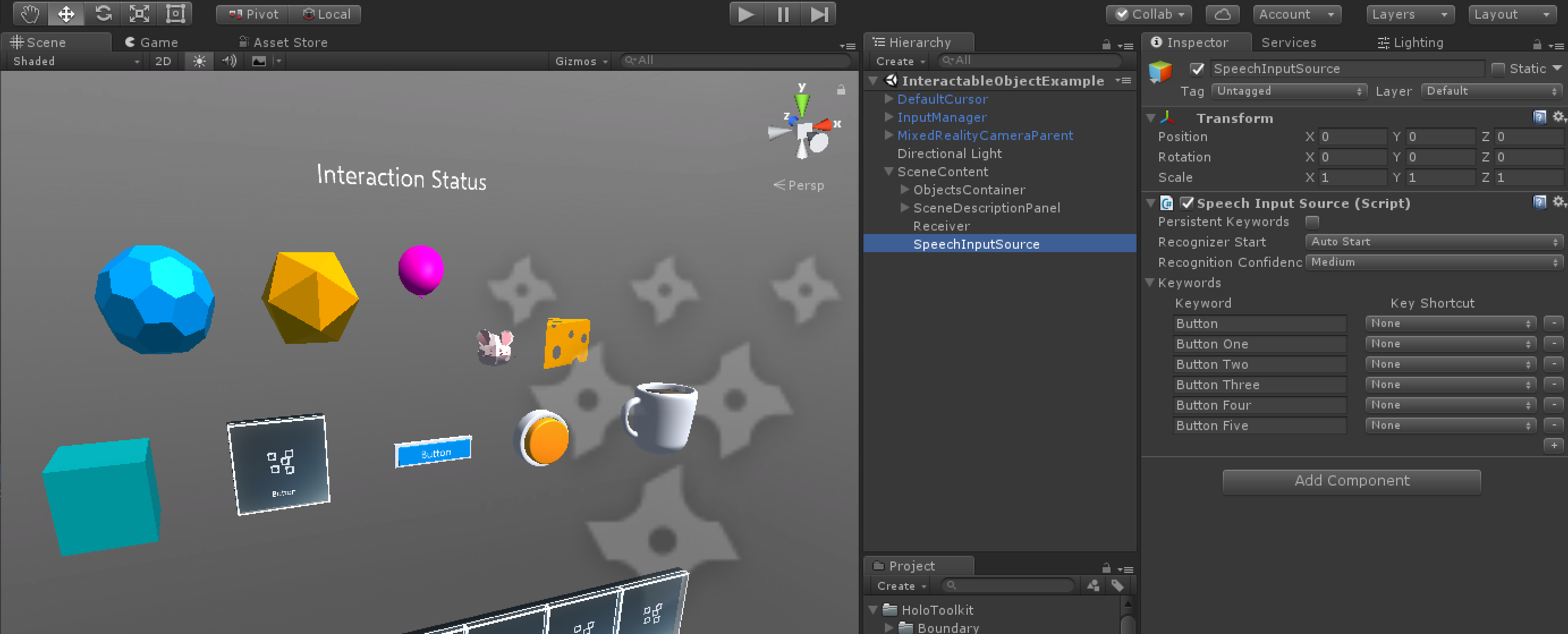
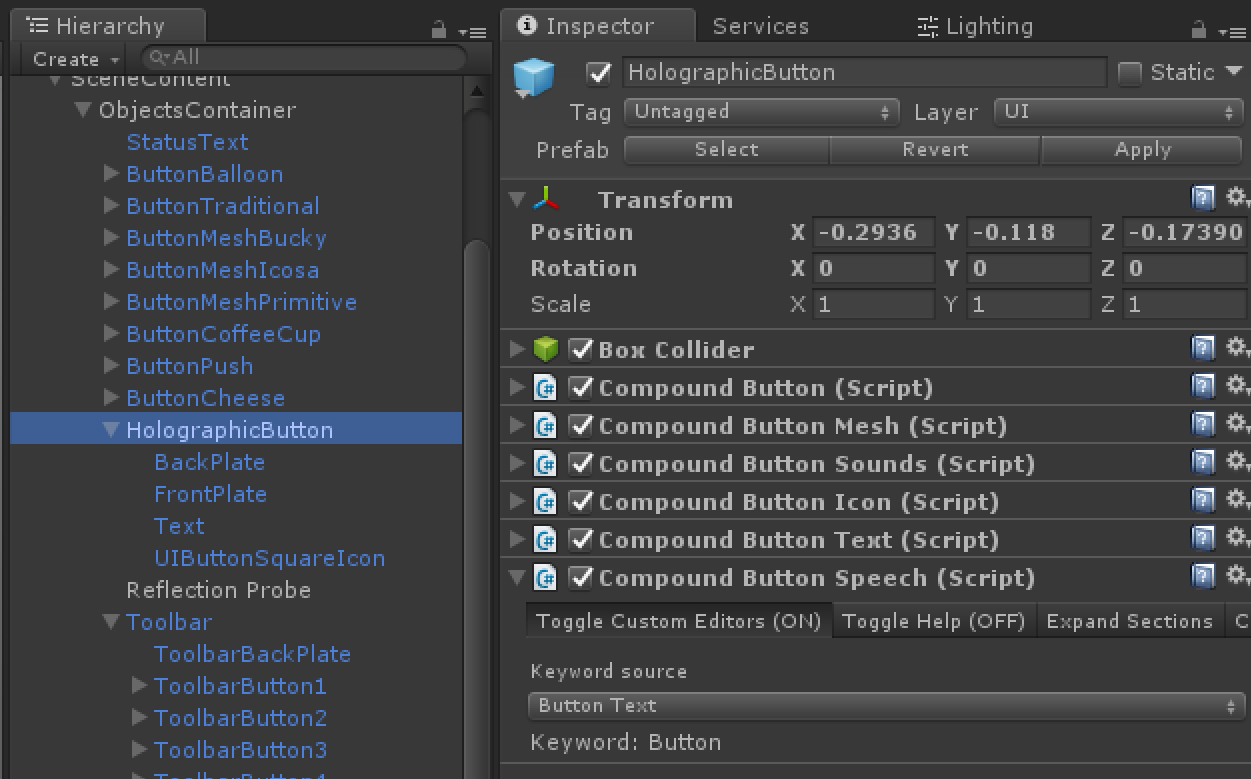
As expected, all you had to do is adding SpeechInputSource and define the keywords. When you add SpeechInputSource to the scene, Holographic Button prefabs works well. CompoundButtonSpeech already has ISpeechHandler and OnSpeechKeywordRecognized() that uses the button's text label as a keyword. I'll submit updated InteractableObjectExample scene. Thank you @Pangels for opening this issue!
cre8ivepark
on 5 Jul 2018
Be sure to register your object as a listener with the input system.
@StephenHodgson I don't understand what do you mean by registering my object as a listener ?
@Pangels I am trying to figure out why existing OnSpeechKeywordRecognized() in CompoundButtonSpeech.cs is not working. It seems like this code block in CompoundButtonSpeech is essentially doing the same thing as CompoundButtonEventTrigger.cs.
public void OnSpeechKeywordRecognized(SpeechEventData eventData)
{
    if (!gameObject.activeSelf || !enabled)
        return;

    if(eventData.RecognizedText.Equals(keyWord))
    {
        // Send a pressed message to the button through the InputManager
        m_button.TriggerClicked();
    }
}
For now, there is no event/action attach to the button, right? I am working on the CompoundButton to make it possible to add (by drag and drop) a script or a gameobject to a field to call an event / action.
As I don't see anything happens when I look at the button and say the keyword. The button just got an animation but I didn't see the InputDown or InputUp event to be triggered.
Pangels
on 6 Jul 2018
For the event action on speech, my teammate found a solution #2408
Pangels
on 6 Jul 2018
I don't understand what do you mean by registering my object as a listener?
All objects in the scene that use the MRTK input manager needs to be registered as a global listener if you want to get input when you're not looking at the object.
StephenHodgson
on 6 Jul 2018
All objects in the scene that use the MRTK input manager needs to be registered as a global listener if you want to get input when you're not looking at the object.
@StephenHodgson Thanks, I'll try to do it that way to get better UX.
Pangels
on 6 Jul 2018
You should be able to just add the global listener script component
StephenHodgson
on 6 Jul 2018
All objects in the scene that use the MRTK input manager needs to be registered as a global listener if you want to get input when you're not looking at the object.
@StephenHodgson How do I create a global listener? Speech Input Source doesn't have an option. Only Speech Input Handler does.... do I need to add all the keywords and connect the events? If so what is the point of InteractionReceiver when it only fires on click actions?
Also I hate to be pedantic but can we please use official names of components. You may know what you're saying but it doesn't help over the internet when people call the same thing with various names. The docs are confusing as it is.
 lordlycastle
on 11 Jul 2018
lordlycastle
on 11 Jul 2018
@cre8ivepark Can you upload the scene somewhere and shoot me a link? Can't wait for next release for this.
lordlycastle
on 11 Jul 2018
@lordlycastle I created a system which get all your CompoundButtonSpeech and fill the SpeechInputSource keywords list automatically. I will make a pull request soon
 ghost
on 11 Jul 2018
ghost
on 11 Jul 2018
Closing issues older than 180 days. If this is still an issue, please reactivate with recent information.
 wiwei
on 11 Apr 2019
wiwei
on 11 Apr 2019
Related issues
 chrisfromwork
·
3Comments
chrisfromwork
·
3Comments
 brean
·
3Comments
brean
·
3Comments
 jimstack
·
3Comments
jimstack
·
3Comments
 rigma
·
3Comments
rigma
·
3Comments
 dfields-msft
·
3Comments
dfields-msft
·
3Comments