Mixedrealitytoolkit-unity: Add ability to manipulate objects using two hands
Preface
Hello! Hi, I filed this proposal based on the contributing guidelines. I currently have a test version of this feature implemented at the [following fork] (https://github.com/julenka/MixedRealityToolkit-Unity) and am working through the contributing guidelines to send out a pull request. Comments welcome!
Overview
Add a new component similar to HandDraggable.cs called TwoHandManipulatable.cs that will allow a user to use two hands to move, scale, and rotate a hologram.
Purposed Changes
A developer/designer will add the component to any game object.
He/she will be able to configure whether the object can be manipulated with one or two hands, as well as the manipulation behavior when using two hands (only scale, only rotate, move and scale, move and rotate, move and scale and rotate). Additionally he/she will be able to specify constraints on rotation of the object (no constraints, rotate only about x, rotate only about y).
When running an application a user will then be able to use one or two hands to move, scale and rotate the object as specified.
The behavior should work both with motion controllers in VR as well as with hands on a HoloLens.
Additionally, the behavior can also be tested in the editor by controlling one hand using the shift key + mouse, and the other using space bar + mouse. The movement of the right hand will be inverted to allow for testing resizing and rotation.
 julenka
All 11 comments
Definitely a good idea. I'm already in the process of refactoring the Input System to accommodate such capabilities, by adding the Handedness and the PressType into the BaseInputEventData.
Check out #1603
 StephenHodgson
on 7 Jan 2018
StephenHodgson
on 7 Jan 2018
(Direct link to TwoHandManipulatable.cs since forked repos aren't searchable.)
This looks very useful. @StephenHodgson this is a perfect case study for the benefits of focus targets and multi-pointer input. A lot of the work this class is doing internally can be pushed onto the input system. I'll bring it up over in #1603 as discussion continues.
 Railboy
on 8 Jan 2018
Railboy
on 8 Jan 2018
This is awesome. By just dragging the script on to a game object, I was able to move/rotate/scale with two hand input. Single hand move support is also working nicely! This will definitely help developers & creators building great experiences. I think this could be used as a great starter scene too.
 cre8ivepark
on 9 Jan 2018
cre8ivepark
on 9 Jan 2018
Glad folks like it! I just fixed a bug with the input dispatch (commit link) where I was not getting SourceLost or InputReleased when I was not gazing at the cube. I have one more small (I hope) fix to make in my repo which is that my username is not showing up correctly in my commits, then I will merge in the latest code and create a pull request (I can add a few more tests and an example while responding to PR comments).
@StephenHodgson @cre8ivepark or @NeerajW should I merge in the latest from master branch, or Dev_Working_Branch?
julenka
on 16 Jan 2018
PRs should always target the dev working branch.
Thanks!
StephenHodgson
on 16 Jan 2018
Thanks Julia for the updates!
I found a bug when there are multiple objects in the scene (each object got assigned TwoHandManipulatable.cs). It keeps the focused object on the first object that I interacted with.
I love the constraint options.
Thanks!
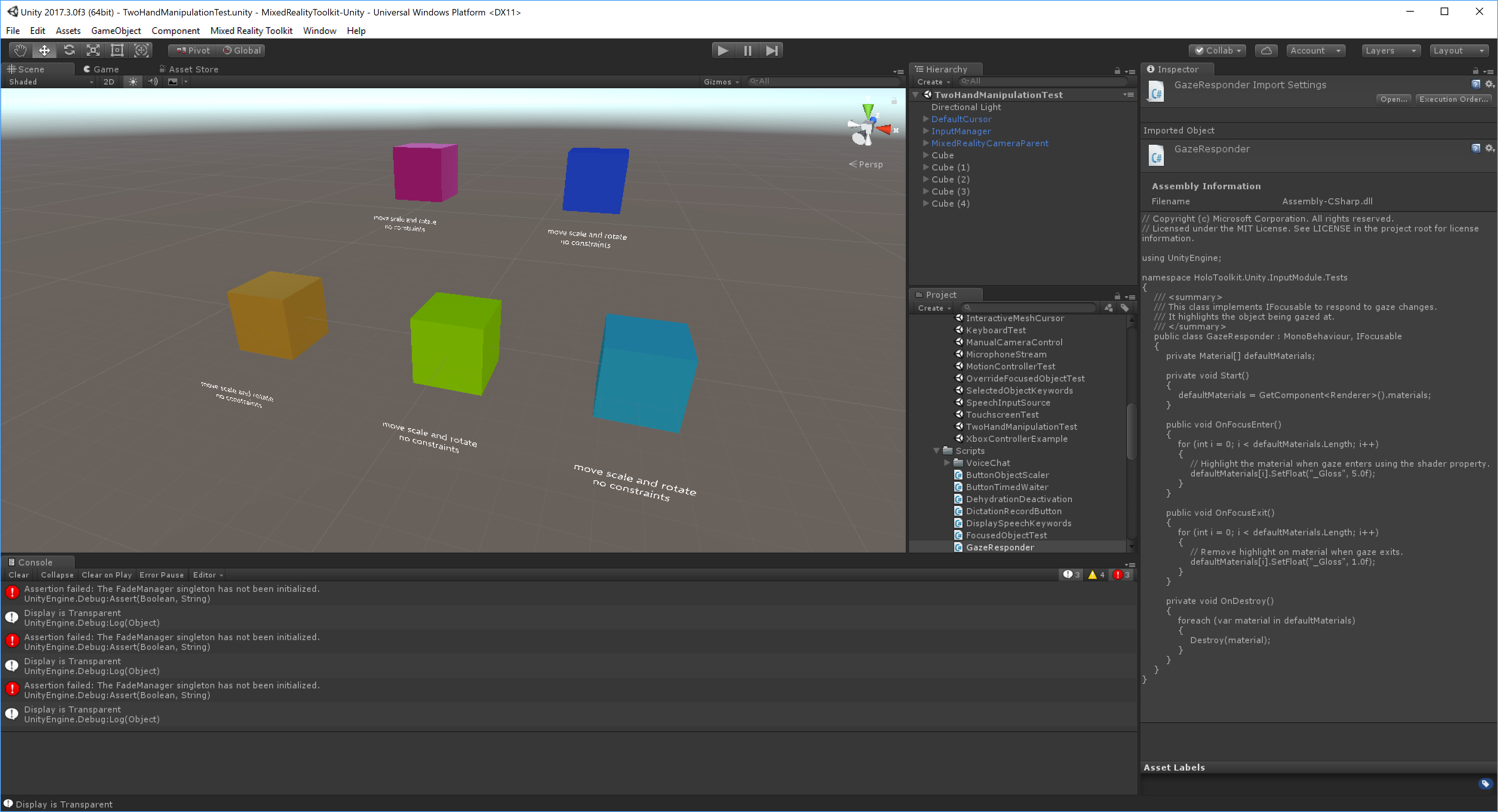
cre8ivepark
on 17 Jan 2018
Ooh could you please share the scene file with me? It looks nice. Can use
that as a starter for the samples.
On Wed, Jan 17, 2018 at 10:01 AM Yoon Park notifications@github.com wrote:
Thanks Julia for the updates!
I found a bug when there are multiple objects in the scene (each object
got assigned TwoHandManipulatable.cs). It keeps the focused object on the
first object that I interacted with.
I love the constraint options.
Thanks!
[image: 2018-01-17 09_55_22-unity 2017 3 0f3 64bit -
twohandmanipulationtest unity - mixedrealitytoolkit-u]
https://user-images.githubusercontent.com/13754172/35058509-019beab2-fb6d-11e7-93de-5c279afac42a.png—
You are receiving this because you authored the thread.
Reply to this email directly, view it on GitHub
https://github.com/Microsoft/MixedRealityToolkit-Unity/issues/1604#issuecomment-358389591,
or mute the thread
https://github.com/notifications/unsubscribe-auth/AAKSLDZbbn2SHSBPIetIluYGWzeK7O9Kks5tLjVngaJpZM4RVfBd
.
julenka
on 17 Jan 2018
I loved this idea and tried it as soon as I've seen it. In Unity it seems to work even if I don't understand how you move each hand independently (I can do both clicks but they move together). Then I tried it on the Hololens with 2 cubes: one with your TwoHandManipulatable.cs and one with HandDraggable.cs. I couldn't do any precise movement (even using just one hand) with your script while I could place the cube anywhere I wanted with HandDraggable.cs... That's weird because I could do precise movement in Unity.
Anyway, it's definitly a great idea I would need on what I am working. I will follow up on this because it would be a great feature !
Also, why not Move-Rotate option ? (With prefab scaled properly already)
 allen2112
on 18 Jan 2018
allen2112
on 18 Jan 2018
Glad you like the idea and thank you for the feedback! In the editor the
hands should move in opposite directions in X (left/right) and Z (use
scroll wheel). Remember to press shift to turn on the left hand and
spacebar to turn on the right hand.
For the HoloLens, it seems like there is a bug dispatching input when two
or more objects are present. I think it’s a regression from my latest
change. I’m going to try to look at this next weekend, since things are
very busy at work this week and weekend. Stay tuned!
On Wed, Jan 17, 2018 at 4:02 PM allen2112 notifications@github.com wrote:
I loved this idea and tried it as soon as I've seen it. In Unity it seems
to work even if I don't understand how you move each hand independently (I
can do both clicks but they move together). Then I tried it on the Hololens
with 2 cubes: one with your TwoHandManipulatable.cs and one with
HandDraggable.cs. I couldn't do any precise movement (even using just one
hand) with your script while I could place the cube anywhere I wanted with
HandDraggable.cs... That's weird because I could precise movement in Unity.Anyway, it's definitly a great idea I would need on what I am working. I
will follow up on this because it would be a great feature !—
You are receiving this because you authored the thread.
Reply to this email directly, view it on GitHub
https://github.com/Microsoft/MixedRealityToolkit-Unity/issues/1604#issuecomment-358491406,
or mute the thread
https://github.com/notifications/unsubscribe-auth/AAKSLHbHULy3ThexZ59aanUglHDFzBRfks5tLoowgaJpZM4RVfBd
.
julenka
on 18 Jan 2018
Tried on my personal project. The script works well with both HoloLens' gesture and Immersive headset's motion controllers.
HoloLens:
https://twitter.com/cre8ivepark/status/961854047211864075
Immersive Headset with Motion controllers:
https://twitter.com/cre8ivepark/status/962193771931754496
cre8ivepark
on 11 Feb 2018
This is now available in master branch.
https://github.com/Microsoft/MixedRealityToolkit-Unity/blob/master/Assets/HoloToolkit-Examples/Input/Readme/README_TwoHandManipulationTest.md
cre8ivepark
on 30 Apr 2018
Related issues
 jimstack
·
3Comments
jimstack
·
3Comments
 nuernber
·
3Comments
nuernber
·
3Comments
 overedge
·
3Comments
overedge
·
3Comments
 MatteoFantasy
·
3Comments
MatteoFantasy
·
3Comments
 DanAndersen
·
3Comments
DanAndersen
·
3Comments
Most helpful comment
(Direct link to TwoHandManipulatable.cs since forked repos aren't searchable.)
This looks very useful. @StephenHodgson this is a perfect case study for the benefits of focus targets and multi-pointer input. A lot of the work this class is doing internally can be pushed onto the input system. I'll bring it up over in #1603 as discussion continues.