Mixedrealitytoolkit-unity: Stabilization Plane Modifier
Overview
The stabilization plane modifier seems to not help with the hologram jitter. When walking around the holograms or being placed at a distance further then approx 4 m, the color separation is very noticeable. Is there an update on this issue? (of course all of the objects have colliders and all of the sorts)
Expected Behavior
No color sepparation when importing the InputManager Prefab
Actual Behavior
Jittering on all holograms no matter what changes I make in the stabilizationPlaneModifier
Steps to reproduce
_(Links to sample github project preferred)_
Unity Editor Version
Unity 2017.2.0p2
Mixed Reality Toolkit Release Version
 AlanNicolaeAndersen
All 22 comments
Your camera is probably not placed at World Zero on startup.
The Stabilization Plane position is best visualized in the hololens web portal at http://127.0.0.1:10080/3dview.htm . The gizmos in HoloToolkit are misleading and incorrect if the Camera World Origin is moved away from World.Zero.
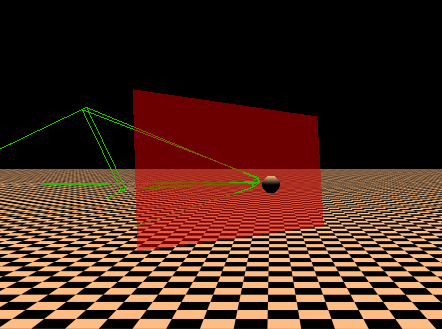
If you start with the camera anywhere else than on World Zero the stabilization plane will need to be corrected by transforming the plane to camera "local" coordinates.
// CustomStabilizationPlaneModifier.cs
  focusPlanePosition = cameraContainer.InverseTransformPoint(focusPlanePosition);
  focusGazeNormal = cameraContainer.InverseTransformDirection(focusGazeNormal);
  velocity = cameraContainer.InverseTransformDirection(velocity);
 Strepto
on 6 Dec 2017
Strepto
on 6 Dec 2017
Thank you so much for the prompt answer. I appreciate it.
My camera is actually at at Vector3(0,0,0)
I am attaching the pictures here

and the camera
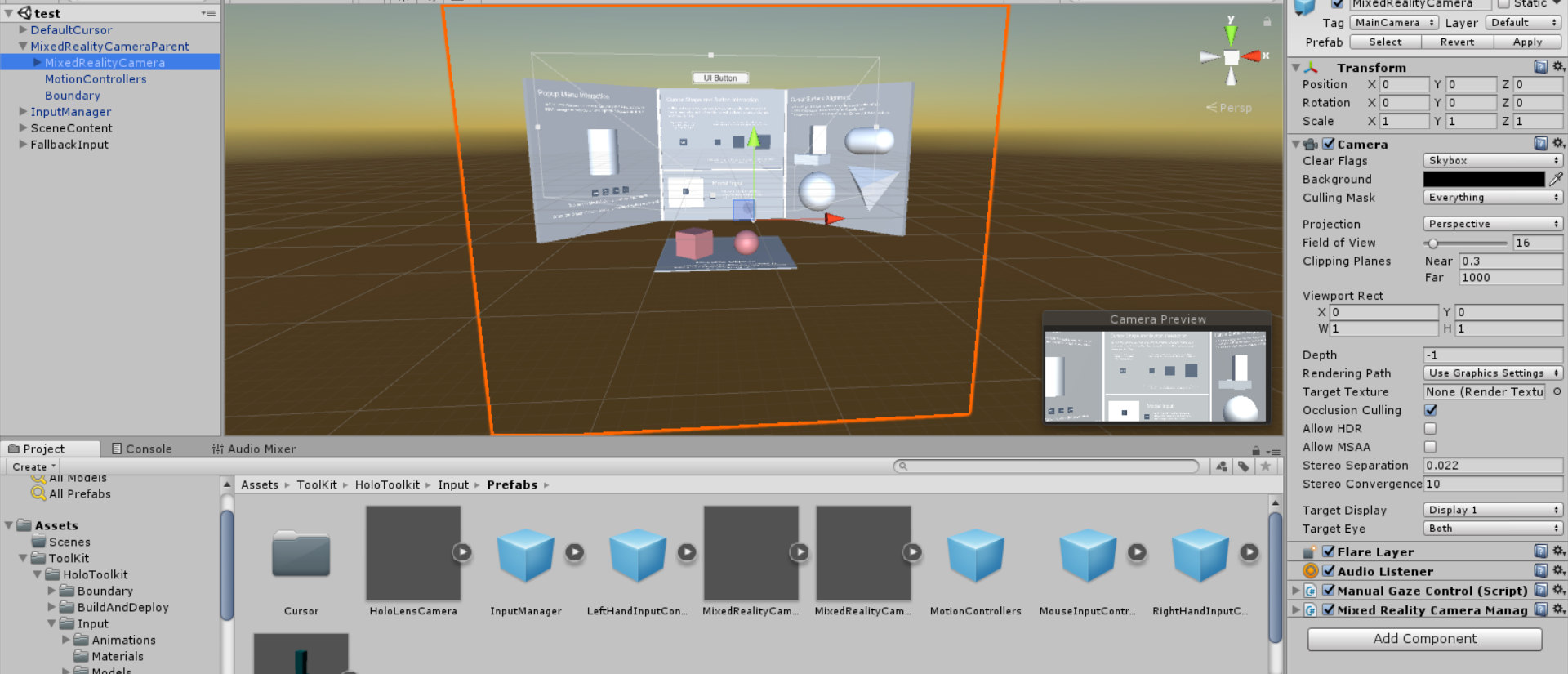
this is done simply by a drag and drop from the prefab folder. Is there anything I am missing?
AlanNicolaeAndersen
on 6 Dec 2017
I have also created a script that forces the camera in the awake method to be at point 0,0,0 and it did not make any difference. Moreover, another person on the slack channel is reporting the same issue, so I am starting to believe that there is something more to this.
AlanNicolaeAndersen
on 6 Dec 2017
Could you please try checking the Windows Device Portal stabilization plane when running your scene with the toolkit code? That might give us some idea.
 NeerajW
on 6 Dec 2017
NeerajW
on 6 Dec 2017
I also recall Unity has lots of regressions in this space in the MRTP 2 builds. Try updating to MRTP 0p5.
NeerajW
on 6 Dec 2017
Thanks, I was in a conference all day so could not get back to you. I will try what you said and get back. I have been looking but can't really find the MRTP 0p5. do you have a link for that?
AlanNicolaeAndersen
on 7 Dec 2017
I do have Update 5 installed, if that was the implication, downloaded from
https://forum.unity.com/threads/custom-build-2017-2-rc-mrtp-windows-mixed-reality-technical-preview.498253/
Sadly that is the last stable version that I can find :(
AlanNicolaeAndersen
on 7 Dec 2017
I have found 0p4 and sadly I get the same issue. Any link for 0p5 ?
AlanNicolaeAndersen
on 7 Dec 2017
patch 4 was the latest that was released this week.
Most likely it'll be a new full release of Unity
 StephenHodgson
on 7 Dec 2017
StephenHodgson
on 7 Dec 2017
Thanks. I have updated everything, even the SDK (even though not specifically required). I am now using Unity with Patch 4. Sadly the same problem persists. The position of stabilization plane works wrong. When I focus at a hologram and move back while still looking at it, the plane moves behind the camera. This also happens when I move around a specific hologram. The further I walk away for instance, the further behind the stabilization plane moves.
See picture bellow.
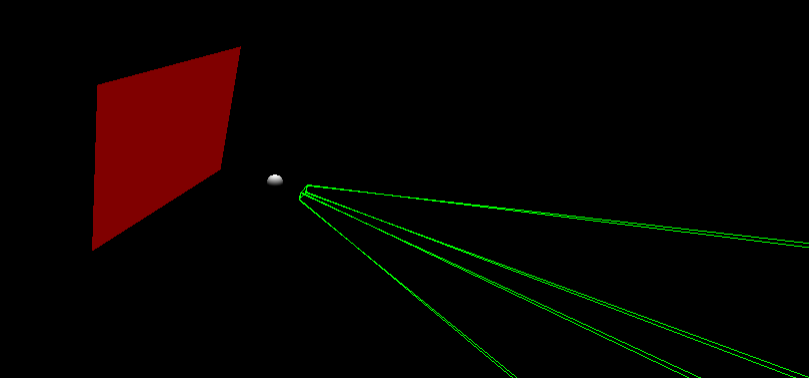
Does anybody know what changes I could make in order to make it work correctly?
AlanNicolaeAndersen
on 8 Dec 2017
As an update to my latest post, when I move towards the specific hologram, the plane works correctly, only when moving back or rotating around the object, the plane somehow moves behind the camera...
AlanNicolaeAndersen
on 8 Dec 2017
With Unity 2017.2.0f3 there is no problem with the stabilization plane. All works well, it is only in the MRTP versions that I get this issue. What is your input, whom is it that I should contact regarding this ?
AlanNicolaeAndersen
on 8 Dec 2017
Anywhere I can track this bug? I suddenly got the same issues after upgrading from 5.6 to Unity 2017.2.1 today.
Strepto
on 14 Dec 2017
In order to make it work, I could only install Unity 2017.2.0f3. For me in that version the stabilization plane works well, but not in the MRTP versions at all (I have tried all from 1 to 4). I have asked regarding this issue and sadly did not get too far regarding it. Some people get it, whilst I found out that others don't. This makes me wonder what it is about.
I have not installed Unity 2017.2.1, or rather I did not dare anymore, but thanks for letting me know that this version contains the same bug :). Hope this helped and sadly I didn't discover much more.
AlanNicolaeAndersen
on 15 Dec 2017
I filed a Unity bug report for it here https://fogbugz.unity3d.com/default.asp?982876_ta6idnss3f18g01m
 rolandsmeenk
on 30 Dec 2017
rolandsmeenk
on 30 Dec 2017
I can confirm that this seems to work correctly in 2017.2.0f3. I see the issue in 2017.2.1 (not tested any other versions).
 larsmoa
on 3 Jan 2018
larsmoa
on 3 Jan 2018
@rolandsmeenk your posted bug report has been closed, do you know what the outcome is?
 Alexees
on 12 Jan 2018
Alexees
on 12 Jan 2018
I did not receive any notification of it so I do not have more information than what is publicly available. I just installed 2017.2.1p2, but have not tested it yet. https://unity3d.com/unity/qa/patch-releases
rolandsmeenk
on 12 Jan 2018
Well I am new to developing with the HoloLens, I have tried testing some scenarios with different unity engines. Here is my conclusions so far.
I have tried Unity 2017.3.0p2, 2017.3.0p2, Unity 2017.2.1f1 with 2017.2.1.0 MRTK release, applied the 3 settings from the MRTK tab and created a simple scene with a cube which seems to swim and jittering when moving and walking around a cube causes flickering and colour separation.
FPS always above 59 and the stabilization plane seems to be moving correctly.
Tried building Holograms 211 completed source code with 2017.3.0p2 and it does not seem to have the issue. Just the background space swims to very little amount, the astronaut itself is very stable.
Since I am new, I may have missed a step since most of the tutorials I have gone through maybe outdated.
 Firifire
on 17 Jan 2018
Firifire
on 17 Jan 2018
Hey guys,
got the same issue with the stabilization plane in Untiy 2017.2.1f1 and because one can not use my app anymore without freezes or jitter, I'm thinking of upgrading Unity 2017.2.1p2. Has anybody had success with this specific Unity version, yet?
At least the Fixes in the Change Logs are promising (at https://unity3d.com/unity/qa/patch-releases):
(969944) - XR: Fixed tracking loss never recovers in Windows Mixed Reality.
UPDATE:
I installed Unity2017.2.1p2 and at least the tracking loss ist fixed (as promised by the Change Log). However, I still have the issue with the stabilization plane moving behind the player.
 lagset
on 24 Jan 2018
lagset
on 24 Jan 2018
I ran into this issue as well. Removing the StabilizationPlaneModifier component from the InputManager prefab fixed it for me. Unity 2017.2.1f1 (64-bit).
 DanLWallace
on 2 Jun 2018
DanLWallace
on 2 Jun 2018
Closing issues older than 180 days. If this is still an issue, please reactivate with recent information.
 wiwei
on 11 Apr 2019
wiwei
on 11 Apr 2019
Related issues
StephenHodgson
·
3Comments
 amfdeluca
·
3Comments
amfdeluca
·
3Comments
 provencher
·
3Comments
Alexees
·
3Comments
provencher
·
3Comments
Alexees
·
3Comments
 reillydonovan
·
3Comments
reillydonovan
·
3Comments
Most helpful comment
I filed a Unity bug report for it here https://fogbugz.unity3d.com/default.asp?982876_ta6idnss3f18g01m