Mixedrealitytoolkit-unity: MRDL -> MRTK Directory Structure
Hi everyone,
In migrating base functionality from the Mixed Reality Design Labs to MRTK there are some directory structure elements I'd like to bring up. Both directory structures have their pros and cons. Here's the primary differences:
MR Toolkit
Each of the buckets below are self-contained sections with the assets, scripts and code under each directory in their own directories. This makes sense if each area is an ala cart set of tools that can function independently though makes digging through to see if something is in Input vs UI vs Interaction a little muddy. There also isn't the use of Resources directories for assets.
HoloToolkit
- Build
- Editor
- CrossPlatform
- Scripts
- Input
- Animations
- Materials
- Modesl
- Plugins
- Prefabs
- Scripts
- Shaders
- Sharing
- Plugins
- Prefabs
- Scripts
- SpatialMapping
- Materials
- Prefabs
- Plugins
- Scripts
- Shaders
- SpatialSound
- Scripts
- SpatialUnderstanding
- Materials
- Plugins
- Prefabs
- Scripts
- UI
- Fonts
- Materials
- Prefabs
- Shaders
- Utilities
- Editor
- Materials
- Prefabs
- Scenes
- Scripts
- Shaders
- Textures
MR Design Labs
In design labs the directory structure is flatter thinking of it as a whole toolkit rather than a collection of individual tools. We also make sure to leverage native structure support for Unity by having all art assets under Resources.
MRDL/HUX
- Editor
- Scripts
- Examples
- Prefabs
- Scripts
- Prefabs
- Buttons
- Cursors
- Debug
- Dialog
- Input
- Interface
- Shader
- Spatial
- Resources
- Audio
- Materials
- Models
- Profiles
- Textures
- Scripts
- Buttons
- Collections
- Core
- Cursors
- Debug
- Dialogs
- Focus
- Input
- Interaction
- Receivers
- Spatial
- Speech
- Utility
One suggestion is to create a UX directory in MRTK and have both UI and Interaction merged with basically all of the MRDL/HUX base functionality in there. Essentially taking make making HUX in the MRDL side just being UX on the MRTK side.
Thoughts/suggestions?
thanks,
-pat
 paseb
paseb
All 13 comments
This is awesome. @paseb, take a look at #986. I can probably fit in some of the changes we're talking about for that PR and do all the moving at once.
 StephenHodgson
on 27 Sep 2017
StephenHodgson
on 27 Sep 2017
I actually like the MRDL structure a little better, it's cleaner, more discoverable...
Just my .02
 jessemcculloch
on 27 Sep 2017
jessemcculloch
on 27 Sep 2017
I'm more in favor of the features being broken out into their own, because I know there are people that only use the sharing service, or remove the spatial mapping and understanding features in their projects.
Having the feature areas broken out into their own folders helps keeps things modular and decoupled as well.
Making a new UX Folder (Or renaming the UI one) is probably the best bet. I'd also want to move out some of the UX based input scripts from the Utilities folder into this new UX folder as well, seeing as they're really just examples of it's use case as a UX element.
StephenHodgson
on 27 Sep 2017
Here's what I'd like to propose. Within MRTK I collapse UI an Interaction into simply UX and have the same structure inside as what we have on the MRDL side:
- MRTK
- UX
- Editor
- Scripts
- Examples
- Prefabs
- Scripts
- Prefabs
- Buttons
- Cursors
- Debug
- Dialog
- Input
- Interface
- Shader
- Spatial
- Resources
- Audio
- Materials
- Models
- Profiles
- Textures
- Scripts
- Buttons
- Collections
- Cursors
- Debug
- Dialogs
- Interaction
- Receivers
- Spatial
- Utility
- Editor
- UX
That way we have one place for UX assets and scripts and we could have that modular instead of trying to differentiate between UI and Interaction as they aren't really mutually exclusive.
paseb
on 28 Sep 2017
I have a feeling we're going to really need to clarify what goes in the Input vs the UX folders.
Currently the Input folder has Cursor and Interaction specific stuff. We need to make sure we're using correct terminology and really define what constitutes Input vs UX assets.
StephenHodgson
on 28 Sep 2017
I think we are getting to the point where we are no longer as able to keep all of these items as decoupled as they originally were. The input module is a prime example of that, it actually touches a lot of other areas, and is also touched by a lot of other areas. Utilities is the same way. Try deleting either folder...
I think flattening out the structure makes it easier to find stuff, and you could still break out things like spatial mapping, spatial understanding, etc under each section. It might be more work for someone to pull those items out, but if it makes the entire toolkit easier for people to use, it might be worth the trade-off.
jessemcculloch
on 28 Sep 2017
If they don't stay decoupled then it's a big problem, and we should be moving towards doing so. Flattening out the folder structure will not make this easy to do.
That's actually an open issue I have #990. We need to decouple the feature areas. There's absolutely no reason why one should depend on the other except in direct use cases (like with the Input and UX)
A perfect example is TapToPlace.cs It really shouldn't care if you have spatial mapping, but as it stands you can't use it without either commenting out the code or removing it all together. (In fact I think that class should be in Examples, but I digress)
StephenHodgson
on 28 Sep 2017
Here's the way I look at:
All core elements should be seen as "modules" that can work together or independently.
- Audio
- CognitiveServices
- CrossPlatform
- Input
- SpatialMapping
- SpatialUnderstanding
- Sharing
- Speech
- UX
- Utilities
If we had dependencies on other modules or toolsets we could have them play nice by using declares within them that other decoupled modules could check for.
thanks,
-pat
paseb
on 28 Sep 2017
[make] them play nice by using declares within them
I'd like to avoid this if possible.
StephenHodgson
on 3 Oct 2017
Also, wouldn't Speech technically fall under CognitiveServices?
StephenHodgson
on 3 Oct 2017
@StephenHodgson,
[make] them play nice by using declares within them
I'd like to avoid this if possible.
I agree and the more I consider it MTRK should have a "core" that all modular functionality can carry dependencies on. If I considered this a shared production environment I'd have a number of functional elements all as submodules. Something like:
Core:
- CrossPlatform
- Input
- Utilities
Submodules:
- Sharing
- UX
- SpatialMapping
- SpatialUnderstanding
- CognitiveServices
- Audio
Thoughts?
thanks,
-pat
paseb
on 4 Oct 2017
Submodules are tricky in unity. It's definitely an advanced concept for some people starting out and could really be the barrier of entry.
StephenHodgson
on 4 Oct 2017
@paseb is HUX currently in VR or XR namespaces?
btw, how does this look?
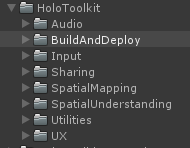
StephenHodgson
on 5 Oct 2017
Related issues
 rigma
·
3Comments
rigma
·
3Comments
 ritijain
·
3Comments
ritijain
·
3Comments
 reillydonovan
·
3Comments
reillydonovan
·
3Comments
 nuernber
·
3Comments
nuernber
·
3Comments
 chrisfromwork
·
3Comments
chrisfromwork
·
3Comments
Most helpful comment
Here's what I'd like to propose. Within MRTK I collapse UI an Interaction into simply UX and have the same structure inside as what we have on the MRDL side:
That way we have one place for UX assets and scripts and we could have that modular instead of trying to differentiate between UI and Interaction as they aren't really mutually exclusive.