Mixedrealitytoolkit-unity: InputManager causing UI events to fire twice
Greetings,
I've recently started running into an issue that causes my button events to fire twice.
To allow users to drag and drop objects to move them around, I use the IInputHandler interface to detect user input. This requires the InputManager and a call to it's AddGlobalListener method. The implementation worked great, but ever since I've been trying to figure out why my button events would fire twice (not always, just most of the time).
I'm using a world space canvas with simple button On Click events (defined in the Unity Inspector), which are handled by the HoloLensInputModule.
After digging around, it appears that the InputManager handles UI input as well, but doesn't prevent the main event system from calling the same method. As such, I'm left with the below two stacktraces. Despite the frame difference, this is the result of one tap gesture:
Rotating 90 degrees (frame 605).
UnityEngine.Debug:LogFormat(String, Object[])
MoveProjectMenu:RotateProject(Single) (at Assets/Scripts/UI/MoveProjectMenu.cs:217)
UnityEngine.EventSystems.ExecuteEvents:ExecuteHierarchy(GameObject, BaseEventData, EventFunction`1)
HoloToolkit.Unity.InputModule.InputManager:HandleEvent(BaseEventData, EventFunction`1) (at Assets/HoloToolkit/Input/Scripts/InputManager.cs:256)
HoloToolkit.Unity.InputModule.InputManager:RaiseInputClicked(IInputSource, UInt32, Int32) (at Assets/HoloToolkit/Input/Scripts/InputManager.cs:352)
HoloToolkit.Unity.InputModule.GesturesInput:OnTappedEvent(InteractionSourceKind, Int32, Ray) (at Assets/HoloToolkit/Input/Scripts/InputSources/GesturesInput.cs:154)
UnityEngine.VR.WSA.Input.GestureRecognizer:InvokeTapEvent(InteractionSourceKind, Ray, Int32)
Rotating 90 degrees (frame 620).
UnityEngine.Debug:LogFormat(String, Object[])
MoveProjectMenu:RotateProject(Single) (at Assets/Scripts/UI/MoveProjectMenu.cs:217)
UnityEngine.EventSystems.EventSystem:Update()
I found a somewhat related issue (https://github.com/Microsoft/HoloToolkit-Unity/issues/658), but it didn't help since both calls were handled by the HoloToolkit, allowing the user to set and read the used flag.
I also found a thread on the HoloLens forums (https://forums.hololens.com/discussion/6999/ui-button-on-click-event-firing-twice), where a user seemingly 'solved' the issue by increasing certain intervals. I did try out this workaround, but without any positive results.
Apologies if I'm misunderstanding the big picture of the InputManager. Any alternatives or solutions are very much appreciated.
 Errors4l
All 14 comments
I came across something similiar.
I used the following to solve the problem.
In the script handling the OnInputClicked-Event
public void OnInputClicked(InputClickedEventData eventData)
{
  if(!eventData.used)
  {
    //Do stuff
    eventData.Use();
  }
}
Now the event is only handled once. I hope it works for you as well.
 ghost
on 23 May 2017
ghost
on 23 May 2017
I did find this solution in your issue (linked in my original post), but it does not work as I do not implement my own OnInputClicked callbacks. Unlike other 3D UIs I've seen, I use a world space 2D UI.
My UI simply consists of Unity UI components (IE. Buttons), which allows you to set a method through the Unity Inspector:

The method or even class itself contains no information regarding the HoloToolkit.
public void RotateProject(float degrees)
{
    Debug.LogFormat("Rotating {0} degrees at frame {1}.", degrees, Time.frameCount);
    ProjectController.Instance.transform.RotateAround(alignAnchor.transform.position, Vector3.up, degrees);
}
Looking at the first stacktrace I posted, it seems the InputManager from the HoloToolkit acts as an input module such as the HoloLensInputModule behind the scenes. On top of invoking the event for subscribed game objects (to call methods such as OnInputClicked), it also seems to invoke normal UI methods, which causes the conflict I've described.
I also noticed the InputManager.cs:PushInputDisable() method, but this directly affects the cursor state in Cursor.cs:OnInputDisabled().
Errors4l
on 23 May 2017
Yes that's correct, if you're using the uGUI components you don't want to implement the click handler in your script but instead use the button class' OnClick handler.
 StephenHodgson
on 30 May 2017
StephenHodgson
on 30 May 2017
Sorry, isn't that what I'm doing? I'm not implementing OnInputClicked from the HoloToolkit: I'm only using the OnClick handler of the Button (through the Inspector and not a script, but that should be all the same).
I've moved from using IInputHandler.OnInputDown to InteractionManager.SourcePressed, but am still having issues since the HoloToolkit Cursor script(s) rely on the existence of an InputManager.
In short, I want to keep the functionality of some scripts that rely on the InputManager (IE. Cursor.cs), without the InputManager fulfilling the same role as the HoloLensInputModule.
I'm using the default HoloLens input module to allow the user to scroll ScrollBar components: something that the HoloToolkit does not seem to support natively (https://github.com/Microsoft/HoloToolkit-Unity/issues/605).
Is there any easy way to accomplish this?
Errors4l
on 31 May 2017
I think I'd actually have to see your setup to give better feedback, to see exactly how you've got things setup.
Yeah the ScrollBar support would be nice.
StephenHodgson
on 31 May 2017
I've created a small project showcasing my issue: https://github.com/Errors4l/HTK-DoubleInput
The project includes the latest HoloToolkit-Unity package (v1.5.7.0), and one main scene (Main).
Pressing the button will rotate the 3D Object 90 degrees. Due to the issue I'm facing with both the InputManager and the HoloLensInputModule handling the OnClick event, it rotates twice consecutively. The method calls are logged to the Console (as two separate messages, as they have different stack traces).
Disabling the InputManager (under Managers) solves this issue, but breaks the Cursor.
Disabling the HoloLensInputModule solves this issue, but breaks the ability to scroll.

Edit: Apologies, I just noticed I've been referring to using a ScrollBar rather than a ScrollRect. The included ScrollBar does work without the HoloLensInputModule, but scrolling ScrollRect components does not work.
My actual project contains various ScrollRects that allow users to scroll both by dragging the control, or by pressing scroll buttons.
Errors4l
on 1 Jun 2017
Thanks, I'll take a look at it later after work.
StephenHodgson
on 1 Jun 2017
I solved this by doing something along the lines of
private float lastClickTime = 0;
private float debounceDelay = 0.005f;
public void OnInputClicked(InputClickedEventData eventData)
{
  if(Time.time - lastClickTime < debounceDelay)
  {
    return;
  }
  lastClickTime = Time.time;
  // do stuff
}
which is more of a debounce than a real solution, but should work for most uses
 connorjsmith
on 2 Jun 2017
connorjsmith
on 2 Jun 2017
@Errors4l, I took a look last night and simply removed the HoloLensInputModule and HoloLensInput on the EventSystem and your project worked just fine for me.

StephenHodgson
on 2 Jun 2017
@StephenHodgson Thanks for having a look.
I kind of wished there was more control over the InputManager, such as defining what the InputManager does and doesn't handle. I'll remove the default HoloLens input components and deal with the fact that scrolling ScrollRect components is not currently supported.
@connorjsmith As I've stated previously, I've not implemented this interface. My methods are bound to the uGUI Button OnClick event.
Errors4l
on 3 Jun 2017
It's supported, just no one has pushed a good example back into the community.
StephenHodgson
on 3 Jun 2017
Alright, thanks for the help!
Errors4l
on 7 Jun 2017
@Errors4l, I took a look last night and simply removed the
HoloLensInputModuleandHoloLensInputon theEventSystemand your project worked just fine for me.
Your God's son .Saved me man
 veerpalk
on 28 Sep 2018
veerpalk
on 28 Sep 2018
@Errors4l, I also needed the scrolling and button clicking behaviour in my HoloLens project. So I made a HoloLens specific button that acts like a normal button when used on other platforms. That way I can use the same canvas for Android/iOS and the HoloLens. Instead of adding a button, I'm adding my HoloLensButton:
#if WINDOWS_UWP
using UnityEngine;
using UnityEngine.EventSystems;
#endif
using UnityEngine.UI;

public class HoloLensButton : Button
{
#if WINDOWS_UWP
    private float _repeatDelay;
    private float _lastClickTime;

    protected override void Start()
    {
        base.Start();
        _repeatDelay = FindObjectOfType<HoloLensInputModule>().repeatDelay;
    }

    public override void OnPointerClick(PointerEventData eventData)
    {
        if (Time.time - _lastClickTime < _repeatDelay)
        {
            return;
        }

        _lastClickTime = Time.time;
        base.OnPointerClick(eventData);
    }
#endif
}
With the following configuration:
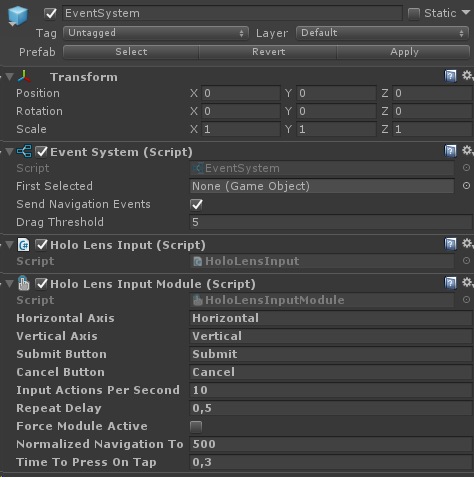
I know I'm not tackling the problem at its source but at least the buttons are working for me. With other clickable UI components, you would need to override the components and implement such debounce functionality as well.
 Reintjuu
on 13 Mar 2019
Reintjuu
on 13 Mar 2019
Related issues
 markgrossnickle
·
3Comments
markgrossnickle
·
3Comments
 nuernber
·
3Comments
nuernber
·
3Comments
 overedge
·
3Comments
overedge
·
3Comments
 DanAndersen
·
3Comments
DanAndersen
·
3Comments
 dfields-msft
·
3Comments
dfields-msft
·
3Comments