Mixedreality-webrtc: How to open sample scene?
Describe the bug
_A clear and concise description of what the bug is._
To Reproduce
Steps to reproduce the behavior:
- import sample package (download tgz or manifest.json).
- double click sample scene.
- Read-only dialog show can't open scene.

 gtk2k
gtk2k
All 12 comments
Just copy the scene from packages to your assets
 sananbintahir
on 10 Aug 2020
sananbintahir
on 10 Aug 2020
Never seen that and can't repro; I am guessing you probably have some read-only file Unity wants to write to. In any case this looks like a Unity issue or misconfiguration of your project. You shouldn't have any need to copy anything to your Assets/ folder, you can perfectly open a scene from any package and run it. Unless there has been a recent change in the latest Unity version I didn't try.
 djee-ms
on 10 Aug 2020
djee-ms
on 10 Aug 2020
Thanks!
I can open scene.
gtk2k
on 10 Aug 2020
Never seen that and can't repro; I am guessing you probably have some read-only file Unity wants to write to. In any case this looks like a Unity issue or misconfiguration of your project. You shouldn't have any need to copy anything to your Assets/ folder, you can perfectly open a scene from any package and run it. Unless there has been a recent change in the latest Unity version I didn't try.
Non-embedded unity packages are read-only, and don't support scenes. As far as I know, this was never possible, even in previous unity versions. You won't be able to run the scene unless the package is physically present in the Packages folder in the unity project. Since the installation of the project requires a dependency in the manifest.json file, it is not an embedded package. You either have to embed the package to play the scene or move the scene into the assets folder.
sananbintahir
on 10 Aug 2020
You are saying that if I download the package and import it from disk from the Unity Package Manager window then I cannot open the scene nor play it? Because I have been doing that just fine with both 2018.4 and 2019.4, either with packages imported from disk or packages downloaded from our custom NPM register. I can also play any scene from the samples package and build+deploy to device. And I have never seen any read-only error like the one above. Again, unless this changed in 2020.x for example, which I never tested.
The only annoyance is Unity 2018.4 silently refusing to open scenes from packages. The workaround is to "Open As Additive" and close the other scene after. This has been fixed in Unity 2019.x at some point though, and is really just a bug.
djee-ms
on 10 Aug 2020
If you install the package from the package manager (adding dependencies in the Packages/manifest.json), the package will not be an "embedded package", meaning it won't be present in your project folder physically, have a look at https://docs.unity3d.com/Manual/upm-embed.html
sananbintahir
on 10 Aug 2020
Instead it will be present in the Packages/ subfolder of the Asset Browser window, from which you can open any asset.

djee-ms
on 10 Aug 2020
Thanks a lot!
gtk2k
on 10 Aug 2020
To make it clear, when your project folder looks like,

You will get the following because the project right now is in Library/PackageCache
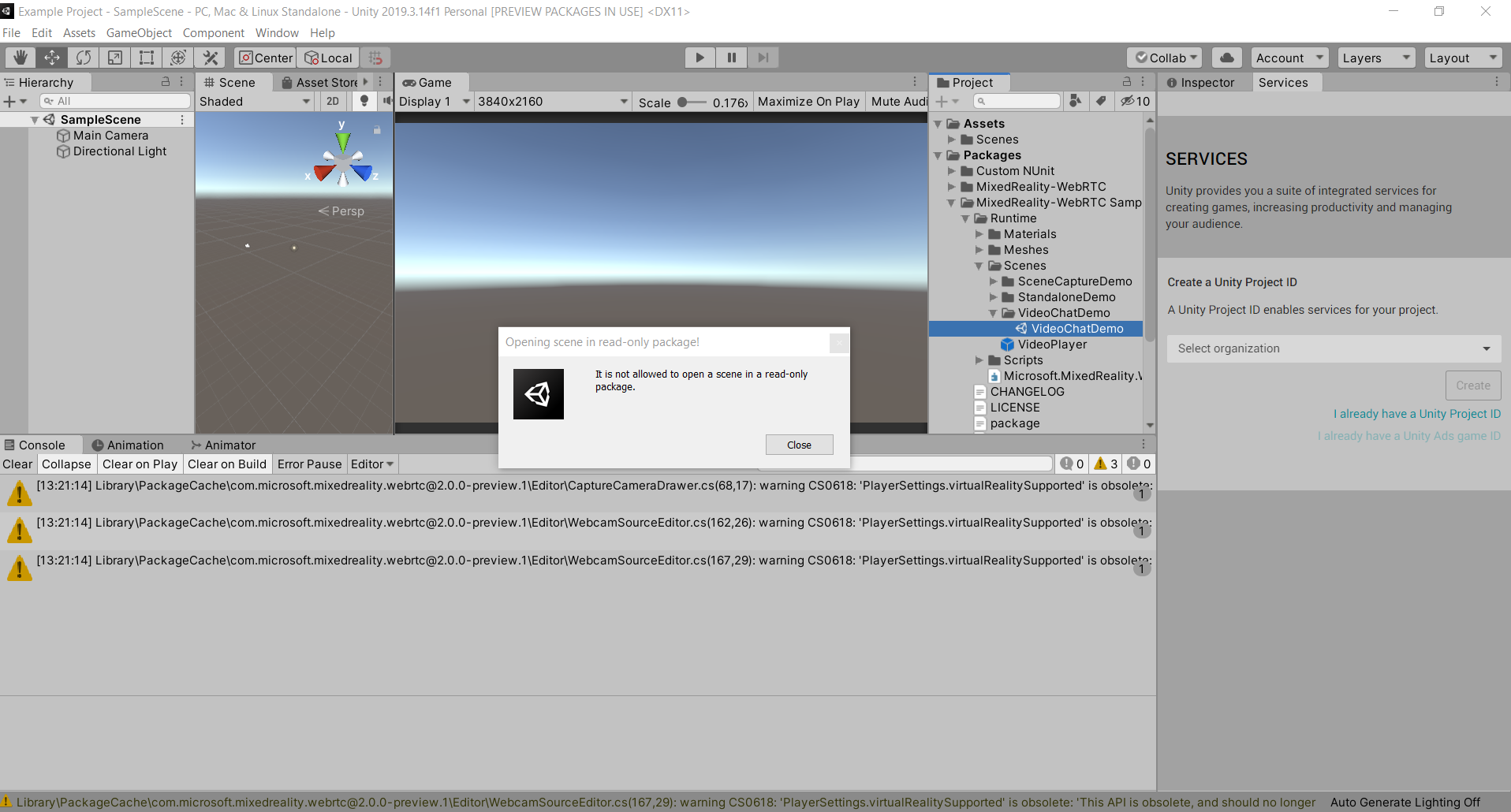
But If you have the package in your packages folder (have to do this manually, adding dependencies in manifest.json will put the package in cache)

Then the scene will open as expected,
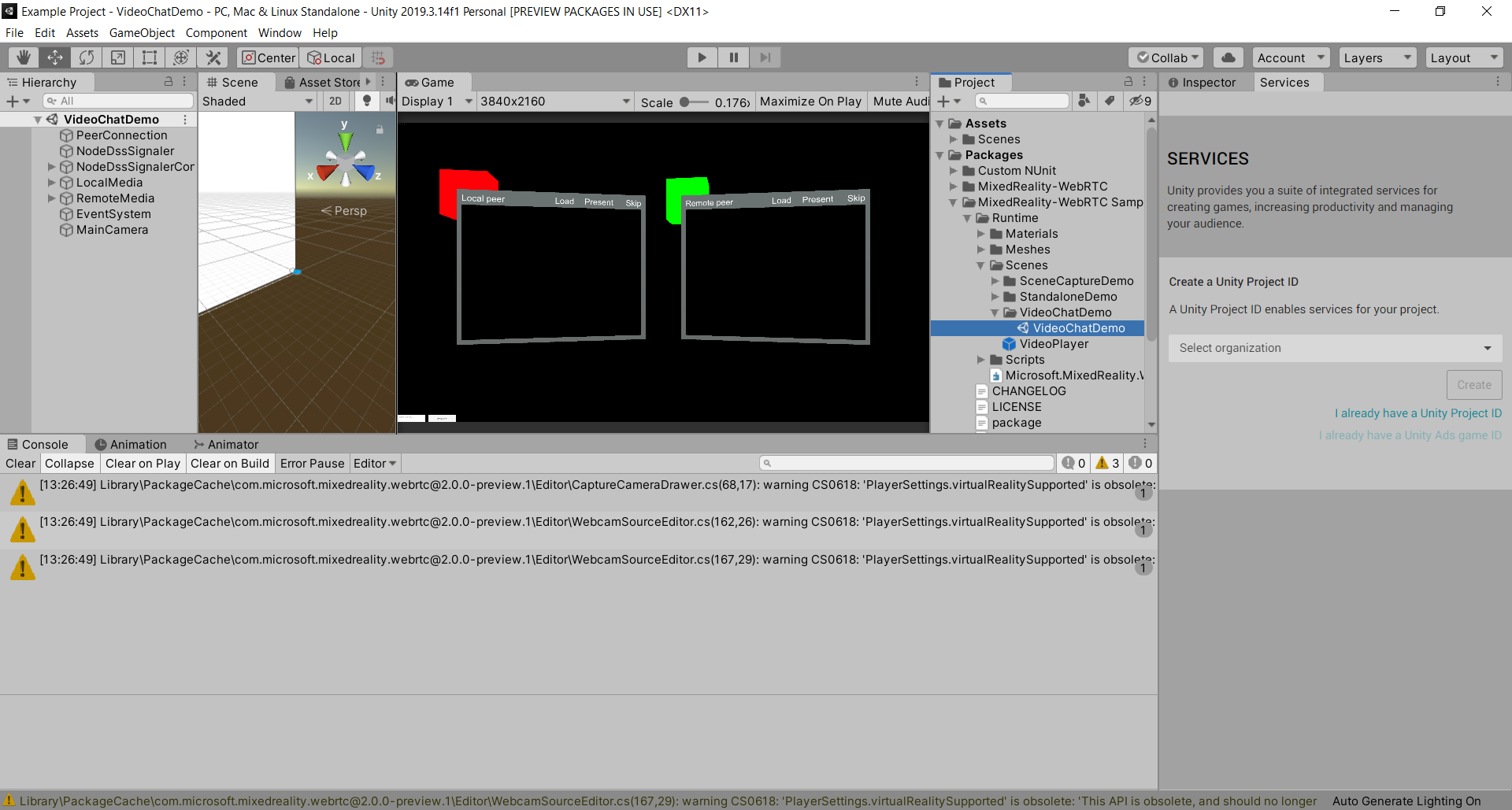
When the package is in the PackageCache folder, you can access all of the assets, but the scenes will not open.
Alternatively, as I mentioned earlier, you could just move the scene into your assets folder.
sananbintahir
on 10 Aug 2020
I don't know why you have this error nor restriction, this works perfectly fine in both 2018.4 LTS and 2019.4 LTS without the package being copied in your Packages/ folder.
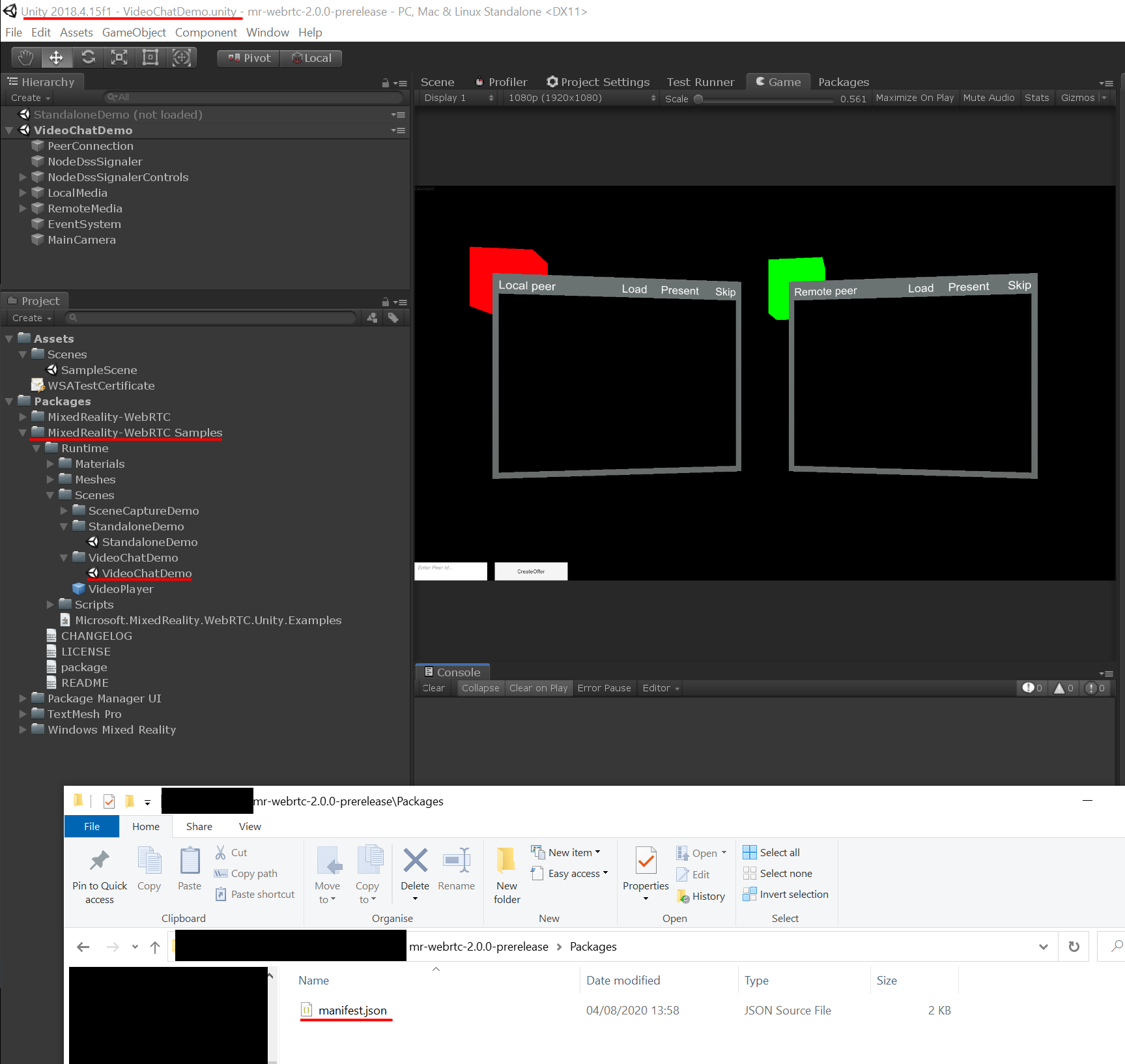
Also the project is in Library/PackageCache/ only if imported via the UPM registry. Otherwise it's wherever you put it when you downloaded it on disk. In either case I can open and play any scene without issue. Might be a bug of one specific version of Unity.
djee-ms
on 10 Aug 2020
Interesting. Might be a Unity bug then, like you said.
sananbintahir
on 10 Aug 2020
I have the same isue if i import the package as a tarball. However if it extract the tgz and import the package.json in UPM I can open the samples scenes.
 raggnic
on 10 Aug 2020
raggnic
on 10 Aug 2020
Related issues
 amfdeluca
·
7Comments
amfdeluca
·
7Comments
 drejx
·
3Comments
amfdeluca
·
3Comments
drejx
·
3Comments
amfdeluca
·
3Comments
 arsi0001
·
3Comments
arsi0001
·
3Comments
 hanseuljun
·
5Comments
hanseuljun
·
5Comments
Most helpful comment
Non-embedded unity packages are read-only, and don't support scenes. As far as I know, this was never possible, even in previous unity versions. You won't be able to run the scene unless the package is physically present in the Packages folder in the unity project. Since the installation of the project requires a dependency in the manifest.json file, it is not an embedded package. You either have to embed the package to play the scene or move the scene into the assets folder.