Mixedreality-webrtc: Crashes sometimes when initializing a new Peer Connection
Tested in Unity and UWP x86.
After the latest changes regarding multiple video tracks per Peer Connection, I've been experiencing random crashes when calling PeerConnection.AddLocalVideoTrackAsync.
I'm currently not trying to use multiple tracks, only one.
In my application I can reconnect as many times as I want. When I reconnect, I fully dispose of previously used resources and initialize them anew, in the same way as when I connect the first time. This is relevant because until now, the function has _never caused a crash the first time_ it's been called.
The deepest call stack I've got is uploaded below:
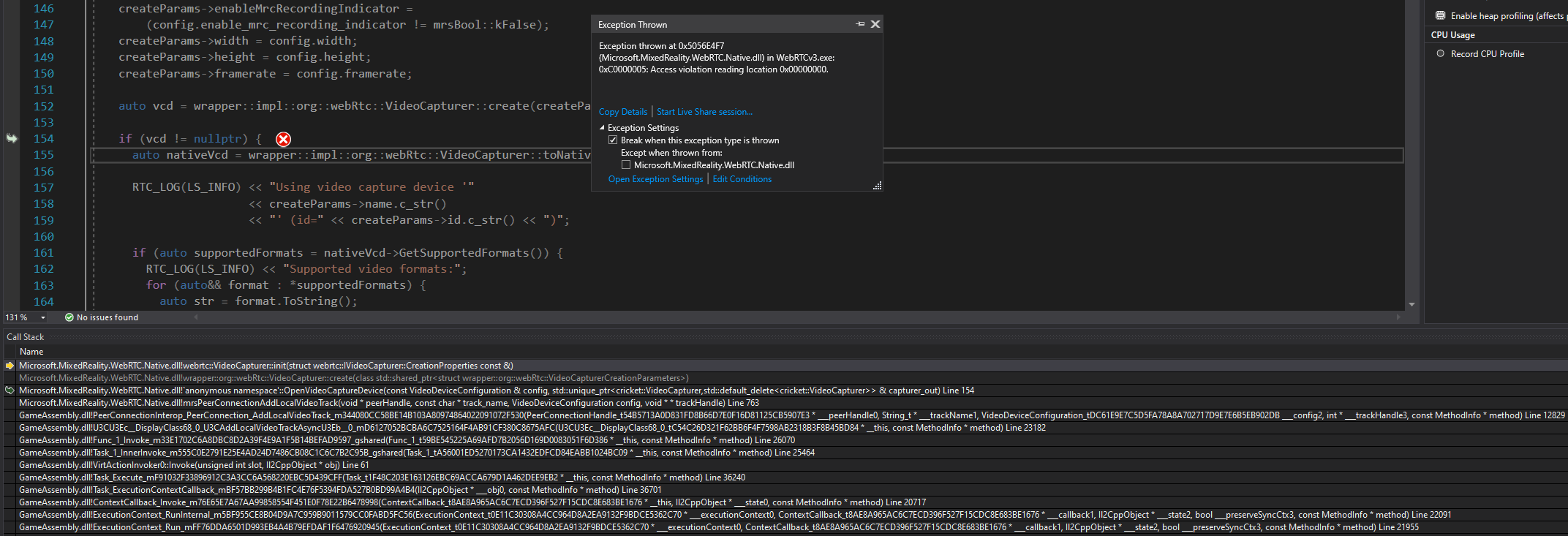
I'm not using LocalVideoSource.cs, but I've copied how that class initializes and disposes of the LocalVideoTrack object. Apart from that, the code is much the same as it was before the recent updates.
Just to specify. First time connecting has not crashed yet. After that I'm able to reconnect in between 2-10 times. At some point it crashes at the call stack above. The variables used to setup the WebRTC call are the same every time.
 eirikhollis
All 13 comments
It looks like the code is trying to call the init() method on a NULL object, which is apparently created in that same method. The question would be : why is that object failing to be created? Since it works several time, my guess would be it's not related to the configuration. So, is the timing affecting the creation success? Can you repro if waiting ~30 sec between each try, or is it more likely if you try as fast as possible to create a new track? Note that because this is likely always the same webcam device used, if the previous call is still cleaning up (due to async actions not waited on during shutdown, as a bug) then it's likely this would prevent a following init on the same device.
 djee-ms
on 21 Nov 2019
djee-ms
on 21 Nov 2019
Tried delaying 30-60 seconds between connect and disconnect, but the issue still occurred. First time it happened on the second connect, second time on the tenth connect. Both Unity and UWP x86.
On my previous post I commented out other aspects of the Peer Connection to focus solely on the AddLocalVideoTrackAsync method, as I thought that was the issue (due to the recent updates on it). But I tested now with PeerConnection.SetBitrate before AddLocalVideoTrackAsync, and what do you know, it crashes on that now instead. Call stack below:

I tried bitrate values from 0 to 100 000 000, but as you mentioned, it seems the issue isn't the input, but calling on a NULL object.
I can try delaying even further, like 5 minutes in between connects, but surely 30 seconds should have been enough?
eirikhollis
on 22 Nov 2019
Can you please try to put a breakpoint in GlobalFactory::~GlobalFactory(), see if really all objects are disposed of, or if some of them are still alive? GlobalFactory::~GlobalFactory() is only invoked when all objects are destroyed, to release the global factory and terminate the (shared) WebRTC threads. I'd like to understand if this is a problem with those, or if this is something with the PeerConnection itself.
djee-ms
on 22 Nov 2019
Do you have a guide on how to connect the WebRTC project to the built IL2CPP project so that I can set breakpoints within the dll?
DLL and PDB are included and symbols are loaded. _Enable Just My Code_ is toggled off. Debugging is set to Native and Managed.
I've added the _Microsoft.MixedReality.WebRTC.Native.UWP_ project to the IL2CPP solution, but not sure if that's the direction to go.
eirikhollis
on 22 Nov 2019
Ok so managed to figure it out. For future reference, what I was missing was to add a path to the DLLs in _Set Symbols and Cache Locations_. Search for it in Visual Studio. You also probably need everything mentioned in the above post and DLLs built in debug.
Back to the issue. I set a breakpoint on
mrsResult GlobalFactory::GetOrCreate(
    rtc::scoped_refptr<webrtc::PeerConnectionFactoryInterface>& factory)
to check if breakpoints are being hit, and they succesfully did so every time I connected.
I also have breakpoints set throughout the entirety of the GlobalFactory::~GlobalFactory() method, and those breakpoints _are never hit_. As I write this it has been disconnected for 5 minutes, and the breakpoint is still not hit. I continued to connect and disconnect until eventually a NULL object was accessed and the app crashed.
Is there anything else you would like me to check while I have the system up and running?
eirikhollis
on 22 Nov 2019
Not sure if it's related, but I seem to get a couple of exceptions on the same Mutex Lock every so often when I try to connect. Call stack:
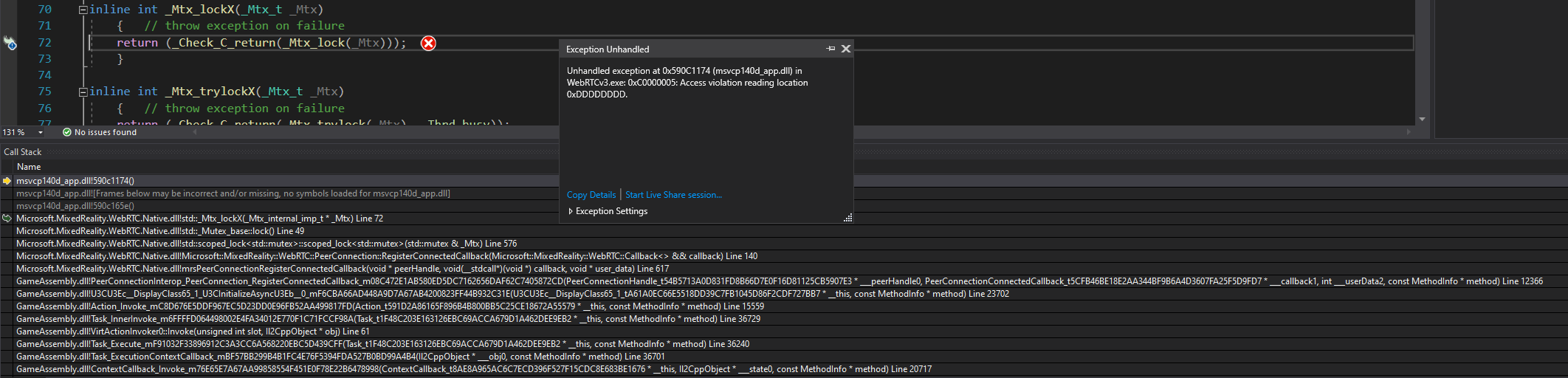
Clicking _Continue_ when debugging in Visual Studio only brings me right back to the exception. Have to restart the application to solve it.
eirikhollis
on 22 Nov 2019
It looks like the PeerConnection has been deinitialized. The 0xdddddddd bit pattern on the memory access is symptomatic of trying to access a this pointer after destroying the object.
If GlobalFactory::~GlobalFactory() is not hit this means the WebRTC threads are still running and some object has not been deinitialized (or there is a logic bug). There is no delay on that; it would be called immediately as the last object is destroyed. Which is fine, just wanted to understand in which configuration we are.
It seems there is a bug somewhere about reference counting the C++ peer connection, and it get destroyed while a C# handle to is still active pointing to it. I would try to put a breakpoint in ~PeerConnection() see when it is destroyed, and compare with one of the calls above trying to use the PeerConnectionHandle (which is just (uint64_t)this, so can be used to identify the instance).
djee-ms
on 25 Nov 2019
Just pushed 5df45e55f00931aa9546e9983b1d14060165df7d which is looping PC tests on C++ 3 times in a row, and is adding the same kind of tests in C#. I couldn't repro locally any crash. Let's see if CI can catch it running all config/platform variants.
Disclaimer: Commits past the v1.0.1 tag contain breaking changes for the next release, in case you want to stay on a stable version.
djee-ms
on 25 Nov 2019
Pulled the latest changes (as of this post), and the crashes do not occur anymore! Reconnected at one point over 100 times successfully, so something has definitely changed.
Tried setting breakpoints in GlobalFactory::~GlobalFactory(), but none of them are hit. Does that mean that something is still not working as intended?
eirikhollis
on 26 Nov 2019
Something is maybe not working as _you_ intended 😉 but there is no requirement for ~GlobalFactory to be called between calls, so not sure whether there's something wrong here. That destructor should at least be called at the end of the program before unloading the DLL, that's the only sure thing. In-between, _if_ you destroy all resources _then_ it should be called. If anything is keeping at least one object alive, then it will not be called. See https://github.com/microsoft/MixedReality-WebRTC/blob/8d5c395cdb51c589f3e9c97ed30eae192eb67a9b/libs/Microsoft.MixedReality.WebRTC.Native/src/interop/global_factory.h#L73 for a list of all the objects known to be alive at any point. That should help you diagnose, once you think that no object should be alive, whether the GlobalFactory state is in sync with your logic (it seems it's not). Then tracking the calls to AddObject() and RemoveObject() (or lack of call) should help determining if there is some object kept alive by your code, or if there is a bug on our side with the tracking.
djee-ms
on 26 Nov 2019
I see. Thanks for the clarification, I'll check out why it isn't being called in my use case and report back when I got updates 🙂
eirikhollis
on 26 Nov 2019
@eirikhollis can we close this bug or is there still something to do here? Did you try to clarify the GlobalFactory destructor not being hit in your app, and any potential object not destroyed?
djee-ms
on 9 Dec 2019
The ~GlobalFactory was never hit, even though the active objects list was empty.
But the function at the end of ~GlobalFactory, namely ShutdownNoLock(), is called in GlobalFactory::RemoveObject, and is probably the reason that ~GlobalFactory never got hit in the first place.
I've had a couple of weeks break on the project as other stuff came up, so I haven't been able to test any of the issues as of late. Right now I think the project crashes on initializing local video, so I can't do any quick testing before I've resolved that issue.
To conclude, you might as well close it. I'll re-open it later if the issue is still present.
eirikhollis
on 9 Dec 2019
Related issues
 CabbageWarrior
·
3Comments
CabbageWarrior
·
3Comments
 derekfreed
·
3Comments
derekfreed
·
3Comments
 jongfeelkim-VIRNECT
·
4Comments
jongfeelkim-VIRNECT
·
4Comments
 eshel
·
6Comments
eshel
·
6Comments
 amfdeluca
·
3Comments
amfdeluca
·
3Comments