Mixedreality-webrtc: HoloLens 1 cannot use [email protected] video capture profile
Observed at commit 59df5a141edf80639b08e40480b7a2bca85595d8 on master branch.
We rely on the 896x504 capture resolution at 29.97 fps as the recommended capture mode for low power usage on HoloLens 1. When this profile is used in the configuration passed to PeerConnection.AddLocalVideoTrackAsync(), the call to PeerConnectionInterop.PeerConnection_AddLocalVideoTrack() results in a value of MRS_E_UNKNOWN which then produces a managed code exception.
It works at 896x504 X 24 fps. To see this:
- run TestAppUWP on HoloLens 1
- select the VideoRecording profile category
- select profile 0 (first in the list)
- select the 896x504 @ 24 fps description
- switch to the Tracks tab and Start Local Video
- local video displays as expected
To see the failure at 29.97 fps:
- run TestAppUWP on HoloLens 1
- select the VideoRecording profile category
- select profile 1 (second in list)
- select the 896x504 @ 29.97 fps description
- switch to the Tracks tab and Start Local Video
- observe that video display does not begin
- if run in a debugger, observe the exception as described above
 kspark-scott
All 9 comments
I believe the floating point error on the framerate makes it not find the capture format, as for some reason most framerates are integral values but 30 FPS rarely is. I need a better selection method:
- either use some min/max value to define a range, though I was arguing in #86 that I didn't want to go down that route, but it seems the most appropriate here;
- or use an
intvalue for the framerate, as done in some parts of the WebRTC code, and use rounding ondouble, which fix this but will prevent distinguishing between 29.97 FPS vs. 30.0 FPS, although I don't think that this is ever a problem for a given resolution in practice.
Any though @kspark-scott?
 djee-ms
on 3 Oct 2019
djee-ms
on 3 Oct 2019
I believe the webrtc-uwp-sdk project went with the min/max approach, making a config API change during m71 development. That seems like the safest approach in that it makes no assumptions on behalf of the client, but in another sense it just forces the client to adopt the questionable assumptions. For example, if I'm trying to select a profile with rate 29.970013..., would I request the range (29.96,29.98)? Or (29.97,29.971)? Somehow I would need to derive the range from the scalar frame rate in the profile description, arbitrarily guessing the correct precision at which to round. On the plus side, it's the only option that allows a client to explicitly indicate that it really doesn't care much, anything in the right general range will do.
Here are two other ideas:
- Round each rate to two decimal digits (or four...) before comparison, which is like the
intapproach but still correctly distinguishes between 29.97 and 30.0. - Search for the closest match, rather than an exact match, selecting the closest frame rate that is within some arbitrary threshold of the requested rate, 1% say. This has the advantage that if the only profile is 29.97 and a client requests 30, they'll probably get what they were expecting rather than a blocking failure. If they really want 29.97 then they can ask for it and will get it.
Any of these suggestions (yours included) would work well for us because our needs are a frame rate of "roughly 30". We do want a specific profile on HoloLens 1 to utilize the lowest power capture mode, but we know the device has only one profile that is close.
They all have drawbacks. Personally my hunch is that the closest match that is "close enough" is most likely to have the desired outcome in practice.
kspark-scott
on 3 Oct 2019
Yes my take on #86 was that Google is doing a closest match without error checking, so you can end up at 300% error from what you requested, with a completely different resolution and framerate. But I like your idea to keep it close, like 1% error. I'll see if I can get a quick fix with that.
djee-ms
on 3 Oct 2019
I have a fix that needs some more testing but I should be able to get a PR up early next week.
djee-ms
on 4 Oct 2019
@kspark-scott I submitted a PR on WebRTC UWP to fix that, but please try another resolution in the meantime anyway, there is likely (also) a bug with the decoder struggling with resolutions whose height is not a multiple of 16px, which 540 is not.
djee-ms
on 7 Oct 2019
Yes, we can certainly use 896x504@24fps in the meantime.
I'm curious about the multiple of 16 issue. None of the HL1 resolutions (https://docs.microsoft.com/en-us/windows/mixed-reality/locatable-camera) have a height that is a multiple of 16. But all resolutions have widths that are multiples of 16. Is it possible that it's width that matters?
kspark-scott
on 8 Oct 2019
Sorry @kspark-scott I meant in general, not specifically for HL1. I also meant another resolution (width x height), not another framerate. Of course you can use another framerate to work around the bug on the current issue, but the framerate fix is coming and will fix this bug, which is a simple floating-point-based logic bug in the selection algorithm and has nothing to do with any device. I was looking forward with my comment and noting that after that bug is fixed, there is still another (un-logged) issue with the decoder when the resolution height is not a multiple of 16px, because the decoder is padding, presumably for hardware performance. It might be also that it requires a width multiple of 16px, but as they all are we don't need to care about the width. So I was suggesting ahead of time to work around that one before you hit it, to not lose time.
Actually I am confused by your comment. The HL1 resolutions listed on that page are:
- 1280x720 : 720 = 16 x 45 ✔
- 1408x792 : 792 = 16 x 49.5 ❌
- 1344x756 : 756 = 16 x 47.25 ❌
- 896x504 : 504 = 16 x 31.5 ❌
Cannot you use 1280x720? This is the one we are using in our testing, both on HL1 and HL2.
- On HL1 it's available under one of the VideoRecording profiles.
- On HL2 it's available under the unique VideoConferencing profile.
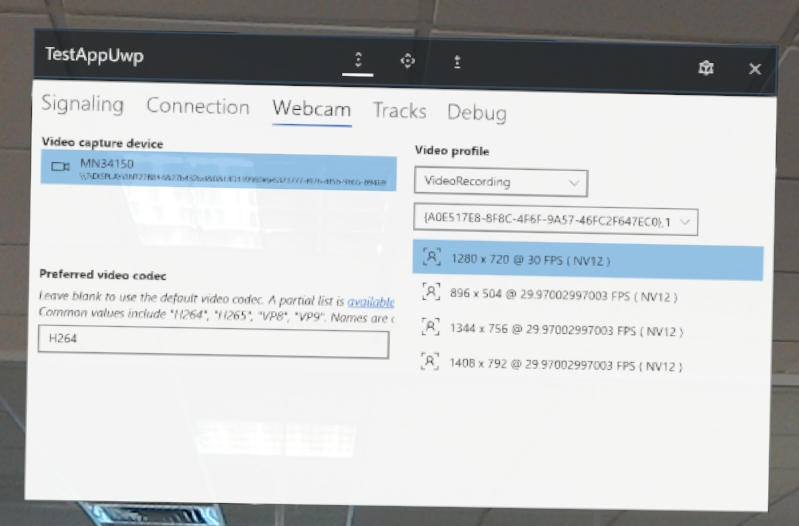
djee-ms
on 9 Oct 2019
@djee-ms: Hmm. How on earth did I miss that (720 % 16) == 0? I even fired up a python shell and did each division there because I didn't fully trust my mental arithmetic, and I remember checking 1280x720 because I _thought_ it was a multiple. Can I blame it on the late hour of the day? :-)
Our intention is to use 1280x720 on HL2 so there is no problem there. And we can certainly do our dev testing with 1280x720 on HL1, or live with whatever issues exist with 896x504. But I don't think we would want to ship in that state. We currently are using two different webrtc versions in our dev build, a customized m62 for x86 (PC and HL1) and a dev snapshot of webrtc-uwp-sdk m71 for ARM. The APIs are incompatible in places so we use a few #if/#else blocks to select the right API. We would very much like to switch to MR-webrtc for all platforms for our first HL2 release but would likely continue with the dual version build for x86 if there were still noticeable problems with 896x504.
kspark-scott
on 9 Oct 2019
Yes we would very much like to fix that decoder issue too and recommend using 896x504x30fps as the best candidate on HL2, this is planned. However I don't have an estimate for that quite yet.
djee-ms
on 9 Oct 2019
Related issues
 amfdeluca
·
7Comments
amfdeluca
·
7Comments
 drejx
·
3Comments
drejx
·
3Comments
 arsi0001
·
3Comments
arsi0001
·
3Comments
 KarthikRichie
·
6Comments
KarthikRichie
·
6Comments
 hansenwuwu
·
4Comments
hansenwuwu
·
4Comments