Mist: No etherbase set and no accounts found as default
- [ ] I've asked for help in the Mist Gitter before filing this issue.
Version: Mist and Ethereum Wallet 0.9.2
OS & Version: windows10 64
Node version: `geth 0.0.0`
Number of blocks synchronized: 0
I did download almost the whole chain, was few blocks left, so I decided to click in testnet to open the wallet.
and after click in test net to open the wallet I start get this error, please how to fix this?
now my wallet it is not working so pretty annoy after spend 7 hours downloading the bblockchain. :(
=============== Nov 12, 2017 (GMT) ===============
11:23:27.928822 log@legend F·NumFile S·FileSize N·Entry C·BadEntry B·BadBlock Ke·KeyError D·DroppedEntry L·Level Q·SeqNum T·TimeElapsed
11:23:27.992825 version@stat F·[5 104 1095 7601 5495] S·28GiB[542MiB 208MiB 2GiB 14GiB 10GiB] Sc·[1.25 2.09 2.10 1.53 0.11]
11:23:27.996825 db@open opening
11:23:28.046843 journal@recovery F·1
11:23:28.051833 journal@recovery recovering @71703
11:23:28.078955 version@stat F·[5 104 1095 7601 5495] S·28GiB[542MiB 208MiB 2GiB 14GiB 10GiB] Sc·[1.25 2.09 2.10 1.53 0.11]
11:23:28.174004 db@janitor F·14305 G·3
11:23:28.174004 db@janitor removing table-71705
11:23:28.175004 db@janitor removing table-71706
11:23:28.176005 db@janitor removing table-71707
11:23:28.176005 db@open done T·179.1799ms
11:23:28.181004 table@compaction L2·1 -> L3·4 S·7MiB Q·128184777
AppData\Roaming\Ethereum Wallet
node file says:
WARN [11-12|12:14:33] No etherbase set and no accounts found as default
INFO [11-12|12:14:33] Starting peer-to-peer node instance=Geth/v1.7.2-stable-1db4ecdc/windows-amd64/go1.9
INFO [11-12|12:14:33] Allocated cache and file handles database=E:\BLOCKS-COIN-2\ethereum-blockchain-nov-2017\geth\chaindata cache=1024 handles=1024
node.log
WARN [11-12|11:23:27] No etherbase set and no accounts found as default
INFO [11-12|11:23:27] Starting peer-to-peer node instance=Geth/v1.7.2-stable-1db4ecdc/windows-amd64/go1.9
INFO [11-12|11:23:27] Allocated cache and file handles database=E:\BLOCKS-COIN-2\ethereum-blockchain-nov-2017\geth\chaindata cache=1024 handles=1024

 douglasdeodato
All 8 comments
I ran into this too. I deleted my data directory which fixed it, and made sure to enter a password after switching to rinkeby. From the behavior I saw, I believe you only have so many seconds to enter a password and if you don't set one in time, it breaks. Then it crashes before you can do anything every subsequent launch, until you delete the data dir.
 rannmann
on 30 Nov 2017
rannmann
on 30 Nov 2017
@rannmann I'm seeing this issue as well. Where is the data directory located that you deleted to fix the issue?
Is it "AppData\Roaming\Ethereum Wallet"?
 bford21
on 30 Nov 2017
bford21
on 30 Nov 2017
Same issue! Still trying to resolve.
 cub4vcu
on 1 Dec 2017
cub4vcu
on 1 Dec 2017
I have this issue as well, pretty annoying! Did anyone else figure a way around it?
 bmoore117
on 1 Dec 2017
bmoore117
on 1 Dec 2017
Leaving this comment here as I have found a workaround. For the TL;DR skip to the end
The core of the issue is that when you switch from mainnet to any test net, mist.exe tries to kill and relaunch geth.exe with different parameters. If you launch mist from the desktop shortcut, I don't know exactly what's going on, but mist is in some kind of mode where any warnings from geth are treated as errors. You'll note in @douglasdeodato's original screenshot, the messages displayed in the error dialog are only warnings. Seems like the devs need to tweak whatever's hosting the mist process when launched from the desktop.
At any rate, for a workaround solution, simply pop open a powershell prompt in your Mist install dir, and launch mist.exe from the command line. It will start the graphical application as normal, and you can switch between all networks and create accounts no problem. The reason it works is when launched this way, mist's output is bound to the powershell terminal instead of whatever Windows component is hosting mist when launched from the desktop, and so any warnings or errors that mist generates simply get printed to the terminal screen. Kinda useful to see what's happening with mist anyway!
bmoore117
on 3 Dec 2017
If you are not soo technical here is what you do:
Right click on your "Mist" icon on your dekstop
Choose "Properties"
Click "ShortCut/Open File Location"
Copy the URL fom the address bar "C:\Program Files\Mist" (or whatever it says on your machine)
Click Windows Start button
Type "Powershell"
Run Powershell from the menu by click it
type cd "C:\Program Files\Mist" or whatever you copied from above
type ".\Mist.exe"
And your download will continue :-)
 WimDeGroote
on 17 Dec 2017
WimDeGroote
on 17 Dec 2017
When I want to do sth in test network, I have the problem, too.
Thanks to WimDeGroote.
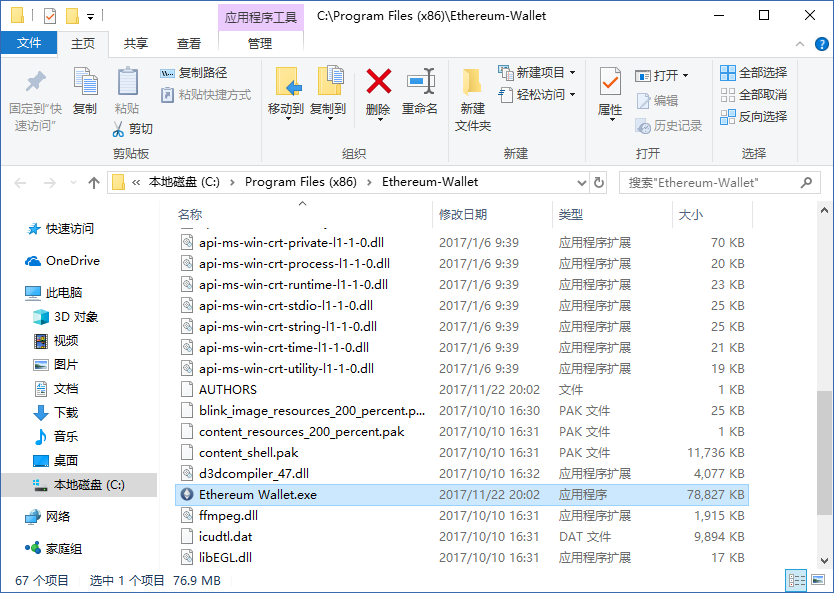
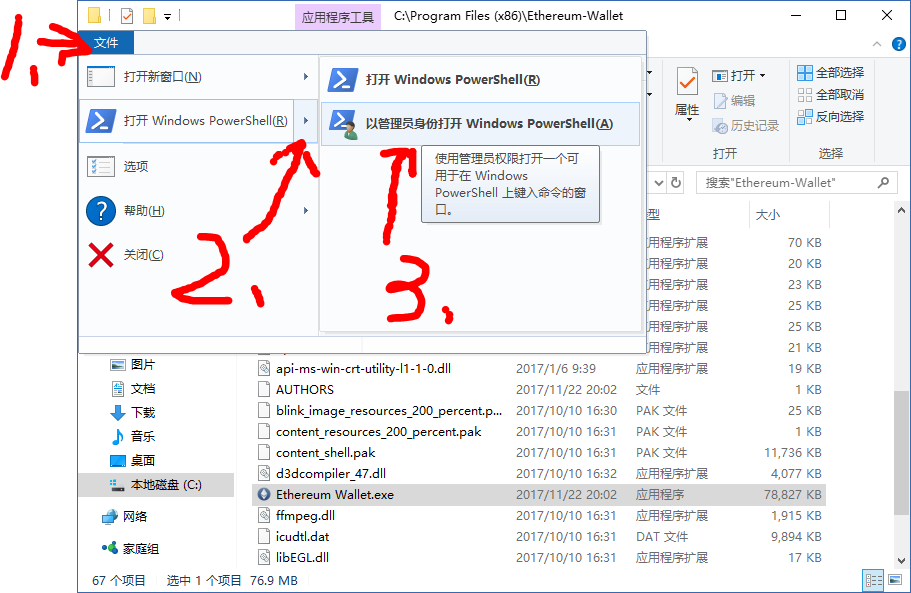
type ./Eth and <Tab> Keyboard
type enter
And it works.
 flyq
on 16 Jan 2018
flyq
on 16 Jan 2018
This thread has been automatically locked because it has not had recent activity. Please open a new issue for related bugs and link to relevant comments in this thread.
![lock[bot] picture](https://avatars.githubusercontent.com/in/6672?v=4&s=40) lock[bot]
on 29 Apr 2018
lock[bot]
on 29 Apr 2018
Related issues
 jamesray1
·
5Comments
jamesray1
·
5Comments
 PacketSmuggler
·
3Comments
PacketSmuggler
·
3Comments
 Swift42
·
6Comments
Swift42
·
6Comments
 ibart7
·
6Comments
ibart7
·
6Comments
 brandoncurtis
·
4Comments
brandoncurtis
·
4Comments
Most helpful comment
If you are not soo technical here is what you do:
Right click on your "Mist" icon on your dekstop
Choose "Properties"
Click "ShortCut/Open File Location"
Copy the URL fom the address bar "C:\Program Files\Mist" (or whatever it says on your machine)
Click Windows Start button
Type "Powershell"
Run Powershell from the menu by click it
type cd "C:\Program Files\Mist" or whatever you copied from above
type ".\Mist.exe"
And your download will continue :-)