Updated in 2018-01-08
Notes about sync
"Stuck" on 100-200 blocks away from current highest block
When using the default Geth setting fast mode, it downloads blocks, headers and chain structure (or state entries). As of today, the latter sums up more than 70 million entries. Know what to expect: it can take several hours to download on a consumer machine. For quicker access to funds or balances, refer to the Light Client section.

"Mist has eaten my hard drive space"
Regular geth sync can take dozens of GB from your hard drive. In order to reclaim space, you can:
- execute
geth removedb - enable the light client (see below)
For information directly related to blockchain sync, refer to https://github.com/ethereum/go-ethereum
Light Client
Soon-to-be default, yet still experimental. It downloads block headers and pulls blocks on demand. The sync times are reduced by an order of magnitude while staying safe. And the required storage is a lot smaller.
How to activate?
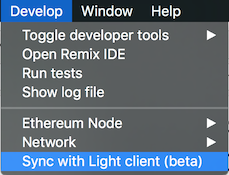
Mist Wiki: https://github.com/ethereum/mist/wiki
Gitter channel, where the community is, and can certainly help as well: https://gitter.im/ethereum/mist
 evertonfraga
All 60 comments
@evertonfraga please put Mist first in the list of releases, then Ethereum Wallet. I think most people would prefer to try using Mist with the built in Ethereum wallet.
 jamesray1
on 29 Sep 2017
jamesray1
on 29 Sep 2017
That’s a nice heads up, but github doesn’t let me do that.
We’re planning to have a super friendly website, where we’ll be in control
of things like this
On Thu, 28 Sep 2017 at 21:01 James Ray notifications@github.com wrote:
@evertonfraga https://github.com/evertonfraga please put Mist first in
the list of releases, then Ethereum Wallet. I think most people would
prefer to try using Mist with the built in Ethereum wallet.—
You are receiving this because you were mentioned.
Reply to this email directly, view it on GitHub
https://github.com/ethereum/mist/issues/3097#issuecomment-332995386, or mute
the thread
https://github.com/notifications/unsubscribe-auth/AAC4BA7F7go4-4W8xPUz5Pdplk9ZQ7zQks5snDNZgaJpZM4Pnv0s
.
evertonfraga
on 29 Sep 2017
OK, sure.
jamesray1
on 29 Sep 2017
As soon as I engage the light client, Mist stops working. It just says 'checking network...'
I believe the problem was fixed by closing Plex Media software; perhaps it was trying to use the same port or something... Anyhow, it works! After months of not being able to see my balance, what a relief!!
 squibbler00
on 29 Sep 2017
squibbler00
on 29 Sep 2017
Run go-ethereum separatedly with geth --vmodule=sync=6,downloader=6 to see whats happening with sync.
 3esmit
on 2 Nov 2017
3esmit
on 2 Nov 2017
Hello,
Not sure this is the right thread to post this question but Im not seeing my ETH in myetherwallet.com.
I saw some people recommending myetherwallet.com but I have having similar issues to others...I transferred small amounts of ETH from both Coinbase and ethermine.org and neither transfers show up in myetherwallet.com but both show on eitherscan.io. Does anyone have any thoughts as to why?
One weird thing I noticed was that when I sign into myetherwallet.com with my private key, the address shows differently than the address shown here (the address shown here is the original address I recorded when i created the wallet - not sure if myetherwallet generates multiple addresses?).
Etherscan.io screenshots below:

Thank you in advance!
 crypt2kpr
on 7 Nov 2017
crypt2kpr
on 7 Nov 2017
Just checked "Sync with light client" and what happened:
balance become 0.
a new subfolder appeared: "lightchaindata" 2 Mb in size.
the old "chaindata" still in place, 205 Gb in size.
after a while it started to sync and the correct balance appeared.
The folders "lightchaindata" and "chaindata" remained unchanged in size: 2 Mb and 205 Gb.
Is it safe now to delete the chaindata" folder ? Can i safely send ether with my wallet in this "light" mode ?
The purpose was to reduce the size on disk and keep the wallet operational.
Using the official ethereum wallet, latest version 0.92 with geth 1.7.2
 atreyyu
on 17 Nov 2017
atreyyu
on 17 Nov 2017
@atreyyu the lightchaindata directory should be bigger than "2Mb" at the moment.
It is safe to delete chaindata, though.
evertonfraga
on 17 Nov 2017
@evertonfraga: the lightchaindata is around 200 Mb now.
I've deleted the chaindata.
Thank you !
atreyyu
on 17 Nov 2017
geth kept failing every 10 - 15 minutes so in windows i created a sync.cmd file with the following and that took care of it.
C:
cd "C:\Users\Dan\AppData\Roaming\Ethereum Wallet\binaries\Geth\unpacked"
:loop
%@Try%
call "geth.exe" --fast --cache=512 --datadir="D:\Ethereum-Wallet-win32-0-9-3"
timeout 2
%@EndTry%
:@Catch
goto loop
:@EndCatch
goto loop
 dfalzetti
on 14 Jan 2018
dfalzetti
on 14 Jan 2018
it can take several hours to download on a consumer machine
It's been 3 days for me, it's still stuck 179 blocks behind. Light client syncing works for me, but I rarely get peers. Any suggestions on the fast sync front?
 anthony-cros
on 17 Jan 2018
anthony-cros
on 17 Jan 2018
@anthony-cros it has to download over 70M state entries. Please start Geth from the command line in order to have a bird's eye on syncing progress.
evertonfraga
on 19 Jan 2018
How does one sync with light client? There is no option on Mist to go to " developers>sync with light client(beta) "
 BlueJayExchange
on 19 Jan 2018
BlueJayExchange
on 19 Jan 2018
the main issue I had was that the version of geth that came with the ethereum wallet that I downloaded kept crashing. I downloaded the latest version and was able to sync in under 24 hours
dfalzetti
on 19 Jan 2018
@evertonfraga , thanks, it's already what I do. Note that it's not _always_ 179 blocks behind, it changes over time but remains in the hundreds
anthony-cros
on 20 Jan 2018
UPDATE: finally got my geth synced (overnight) using the following:
debian:9.3-slimbase docker image (instead ofubuntu:16.04earlier)- ports
8545and30303open - geth options:
--fastand--cache=1024(I was using 512 earlier)
Not sure if it was just luck or if something in the above list made the difference, but hopefully that'll help someone else...
anthony-cros
on 21 Jan 2018
This wallet is just broken, for this big of a project like Ethereum its a damn shame that its default wallet does not work ever. I ma stuck at "Node connected" splash screen and no matter what I try cannot get pass it.
 VladimirAmiorkov
on 21 Jan 2018
VladimirAmiorkov
on 21 Jan 2018
Any ideas, after turning light client my wallet hangs. After I start the client it says "Ethereum node connected" and freezes, nothing happening. Tryed to rename chaindata folder didnt helped. Any ideas? Also same problem as VladimirAmiorkov.
 JuC0de
on 22 Jan 2018
JuC0de
on 22 Jan 2018
again: win10, i7 quad core, 16gb ram, nvidia gcard.
synced mist also with light client beta, accounts are still zero!
https://github.com/ethereum/mist/issues/3593
another thought.
if, I start fresh, how do I import the existing accounts, i know passwords of in mist/ethereum wallet?
 lnaie
on 22 Jan 2018
lnaie
on 22 Jan 2018
any update on this?
 ChristBKK
on 23 Jan 2018
ChristBKK
on 23 Jan 2018
Inae, I had same issue i turned normal client on and delete lightchain folder, took me some time to download whole chain but it starts normaly now and doesnt hangs on the splash screen. my wallet works also still 1000 blocks left to sync but i can see some of the ethereum in the wallet now. after fully sinced ill delete this crap wallet! no more!
JuC0de
on 23 Jan 2018
how do I import an existing account in mist/ethereum wallet, for which I know its password and I have its infamous UTC--yyy--xxx file?
lnaie
on 23 Jan 2018
Here is what I've done.
Synced mist with default settings but in a custom data folder: "C:\Program Files\Mist\Mist.exe" --node-datadir="D:\Repository\Ethereum"
It took almost 24h.
Then I've copy & pasted the UTC--yyy--xxx files in D:\Repository\Ethereum\keystore.
It immediately recognized and calculated the accounts.
Thanks
lnaie
on 24 Jan 2018
Hey Guys, for everyone having issues. I know this tip is not rational, but what worked for me (took 6 days) was starting geth --cache=1024 like 50 times. Including restarting the computer and so on. Also in the end I didn't start geth first, I started just Mist and let it do its job. I know not much of a help but I want to give you guys motivation back to try it again if you really need MIST (I do.)
ChristBKK
on 24 Jan 2018
And what about the crazy fees when using lite mode? Is that also on the list of things to be addressed?
 pingram3541
on 27 Jan 2018
pingram3541
on 27 Jan 2018
worst wallet ever! this garbage is beta
 great999
on 1 Feb 2018
great999
on 1 Feb 2018
@pingram3541 this is being addressed by Go-ethereum team, which provides Gas estimations.
evertonfraga
on 1 Feb 2018
@evertonfraga thx, so there should be somewhere we can put #3002 in front of them?
This is a very big issue forcing many to use My Ether Wallet and upload their json/keystor files which is not very secure but seems to be the only alternative to sending eth/tokens from an existing desktop wallet (without exorbitant fees).
pingram3541
on 1 Feb 2018
I think I found why it doesnt sync. The situation is clear somehow ... but I have no clue how to fix it.
node.log
 garethplayford
on 1 Feb 2018
garethplayford
on 1 Feb 2018
Just popping by to say I've been trying to sync for over a week now, both light & standard versions unsuccessful.
Multiple reinstallations & even reinstalled windows twice. Getting desperate.
 makorth12
on 6 Feb 2018
makorth12
on 6 Feb 2018
How long is the geth remove db command supposed to take? This thing is taking forever. It's like my CLI is frozen?
 jcklpe
on 7 Feb 2018
jcklpe
on 7 Feb 2018
@thedonquixotic geth removedb should take less than a minute.
evertonfraga
on 14 Feb 2018
@evertonfraga It was taking a long time for me so I just ended up deleting the chaindata files manually.
I tried the CLI commands with the additional flags that people have suggested and it helped a little but still getting stuck at about 4%.
jcklpe
on 15 Feb 2018
Hi @thedonquixotic Geth have just updated to 1.8.0, a major update.
Once you have the command line skills, please download it and run in the light mode. It works, and it's blazingly fast:
> geth removedb
> geth --syncmode light --cache 1024
There's an open PR that upgrades Geth to latest in Mist: https://github.com/ethereum/mist/pull/3688
evertonfraga
on 15 Feb 2018
@evertonfraga I've tried that, but I do need to try it with a new version of geth. I've got a problem though. I know this is kind of stupid.... but... I kind of forgot my password. I set this thing up months and months ago, and while I follow an algorithm for my internet passwords, I don't know what I did when I set up my account in the CLI. And since it was in the CLI, I don't have it saved anywhere on my LastPass password manager etc. So... not really sure what to do. It's currently logged in, but if I try to use myetherwallet.com etc to access my wallet by uploading my keystore, I don't have the password necessary to decrypt it.
If I install 18 will that require me to log back in? Because if so, then I basically have to give up on this I guess.
jcklpe
on 15 Feb 2018
@thedonquixotic I am not sure what does "log back in" mean, as there is no log in feature, just private keys decrypt. And that procedure is stateless and don't rely on having the same Geth version.
evertonfraga
on 15 Feb 2018
@thedonquixotic meaning: you should update to 1.8.0 and try again :)
evertonfraga
on 15 Feb 2018
Yes, sorry, that's what I meant. I just meant that whatever the password
was for geth that I was required to create when I first installed geth has
been forgotten which means that I can not unlock my keystore in my mist
wallet, which is why I'm trying to update the block chain locally so I can
send the eth in that account to a new freshly created address. I'll let
you know how it goes! Thank you!
On Thu, Feb 15, 2018 at 2:17 PM Ev notifications@github.com wrote:
@thedonquixotic https://github.com/thedonquixotic I am not sure what
does "log back in" mean, as there is no log in feature, just private keys
decrypt. And that procedure is stateless and don't rely on having the same
Geth version.—
You are receiving this because you were mentioned.
Reply to this email directly, view it on GitHub
https://github.com/ethereum/mist/issues/3097#issuecomment-366048654, or mute
the thread
https://github.com/notifications/unsubscribe-auth/AJA4zg7Nbg062F_Eyyvb7jswJ58EUcsEks5tVJDtgaJpZM4Pnv0s
.
jcklpe
on 15 Feb 2018
I have the impression that currently blocks are generated faster than they can be synced, and this is really frustrating. My client is always 100s of blocks behind latest_block and never finishes syncing.
Yes I can light sync in 1o minutes, but this will not help me, as I have some solidity contracts ready, tested on a private blockchain and need obviously a fully synced node to deploy to the main BC.
I have to say, after months of learning blockchain programming and weeks of syncing BS, that effectively at >150% CPU usage nealy burned down my Mac, I am about to leave Ethereum as a development platform.
I tried NEO, which is even more complicated and was hoping for QTUM which has smart contracts still some month away, but I think if nobody can recommend any other BC system with smart contracts that really works, I am going to abandon development until this technology is ready for the real world.
I am a developer for over 20 years, and have to say that working with this was the most frustrating experience I had in software development. I know there are always are entry barriers into a new system, but this is really annoying and by design will not get better, if more people would adopt the system.
 Bogula
on 2 Mar 2018
Bogula
on 2 Mar 2018
I'm in the same situation and nobody care about us, they are lazy and care about money.
I hope this ether joke will be crushed
great999
on 2 Mar 2018
Hi all,
I bring some exciting improvements on this topic.
Light client
The go-ethereum team did an incredible job with Geth 1.8 release family. With the rollout of LES version 2, we now have a more reliable, and blazingly-fast Light Client.
Fast sync
With state pruning and I/O optimizations, even fast-syncing is possible again. Fixes around state entries download reporting (called "chain structure" in Mist) brings some relief to the people that got confused, thinking the sync has started over again (more info).
Read their release notes for more information:
Geth 1.8.2 is now available to every Mist/Wallet user, after the prompt.
Remote node integration
Soon it'll be able to instantly connect to a remote node while your local blockchain gets updated, with the help of INFURA infrastructure. You can take a look at the working branch here: https://github.com/ethereum/mist/tree/layered-nodes. This is on our priorities for Q1-2018, so tune in for updates.
evertonfraga
on 6 Mar 2018
@Bogula
by design will not get better, if more people would adopt the system.
This is false. please take a look at Light Client (recently implemented), and Sharding (future plans).
evertonfraga
on 6 Mar 2018
Please take a look at this excellent write-up about current sync state, by @karalabe: https://github.com/ethereum/go-ethereum/issues/15001#issuecomment-370732526
evertonfraga
on 6 Mar 2018
@Bogula
I have the impression that currently blocks are generated faster than they can be synced, and this is really frustrating. My client is always 100s of blocks behind latest_block and never finishes syncing.
please take a look at the link above for an explanation on this.
evertonfraga
on 6 Mar 2018
ethereum = waist of time and money
great999
on 11 Mar 2018
My geth is syncing about 35 days till start. Now i have about 158 million pulled states and it is not ended yet. :hankey:
So I started it on 3 computers, and state is almost the same.
Dunno how to get actual livenet.
 quasisamurai
on 3 May 2018
quasisamurai
on 3 May 2018
The light mode is working well for me, still using this setup. I haven't tried fast mode again lately though. NB: I use mist with the --rpc option pointing to my geth's .ipc.
anthony-cros
on 12 May 2018
look for alternative because this is a way of wasting time
great999
on 12 May 2018
I am still having sync issues. I am using
MacOS High Sierra 10.13.4 with
Etherium Wallet using Geth 1.8.2
When I don't use lite mode I get stuck on the last 65 blocks.
When I have lite enabled there are no peers to connect on that network, so I cannot know if it will sync.
 adjiandov
on 13 May 2018
adjiandov
on 13 May 2018
Same issue I think. Using Geth 1.8.7 on Win10. Have run geth removedb and then geth --syncmode=light. Let's see if that makes any difference.
It is SO annoying having to do this all over again. I am just trying to do a simple smart contract tutorial!
@Bogula Come try Stratis... they're announcing smart contracts in C# tomorrow (aplha). In my experience they are a really excellent team and their tech speaks for itself.
 slugmandrew
on 15 May 2018
slugmandrew
on 15 May 2018
Perpetually ~60 blocks away from syncing. Reading elsewhere that I cannot query the geth node until it is synced, making this unusable.
--syncmode=light seems to just not sync at all. Same results as @adjiandov
 quantumproducer
on 15 May 2018
quantumproducer
on 15 May 2018
@quantumproducer @slugmandrew What I did at the end to be able to sync is I manually started geth (via terminal). I downloaded the latest a few days ago which was 1.8.7-stable. Started it using the following command:
geth --testnet --light optionally I set the directory where to start and this worked, for some reason networkId 3 and testnet behave differently, but they sync to the same network. After this start syncing then I started also from terminal my wallet pointing to the url=~/username/Library/Ethereum/mydirectory/geth.ipc and this works for now :) Hope this helps
adjiandov
on 16 May 2018
@adjiandov were you using testnet then, with network id 3?
quantumproducer
on 16 May 2018
From @karalabe , in https://github.com/ethereum/go-ethereum/issues/16743#issuecomment-389445550
begin quote:
Syncing Ethereum is a pain point for many people, so I'll try to detail what's happening behind the scenes so there might be a bit less confusion.
The current default mode of sync for Geth is called fast sync. Instead of starting from the genesis block and reprocessing all the transactions that ever occurred (which could take weeks), fast sync downloads the blocks, and only verifies the associated proof-of-works. Downloading all the blocks is a straightforward and fast procedure and will relatively quickly reassemble the entire chain.
Many people falsely assume that because they have the blocks, they are in sync. Unfortunately this is not the case, since no transaction was executed, so we do not have any account state available (ie. balances, nonces, smart contract code and data). These need to be downloaded separately and cross checked with the latest blocks. This phase is called the state trie download and it actually runs concurrently with the block downloads; alas it take a lot longer nowadays than downloading the blocks.
So, what's the state trie? In the Ethereum mainnet, there are a ton of accounts already, which track the balance, nonce, etc of each user/contract. The accounts themselves are however insufficient to run a node, they need to be cryptographically linked to each block so that nodes can actually verify that the account's are not tampered with. This cryptographic linking is done by creating a tree data structure above the accounts, each level aggregating the layer below it into an ever smaller layer, until you reach the single root. This gigantic data structure containing all the accounts and the intermediate cryptographic proofs is called the state trie.
Ok, so why does this pose a problem? This trie data structure is an intricate interlink of hundreds of millions of tiny cryptographic proofs (trie nodes). To truly have a synchronized node, you need to download all the account data, as well as all the tiny cryptographic proofs to verify that noone in the network is trying to cheat you. This itself is already a crazy number of data items. The part where it gets even messier is that this data is constantly morphing: at every block (15s), about 1000 nodes are deleted from this trie and about 2000 new ones are added. This means your node needs to synchronize a dataset that is changing 200 times per second. The worst part is that while you are synchronizing, the network is moving forward, and state that you begun to download might disappear while you're downloading, so your node needs to constantly follow the network while trying to gather all the recent data. But until you actually do gather all the data, your local node is not usable since it cannot cryptographically prove anything about any accounts.
If you see that you are 64 blocks behind mainnet, you aren't yet synchronized, not even close. You are just done with the block download phase and still running the state downloads. You can see this yourself via the seemingly endless Imported state entries [...] stream of logs. You'll need to wait that out too before your node comes truly online.
Q: The node just hangs on importing state enties?!
A: The node doesn't hang, it just doesn't know how large the state trie is in advance so it keeps on going and going and going until it discovers and downloads the entire thing.
The reason is that a block in Ethereum only contains the state root, a single hash of the root node. When the node begins synchronizing, it knows about exactly 1 node and tries to download it. That node, can refer up to 16 new nodes, so in the next step, we'll know about 16 new nodes and try to download those. As we go along the download, most of the nodes will reference new ones that we didn't know about until then. This is why you might be tempted to think it's stuck on the same numbers. It is not, rather it's discovering and downloading the trie as it goes along.
Q: I'm stuck at 64 blocks behind mainnet?!
A: As explained above, you are not stuck, just finished with the block download phase, waiting for the state download phase to complete too. This latter phase nowadays take a lot longer than just getting the blocks.
Q: Why does downloading the state take so long, I have good bandwidth?
A: State sync is mostly limited by disk IO, not bandwidth.
The state trie in Ethereum contains hundreds of millions of nodes, most of which take the form of a single hash referencing up to 16 other hashes. This is a horrible way to store data on a disk, because there's almost no structure in it, just random numbers referencing even more random numbers. This makes any underlying database weep, as it cannot optimize storing and looking up the data in any meaningful way.
Not only is storing the data very suboptimal, but due to the 200 modification / second and pruning of past data, we cannot even download it is a properly pre-processed way to make it import faster without the underlying database shuffling it around too much. The end result is that even a fast sync nowadays incurs a huge disk IO cost, which is too much for a mechanical hard drive.
Q: Wait, so I can't run a full node on an HDD?
A: Unfortunately not. Doing a fast sync on an HDD will take more time than you're willing to wait with the current data schema. Even if you do wait it out, an HDD will not be able to keep up with the read/write requirements of transaction processing on mainnet.
You however should be able to run a light client on an HDD with minimal impact on system resources. If you wish to run a full node however, an SSD is your only option.
quantumproducer
on 16 May 2018
@quantumproducer I ended up using a command argument called --testnet, without specifying networkId, which at the end sync to the Ropsten network. So just try the following: geth --light --testnet and then point your wallet up to the opened geth.ipc from this node.
adjiandov
on 16 May 2018
Ah, I am trying to sync mainnet.
quantumproducer
on 17 May 2018
@quantumproducer , any idea what the upper limit is for the chain structure? (You say 100's of millions, but do you have any specific number?)
 devedse
on 6 Jun 2018
devedse
on 6 Jun 2018
Thanks to everyone on the thread for all the help. I had quite a bit of trouble getting the "vanilla" eth client to sync fully... but after a lot of struggle I got it working well. I think I have a strategy to try if all else seems to fail. This is my first GitHub post, and take everything I say with a grain of salt. But this program gave me a lot of issues and I would love to keep others from a bad experience if I can. Using this method I can now fully sync in about 4 or 5 hours total instead of not getting it to sync at all for days. As with any advice try at your own risk and
Make sure you ALWAYS BACKUP your keystore accounts if you hold ETH in any of them or need the old accounts for any reason. If you don't know how to do this yet, it is in the menu of the GUI. Back them all up now.
I am going to make this little guide thorough so hopefully... anyone who finds this might finally get a sync. Even if they don't have much crypto experience. Here we go...
Syncing using vanilla GETH command line console (win)
OS: Windows 10 64bit
Hard Disk: 800GB SSD
Network Connection: 200mbps
Installation Package Used: Ethereum-Wallet-installer-0-10-0.exe
Date: 6/19/2018
**The method that finally worked (TLDR):
- Clean uninstall
- port forward 30303
- use the console for fast sync
- WAIT
- light sync
- full sync
- WAIT
- fast sync in default directories while monitoring with the GUI.**
Step by step guide to this strategy:
First:
Download the "vanilla" client from ethereum.org
Log into your router and open port 30303 for port forwarding. If you do not know how to do this please do a search and find out how to set up your router for port forwarding. It is different for every model and way too much to go into in this already long-winded post. Try a google search or this link: https://portforward.com/
I think the sync may work a bit better using the defaults wherever possible. Unless you have a high-speed drive other than your main system drive... keep your blockchain data on your main system. If you don't have enough space on your OS disk you need to get another SSD for the blockchain. If you have no SSD, NVME, or other high-speed data storage, then use light sync mode.
You must be running at least an SSD to sync a full node!!
Having a fast disk and network connection is important and super helpful to sync... this is why I didn't put the data folder on a different HDD in the system. This method may also work for slower HDDs also, but you will probably need to wait a lot longer for best chances. (full node requires SSD)
Now let's make sure we back up our old keystore files and any other data we can't afford to lose to a few places such as Desktop and maybe a backup folder on another hard drive. We will be completely removing any remnants of old wallets from the AppData folder and if you delete your wallet by accident there is no going back!
If you already have been tinkering with geth.. let's make sure we get rid of the old blockchain and associated database. Navigate to your _current_ geth folder in the command line and run the following command:
geth removedb
answer "y" when prompted and exit the window once it finishes. Depending on the size of your blockchain this may take a minute or so.
Either use the default control panel uninstaller to remove old installations of Ethereum or Mist or any other Ethereum client/wallet you don't want to use anymore. Again.. make sure you back up any accounts before doing this. I like using Revo Uninstaller to be sure to get every last trace that I can off the system. Once uninstall process is over check and make sure the folders in your Users/YOURUSER/AppData related to Ethereum are gone.
Might be a good idea to reboot the machine at this point just to be sure nothing is hanging around in memory or whatnot.
Back in Windows, be sure to test your speed by running a speed test. Just do a google search for one, test your speed, and make sure you are not behind any firewall, VPN, or Proxy that may slow the download and sync process. You can also find "Time to Download" with a quick search as well. After a full sync, my blockchain folder is about 100GB so plug that in along with your speed in the calculator to determine an estimate of how long the entire sync will take. If you run a high-speed cable connection you can get up to 200+mbps in many cases (don't hold me to that.. or anything for that matter).
By default, Ethereum installer seems to like making two folders in your "AppData" User folder. This is hidden by windows explorer by default, so be sure to change explorer to show hidden files and folders.
Users/YOURWINUSERNAME/AppData/Roaming -->
/Ethereum Wallet (here on known as "Ethereum Program Folder")
/Ethereum (here on known as "Ethereum Data Folder" shows up after you first start geth)
These are the two folders that the client seems to like to use by default. After you first install the package from ethereum.org it will put the program files in the Ethereum Program folder outlined above. The data folder will be created when we start syncing the node.
Now that we extracted the vanilla package and it is in the AppData folder we will navigate to it using windows command prompt in administrator mode. Click the Cortana search thing and type cmd. Right-click cmd and run as administrator.
A new window opens... change directory to your system drive's root (usually C:)
C:\Windows\System32> cd /
C:> _
Open your file explorer and navigate to this folder:
C:\Users\YOURUSERNAME\AppData\Roaming\Ethereum Wallet\binariesGeth\unpacked
Right-click the address bar and choose "copy address as text"
Back at your command prompt... we are going to change to that directory by typing cd and pasting that address.
C:> cd C:\Users\YOURUSERNAMEHERE\AppData\Roaming\Ethereum Wallet\binariesGeth\unpacked
C:\Users\YOURUSERNAMEHERE\AppData\Roaming\Ethereum Wallet\binariesGeth\unpacked> _
Now we are finally ready to start the sync. Once you start this next command you must wait until it completes most of the chain as I will explain shortly. Make sure you won't need to reboot any time soon in case it takes a little longer than expected. Be to set the data dir correctly, not in the folder you are currently working in. Type the following command (must have 2GB or more RAM):
geth --cache 2048 --syncmode="fast" --datadir="C:\Users\The\AppData\Roaming\Ethereum" console
If you want to you can watch the progress bar from the regular Ethereum wallet link installed on your desktop by launching it after getting geth running in the command line. It should auto-connect to the process running in the command line window.
Hopefully, this will begin pulling the blockchain down pretty fast. After your time estimate from earlier has passed (good idea to add some time) check the status. Remember, this can take a long time depending on your connection. If it completely syncs, congrats your all set.. just import your old keystore to the data dir. But this is where most problems start and people get confused. I got stuck here for a while because it would infinitely download "chaindata" and always be behind about 100 blocks. The program just gets stuck in a loop of "_Imported new state entries_."
IF you get stuck here like I did (constantly getting stuck on imported state entries and why I made this guide). Thanks to karalabe's post we learn that the node doesn't hang, it just doesn't know how large the state trie is in advance so it keeps on going and going and going until it discovers and downloads the entire thing. The problem is that this would run for me for over 24 hours with no success. You can either try waiting it out for hours and hours, or restart the client, but either way this part will go on for a while.
First, click Launch Application and then quit the GUI if you launched it...
Click the command line window that geth is running in and type "exit" and hit enter. The console will be scrolling a lot so it looks like you can't type in commands but they still work.
If you don't have an account yet, maybe make one at this point... not absolutely sure though. If you are using an old account, move the backup keystore to the new keystore in the data folder.
Now that most of the blockchain is in our data folder I had luck by running the following in command line using the "light" sync mode.
geth --cache 2048 --syncmode="light" --datadir="C:\Users\YOURUSER\AppData\Roaming\Ethereum" console
After running this go ahead and attach the GUI by clicking the desktop icon and Launch Application. If you didn't get synced before then this should probably work. The problem is we don't want just a "light" sync... but this was a step I took to get it working so I included it. Uncheck "Sync with light client" in the GUI and quit Ethereum Wallet GUI.
Go back to command window and type exit into the console and hit enter to stop geth.
Now that we did a light sync, let's do a full sync and let it run for about an hour (at 200mbps net speed). I don't know if this helps, but it was a step I did to get the final sync to work and I don't see how it can hurt.
geth --cache 2048 --syncmode="full" --datadir="C:\Users\YOURUSER\AppData\Roaming\Ethereum" console
Open the GUI again and Launch the Application. I waited about an hour or two at this point, even though it didn't seem to make a lot of progress. If the wallet still is not syncing (like mine) after this time lets quit again. Remember quit the wallet GUI first then type exit into the command line console.
I rebooted the computer again at this point. After this, I did another "fast" sync and it _finally completed_ after about a half hour.
geth --cache 2048 --syncmode="fast" --datadir="C:\Users\YOURUSER\AppData\Roaming\Ethereum" console
I now have a fully synced blockchain and can do contracts or whatever. After getting this first sync to go through it should be smooth sailing until the next update. Should never need to launch from the command line anymore.. or have to use Mist or some other wallet when I kinda like using the default program.
I really hope I didn't forget anything that I did to get this to finally work... if you stuck with me through this guide and got it working then great! Again this is my first GitHub post, please let me know if I did anything wrong or posted any sort of misinformation.
Good luck everybody and have fun!
my ETH: 0xD5E0F0e2065E658E09F8131956D4A9e1ac5F3C46
 whizzard80
on 20 Jun 2018
whizzard80
on 20 Jun 2018
😊
 Chanajit
on 7 Jul 2018
Chanajit
on 7 Jul 2018
Hello everyone, I wanted to share some great news here:
We've launched Mist and Ethereum Wallet v0.11.0, which comes with a major upgrade on how we connect to the blockchain. It should solve the burdens of syncing, so far.
Please head to the download page for links:
https://github.com/ethereum/mist/releases/tag/v0.11.0
I am closing this issue, should one of you have any trouble, please open a new one. Thank you!
evertonfraga
on 10 Jul 2018
Related issues
 stephantual
·
7Comments
jamesray1
·
5Comments
stephantual
·
7Comments
jamesray1
·
5Comments
 chanukya246
·
5Comments
chanukya246
·
5Comments
 ihatecreatingaccounts
·
6Comments
ihatecreatingaccounts
·
6Comments
 brandoncurtis
·
4Comments
brandoncurtis
·
4Comments
Most helpful comment
ethereum = waist of time and money