Version: Mist 0.9.0
OS & Version: Windows x64
Node type: eth/geth
Number of blocks synchronized: 2.915,000(Slowly increasing)
24h with the computer on, and so far only synchronized 2,915,000 blocks out of a total of 4,124,177. And I always have to keep an eye out, because sometimes he just stops the blocks and I need to close and open the Mist again so that it can continue.
My internet is 15MB, and I downloaded a 22GB torrent in less than 24h. The first time I synchronized and created my wallet was very fast, but it's been almost 2 days that I'm waiting to synchronize so I can access my wallet and so far I have not been able to finish this process.
Does anyone know why it's taking so long to sync the blocks? Is it related to the Bitcoin fork?

 rubensrocha
All 40 comments
I have this same problem too on Windows 10 and when I restart Mist I notice that the memory size of swarm.exe has grown to a very large value, 3-4 GB in size. After restarting the sync is still very slow a max of 1 block per second and usually .5 blocks per second. My CPU is only 20-30 % busy and my Internet speed is 60 Mbps.
 edstewbob
on 6 Aug 2017
edstewbob
on 6 Aug 2017
@edstewbob Same with me. Almost 2GB ram on swarm.exe. I'll delete the files a second time and try to start from scratch again to see if that works out.
rubensrocha
on 6 Aug 2017

Waiting for a miracle.
Pc on since: yesterday(24h or more)
Don't finish, and don't let me use my pc for other things because excessive use of memory. :-(
rubensrocha
on 8 Aug 2017
@rubensrocha I have the same problem on my laptop HP Probook Windows 10x64 with last updates - never ending sync for more than 2 days with downloaded 32 gb. files and excessive use of disk(100%).
A warning from windows defender appears during it.
Looks like this software downloads Trojans from everywhere, i removed it permanently. )
 OlegSev
on 9 Aug 2017
OlegSev
on 9 Aug 2017

More than 12h stuck in this value. I'll give up this. On the next month i try again, with luck, i can get my money and transfer then to a exchange and won't use this sh@t again. Without support from devs, i can't do nothing.
rubensrocha
on 9 Aug 2017
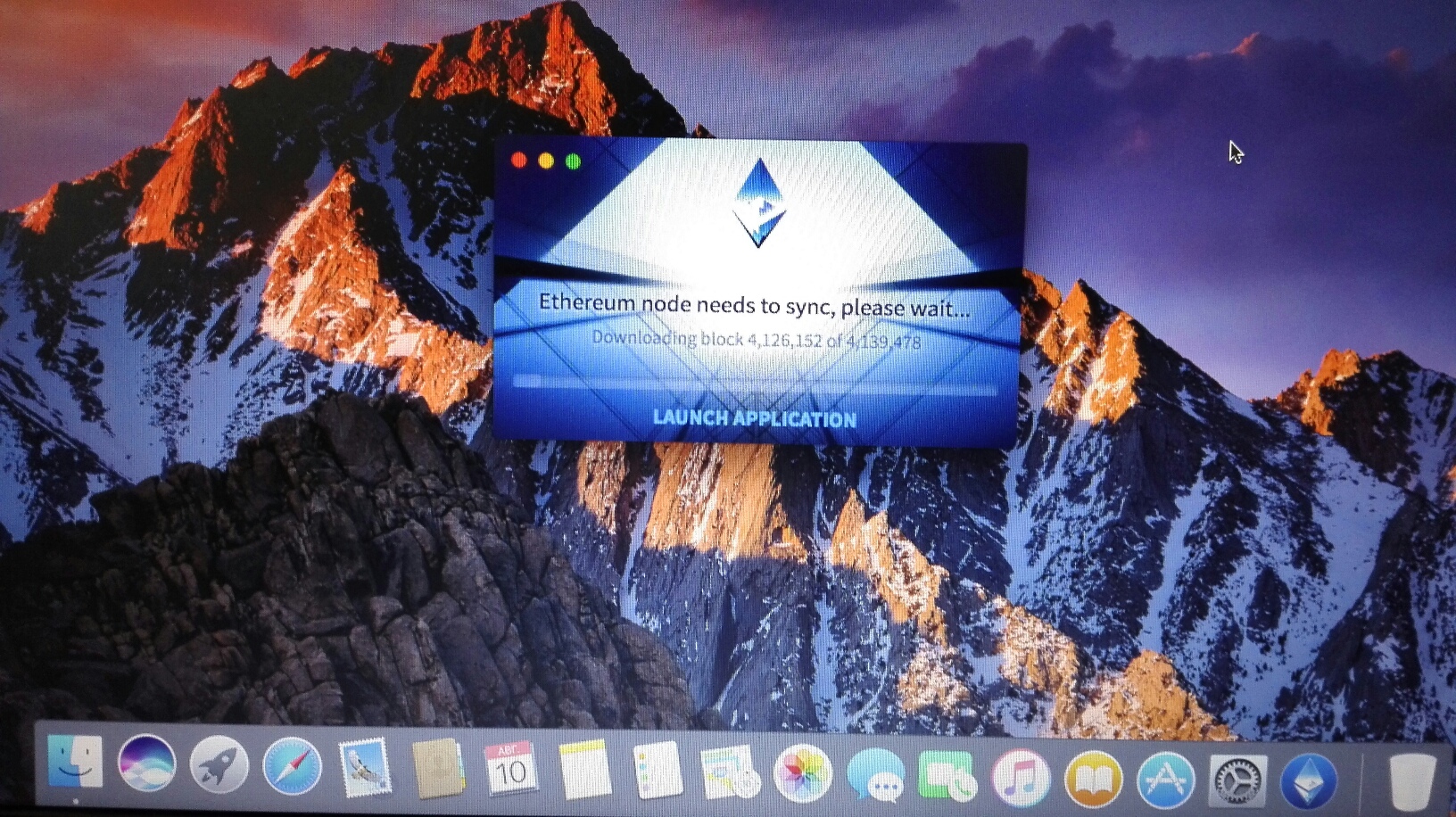
For now I have been trying to sync on Mac OS under VMware virtual machine, second day with the same result - not ending sync.
IMO: using this blockchain platform you are in a big risk, you may lost everything accidentally, all your investments and money, with such software and support!
OlegSev
on 10 Aug 2017
OlegSev
on 10 Aug 2017
Probably relevant to #2372 .
 PatchRanger
on 10 Aug 2017
PatchRanger
on 10 Aug 2017
Now the full blockchain's size is over 100 gb and fast growing, the other side of slow sync.
It already can't be used by most of users.
OlegSev
on 10 Aug 2017
Thanks to @pparent76 in #2372 !
Syncing under "light" mode was millions times faster :)
This works for Mist under Ubuntu / Linux (should work in OSX too).
I had it working with this staring script:
````
!/bin/bash
ps -ae | grep geth
if [ "$?" -ne "0" ]; then
geth --syncmode "light" &
sleep 10;
fi
mist --light-node
 rodgermoore
on 21 Aug 2017
rodgermoore
on 21 Aug 2017
Run this command on your terminal and you should be fine after a few mins.
geth --syncmode "light" --cache 4096 console
After you are done change the "light" to "Full" and again wait a few min and should be done.
 emiliano1
on 18 Sep 2017
emiliano1
on 18 Sep 2017
Super slow sync. I have the data on a different drive.
Occasionally the client crashes!
Question is why do I have to hack it in ways? ;)
@emiliano1: where is geth installed?
 lnaie
on 21 Sep 2017
lnaie
on 21 Sep 2017
No need to hack anymore!
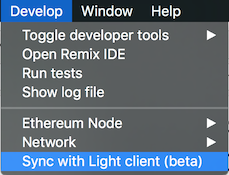
We have just launched Mist v0.9.1, with Light Client integration (beta).
What does that mean?
- Sync times reduced by an order of magnitude while staying safe.
- Much smaller storage required.
How to activate?
I'm closing this issue. Should you have any trouble, please refer to these channels:
- Canonical issue regarding sync: https://github.com/ethereum/mist/issues/3097
- Gitter channel, where the community is, and can certainly help as well: https://gitter.im/ethereum/mist
 evertonfraga
on 28 Sep 2017
evertonfraga
on 28 Sep 2017
@lnaie it is installed in root, but you can simply install it with homebrew.
https://github.com/ethereum/go-ethereum/wiki/Installation-Instructions-for-Mac
emiliano1
on 29 Sep 2017
$Geth is a mess and consumer over 125% of the CPU to sync this wallet. Something needs to be fixed!
emiliano1
on 25 Oct 2017
I have old laptop hard drive for use with ethereum mist. After suffering over 5 days trying to sync, I finally found a way to complete the sync. Trick was to defrag the hard drive with ether data. I am guessing geth frag the shit outta hard drive and i/o speed crawls down. After frag is over, it finished syncing in few hours. good luck.
 hawaii18k
on 16 Dec 2017
hawaii18k
on 16 Dec 2017
Adding data: using MacBook Air with 4GB / 256GB. Over 7 days and still at 30000000 / 40000000 blocks.
 fulldecent
on 19 Dec 2017
fulldecent
on 19 Dec 2017
All of this is assuming you have geth in place etc and usually -v 1.7.2 or above.
ok it is final guys! This is the solution:
- $ cd ~/Libary/Ethereum/geth/
- $ mv chaindata chaindata_backup
- $ mkdir chaindata
- $ geth --fast --cache=1024
- open ethereum wallet but DO NOT click on Launch Application.
- Wait and if it all works fine (after 100% sync) then, remove the chaindata_backup file by doing $ ~/Libary/Ethereum/geth/chaindata_backup
emiliano1
on 19 Dec 2017
@emiliano1 - thanks for the walkthrough. your steps have worked and I was able to get up to sync in about 10 hours on my Mac. However, the sync never actually finishes. It continues to hover around about 99% complete and never gets over the finish line. Currently (1/1/2018) - the sync has been running for about 48 hours and my block count is: 4,834,097 of 4,834,265.
Also, Every few minutes, I get a message about downloading the chain structure, where the processing chain count rises quickly, but the target block count is also rising. The chain structure count is currently at 3,755,781
My question is: is this expected?
 divgo
on 1 Jan 2018
divgo
on 1 Jan 2018
Yes it is @divgo I waited a very long time and it all worked out - just patience! HoDL your ETH/BTC btw
emiliano1
on 2 Jan 2018
I've been running for 24 hrs and I am at 4,559,000 or so.....it keeps timeing out no and then and giving a no sync error and then starts running again after a few minutes. Will the above code fix that?
 DCardosa
on 5 Jan 2018
DCardosa
on 5 Jan 2018
@DCardosa open ethereum wallet but DO NOT click on Launch Application and let it run there forever! Once done it will open the wallet for you automatically.
emiliano1
on 5 Jan 2018
Thanks....now all I need to do is try to compile it for multichain.
-----Original Message-----
From: Emiliano Qaqi notifications@github.com
To: ethereum/mist mist@noreply.github.com
Cc: DCardosa DCardosa@aol.com; Mention mention@noreply.github.com
Sent: Fri, Jan 5, 2018 12:51 pm
Subject: Re: [ethereum/mist] Very slow sync (#2895)
@DCardosa open ethereum wallet but DO NOT click on Launch Application and let it run there forever! Once done it will open the wallet for you automatically.
—
You are receiving this because you were mentioned.
Reply to this email directly, view it on GitHub, or mute the thread.
DCardosa
on 5 Jan 2018
Then you might need to run the $geth on terminal
emiliano1
on 5 Jan 2018
Been over 48 hrs and still hasn't finished. It gets close...within 10,000 or so then it falls behind again.
DCardosa
on 6 Jan 2018
I've been stuck on block number 4,860,023 of 4,868,606 for 2 days now. Downloaded over 38,000,000 blocks of chain data but still not synchronized? It's running and downloading chains of data but every once in a while gets stuck gives error messages about dropping the peer, searches for peers then restarts downloading again but never seems to become fully synchronized...is this normal?
DCardosa
on 7 Jan 2018
I closed everything and then reopened the wallet...it jumped to 4,860,573. It is still synching though it is closer. When I open terminal there's nothing there...go ethereum command does nothing, updated brew and tried to rerun get -fast says it is being used so I assume it is still running with the wallet synch even though I can't see it.
DCardosa
on 7 Jan 2018
Well, it's been over a week now and still not finished. It's close but never seems to rech the end although each day it seems to get closer and closer. I started taking some online classes from block geeks, since I have no real experience other than I took BASIC and PASCAL 30 years ago. I wonder if I didn't load some code like son, roc, sole, plus a few other things I can't remember.
DCardosa
on 13 Jan 2018
I am thinking there is a problem with the sync code itself. From my experience, and others comments, the Sync always gets to around 250 or less blocks, but never finishes.
Just putting this out there, but I wonder if the code is getting confused after a long sync process when it gets near the end and there are less than a certain number of blocks left.
divgo
on 14 Jan 2018
That's what I'm seeing. It gets close but never finishes and never catches up. Block data and Chain data downloads but the chain keeps increasing just as quickly and the blocks keep going to higher numbers..
DCardosa
on 14 Jan 2018
3 weeks and still not synched. It gets real close, within a couple of hundred block chains and a couple of thousand chains but can never get to the finish line.
DCardosa
on 20 Jan 2018
I gave up on sitting and waiting for it to complete. I decided to toggle around with different geth settings to see if I could get something to click.
After a while, I was able to get it to finish and have the app automatically open. I dont remember where I found the instructions, but what worked was opening a terminal (or command line) and cd-ing into the directory where geth is installed and running the following;
geth removedb
geth --cache=1024 --maxpeers 100 --syncmode "light"
after a few moments, the console will print something along the lines of;
IPC endpoint opened: /Users/[user_name]/Library/Ethereum/geth.ipc
At which point I open the Ethereum App and leave it alone. I do not click Launch Application.
Eventually, the blockchain will begin downloading and the Ethereum App will show you the progress bar. Depending on how far behind gives you an idea of how long your going to wait.
I posting this here for you @DCardosa because I too, like you, am tired of waiting for a Full Sync to never finish. This process, while not downloading the full complete chain, at least downloads enough information to get your wallet to open and view any ETH you might have. In my case I just wanted to see the whole process actually complete.
divgo
on 20 Jan 2018
Thanks, I'll give that a try.
DCardosa
on 21 Jan 2018
Ok...I got an error message but I don't know what it means...Incorrect usage: flag provided but not defined: -cache
DCardosa
on 21 Jan 2018
this is two separate commands;
geth removedb
geth --cache=1024 --maxpeers 100 --syncmode "light"
divgo
on 21 Jan 2018
Thanks Sage. I tried that and it's running...I still keep getting warning messages that sync is stalling and dropping peers. Then, it starts up and runs again. How long does sync usually take to finish? I must have done something wrong. This is my first time trying to code since PASCAL in the 80's.
DCardosa
on 22 Jan 2018
Well, 1 month now and still can't finish. Now I can't open the directory that is running geth either. every time I try I get message that the datadir is being used by another process. How do I find the directory running geth?
DCardosa
on 26 Jan 2018
@DCardosa which OS are you using? If you're using Linux or MacOS, open a terminal and running something like 'kill $(ps | grep geth | awk '{print $1}')' which will kill any process with Geth in the title. On windows, Task Manager is probably the easiest route, although both PowerShell & CMD prompt offer similar solutions.
 ianabray
on 13 Feb 2018
ianabray
on 13 Feb 2018
I am using high sierra OS. What will that command do?..it is running and synching, just never catches up. I am upgrading from a 75/35 bps network to a 500/500 bps network today to see is more download speed will help.
DCardosa
on 13 Feb 2018
@DCardosa The commands runs ps to get all running processes, uses grep to exclude anything that does not include geth in the arguments, and then only gets the Process IDs for those commands (one will be the actual ps command, but it doesn't matter)- it then passes that as a list to the kill command which will then kill each of those PIDs- ensuring every instance of geth on your machine is stopped. You can then run ps aux | grep geth to ensure that there are no current instances of geth running afterwards
ianabray
on 13 Feb 2018
Related issues
 jamesray1
·
5Comments
jamesray1
·
5Comments
 PacketSmuggler
·
3Comments
PacketSmuggler
·
3Comments
 tomtom87
·
4Comments
tomtom87
·
4Comments
 toby1991
·
6Comments
toby1991
·
6Comments
 ihatecreatingaccounts
·
6Comments
ihatecreatingaccounts
·
6Comments
Most helpful comment
More than 12h stuck in this value. I'll give up this. On the next month i try again, with luck, i can get my money and transfer then to a exchange and won't use this sh@t again. Without support from devs, i can't do nothing.