Mist: Ethereum Wallet gets stuck on sync
System information
Version: Ethereum Wallet 0.8.10
OS & Version: OS X 10.12.5 (Sierra)
Node type: Geth 1.6.5 (default)
I've tried to delete the chaindata folder and start over 3 times now, but every time the sync process gets started on a seemingly random block. I'm not sure what's up or how to resolve this.

Not sure if this is related, but Cmd-Q or closing it down doesn't seem to work (it just adds a message "Checking network..." and stays open) and I've had to kill the process to shut it down.
Here's the console:

And the log files:
Any ideas? Thanks!
 califa
All 90 comments
My sync has been extremely slow (and inconsistent) since yesterday. --fast and --cache=1024 haven't seemed to help. I've been stuck on the same block for an hour now. It just says Downloading Block 3,xxx,xxx out of 3,913,622.
 spoikonen
on 22 Jun 2017
spoikonen
on 22 Jun 2017
I have the same situation, the new blocks are downloaded quickly, and then for a very long time looking for peers for a few hours. What can be the reason?
 IvanM1993
on 22 Jun 2017
IvanM1993
on 22 Jun 2017
Same issue here... What's going on someone help us out.
 Sylk
on 23 Jun 2017
Sylk
on 23 Jun 2017
Same issue here. Been stuck around 1.5 - 1.7 m blocks last 2 days
 j-chimienti
on 23 Jun 2017
j-chimienti
on 23 Jun 2017
same issue. is anyone helping? is not possible to wait 2-3 or more days just to have the wallet up to date.
 nicoleta31
on 23 Jun 2017
nicoleta31
on 23 Jun 2017
very simple, some hackers of the big companies what to block the individuals and to force them to use "online" wallets.
But they are stupids, in this way millions of people will go to bitcoin and other virtual currencies.
Just bunch of Idiots.
 eldadwasserman
on 23 Jun 2017
eldadwasserman
on 23 Jun 2017
I had the same problem on 3 different PCs.
My issue was that geth suddenly crashes when started in background by the Ethereum Wallet application. You can verify this from the Task Manager: when you start Ethereum Wallet, you will notice that also geth is started and after a few minutes, it will disappear (probably crashing).
My solution was to close Ethereum Wallet and start geth from its directory which you can reach from the etherem wallet menu Account->Backup->Applicative Data and then, once the file explorer shows up, "binaries\Geth\unpacked\geth.exe".
now let it be until you see that it adds a line every 30 seconds.
Press CTRL C and re-open Ethereum Wallet.
However, geth will continue to disappear, but once the blockchain is synchronized, you can just close and reopen the Ethereum Wallet.
hope it helps
 solarin
on 24 Jun 2017
solarin
on 24 Jun 2017
@solarin do you have similar advice for OS X? I'm running geth in the background and it's giving me issues:

INFO [06-23|22:36:33] Starting peer-to-peer node               instance=Geth/v1.6.6-stable-10a45cb5/darwin-amd64/go1.8.3
INFO [06-23|22:36:33] Allocated cache and file handles         database=/Users/joel/Library/Ethereum/geth/chaindata cache=128 handles=1024
INFO [06-23|22:36:33] Initialised chain configuration          config="{ChainID: 1 Homestead: 1150000 DAO: 1920000 DAOSupport: true EIP150: 2463000 EIP155: 2675000 EIP158: 2675000 Metropolis: 9223372036854775807 Engine: ethash}"
INFO [06-23|22:36:33] Disk storage enabled for ethash caches   dir=/Users/joel/Library/Ethereum/geth/ethash count=3
INFO [06-23|22:36:33] Disk storage enabled for ethash DAGs     dir=/Users/joel/.ethash                      count=2
INFO [06-23|22:36:33] Initialising Ethereum protocol           versions="[63 62]" network=1
INFO [06-23|22:36:33] Loaded most recent local header          number=766837 hash=ac48ae…e821e8 td=4846919864801191634
INFO [06-23|22:36:33] Loaded most recent local full block      number=0      hash=d4e567…cb8fa3 td=17179869184
INFO [06-23|22:36:33] Loaded most recent local fast block      number=761344 hash=98c446…44ecc0 td=4799615785073116761
INFO [06-23|22:36:33] Starting P2P networking
INFO [06-23|22:36:35] Mapped network port                      proto=udp extport=30303 intport=30303 interface="UPNP IGDv2-IP1"
INFO [06-23|22:36:35] UDP listener up                          self=enode://12749cacc6227c63e7c2a167c0a0d862dfe1ffab2cb3bdbceae49ad6485217a34bf8f74afcf3a6eb4d80fa87a4182a3219d414c456ff94b702ccf1106756c4d9@24.90.4.73:30303
INFO [06-23|22:36:35] RLPx listener up                         self=enode://12749cacc6227c63e7c2a167c0a0d862dfe1ffab2cb3bdbceae49ad6485217a34bf8f74afcf3a6eb4d80fa87a4182a3219d414c456ff94b702ccf1106756c4d9@24.90.4.73:30303
INFO [06-23|22:36:35] IPC endpoint opened: /Users/joel/Library/Ethereum/geth.ipc
INFO [06-23|22:36:35] Mapped network port                      proto=tcp extport=30303 intport=30303 interface="UPNP IGDv2-IP1"
INFO [06-23|22:36:45] Block synchronisation started
WARN [06-23|22:36:55] Synchronisation failed, retrying         err="block download canceled (requested)"
INFO [06-23|22:36:58] Imported new state entries               count=1 flushed=0 elapsed=997.892µs processed=1 pending=17 retry=0 duplicate=0 unexpected=0
INFO [06-23|22:36:58] Imported new state entries               count=2 flushed=0 elapsed=1.030ms   processed=3 pending=49 retry=2 duplicate=0 unexpected=0
INFO [06-23|22:36:58] Imported new state entries               count=5 flushed=0 elapsed=4.732ms   processed=8 pending=129 retry=0 duplicate=0 unexpected=0
INFO [06-23|22:36:59] Imported new state entries               count=33 flushed=0 elapsed=13.850ms  processed=41 pending=657 retry=3 duplicate=0 unexpected=0
INFO [06-23|22:36:59] Imported new state entries               count=215 flushed=0 elapsed=75.819ms  processed=256 pending=4088 retry=2 duplicate=0 unexpected=0
INFO [06-23|22:36:59] Imported new state entries               count=78  flushed=0 elapsed=22.824ms  processed=334 pending=5336 retry=0 duplicate=0 unexpected=0
INFO [06-23|22:36:59] Imported new block headers               count=0   elapsed=4.224ms   number=761536 hash=802579…262ac1 ignored=192
INFO [06-23|22:36:59] Imported new state entries               count=384 flushed=0 elapsed=281.100ms processed=718 pending=10624 retry=2 duplicate=0 unexpected=0
INFO [06-23|22:37:00] Imported new state entries               count=1   flushed=0 elapsed=92.737µs  processed=719 pending=10627 retry=1 duplicate=0 unexpected=0
INFO [06-23|22:37:00] Imported new state entries               count=5   flushed=0 elapsed=4.320ms   processed=724 pending=10626 retry=1 duplicate=0 unexpected=0
WARN [06-23|22:37:00] Node data write error                    err="leveldb/table: corruption on data-block (pos=770870): checksum mismatch, want=0x53d75c8e got=0x1a62c72c [file=003843.ldb]"
WARN [06-23|22:37:00] Synchronisation failed, retrying         err="leveldb/table: corruption on data-block (pos=770870): checksum mismatch, want=0x53d75c8e got=0x1a62c72c [file=003843.ldb]"
INFO [06-23|22:37:03] Imported new state entries               count=0   flushed=0 elapsed=788.485µs processed=724 pending=1     retry=1 duplicate=0 unexpected=252
INFO [06-23|22:37:03] Imported new state entries               count=1   flushed=0 elapsed=288.474µs processed=725 pending=17    retry=0 duplicate=0 unexpected=252
INFO [06-23|22:37:03] Imported new state entries               count=16  flushed=0 elapsed=4.207ms   processed=741 pending=273   retry=0 duplicate=0 unexpected=252
INFO [06-23|22:37:04] Imported new state entries               count=256 flushed=0 elapsed=69.156ms  processed=997 pending=4369  retry=0 duplicate=0 unexpected=252
INFO [06-23|22:37:04] Imported new state entries               count=384 flushed=0 elapsed=125.867ms processed=1381 pending=10488 retry=0 duplicate=0 unexpected=252
INFO [06-23|22:37:05] Imported new state entries               count=384 flushed=0 elapsed=434.040ms processed=1765 pending=15158 retry=0 duplicate=0 unexpected=252
INFO [06-23|22:37:05] Imported new state entries               count=1   flushed=0 elapsed=2.199ms   processed=1766 pending=15173 retry=3 duplicate=0 unexpected=252
INFO [06-23|22:37:05] Imported new state entries               count=384 flushed=0 elapsed=48.109ms  processed=2150 pending=16151 retry=0 duplicate=0 unexpected=252
WARN [06-23|22:37:05] Node data write error                    err="leveldb/table: corruption on data-block (pos=770870): checksum mismatch, want=0x53d75c8e got=0x1a62c72c [file=003843.ldb]"
INFO [06-23|22:37:05] Imported new block headers               count=0   elapsed=26.812ms  number=761920 hash=4bf4a0…45a0cc ignored=576
WARN [06-23|22:37:05] Synchronisation failed, retrying         err="leveldb/table: corruption on data-block (pos=770870): checksum mismatch, want=0x53d75c8e got=0x1a62c72c [file=003843.ldb]"
WARN [06-23|22:37:05] Synchronisation failed, dropping peer    peer=0a6dc852bc2469a0 err="action from bad peer ignored"
WARN [06-23|22:37:06] Synchronisation failed, dropping peer    peer=499b5debd0a7c5db err="action from bad peer ignored"
INFO [06-23|22:37:20] Imported new block headers               count=0   elapsed=53.057ms  number=762304 hash=d1d9de…9ff234 ignored=960
INFO [06-23|22:37:21] Imported new block headers               count=0   elapsed=24.873ms  number=762880 hash=01b42d…e983ef ignored=576
CRIT [06-23|22:37:24] Failed to store block body               err="leveldb/table: corruption on data-block (pos=770870): checksum mismatch, want=0x53d75c8e got=0x1a62c72c [file=003843.ldb]"
califa
on 24 Jun 2017
Deleted chaindata and ran it again. This time it failed on another block. Really not sure what's happening.
CRIT [06-23|23:27:33] Failed to store block body               err="leveldb/table: corruption on data-block (pos=932314): checksum mismatch, want=0xe801dbf5 got=0x8b855057 [file=042733.ldb]"
logout
Saving session...
...copying shared history...
...saving history...truncating history files...
...completed.
califa
on 24 Jun 2017
I started on Monday and it was extremely slow like explained above. I delete all eth* on all my disks. Restart ... let it run ... (with --fast --cache 1024 saw in "ps -ax") and today ... 5 days later ... (until 20 mn per block sometimes) it is written "1 553 897 block left". Its slow but blocks are processed.
So i think it will finish at the middle of next week. (I share my 30303 port). The only thing interesting i found is this : https://ethereum.stackexchange.com/questions/9883/why-is-my-node-synchronization-stuck-extremely-slow-at-block-2-306-843 and not "some hackers of the big companies".
 Arthur111
on 24 Jun 2017
Arthur111
on 24 Jun 2017
It is very slow and at a some point it won't sync anymore though there are active peers connection.
 Salmen2
on 24 Jun 2017
Salmen2
on 24 Jun 2017
jcalifa, unfortunately I didn't try on OS X, one question: how many free GBs do you have?
solarin
on 24 Jun 2017
tried for week same problem, can I get my ether sent back to coin base?
TxHash: 0xeb8194034103199574ad8c10bb5c4be31e13530a2f8194d3e2107fb623b9c47a
Block Height: 3764170 (158308 block confirmations)
TimeStamp: 30 days 2 hrs ago (May-25-2017 07:58:56 AM +UTC)
From: 0xfb50195f39be7f7b71f712ed5baa0374f3abe809
To: 0x0ea415b4574f5204ebea642dd9430967a35b70a6
Value: 4.17 Ether ($1,360.59)
Gas Limit: 90000
Gas Price: 0.00000002 Ether (20 Gwei)
Gas Used By Txn: 21000
Actual Tx Cost/Fee: 0.00042 Ether ($0.14)
Cumulative Gas Used: 1318761
Nonce: 0
And I also tried to buy direct from wallet............................
TxHash: 0x867188bf8b6f0ad6843a88c3222739acfa5a301ae7389a1f18e32e45ab1fd74a
Block Height: 3766241 (156264 block confirmations)
TimeStamp: 29 days 17 hrs ago (May-25-2017 05:02:23 PM +UTC)
From: 0x6d20885d201297bcb0ad503071540262fa686679
To: 0ea415b4574f5204ebea642dd9430967a35b70a6
Value: 0.25777091 Ether ($84.06)
Gas Limit: 90000
Gas Price: 0.00000002 Ether (20 Gwei)
Gas Used By Txn: 21000
Actual Tx Cost/Fee: 0.00042 Ether ($0.14)
Cumulative Gas Used: 2511929
Nonce: 0
 zboneh
on 24 Jun 2017
zboneh
on 24 Jun 2017
It is very slow and at a some point it won't sync anymore though there are active peers connection.
And Eth/Usd will go south, until they clean up the mess.
Arthur111
on 24 Jun 2017
Another thing to add is it imply a very very high disk activity. For this reason i stop it and run disk utility and other tools to repair the directory and defragment the disk every 6 hours. (I got a message saying "Disk is too hot"). Maybe this explain why some people have crash or are unable to run it. Check your hard drive ! (Repair it and defragment it !).
Arthur111
on 24 Jun 2017
There is a problem with --fast because its disabled if the blockchain is not empty when the app is launched see : https://github.com/ethereum/go-ethereum/issues/2639 and the problem is closed with this reason : " That's intended. Fast sync runs only once for security reasons. ".
and i added this comment :
"fast sync must be disabled when the first time its sync.
Until its not sync the first time --fast must stay enabled.
Like this you can restart as you want, or after a crash (bug) until its sync for the first time."
Arthur111
on 24 Jun 2017
Hey so, any idea what can be done to resolve this and complete sync?
califa
on 24 Jun 2017
@solarin I have 470GB free
califa
on 25 Jun 2017
What does it mean? Eth is death?
Since 7 days i try to sync all chain but he stars random new
5 hours ago i have 2peer at 13%
1 hour ago i have 1 peer and 2%.....
more then 2 peers i never had.
 BoBBer446
on 25 Jun 2017
BoBBer446
on 25 Jun 2017
Same problem. Hasn't synced after a week on a gigabit connection running on a new desktop with plenty of disk space.
 stevedekorte
on 28 Jun 2017
stevedekorte
on 28 Jun 2017
Its a disaster .... i have 100 blocks until its sync and its since yesterday ... there is no end ... so ... i am moving to openledger ... bitshares etc ...
Arthur111
on 28 Jun 2017
This is the reason people go to “online wallet” or don’t continue with ethereum … very smart way to control the potential ethereum users 😊
From: Arthur [mailto:[email protected]]
Sent: 28/06/2017 09:15
To: ethereum/mist mist@noreply.github.com
Cc: eldadwasserman eldad.wasserman@gmail.com; Comment comment@noreply.github.com
Subject: Re: [ethereum/mist] Ethereum Wallet gets stuck on sync (#2595)
Its a disaster .... i have 100 blocks until its sync and its since yesterday ... there is no end ... so ... i am moving to openledger ... bitshares etc ...
—
You are receiving this because you commented.
Reply to this email directly, view it on GitHub https://github.com/ethereum/mist/issues/2595#issuecomment-311566507 , or mute the thread https://github.com/notifications/unsubscribe-auth/AHZMBgq9OxVhc7JsSDhuv7h5l2p_X_EHks5sIe9ygaJpZM4OCbp8 . https://github.com/notifications/beacon/AHZMBpYNnlRR4lMpQ_DP0F0ZAV5hteHWks5sIe9ygaJpZM4OCbp8.gif
eldadwasserman
on 28 Jun 2017
Is there anyone attached to the project that can chime in?
califa
on 4 Jul 2017
I was able to finally sync by deleting the chain data and using the geth CLI with --fast. Not a friendly user experience.
stevedekorte
on 7 Jul 2017
Same problem here, I have to keep closing and reopening it for it to continue. If it gets stuck, it wont continue downloading until the next time it is reopened.
And some times it just starts to give errors and cannot sync unless you delete the data files, which makes it almost imposible to sync the wallet.
 ShikiGami
on 18 Jul 2017
ShikiGami
on 18 Jul 2017
Same problem here, stuck at "268 blocks left, 99%" for 4 hours
 JeremyTCD
on 26 Jul 2017
JeremyTCD
on 26 Jul 2017
Try use the automated Start/Stop small tool for Ethereum Wallet, if stuck in sync.
www.teremi.hu/ethereum
 Szerzetes
on 31 Jul 2017
Szerzetes
on 31 Jul 2017
i have 133 blocks to end and it stucks for 2 days, i have no idea what i should to do
 Aziaev
on 6 Sep 2017
Aziaev
on 6 Sep 2017
This is a continual problem for me. I have to delete the entire chain and do the sync from scratch, but eventually, this happens again. I will open the the wallet and it will get stuck on one block and the only way to fix it is to delete the entire chain and start again.
The fact it keeps happening is what's annoying. Given the size of the blockchain, having to continually redownload it from the beginning is frustrating. It seems that sometimes while it's syncing it becomes corrupt and unable to recover.
 robme
on 6 Sep 2017
robme
on 6 Sep 2017
Does anyone here find a way to solve this problem. I have already tried different OS and it is sad that all of them stuck at the end.
 vincentvc
on 11 Sep 2017
vincentvc
on 11 Sep 2017
This is the way to push out more people to have wallets !!!!
From: vincentvc [mailto:[email protected]]
Sent: 11/09/2017 17:45
To: ethereum/mist mist@noreply.github.com
Cc: eldadwasserman eldad.wasserman@gmail.com; Comment comment@noreply.github.com
Subject: Re: [ethereum/mist] Ethereum Wallet gets stuck on sync (#2595)
Does anyone here find a way to solve this problem. I have already tried different OS and it is sad that all of them stuck at the end.
—
You are receiving this because you commented.
Reply to this email directly, view it on GitHub https://github.com/ethereum/mist/issues/2595#issuecomment-328551971 , or mute the thread https://github.com/notifications/unsubscribe-auth/AHZMBhoxZzf8GFgtuL9NOceL7ZWrIMPuks5shUdlgaJpZM4OCbp8 . https://github.com/notifications/beacon/AHZMBigkhZByRpzQZRwyltcJK_74qafqks5shUdlgaJpZM4OCbp8.gif
eldadwasserman
on 11 Sep 2017
I'm have been trying to finish downloading a chain for to weeks. I have hundreds blocks to end. Kill me!
Aziaev
on 12 Sep 2017
I solved it with the following:
Open Command Prompt: Press Windows Key and R at the same time.
Delete current Blockchain file: copy and paste into the command prompt: "%APPDATA%\Ethereum Wallet\binaries\Geth\unpacked\geth.exe" removedb
Download Blockchain from beginning: copy and paste into command prompt: "%APPDATA%\Ethereum Wallet\binaries\Geth\unpacked\geth.exe" --fast --cache=1024
I'm just sick of having to do it when the wallet eventually gets stuck on a block when I start it, I have to do the above again.
robme
on 12 Sep 2017
@robme how long it tooks to finish downloadin in a new way?
Aziaev
on 12 Sep 2017
Took about 4 hours with a good CPU and SSD.
robme
on 13 Sep 2017
Hi, we have just launched Mist v0.9.1, with Light Client integration (beta).
What does that mean?
- Sync times reduced by an order of magnitude while staying safe.
- Much smaller storage required.
How to activate?
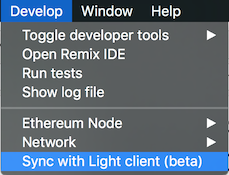
I'm closing this issue. Should you have any trouble, please refer to this canonical issue: https://github.com/ethereum/mist/issues/3097
 evertonfraga
on 28 Sep 2017
evertonfraga
on 28 Sep 2017
The issue still exists for me on Windows 10 with the latest release.
It seems that geth is crashing all the time with a stacktrace that is longer than the cmd's buffer.
 fell0w
on 9 Oct 2017
fell0w
on 9 Oct 2017
Having the same issue and running Mist 9.2 and Mac OS Sierra. Tried on several different internet connections over the past few days ranging from Satellite to T3. In my case Mist doesn’t get stuck or throw an error while syncing, it has about 100-200 blocks left and never will finish.
 calvinstiff
on 20 Oct 2017
calvinstiff
on 20 Oct 2017
Same issue here, tried both with Parity 1.8.0 beta ( which runs geth node) and Mist (which has its own node)..
I ended up using the Light node mode of Mist to avoid the issue,
but i really wanted to run fullnode.
In the log i see:
INFO [10-23|14:44:28] Starting peer-to-peer node               instance=Geth/v1.7.2-stable-1db4ecdc/windows-amd64/go1.9
INFO [10-23|14:44:28] Allocated cache and file handles         database=C:\\Users\\Developer\\AppData\\Roaming\\Ethereum\\geth\\chaindata cache=1024 handles=1024
INFO [10-23|14:44:32] Initialised chain configuration          config="{ChainID: 1 Homestead: 1150000 DAO: 1920000 DAOSupport: true EIP150: 2463000 EIP155: 2675000 EIP158: 2675000 Byzantium: 4370000 Engine: ethash}"
INFO [10-23|14:44:32] Disk storage enabled for ethash caches   dir=C:\\Users\\Developer\\AppData\\Roaming\\Ethereum\\geth\\ethash count=3
INFO [10-23|14:44:32] Disk storage enabled for ethash DAGs     dir=C:\\Users\\Developer\\AppData\\Ethash                          count=2
INFO [10-23|14:44:32] Initialising Ethereum protocol           versions="[63 62]" network=1
INFO [10-23|14:44:33] Loaded most recent local header          number=4413991 hash=e10c8e…646e57 td=1261742833689536303319
INFO [10-23|14:44:33] Loaded most recent local full block      number=0       hash=d4e567…cb8fa3 td=17179869184
INFO [10-23|14:44:33] Loaded most recent local fast block      number=4413817 hash=43c812…536d1b td=1261484585738609020118
INFO [10-23|14:44:33] Upgrading chain index                    type=bloombits percentage=28
INFO [10-23|14:44:33] Loaded local transaction journal         transactions=0 dropped=0
INFO [10-23|14:44:33] Regenerated local transaction journal    transactions=0 accounts=0
So my most recent block is 4413817 , as far i remember it's the same block i have in Parity.
And both of them cannot get past that block.
Is that a bug with geth?
 lbphp
on 23 Oct 2017
lbphp
on 23 Oct 2017
I notice that i always have between 1-5 peers connected which is not very much.
Maybe my peers are not fully synced too, that's why i can't sync.
Could be an issue with my connection ?
How many peers do you have ?
lbphp
on 23 Oct 2017
Seems to progress now, even though it's very slow considering i have decent bandwidth.
It takes hours just for a few blocks
WARN [10-23|14:49:15] Node data write error                    err="state node 9912ae…86a40a failed with all peers (4 tries, 4 peers)"
WARN [10-23|14:49:15] Synchronisation failed, retrying         err="state node 9912ae…86a40a failed with all peers (4 tries, 4 peers)"
INFO [10-23|14:49:18] Imported new block headers               count=0   elapsed=5.467ms   number=4414338 hash=b0d648…fe8b86 ignored=192
INFO [10-23|14:49:18] Imported new block headers               count=11  elapsed=22.571ms  number=4414464 hash=a80059…57c45c ignored=115
INFO [10-23|14:49:23] Upgrading chain index                    type=bloombits percentage=86
INFO [10-23|14:49:24] Imported new state entries               count=0   elapsed=0s        processed=853 pending=1   retry=1  duplicate=0 unexpected=2
INFO [10-23|14:49:31] Upgrading chain index                    type=bloombits percentage=88
INFO [10-23|14:49:40] Upgrading chain index                    type=bloombits percentage=89
INFO [10-23|14:49:48] Upgrading chain index                    type=bloombits percentage=91
INFO [10-23|14:49:56] Upgrading chain index                    type=bloombits percentage=92
INFO [10-23|14:50:05] Upgrading chain index                    type=bloombits percentage=94
INFO [10-23|14:50:13] Upgrading chain index                    type=bloombits percentage=95
INFO [10-23|14:50:21] Upgrading chain index                    type=bloombits percentage=97
INFO [10-23|14:50:29] Upgrading chain index                    type=bloombits percentage=98
INFO [10-23|14:50:35] Finished upgrading chain index           type=bloombits
WARN [10-23|14:52:29] Stalling state sync, dropping peer       peer=26dd53c013dde045
WARN [10-23|14:52:51] Node data write error                    err="state node 654c2e…8e3f4e failed with all peers (3 tries, 3 peers)"
WARN [10-23|14:52:51] Synchronisation failed, retrying         err="state node 654c2e…8e3f4e failed with all peers (3 tries, 3 peers)"
INFO [10-23|14:52:59] Imported new block headers               count=17  elapsed=35.291ms  number=4414481 hash=7b39b0…72c9c4 ignored=175
INFO [10-23|14:52:59] Imported new block receipts              count=2   elapsed=4.924ms   bytes=194212   number=4414291 hash=7d79b1…08d4e5 ignored=0
INFO [10-23|14:52:59] Imported new block receipts              count=6   elapsed=4.925ms   bytes=210728   number=4414297 hash=f03d3d…349f50 ignored=0
INFO [10-23|14:52:59] Imported new block headers               count=1   elapsed=3.925ms   number=4414482 hash=5b6b35…0c2690 ignored=0
INFO [10-23|14:52:59] Imported new block receipts              count=2   elapsed=3.549ms   bytes=188816   number=4414299 hash=92b088…48e6f5 ignored=0
INFO [10-23|14:53:02] Imported new block receipts              count=24  elapsed=30.765ms  bytes=1300418  number=4414323 hash=a77421…f755f3 ignored=0
INFO [10-23|14:53:02] Imported new block receipts              count=10  elapsed=15.703ms  bytes=573225   number=4414333 hash=c76130…f850ea ignored=0
INFO [10-23|14:53:02] Imported new block receipts              count=6   elapsed=14.720ms  bytes=485594   number=4414339 hash=54cfe0…a6a6a6 ignored=0
INFO [10-23|14:53:02] Imported new block receipts              count=7   elapsed=10.794ms  bytes=407610   number=4414346 hash=2262b5…b21b4d ignored=0
INFO [10-23|14:53:13] Imported new state entries               count=0   elapsed=0s        processed=853 pending=1   retry=1  duplicate=0 unexpected=4
WARN [10-23|15:00:20] Node data write error                    err="state node dc7617…afc7e3 failed with all peers (4 tries, 1 peers)"
WARN [10-23|15:00:20] Synchronisation failed, retrying         err="state node dc7617…afc7e3 failed with all peers (4 tries, 1 peers)"
INFO [10-23|15:00:26] Imported new block headers               count=33  elapsed=51.056ms  number=4414515 hash=aae25d…78b0c4 ignored=136
INFO [10-23|15:00:26] Imported new block receipts              count=2   elapsed=2.000ms   bytes=62454    number=4414348 hash=5ea5f2…c572b8 ignored=0
INFO [10-23|15:00:27] Imported new block receipts              count=3   elapsed=1.018ms   bytes=96201    number=4414351 hash=bc5cb8…4e7bbf ignored=0
INFO [10-23|15:00:27] Imported new block receipts              count=5   elapsed=4.988ms   bytes=195715   number=4414356 hash=84cd78…2ada10 ignored=0
INFO [10-23|15:00:28] Imported new state entries               count=0   elapsed=0s        processed=853 pending=1   retry=1  duplicate=0 unexpected=13
WARN [10-23|15:02:23] Stalling state sync, dropping peer       peer=85fb202afb414a54
WARN [10-23|15:03:59] Stalling state sync, dropping peer       peer=8df1765465c7ddd9
WARN [10-23|15:03:59] Node data write error                    err="state node d7873f…35cae1 failed with all peers (2 tries, 2 peers)"
WARN [10-23|15:03:59] Synchronisation failed, retrying         err="state node d7873f…35cae1 failed with all peers (2 tries, 2 peers)"
INFO [10-23|15:04:06] Imported new block headers               count=11  elapsed=19.627ms  number=4414526 hash=bfa4dd…f39eaf ignored=159
INFO [10-23|15:04:08] Imported new block receipts              count=11  elapsed=14.760ms  bytes=648172   number=4414367 hash=ae5f6f…6d7eb6 ignored=0
WARN [10-23|15:12:33] Node data write error                    err="state node 0a4247…36d9e6 failed with all peers (5 tries, 5 peers)"
WARN [10-23|15:12:33] Synchronisation failed, retrying         err="state node 0a4247…36d9e6 failed with all peers (5 tries, 5 peers)"
INFO [10-23|15:12:37] Imported new block headers               count=33  elapsed=66.296ms  number=4414559 hash=4eb3fe…65bc0e ignored=159
INFO [10-23|15:12:38] Imported new block receipts              count=2   elapsed=2.501ms   bytes=97610    number=4414369 hash=4d9301…3a52a9 ignored=0
INFO [10-23|15:12:38] Imported new block receipts              count=2   elapsed=2.942ms   bytes=148224   number=4414371 hash=63f04c…79cf74 ignored=0
INFO [10-23|15:12:39] Imported new block receipts              count=2   elapsed=500.5µs   bytes=14867    number=4414373 hash=b67523…c470cd ignored=0
INFO [10-23|15:12:40] Imported new block receipts              count=10  elapsed=18.677ms  bytes=772481   number=4414383 hash=705e70…5ec32b ignored=0
INFO [10-23|15:12:42] Imported new block receipts              count=21  elapsed=30.420ms  bytes=1197868  number=4414404 hash=c38350…b8abe3 ignored=0
INFO [10-23|15:12:46] Imported new block receipts              count=37  elapsed=51.449ms  bytes=2014907  number=4414441 hash=a9ddc2…cb2e87 ignored=0
INFO [10-23|15:12:47] Imported new state entries               count=0   elapsed=0s        processed=853 pending=1   retry=1  duplicate=0 unexpected=33
That does seem slow. I’m relatively new to Ethereum and mining, so take my advice with a grain of salt. I ended up deleting Mist and Ethereum wallet because after a week I still didn’t have the entire chain. My solution was to delete all app data for Geth, Mist, and E Wallet. Meaning I found the folders and removed the content entirely. After that I reinstalled Geth and Ethminer, to enable mining from my GTX1070 eGPU. I told Geth to re-download the chain with ./geth —rpc —fast —cache=1024. As of this morning I had about 100,000 more to go. Geth has taken about 14hrs vs days (maybe weeks) with Mist.
calvinstiff
on 24 Oct 2017
@calvinstiff But AFAIK both Mist and Parity at the end of the day run a Geth process and they just use
IPC or RPC to communicate with it.
So if geth from commandline works for you then i wonder why Mist doesn't, it just adds an UI to it.
Maybe you can try keeping your current geth node and add just a different UI .
P.S. if the trick is in the parameters —rpc —fast —cache=1024 you can still tell Mist/Parity to pass those params to the underlying geth node.
Parity.exe --geth --rpc --cache=1024
Mist i think can do the same
lbphp
on 24 Oct 2017
It's because it gets stuck for some reason. I don't have this problem with any other wallet, it's only Ethererum / Geth which occasionally gets stuck. When that happens the only way I have found to sync is to delete the entire chain and redownload. Using the --fast switch and increasing the cache size just makes it go quicker, which reduces the chance of it getting stuck on a block.
robme
on 24 Oct 2017
@robme is there a 101 version of this? Ive been stuck for about 2 weeks. Deleting chain data. Tried the light version. Tried new versions of the wallet. Can anyone help? Not program savvy.

 ncnf
on 25 Oct 2017
ncnf
on 25 Oct 2017
@ncnf Even activating the Light (beta) option ?? Wow i thought that was bulletproof since that does not even download the chain.
lbphp
on 25 Oct 2017
@ncnf try this from the command prompt
cd "c:\Program Files\Mist"
Mist.exe --geth --fast --cache=2048
If it doesn't help, uninstall Mist from the normal Windows settings ( control panel ).
Then check if the Ethereum Wallet and blockchain folders are still there:
C:\Users\<user>\AppData\Roaming\Ethereum Wallet
C:\Users\<user>\AppData\Roaming\Ethereum
(replace < user > with your username)
try deleting them and re-install Mist or try Parity
lbphp
on 26 Oct 2017
@sleepndevelop -i dont know what parity is but i have ethereum wallet latest version and mist lastest version and downloaded geth. have unistalled and re-installed a few x. This is what the command prompt says.

ncnf
on 27 Oct 2017
Same trouble. Could not sync Ethereum Wallet. Gets stuck on 99% and no progress for days. Tried both on Windows and Linux, tried to remove loaded data and restart app - no result. Version 0.9.2.
 Gim6626
on 7 Nov 2017
Gim6626
on 7 Nov 2017
I'm also still having this problem on the latest Mist.
stevedekorte
on 7 Nov 2017
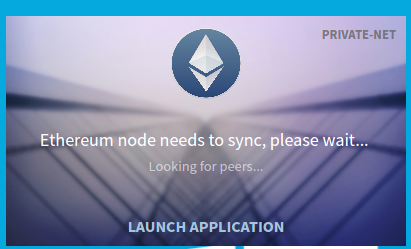
I did create 2 wallet with my private network, and did transaction from main wallet to another. but there is 0 confirmation. wallet stuck with node syncing.
Can anyone help me to get this fix ?
 tundak
on 7 Nov 2017
tundak
on 7 Nov 2017
Mine is also stuck at 99 percent. This is the absolute worst thing. I had a plan and now it’s all going downhill because I can’t use my ETH which is now stuck in limbo because of the stupid wallet. Ughh, I learned my lesson. Never again.
 mkdamike
on 13 Nov 2017
mkdamike
on 13 Nov 2017
Dual booting Ubuntu from OS Sierra ended up being easier. That included configuring my 1070 eGPU within Linux lol. I found Mac OS mining with an eGPU, at this point, is impossible. At least with my setup.
My recommendation through the whole process is to be patient with the chain sync. My initial home internet was a problem as well. I found that using a 10/MB+ (not 10mb/s) speeds made the download and sync process work. Regardless of peers it helps to have a fast connection. If you need help I can be more specific.
Calvin Stiff
On Nov 13, 2017, at 10:09 AM, mkdamike notifications@github.com wrote:
Mine is also stuck at 99 percent. This is the absolute worst thing. I had a plan and now it’s all going downhill because I can’t use my ETH which is now stuck in limbo because of the stupid wallet. Ughh, I learned my lesson. Never again.
—
You are receiving this because you were mentioned.
Reply to this email directly, view it on GitHub, or mute the thread.
calvinstiff
on 14 Nov 2017
Loooks like there is not only ONE Bug...
I managed 99% within tow days after first install but it never fully synced.
When I startet MIST again the next day this shit restarted sync with block 1 :-(
Now it stuck at 2,331,177 of 4,349,904 .... One more chance then go back to Bitcoin that always syncs without problems for more than 10 years I use it.
May "chaindata" folder is 64GB - which is time and money. I do not like to delete it :-(
In fact this stuff seem to need more bandwidth as I have here.
 tyramisoux
on 22 Nov 2017
tyramisoux
on 22 Nov 2017
Never ending story, software is actually terrible. syncing over the weekend and still not in sync. when stopping and starting the software there are more blocks then first and sync is proceeding.
Downloading of chainstructure to the left is growing but to the right is also growing. downloading 1 of 2, then downloading 2 of 3 etc.
I followed the above advice to clean the db and downloaded blocks and started over. Same problem again. never finishes.
what is there to do to actually use the wallet?
 aplanting
on 27 Nov 2017
aplanting
on 27 Nov 2017
i wonder how this currency became so successful ... with all of these technical issues with the nodes.
Maybe only high-bandwidth nodes can keep up with the sync process, but this defeats the purpose of decentralization.
BTC and other wallets work better for normal people as well even where there is poor connection speed, not just for the people with 30+Mbps
lbphp
on 27 Nov 2017
i wonder how this currency became so successful ...
Because of the technology ... the blockchain ... and PR.
the blockchain is something new .. like internet in 90s
Not because of the implementation of the technology ... ethereum .. who has many problem as we can see it.
Arthur111
on 27 Nov 2017
@Arthur111 You mean that the Blockchain has been introduced by Ethereum? I suppose BTC did it, and before ETH there were many BTC clones like LTC that also were blockchains, so nothing new here.
Only smart contracts are something new brought by ETH, but i'm not sure they have been determinant to the success of ETH.
PR... maybe. Putin seems to love it, that's why
lbphp
on 27 Nov 2017
Blockchain is a technology, not a product or application or something to be sold. It is just specifications.
Bitcoin was the first application (currency, product call it whatever you want) who implemented blockchain technology, after Ethereum and others ...
Its important to not confuse technology and implementation on it.
The first chat messenger application Crypviser based on blockchain used Ethereum and they switch to bitshares because it was too slow (bitshares is 100 000 transactions per sec).
https://cointelegraph.com/news/crypviser-moves-to-bitshares-blockchain-ditching-ethereum-in-process
Only smart contracts are something new brought by ETH,
yes
Arthur111
on 27 Nov 2017
Hi, we are using hardware ETH NODEs to sync up our miners and wallets. If you would be interested in getting more info, contact me via PM.
 WhiteHatCryptoMiner
on 5 Dec 2017
WhiteHatCryptoMiner
on 5 Dec 2017
The sync is stalled at 4,366,929 out of 4,367,130 blocks. A lot of retrieved hash chain is invalid and action from bad peer ignored.
WARN [12-11|19:07:23] Rolled back headers                      count=185 header=4370001->4370001 fast=4369814->4369814 block=0->0
WARN [12-11|19:07:23] Synchronisation failed, dropping peer    peer=784f709bf3dee63c err="retrieved hash chain is invalid"
WARN [12-11|19:07:26] Rolled back headers                      count=185 header=4370001->4370001 fast=4369814->4369814 block=0->0
WARN [12-11|19:07:26] Synchronisation failed, dropping peer    peer=de55b45c99b7f44e err="retrieved hash chain is invalid"
WARN [12-11|19:07:27] Synchronisation failed, dropping peer    peer=e116b48c5b2e71d5 err="action from bad peer ignored"
WARN [12-11|19:07:31] Rolled back headers                      count=185 header=4370001->4370001 fast=4369814->4369814 block=0->0
WARN [12-11|19:07:31] Synchronisation failed, dropping peer    peer=bc7fbec8834fc2f3 err="retrieved hash chain is invalid"
WARN [12-11|19:07:33] Synchronisation failed, dropping peer    peer=8b31dda297787741 err="action from bad peer ignored"
WARN [12-11|19:07:39] Synchronisation failed, dropping peer    peer=a3fa3760e1eb7855 err="action from bad peer ignored"
WARN [12-11|19:07:49] Rolled back headers                      count=185 header=4370001->4370001 fast=4369814->4369814 block=0->0
WARN [12-11|19:07:49] Synchronisation failed, dropping peer    peer=8900960e303bfc6a err="retrieved hash chain is invalid"
WARN [12-11|19:07:53] Synchronisation failed, dropping peer    peer=e68846044cd5bab9 err="action from bad peer ignored"
WARN [12-11|19:07:55] Rolled back headers                      count=185 header=4370001->4370001 fast=4369814->4369814 block=0->0
WARN [12-11|19:07:55] Synchronisation failed, dropping peer    peer=2bc970b2aadfe335 err="retrieved hash chain is invalid"
WARN [12-11|19:07:59] Synchronisation failed, dropping peer    peer=de14d0d2dd4cb106 err="action from bad peer ignored"
WARN [12-11|19:08:05] Synchronisation failed, dropping peer    peer=d5d2ba92ef97865c err=timeout
INFO [12-11|19:08:14] Imported new state entries               count=447 elapsed=494.608µs processed=1484 pending=971   retry=5 duplicate=0 unexpected=0
INFO [12-11|19:08:16] Imported new state entries               count=733 elapsed=829.428µs processed=2217 pending=2541  retry=2 duplicate=0 unexpected=0
WARN [12-11|19:08:17] Rolled back headers                      count=185 header=4370001->4370001 fast=4369814->4369814 block=0->0
INFO [12-11|19:08:17] Imported new state entries               count=442 elapsed=765.165µs processed=2659 pending=3090  retry=5 duplicate=0 unexpected=0
WARN [12-11|19:08:17] Synchronisation failed, dropping peer    peer=f4b85579bb4d6a16 err="retrieved hash chain is invalid"
WARN [12-11|19:08:17] Empty head header set                    peer=cb5d1a6310e6c309
WARN [12-11|19:08:17] Synchronisation failed, dropping peer    peer=cb5d1a6310e6c309 err="empty header set by peer"
WARN [12-11|19:08:21] Rolled back headers                      count=185 header=4370001->4370001 fast=4369814->4369814 block=0->0
WARN [12-11|19:08:21] Synchronisation failed, dropping peer    peer=e7f6a4ad125d2d5d err="retrieved hash chain is invalid"
WARN [12-11|19:08:26] Rolled back headers                      count=185 header=4370001->4370001 fast=4369814->4369814 block=0->0
WARN [12-11|19:08:26] Synchronisation failed, dropping peer    peer=015ce7cbd59be446 err="retrieved hash chain is invalid"
WARN [12-11|19:08:39] Synchronisation failed, dropping peer    peer=e38d7f32a2b2918e err="action from bad peer ignored"
WARN [12-11|19:08:41] Rolled back headers                      count=185 header=4370001->4370001 fast=4369814->4369814 block=0->0
WARN [12-11|19:08:41] Synchronisation failed, dropping peer    peer=fc917a71a808385e err="retrieved hash chain is invalid"
WARN [12-11|19:08:42] Synchronisation failed, dropping peer    peer=a97b5f6e0c1f201b err="action from bad peer ignored"
WARN [12-11|19:08:46] Synchronisation failed, dropping peer    peer=5873f911b7b9e48c err="action from bad peer ignored"
WARN [12-11|19:08:53] Synchronisation failed, dropping peer    peer=38f074f4db8e64df err="action from bad peer ignored"
WARN [12-11|19:08:55] Rolled back headers                      count=185 header=4370001->4370001 fast=4369814->4369814 block=0->0
WARN [12-11|19:08:55] Synchronisation failed, dropping peer    peer=e38d7f32a2b2918e err="retrieved hash chain is invalid"
WARN [12-11|19:09:00] Synchronisation failed, retrying         err="block download canceled (requested)"
 mvanholsteijn
on 11 Dec 2017
mvanholsteijn
on 11 Dec 2017
Try running the default geth
Not via the wallet application and/or mist browser, but loading geth.exe in cmd without fast and a cache of only 128 (default), like double clicking it.
It's running again here now and processing the state entries without errors and unexpected nonsense, but as soon as I load the wallet application everything goes haywire again.
 Apekool
on 12 Dec 2017
Apekool
on 12 Dec 2017
Deleted all the chain data and ran as geth, no luck. Get up to the last ~100 blocks and no progress. Restart, 400 or so blocks behind, it catches back up a little, but freezes right within the last ~100.
This is technically a fatal error since it makes the application, and tons of people's wallets, completely unusable. This could massively prevent adoption if not fixed soon.
 ethancrist
on 13 Dec 2017
ethancrist
on 13 Dec 2017
Yes it is still unable to get to a full sync and gets stock when around 150 blocks left. Also tried to delete old blockchain data several times, but the same happens every time. I also upgraded the wallet to see if that should do the trick, but no....:(
 Guttler
on 13 Dec 2017
Guttler
on 13 Dec 2017
Having the same problem. Mist and Ethereum network are pretty bad, unfortunately we can't move on to any other platform for now. I hope we can lose Ethereum and use some other blockchain in the future
 trbsi
on 14 Dec 2017
trbsi
on 14 Dec 2017
PR... maybe. Putin seems to love it, that's why
Putin has his own coin : https://www.rt.com/business/413303-putin-coin-surge-cryptocurrency
Arthur111
on 15 Dec 2017
Yesterday I deleted the chaindata folder again and made a full re-sync overnight. And this morning it went through?! I updated Ethereum wallet before that, so maybe that also had an effect?!
Guttler
on 15 Dec 2017
SAME HERE. IT NEVER ENDS.
 rico345100
on 17 Dec 2017
rico345100
on 17 Dec 2017
Don't use Mist people, Use Ethereum Remix and MyEtherWallet to deploy and interact with your contract. You can use it for main or ropsten network.
I'll write tutorial about it on Medium tomorrow
trbsi
on 17 Dec 2017
I managed to launch by running: geth removedb.. and then ethereumwallet -node-light. Now it's waiting for peers, it looks like there is none..
 mpasserini
on 17 Dec 2017
mpasserini
on 17 Dec 2017
I got mine to work. I had to use the wallet on an entirely different machine which had an SSD.
ethancrist
on 17 Dec 2017
Hey all,
I think this might be a memory / allocation issue. I could not download ethereum on my old comp. But now that I have a new machine, its working fine...except that it is getting stuck occasionally but it seems to only get stuck when i have other apps competing for mem during download. What if it's as simple as having enuf ram? Or maybe has something to do with allocation settings or cache?
 rudynunez
on 20 Dec 2017
rudynunez
on 20 Dec 2017
I have the same problem, deleted chaindata, when I resync I'm stuck at 89%
 Ottimusen
on 20 Dec 2017
Ottimusen
on 20 Dec 2017
Of note about SSD's - Irrelevant but still important
Don't use an SSD - this is bad for any P2P software anyhow. Its irrelevant to this issue, but it was brought up. May as well deem it relevant to any P2P software in general (this includes BitTorrent, and really anything using a swarm based connection method that hikes the disk access).
The new wallet app DOES work
The new wallet app with improved sync has rectified this issue. I'm half the blockchain download in in just under 30 minutes, and not even the best internet in the world. (37mbit/s) My Discord buds have better. Don't blame your internet, blame your router's misconfiguration (or your ISP for blocking P2P access ports) - in this case. I have to run behind VPN, a bonder, and an out-of-country ISP to even have the option to P2P.
Thorough explanation about deep packet inspection and consumer profiling used to block P2P swarming
- If you can answer "yes" to "Comcast is my Internet Provider" you should not be Etherium mining. They're the worst about deep-packet inspection, and they will terminate any peer accesses or swarms relatively quickly.
- If you tend to receive a lot of warnings about peer stalls, but it works for a time and potentially stops, the finger goes pointed in the ISP's direction - not the Etherium developers. Speed doesn't matter. It is what/and if such traffic is being potentially sniffed and discarded out of your pipe. These monitorings are often done on ports remindful of P2P software: 8000-9000 range for localhosts, 6666 and 6667 for private IRC client connections (typical of unlawful behavior), onion router ports, and higher ranges typical of default BitTorrent protocols.
- This behavior is normal of an internet service provider lax in the protection of the information of its customers. Its a process known as "Consumer Connection Profiling". Most often written off as an infrastructural integrity measure, but more-so intended to line the ISP's pockets. I had to purchase a static IP and a dedicated line under the jurisdiction of a different country to be able to avoid this.
Summary
_About Peer Stalls_
Do not blame the Etherium developers if you are observing Peer Stalls in your logs and repeat attempts fail due to errors. You should instead, be terminating services with whichever ISP you call your own, and switch to a provider that isn't periodically terminating P2P connections.
_Node Write Error and Apple products_
Do not blame the Etherium developers if you are observing Node Write Error messages in your logs. For MacOS users, unless jailbroken and homebrewed, or hackintoshed, MacOS is essentially proprietary Apple software, as-is all the hardware inside of the computer. P2P blocking happens at Apple's level unless explicitly disabled by alternative means.
_Node Write Error Storage and Software Tips_
Additionally, Node Write Error is caused by: an overheating SSD, or a mechanical in a fragmented state. Defragment (if formatted to an NTFS filesystem on a mechanical drive, ext3/4 users, you're probably smart enough to have already installed your passive heatsinks, but you could still have bad sectors). The sdelete Windows Systeminternals tool works well to cap free space on NTFS after an operation on a mechanical drive. Keep Cortana at bay sword-and-shield with local group policy snap-in if you intend to use P2P software on a Windows 10 machine (and please, I say this to Windows users, please - if you are doing something as complex as using these types of software, get an Enterprise or Server version of windows that has the feature-set to DISABLE telemetry and these types of packet analysis, and has the featureset to properly deal with your LAN controllers, switches, and networking components. P2P disabling happens in the OS at kernel-level from Microsoft on Home editions of Windows (intended for families to protect their children from the internet, not for heavy server software).
Microsoft offers an option for us. That is often overlooked due to the price tag, but they do give us an option. Apple does not.
You must maintain your hardware for things to continue running smoothly.
and as always:
_The software is only ever as smart as its end-user_
 loopyd
on 22 Dec 2017
loopyd
on 22 Dec 2017
Hey man, I figured it out by transferring the key file to mew, cheers
though.
On Dec 22, 2017 18:00, "Robert Smith" notifications@github.com wrote:
Of note about SSD's - Irrelevant but still important
Don't use an SSD - this is bad for any P2P software anyhow. Its irrelevant
to this issue, but it was brought up. May as well deem it relevant to any
P2P software in general (this includes BitTorrent, and really anything
using a swarm based connection method that hikes the disk access).The new wallet app DOES work
The new wallet app with improved sync has rectified this issue. I'm half
the blockchain download in in just under 30 minutes, and not even the best
internet in the world. (37mbit/s) My Discord buds have better. Don't blame
your internet, blame your router's misconfiguration (or your ISP for
blocking P2P access ports) - in this case. I have to run behind VPN, a
bonder, and an out-of-country ISP to even have the option to P2P.Thorough explanation about deep packet inspection and consumer profiling
used to block P2P swarming
- If you can answer "yes" to "Comcast is my Internet Provider" you
should not be Etherium mining. They're the worst about deep-packet
inspection, and they will terminate any peer accesses or swarms relatively
quickly.- If you tend to receive a lot of warnings about peer stalls, but it
works for a time and potentially stops, the finger goes pointed in the
ISP's direction - not the Etherium developers. Speed doesn't matter. It is
what/and if such traffic is being potentially sniffed and discarded out of
your pipe. These monitorings are often done on ports remindful of P2P
software: 8000-9000 range for localhosts, 6666 and 6667 for private IRC
client connections (typical of unlawful behavior), onion router ports, and
higher ranges typical of default BitTorrent protocols.- This behavior is normal of an internet service provider lax in the
protection of the information of its customers. Its a process known as
"Consumer Connection Profiling". Most often written off as an
infrastructural integrity measure, but more-so intended to line the ISP's
pockets. I had to purchase a static IP and a dedicated line under the
jurisdiction of a different country to be able to avoid this.Summary
About Peer Stalls
Do not blame the Etherium developers if you are observing Peer Stalls
in your logs and repeat attempts fail due to errors. You should instead, be
terminating services with whichever ISP you call your own, and switch to a
provider that isn't periodically terminating P2P connections.Node Write Error and Apple products
Do not blame the Etherium developers if you are observing Node Write
Error messages in your logs. For MacOS users, unless jailbroken and
homebrewed, or hackintoshed, MacOS is essentially proprietary Apple
software, as-is all the hardware inside of the computer. P2P blocking
happens at Apple's level unless explicitly disabled by alternative means.Node Write Error Storage and Software Tips
Additionally, Node Write Error is caused by: an overheating SSD, or a
mechanical in a fragmented state. Defragment (if formatted to an NTFS
filesystem on a mechanical drive, ext3/4 users, you're probably smart
enough to have already installed your passive heatsinks, but you could
still have bad sectors). The sdelete Windows Systeminternals tool works
well to cap free space on NTFS after an operation on a mechanical drive.
Keep Cortana at bay sword-and-shield with local group policy snap-in if you
intend to use P2P software on a Windows 10 machine (and please, I say this
to Windows users, please - if you are doing something as complex as using
these types of software, get an Enterprise or Server version of windows
that has the feature-set to DISABLE telemetry and these types of packet
analysis, and has the featureset to properly deal with your LAN
controllers, switches, and networking components. P2P disabling happens in
the OS at kernel-level from Microsoft on Home editions of Windows (intended
for families to protect their children from the internet, not for heavy
server software).Microsoft offers an option for us. That is often overlooked due to the
price tag, but they do give us an option. Apple does not.You must maintain your hardware for things to continue running smoothly.
and as always:
The software is only ever as smart as its end-user
—
You are receiving this because you commented.
Reply to this email directly, view it on GitHub
https://github.com/ethereum/mist/issues/2595#issuecomment-353637207, or mute
the thread
https://github.com/notifications/unsubscribe-auth/AM2TO-4yNR568UFc6Y2B929HDH0yzmkgks5tC-AXgaJpZM4OCbp8
.
Ottimusen
on 22 Dec 2017
I found a solution and explained it in details step by step here
http://hellomimic.com/blog/2017/12/23/how-to-code-smart-contract-without-mist/
Also on my Medium
https://medium.com/@mimicapp.official/how-to-code-smart-contract-without-mist-64199a78fe7c
trbsi
on 23 Dec 2017
I blame society usually. Let me buy a non ssd in 2017, seems like a good investment. Cloning the Bitcoin repo and writing your own cryptocurrency is actually less of a headache.
Calvin Stiff
On Dec 23, 2017, at 7:53 AM, trbsi notifications@github.com wrote:
I found a solution and explained it in details step by step here
http://hellomimic.com/blog/2017/12/23/how-to-code-smart-contract-without-mist/
Also on my Medium
https://medium.com/@mimicapp.official/how-to-code-smart-contract-without-mist-64199a78fe7c—
You are receiving this because you were mentioned.
Reply to this email directly, view it on GitHub, or mute the thread.
calvinstiff
on 24 Dec 2017
I have the same problem, what will we do?
Will we ever make it?
 mustafatorun
on 26 Dec 2017
mustafatorun
on 26 Dec 2017
Mate, get yourself a nano ledger s. take the key file and upload it to my
ether wallet, then you can put all you ether on the nano ledger s without
the need to sync it. That's how I fixed it
On Dec 26, 2017 20:56, "mustafatorun" notifications@github.com wrote:
I have the same problem, what will we do?
Will we ever make it?—
You are receiving this because you commented.
Reply to this email directly, view it on GitHub
https://github.com/ethereum/mist/issues/2595#issuecomment-354006947, or mute
the thread
https://github.com/notifications/unsubscribe-auth/AM2TO1PVhvta8h1k8iwN-3nFt20HrTK0ks5tEU9mgaJpZM4OCbp8
.
Ottimusen
on 26 Dec 2017
Ottimunsen, easy enough to move and I was planing to use nano ledger s. I sent 0.2 ETH to my etherium wallet main account to test it and because of sync problem it still shows 0.0 ETH there. I used the off site account checker and there I can see the eth in my ether wallet i just can not take it out until it syncs... How to take out the eth if it won't sync?
 QuarksRules
on 27 Dec 2017
QuarksRules
on 27 Dec 2017
So I pretty much did the same as you. I sent 1 test ether to my nano ledger
s and it worked, then as I was about to send the rest it said my network
had to sync and then all problems started. I tried pretty much everything.
I installed geth, I deleted the chaindata etc etc. Nothing worked, I was
stuck on the last 200 blocks out of 4.7 million. Then eventually I found a
very easy solution. Locate where your keystore is. Personally I use a Mac
so for me it's on file - > backup -> accounts. I think it should be easy to
find on windows as well. Now click that folder and you will find your key
file, back this up. (I used iCloud, you could use USB or whatever). Now go
on myetherwallet.com and go to send ether & tokens. Now it will ask you how
to access your wallet. Select keystore/JSON file. Now find the keystore
file and upload it to myetherwallet.com. It will now ask you for your
password. After that you will be good to go to send it to your hardware
wallet address and you will never have to worry about that awful wallet
ever again.
Hope this helps!
Otto.
On Dec 27, 2017 00:39, "QuarksRules" notifications@github.com wrote:
Ottimunsen, easy enough to move and I was planing to use nano ledger s. I
sent 0.2 ETH to my etherium wallet main account to test it and because of
sync problem it still shows 0.0 ETH there. I used the off site account
checker and there I can see the eth in my ether wallet i just can not take
it out until it syncs... How to take out the eth if it won't sync?—
You are receiving this because you commented.
Reply to this email directly, view it on GitHub
https://github.com/ethereum/mist/issues/2595#issuecomment-354025315, or mute
the thread
https://github.com/notifications/unsubscribe-auth/AM2TO9Nnh-1bCtgJ7jI5sVbihBtPO4aoks5tEYO_gaJpZM4OCbp8
.
Ottimusen
on 27 Dec 2017
@Ottimusen there is an easier way: just turn Mist in Lite mode from the main menu. So that it doesn't need to sync anymore since it gets updated via a server ( like Electrum does for Bitcoin).
See https://github.com/ethereum/mist/issues/2595#issuecomment-332942066
Then you can directly send your coins from Mist.
lbphp
on 27 Dec 2017
@Ottimusen 's suggestion worked!
Backstory: I wanted to start migrating my cryptocurrency to the Ethereum Wallet desktop application. So I sent 0.25 Ether from Coinbase to my Ethereum Wallet address as a test. When I opened the Ethereum Wallet on my desktop, and found that loading the blocks wasn't happening (same problem as the entire discussion above), I decided that I needed to find a way to reverse the transaction - because I couldn't even see my Ether in Ethereum Wallet. Also, it was eating up space on my hard-drive...
Resolution: I followed @Ottimusen 's instructions. I found my keystore on Windows 10 by using File Explorer:
C:\Users\xxx xxx xxx\AppData\Roaming\Ethereum\keystore
Math: But in order to send the 0.25 Ether back to Coinbase (for now) I had to do a little math to estimate how much ether I needed to leave off for MyEtherWallet to convert to Gas and to complete the transaction. Here is a good website to help with the math:
https://ethgasstation.info/index.php
In my case, it was 0.0000000005 Ether = 0.5 Gwei
In other words, I sent back 0.24 Ether to Coinbase, hoping that would leave enough Gas to complete the transaction.
Hit me up if you need more explanation.
 mrrickwilson
on 31 Dec 2017
mrrickwilson
on 31 Dec 2017
@Ottimusen thanks for your info, that's helped me recover my coins and put them back into Coinbase. My problem was that the wallet was just crashing every couple of mins and I would need to reload it each time. I ended up giving up as it just wasn't worth the hassle!!
 GlenHughes
on 31 Dec 2017
GlenHughes
on 31 Dec 2017
I’m having this issue on OSX.
On Jan 16, 2018, at 2:19 PM, Jose Ortiz notifications@github.com wrote:
You know what? I bet a lot of people are having sync issues because they are using Windows CMD, and they have QuickEdit mode enabled (by default) which freezes the code if the user scrolls. If you are a Windows user using CMD prompt, right click header -> Properties -> uncheck QuickEdit mode.
—
You are receiving this because you commented.
Reply to this email directly, view it on GitHub, or mute the thread.
stevedekorte
on 16 Jan 2018
Here are four points that could solve your issue:
- Update to the latest version. At the time of writing this post, the latest version was 0.9.3
- Make sure that you have at least 20GB of free space on your hard drive.
- Use a high-speed internet of about 100MBPs
- Use an SSD Hard Drive.
_Mostly point 1 and 2 will solve the issue. Point 3 and 4 are optional._
Bonus Tips
- To clear your memory space, you can use 'Disc Inventory X'. Link: http://www.derlien.com/
- If you don't have any of the above requirements i.e. Memory Space, High Speed and SSD then you can use a VPS on Digital Ocean. Here is a link to get free $10 credits: https://m.do.co/c/679338b50344
Explanation of why I think this will work:
I was stuck at 99% with 210 Blocks left. Nothing moved for about 8 hours. I had 6GB of free space and was on 1 MBPS internet connection. I simultaneously did two points. i.e. Removed the extra memory and moved to a high-speed internet. One of the two points seems to have worked.
My MacBook Air already had an SSD so not sure if it is a must but I read in multiple places that it is suggested to have an SSD. Let me know if my solution helps.
If it helps, you might want to show some love 😁. Here is my address for Etherium wallet: 0x22C1C345830fC82b1D1E26aBc26a32B7ad7D4D7A
 sudoman999
on 22 Jan 2018
sudoman999
on 22 Jan 2018
Ethereum won't sync - Memory Error
Windows 10 Home 1709 64-bit 8gb RAM.
Ethereum Wallet 0.9.3
Open Command Prompt (Win+R cmd)
[optional] Move Ethereum from an SSD to an HDD
Backup "keystore"
Move "Ethereum" (from appdata) to HDD (if you copy, make sure to delete the source after)
mklink [old path] [new path]
example: mklink "%APPDATA%\Ethereum D:\Ethereum
(@loopyd I haven't had a write error, would not using an SSD still be wise?)"%APPDATA%\Ethereum Wallet\binaries\Geth\unpacked\geth.exe" --fast
(@robme thanks for sharing this, why do you delete the db?)[optional] Open Ethereum Wallet & Launch Application
(I don't think this is necessary, but who doesn't love a progress bar)
The sync lasted for 1.5hrs until
ERROR[02-16|01:25:58] Failed to generate mapped ethash cache epoch=141 err="MapViewOfFile: Not enough storage is available to process this command."
runtime: out of memory: cannot allocate 35258368-byte block (1525252096 in use)
fatal error: out of memory
- Run step 3 again (there is no need to close anything)
Notes: Geth seems to use more and more RAM as it runs the sync. For my computer, I would run out of RAM which would cause the runtime error. Geth would end on this error. Repeating step 3 would continue from the previous partial sync.
I have not tried deleting the blockchain file.
I know this is a very brute-force approach, suggestions about a more elegant way would be much appreciated.
Q: Why would this sync process continuously use more and more memory? @rudynunez maybe like you suggested, allocation settings or cache?
 NathanaelGandhi
on 18 Feb 2018
NathanaelGandhi
on 18 Feb 2018
Was able to boost the number of connected peers after installing "Meinberg NTP Service" (Windoze). Looks like the win10 NTP-Client makes no good job.
Allways had 1 or 2 peers connected before (even after manual time synchronisation). After installing the NTP-Service I've seen 10 peers connected and my chaindata will be done in a few hours.
coincidence? I don't think so.
Btw I had "high I/O and Disk load" only after a power-failure when geth reorganised the stuff. But it did not take too much time.
I had all that trouble only when running geth through MIST (even with proper --node-parameters). When running geth from console it looks way better for me.
the "getBlock("latest") should not return anything at all but an Error when not synced. Id does when requesting a block > eth.syncing.currentBlock
I had legitimate expectation MIST output was valid and relied on the data. If known one might check .number != 0
tyramisoux
on 15 Mar 2018
last status I've seen about an hour ago was:
eth.syncing
{
currentBlock: 5256025,
highestBlock: 5258273,
knownStates: 17472478,
pulledStates: 17460225,
startingBlock: 5255425
}
still connected to a few peer but now I get:
eth.syncing
false
So there is no way to check if currentBlock reached highestBlock? How to ensure it is synced? It obviously is NOT and this might explain why the status MIST shows also is confusing.
(eth.blockNumber returns 0 as well the getBlock("latest") does)
what the fu* does eth.getWork() return in this state? (it is the same for days but I guess nothing I should spend energy for)
I see - chain seem not finished at all. It is Busy "Importing new state entries" now.
But how ensure through RPC the status? How can I tell if stuff is synced?
"admin.chainSyncStatus"? unfortunately admin module is off by default in recent geth
edit:
I've read an article claiming "--fast" was made default? This might explain what is going on here since it switched "fast" off (as it should) and downloading more.
edit:
eth.syncing
{
currentBlock: 5259089,
highestBlock: 5259169,
knownStates: 25705755,
pulledStates: 25702370,
startingBlock: 5256286
}
am I right? it auto-switched back from fast-mode to full? (as supposed to).
Just need to know how tell the exact status (to make the mining rigs not work on garbage for example)
edit:
enabled admin-module by adding --rpcapi "admin,eth,miner,net,rpc,web3" (or --node-rpcapi when starting through MIST).
It is no longer enabled by default in 1.8.2.
bzw. sync became very slow now and I wonder if "currentBlock" ever will reach "highestBlock"
I/O and Disc access very low
Network: about about 200Kb/s
Peers about 7
errors like; err="state node c381d0…b12eb8 failed with all peers (3 tries, 3 peers)"
shitloads of them....
tyramisoux
on 15 Mar 2018
WTF?
eth.syncing
{
currentBlock: 2,
highestBlock: 5263087,
knownStates: 31506154,
pulledStates: 31502113,
startingBlock: 5263087
}
Importing new state-entries now
tyramisoux
on 16 Mar 2018
Related issues
 ibart7
·
6Comments
ibart7
·
6Comments
 ivica7
·
6Comments
ivica7
·
6Comments
 tymat
·
6Comments
tymat
·
6Comments
 keznerve
·
5Comments
keznerve
·
5Comments
 jamesray1
·
5Comments
jamesray1
·
5Comments
Most helpful comment
Deleted all the chain data and ran as geth, no luck. Get up to the last ~100 blocks and no progress. Restart, 400 or so blocks behind, it catches back up a little, but freezes right within the last ~100.
This is technically a fatal error since it makes the application, and tons of people's wallets, completely unusable. This could massively prevent adoption if not fixed soon.