Downloaded the Ethereum Wallet nearly one week ago, version 0.8.10.
Funded with 0.25 Ethereum using my bitcoin client, which is Btc-Core. Theres is a option in the Ethereum wallet to do that. Very useful, I think.
Last five or six days were trying to synch it. Had to use geth with --fast tag to be able to finish, my computer stayed on for four days, constantly.
Finished right now, and... theres 0 (ZERO, nothing) Ethereum in my wallet.
Transaction address show more than a thousand confirmations: https://blockchain.info/address/1HzT3xeMNdKbiix3qVyww29GJAb5wi6pF2
Value is 0.01943974 BTC. The money is not showing in my wallet.
System information
Version: `0.0.0`
OS & Version: windows/linux/osx
Node type: `eth/geth(default)`
Please check the already existing issues to keep duplicates at a minimum.
Furthermore several work-arounds have been collected in the Mist-Troubleshooting-Guide.
If possible add the following to your report:
Screenshots
Check the console, of Mist (
CTRL/CMD + ALT + i) and take a screenshotLog files
- go to
menu -> accounts -> backup -> application data - zip and upload
node.logand all othernode.log.Xfiles
- go to
 fabiorem
All 17 comments
I have the same problem, but still not fully synced yet (2 full days but it keeps going up and down around 1380600) but i transferred my coins to my wallet and can't see them yet--if I use the fast tag to finish, will my wallet be affected? cheers xx
 jcantieri
on 2 Jun 2017
jcantieri
on 2 Jun 2017
Likewise if anyone gets any solid answers pass them on!
 UncleWetnaps
on 2 Jun 2017
UncleWetnaps
on 2 Jun 2017
Last night the Ethereum Wallet restarted the synch. That's the reason why it didn't showed any ETH, it was not fully synched. Today I restarted Geth and put the --fast command again, now with --cache=8192, since I have 16gb of RAM. Some three hours passed and it is still synching, even with --fast --cache=8192. However, I installed Parity and was able to access my account on Geth through there, and the 0.25 ETH is now showing. My only concern is that Parity is used through the web browser, which I dont think it is safe. I wanted to have a copy of the blockchain stored in a external drive, just in case.
fabiorem
on 2 Jun 2017
So how did you use Parity to access you account?
 glad-zilla
on 2 Jun 2017
glad-zilla
on 2 Jun 2017
I have had the same problem.using version 0.8.9 bought 1.29 ether weeks ago and still nothing in my wallet. Sent from Coin base which shows transaction successful. Etherscan shows the ether in my wallet but my Ethereum wallet still reads 0. would it help to download new version? any tips would be appreciated.
 Dbabcock001
on 3 Jun 2017
Dbabcock001
on 3 Jun 2017
Theres a option in the Parity web page called Geth Keystore, so I imported the key from there, and used the downloaded blockchain through Geth to access it.
But Mist is still not working. The download was complete yesterday, I got 21gb of data in --fast mode. But when I opened Mist, the connection failed. Tried more times, until it connected, but then started to overwrite from block zero, the same issue that had happened before. Fortunatelly, I made a copy of the blockchain this time, so I close Mist and restored the data. Will be using Parity instead.
fabiorem
on 3 Jun 2017
@fabiorem thank you --i'm trying the same thing. Thank you :)
Have downloaded parity and have imported my accounts using the Geth Keystore-but it still shows 0 ETH in the account- what did you do after importing the key? Sorry, I'm new to all of this!! Thanks a bunch-jan
jcantieri
on 4 Jun 2017
Did nothing more. But I downloaded the blockchain through Geth before this, until it reached 21gb. I used the --fast command.
fabiorem
on 4 Jun 2017
so I have also had massive problems with this mist and ethereum wallet. my honest opinion of this wallet is it is shit !!!
I have been trying to download this blockchain for a month now and have literally tried everything...
my ether is in the account, as I have seen it on the parity account.
is there any way of sending that ether from your parity account to another wallet as I am never going to use this stupid mist wallet.......
 nicholas104
on 6 Jun 2017
nicholas104
on 6 Jun 2017
"Accounts can't display incoming transactions, but can receive, hold and send Ether. To see incoming transactions, create a wallet contract to store Ether"
I create a wallet contract a fives times and still not working. What can I do?
 Haisenbang
on 8 Jun 2017
Haisenbang
on 8 Jun 2017
@Haisenbang you don't need to create a contract, you just need to let your wallet fully sync. You can use myetherwallet.com if you'd like to access your ETH while your wallet syncs.
 garretlaxton
on 8 Jun 2017
garretlaxton
on 8 Jun 2017
@fabiorem Hi all, I am new to the cryptocurrency world too. Have encountered the same issue - downloaded Ethereum Wallet from the official site, created an account, bought Ether (before the wallet has been fully synced), Ether not showing in the wallet, frustrated.
Here is how i solved it and some learning
- Check your wallet balance at etherscan.io or myetherwallet.com using your account address - if the Ether is there. you can relax.
- You can 1) wait for your Ethereum wallet to be fully synced to show the balance (in my case, it look more than a week and it is still not fully synced. maybe because my computer is old) 2) import your Ether to another wallet.
- I chose to import my Ether to a different application. I was recommended to use Jaxx because of its user-friendly interface for non-technical people. Here is what i did:
1) download the Jaxx application to my phone; create a wallet
2) go to https://www.myetherwallet.com/#send-transaction. here i chose the Keystore File to access my wallet. I uploaded my Keystore File (you can find it in your Ethereum wallet => Account => Backup).
3) Once the Keystore File is uploaded, I can view my private keys and download the paper wallet (the QR code with your public and private key); I downloaded my paper wallet
4) Go to Jaxx application on my phone. Open Tools => Transfer Paper Wallet. Here it asked me to scan the private keys (QR code) of the wallet i wish to transfer from. I confirmed.
5) The Ether got transferred to the new account on Jaxx.
I think here the key is if you just want to make sure you Ether is there and not missing: just check the balance online (Step 1) . If you want to trade, you either have to wait for the wallet to fully sync or use another application (https://www.myetherwallet.com or Jaxx) to access your wallet with your private keys.
If anyone technical knows the pros and cons of each application, welcome to comment.
Hope this is helpful.
 JX88230
on 10 Jun 2017
JX88230
on 10 Jun 2017
But in this case of Jaxx, it would not store the ether inside your cellphone, since the blockchain have 21gb, right? I would need a solution to store the blockchain in a external hard drive, alongside the wallet (or keystore) to use as a cold storage. I do this with bitcoin already as I dont fully trust leaving all the money in the exchanges.
The keystore import is also available on Parity, that's how I got access to the ether. The key is located in a folder called "keystore" next to the geth folder in Ethereum.
I guess Ethereum don't need to download the blockchain to be able to be used, as proved by Parity and this other Jaxx program. You only need the address and password to access it.
fabiorem
on 10 Jun 2017
Thank you for this! I haven’t been able to access mine on Ethereum Wallet or on Parity yet even though it says I’ve downloaded most of the blockchain.
I am trying your approach with Jaxx now—I am at Step 4—but I don’t see a way to “Confirm” after it scanned my paper wallet. There is no button on the screen to click “ok” even, just scans it and then stays there with nothing confirmed. Did this appear differently for you? Hoping it goes through :)
Thanks again!
Janice Cantieri
Fulbright National Geographic Storytelling Fellow
Comer Scholar for Environmental Reporting @ Medill School of Journalism
Northwestern University
On Jun 10, 2017, at 6:27 AM, JX88230 notifications@github.com wrote:
@fabiorem https://github.com/fabiorem Hi all, I am new to the cryptocurrency world too. Have encountered the same issue - downloaded Ethereum Wallet from the official site, created an account, bought Ether (before the wallet has been fully synced), Ether not showing in the wallet, frustrated.
Here is how i solved it and some learning
Check your wallet balance at etherscan.io or myetherwallet.com using your account address - if the Ether is there. you can relax.
You can 1) wait for your Ethereum wallet to be fully synced to show the balance (in my case, it look more than a week and it is still not fully synced. maybe because my computer is old) 2) import your Ether to another wallet.
I chose to import my Ether to a different application. I was recommended to use Jaxx because of its user-friendly interface for non-technical people. Here is what i did:
download the Jaxx application to my phone; create a wallet
go to https://www.myetherwallet.com/#send-transaction https://www.myetherwallet.com/#send-transaction. here i chose the Keystore File to access my wallet. I uploaded my Keystore File (you can find it in your Ethereum wallet => Account => Backup).
Once the Keystore File is uploaded, I can view my private keys and download the paper wallet (the QR code with your public and private key); I downloaded my paper wallet
Go to Jaxx application on my phone. Open Tools => Transfer Paper Wallet. Here it asked me to scan the private keys (QR code) of the wallet i wish to transfer from. I confirmed.
The Ether got transferred to the new account on Jaxx.
I think here the key is if you just want to make sure you Ether is there and not missing: just check the balance online (Step 1) . If you want to trade, you either have to wait for the wallet to fully sync or use another application (https://www.myetherwallet.com https://www.myetherwallet.com/ or Jaxx) to access your wallet with your private keys.If anyone technical knows the pros and cons of each application, welcome to comment.
Hope this is helpful.
—
You are receiving this because you commented.
Reply to this email directly, view it on GitHub https://github.com/ethereum/mist/issues/2412#issuecomment-307559463, or mute the thread https://github.com/notifications/unsubscribe-auth/AbvPN0LUuJKSor_FUVg1KbRw_C6z4WgDks5sCn2tgaJpZM4NtiaF.
jcantieri
on 13 Jun 2017
Nevermind I got it!! Woohoo finally! Thank you so so so much!
Janice Cantieri
Fulbright National Geographic Storytelling Fellow
Comer Scholar for Environmental Reporting @ Medill School of Journalism
Northwestern University
On Jun 10, 2017, at 6:27 AM, JX88230 notifications@github.com wrote:
@fabiorem https://github.com/fabiorem Hi all, I am new to the cryptocurrency world too. Have encountered the same issue - downloaded Ethereum Wallet from the official site, created an account, bought Ether (before the wallet has been fully synced), Ether not showing in the wallet, frustrated.
Here is how i solved it and some learning
Check your wallet balance at etherscan.io or myetherwallet.com using your account address - if the Ether is there. you can relax.
You can 1) wait for your Ethereum wallet to be fully synced to show the balance (in my case, it look more than a week and it is still not fully synced. maybe because my computer is old) 2) import your Ether to another wallet.
I chose to import my Ether to a different application. I was recommended to use Jaxx because of its user-friendly interface for non-technical people. Here is what i did:
download the Jaxx application to my phone; create a wallet
go to https://www.myetherwallet.com/#send-transaction https://www.myetherwallet.com/#send-transaction. here i chose the Keystore File to access my wallet. I uploaded my Keystore File (you can find it in your Ethereum wallet => Account => Backup).
Once the Keystore File is uploaded, I can view my private keys and download the paper wallet (the QR code with your public and private key); I downloaded my paper wallet
Go to Jaxx application on my phone. Open Tools => Transfer Paper Wallet. Here it asked me to scan the private keys (QR code) of the wallet i wish to transfer from. I confirmed.
The Ether got transferred to the new account on Jaxx.
I think here the key is if you just want to make sure you Ether is there and not missing: just check the balance online (Step 1) . If you want to trade, you either have to wait for the wallet to fully sync or use another application (https://www.myetherwallet.com https://www.myetherwallet.com/ or Jaxx) to access your wallet with your private keys.If anyone technical knows the pros and cons of each application, welcome to comment.
Hope this is helpful.
—
You are receiving this because you commented.
Reply to this email directly, view it on GitHub https://github.com/ethereum/mist/issues/2412#issuecomment-307559463, or mute the thread https://github.com/notifications/unsubscribe-auth/AbvPN0LUuJKSor_FUVg1KbRw_C6z4WgDks5sCn2tgaJpZM4NtiaF.
jcantieri
on 13 Jun 2017
Hi, we have just launched Mist v0.9.1, with Light Client integration (beta).
What does that mean?
- Sync times reduced by an order of magnitude while staying safe.
- Much smaller storage required.
How to activate?
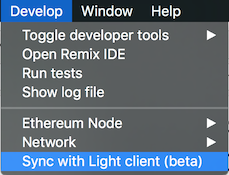
I'm closing this issue. Should you have any trouble, please refer to these channels:
- Canonical issue regarding sync: https://github.com/ethereum/mist/issues/3097
- Gitter channel, where the community is, and can certainly help as well: https://gitter.im/ethereum/mist
 evertonfraga
on 28 Sep 2017
evertonfraga
on 28 Sep 2017
Hello,
I didn't get ether balance in wallet.My client send ether to my address before two days ago.But i did not get yet why ?
After how many day's getting balance ?
 braravind
on 24 Feb 2018
braravind
on 24 Feb 2018
Related issues
 ibart7
·
6Comments
ibart7
·
6Comments
 Raindownchips
·
6Comments
Raindownchips
·
6Comments
 brandoncurtis
·
4Comments
brandoncurtis
·
4Comments
 tymat
·
6Comments
tymat
·
6Comments
 Nogreedy
·
4Comments
Nogreedy
·
4Comments
Most helpful comment
so I have also had massive problems with this mist and ethereum wallet. my honest opinion of this wallet is it is shit !!!
I have been trying to download this blockchain for a month now and have literally tried everything...
my ether is in the account, as I have seen it on the parity account.
is there any way of sending that ether from your parity account to another wallet as I am never going to use this stupid mist wallet.......