Mist: Blockchain takes way too long to sync
It's been three days and my blockchain hasn't sync'd yet idk why its taking so long time i am on a 100/100 connection.
 Pac23
Pac23
All 18 comments
I have the same issue, I even tried deleting the application and chaindata folder and installing it again. Same story, even with the geth --fast command it still takes several days to sync the whole chain.
 MartijntenCaat
on 31 May 2017
MartijntenCaat
on 31 May 2017
Same problem. The wallet is basically unusable right now. I have tried to delete chaindata several times and also tried many different geth commands, but each time it will stop at a new block. The only time I was able to get in with an updated wallet balance was when i tried to run geth --light overnight, then launched the wallet. However after closing and restarting the wallet the sync was restarted from 0 again.
 aleksre
on 31 May 2017
aleksre
on 31 May 2017
@aleksre @MartijntenCaat i have tried the same things you folks have,i hope this is fixed soon.
Pac23
on 31 May 2017
Had the same problem for weeks now. No one is working on it. Seems that Ethereum requires an SSD as a system disc. Large disadvatage to bitcoin. Will create a lot of unhappy first (and last) time users.
 NeunMalsechs
on 1 Jun 2017
NeunMalsechs
on 1 Jun 2017
@NeunMalsechs Conspiracy theory but imo these people are trying to force others to store their eth on online wallets
Pac23
on 2 Jun 2017
same issue with me.. i have 2 machines ive been trying to load it up on. one is not an ssd and it downloaded 8-10hrs.. well up until 3,200,000 and change and then it freezes up... my other pc has an ssd but i dont want to dedicate my primary ssd on my primary pc to a wallet so i had the blockchain stored on a separate 10k drive and im on day 7 with 47,000 blocks left to go.... i do not understand this...
 DIESLTEK710
on 3 Jun 2017
DIESLTEK710
on 3 Jun 2017
I have to run it in light mode. Full or fast is unusable even on SSD.
To run geth from the command line:
Go to the geth dir (default is C:UsersYOUR_USERAppDataRoamingEthereum WalletbinariesGethunpacked) create a shortcut for geth.exe. Right click on it. On the "target" field add:
--syncmode=light
Run the shortcut. Keep the command line window open.
Open the ethereum wallet as usual. It will sync in light mode. First time may take a little while. Next time is very very fast.
Everytime you want to open the wallet you have to run geth trough the shortcut first.
I dont know if there are any security issues with it or any additional problems. Perhaps someone else can comment on it.
I hope it helps.
 burdo3417
on 5 Jun 2017
burdo3417
on 5 Jun 2017
@burdo3417 Thanks for the hints. With this I could at least see my current balance.
Nevertheless this is a best a workaround, feasible for a technician, nothing that can be asked from business user.
And I fear that this is a problem of Ethereums architectural design. Especially since the developer community doesn't even respond to those reports. Will not be easy to fix. Despite the good marketing the Ethereum Foundation is doing, it will come back to haunt them.
I guess I will have to take another look at Lisk if I want useable Smart Contracts.
NeunMalsechs
on 8 Jun 2017
Elsewhere I saw the workaround described that works for me on a normal HD:
- install parity separately
- run it as 'parity.exe --geth'
- start up mist when synced
- keep both running....
 Moorelife
on 8 Jun 2017
Moorelife
on 8 Jun 2017
я вообще не могу кошелек открыть
 dfkthf125
on 8 Jun 2017
dfkthf125
on 8 Jun 2017
I guess, it is related to #2372 .
 PatchRanger
on 10 Aug 2017
PatchRanger
on 10 Aug 2017
it's taking me 2 days to sync my mac book pro so far, it's always get stuck at the end the last few blocks never seems to finish.
Windows clients all failed to sync so far last week and gave up
 tomtom87
on 16 Aug 2017
tomtom87
on 16 Aug 2017
Hi, we have just launched Mist v0.9.1, with Light Client integration (beta).
What does that mean?
- Sync times reduced by an order of magnitude while staying safe.
- Much smaller storage required.
How to activate?
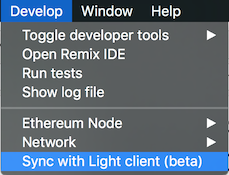
I'm closing this issue. Should you have any trouble, please refer to this canonical issue: https://github.com/ethereum/mist/issues/3097
 evertonfraga
on 28 Sep 2017
evertonfraga
on 28 Sep 2017
Mist app mostly freeze my PC, it always occupies 100% disk performance and also make it fragmented.
My HDD now is almost burnt up and going to be broken down.
 haikieu
on 4 Nov 2017
haikieu
on 4 Nov 2017
Just use Exodus
 Gasparunho
on 14 Nov 2017
Gasparunho
on 14 Nov 2017
+1 Exodus ftw or MEW if you cant install it
On 15 Nov 2017, at 01:52, Gasparunho notifications@github.com wrote:
Just use Exodus
—
You are receiving this because you commented.
Reply to this email directly, view it on GitHub, or mute the thread.
tomtom87
on 15 Nov 2017
Hi. I am a newbie on smart contracts and have followed the Smart Contract Initiative but it has been running for more than two days and has not been completed. please kindly guide me more. thank you very much.

 danhnguyen01
on 18 Nov 2017
danhnguyen01
on 18 Nov 2017
This thread has been automatically locked because it has not had recent activity. Please open a new issue for related bugs and link to relevant comments in this thread.
![lock[bot] picture](https://avatars.githubusercontent.com/in/6672?v=4&s=40) lock[bot]
on 30 Mar 2018
lock[bot]
on 30 Mar 2018
Related issues
 ibart7
·
6Comments
ibart7
·
6Comments
 ihatecreatingaccounts
·
6Comments
ihatecreatingaccounts
·
6Comments
 jamesray1
·
5Comments
jamesray1
·
5Comments
 brandoncurtis
·
4Comments
brandoncurtis
·
4Comments
 stbregeon
·
3Comments
stbregeon
·
3Comments
Most helpful comment
I have to run it in light mode. Full or fast is unusable even on SSD.
To run geth from the command line:
Go to the geth dir (default is C:UsersYOUR_USERAppDataRoamingEthereum WalletbinariesGethunpacked) create a shortcut for geth.exe. Right click on it. On the "target" field add:
--syncmode=light
Run the shortcut. Keep the command line window open.
Open the ethereum wallet as usual. It will sync in light mode. First time may take a little while. Next time is very very fast.
Everytime you want to open the wallet you have to run geth trough the shortcut first.
I dont know if there are any security issues with it or any additional problems. Perhaps someone else can comment on it.
I hope it helps.