Mintty: [Feature Request] Support fallback font
I changed mintty's font settings to consolas (system language: Simplified Chinese), but the consolas font only supports English characters. So windows will auto fallback other characters to system default fonts, other characters will look very ugly (at least in Simplified Chinese), like this:
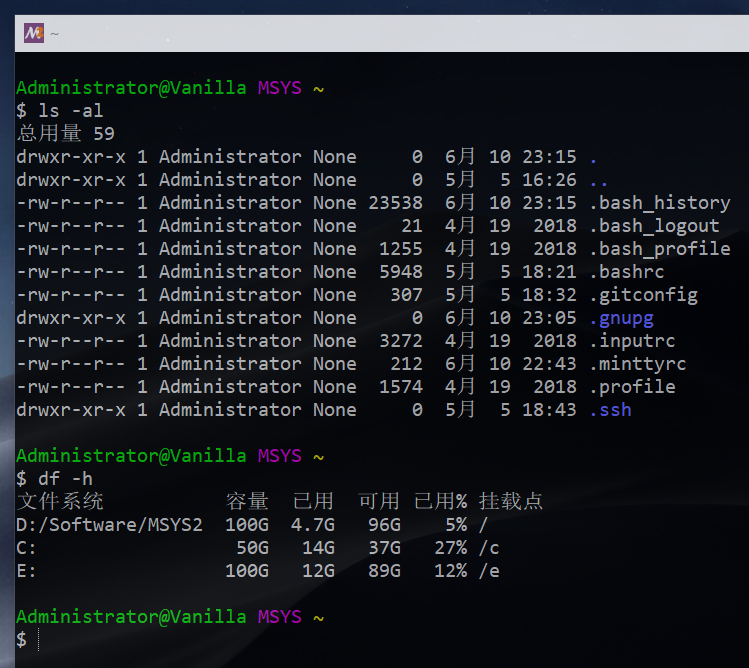
So I hope that mintty will support fallback font settings in future versions. Just like the font settings of the Intellj IDEA:

 pexcn
pexcn
All 5 comments
mintty already uses Uniscribe for output, so will use Windows linked fonts if specified in the registry:
https://docs.microsoft.com/en-us/globalization/input/font-technology#font-linking
which you have to set up yourself for standard fonts.
Windows "font fallback" is the original facility to use Windows equivalent fonts names as a substitute for font names available on other platforms, e.g. Times->Times New Roman, Courier->Courier New, Swiss->Arial, etc.
 BrianInglis
on 10 Jun 2019
BrianInglis
on 10 Jun 2019
Thanks for your reply, I will try it later.
pexcn
on 11 Jun 2019
Solved, thank you.
pexcn
on 12 Jun 2019
Mintty now supports script-specific secondary fonts, option FontChoice. Configuration example:
FontChoice=Hebrew:6;Arabic:7;Han:8;Hangul:9
Font6=David
Font7=Simplified Arabic Fixed
Font8=FangSong
Font9=MingLiU
 mintty
on 10 Jul 2019
mintty
on 10 Jul 2019
Released 3.0.2.
mintty
on 13 Jul 2019
Related issues
 oxo42
·
10Comments
oxo42
·
10Comments
 Jekotia
·
13Comments
Jekotia
·
13Comments
 DanielGGordon
·
12Comments
DanielGGordon
·
12Comments
 nyuszika7h
·
5Comments
nyuszika7h
·
5Comments
 megapctr
·
13Comments
megapctr
·
13Comments
Most helpful comment
Mintty now supports script-specific secondary fonts, option
FontChoice. Configuration example: