Mintty: "There is no font with that name" - but the font exists
Below you can see the error message. This is occuring in all my instances of Mintty (I have 3x - one for Git Bash, one for Babun, and a portable version of Git Bash).
So even though I installed these fonts, Mintty is telling me they don't exist.
So I deleted them all via the control panel. Then I went back to Mintty, and the fonts still exist. Re-installing seemed to have no effect.

 DanielGGordon
All 12 comments
Are they freeware fonts? Can you send a link to them?
 mintty
on 23 Dec 2015
mintty
on 23 Dec 2015
So I was able to get rid of them from the menu after restarting my computer.
I then tried to add the fonts (manually, one by one).
The fonts now show up in Babun (or anything that uses Mintty), but I now get the same error again.
These are Powerline patched fonts, specifically, the Meslo family of fonts.
DanielGGordon
on 23 Dec 2015
The names of these fonts are very long and weird, like Meslo LG L DZ for Powerline RegularForPowerline. The font doesn't work with a command-line option -o Font=... either, but without error message. The error popup is not generated by mintty.
With these observations, my current assumption is that some Windows component has a length limit for font names.
mintty
on 5 Jan 2016
Yes this has to do with name length of the font. Closing.
DanielGGordon
on 13 Jan 2016
Well, mintty -o Font="Meslo LG L DZ for Powerline" works,
so actually it doesn't seem to be the length limit (which is 32) but the weird fact that the name used to present the font in the font selection menu is longer than the name used to select the font.
However, the font selection menu is handled by Windows (ChooseFont), not mintty.
mintty
on 26 Feb 2016
It turns out that, with some new handling of the font selection menu, the Meslo fonts can be selected, but only with the new Apply button within the font selection menu.
mintty
on 11 Mar 2016
Released a number of font selection problems in 2.2.4 although not particularly this one; but those fonts can now be selected with the new Apply button.
mintty
on 18 Mar 2016
FWIW, I found out that the names shown in Windows are quite inconsistent. The file-name does not correspond to the name listed in the "Fonts" window of windows, which in turn does not correspond to the font name stored in the TTF file(?), so knowing which one to use is a bit of guesswork.
After a bit of fiddling around with various settings, I found that the name which works for the Font=... setting in mintty is the one shown in the font detail window:
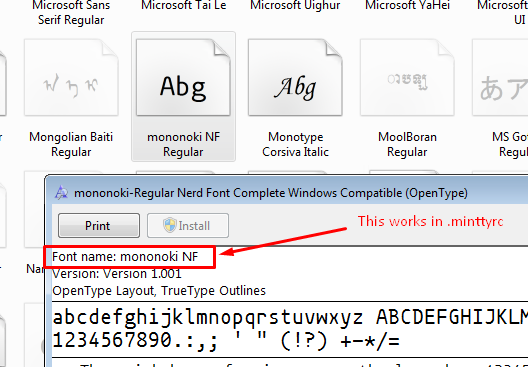
 exhuma
on 18 Jan 2018
exhuma
on 18 Jan 2018
My rule of thumb was to use the listed font name ("mononoki NF Regular" above) and leave out generic style suffixes ("Regular"), but that's a bit fuzzy.
Thanks for identifying this proper association, I should mention it on the wiki Tips page.
You may also be interested in the following:
For font families with unusual style sets, especially more than 4 styles, the Windows font chooser ("Font" - "Select...") is not capable to offer proper selection. In this case, however, the mintty built-in font menu helps out at is distinguishes them all. Option -o FontMenu=0; example Iosevka.
mintty
on 18 Jan 2018
@mintty as an addendum to my post, it seems this name does not work when using .minttyrc. Specifying that name in the -o Font= option works however!
exhuma
on 18 Jan 2018
Please check the exact spelling; trailing space is significant.
mintty
on 18 Jan 2018
Font=mononoki NF in .minttyrc works fine here.
mintty
on 19 Jan 2018
Related issues
 fengyichui
·
4Comments
fengyichui
·
4Comments
 GoogleCodeExporter
·
16Comments
GoogleCodeExporter
·
16Comments
 jdforsythe
·
11Comments
jdforsythe
·
11Comments
 E3V3A
·
11Comments
E3V3A
·
11Comments
 JohanVandeplas
·
15Comments
JohanVandeplas
·
15Comments
Most helpful comment
Released a number of font selection problems in 2.2.4 although not particularly this one; but those fonts can now be selected with the new Apply button.