Mini-graph-card: Reduce white space
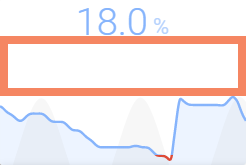
Is there a way to reduce the size of all this white space? It is filling 1/3 of the entire card and I don't really need it.
I tried with the card-mod but I can't figure it out.
 ACrazyConcept
All 8 comments
Going to try this: https://github.com/kalkih/mini-graph-card/issues/294#issuecomment-596093829
ACrazyConcept
on 4 Apr 2020
Nope. Can't figure it out ^^
ACrazyConcept
on 4 Apr 2020
Yeah, that looks weird, could you post your card config so I can have a look at it? 🙂
 kalkih
on 4 Apr 2020
kalkih
on 4 Apr 2020
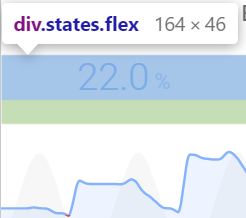
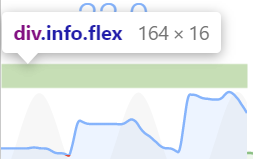
Sure. I actually came some of the way I think. It is ~50% div.states.flex and 50% div.info.flex. And I tried with the card-mod to simply remove div.info.flex but I couldn't figure out the exact way to do it. I think I managed to apply the display: none, but looks like there was still a padding left I could not change:
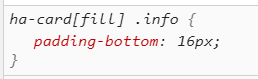
It is one of 3 in a horizontal stack:
- type: custom:mini-graph-card
group: true
entities:
- entity: '[[moisture_sensor]]'
show_fill: false
state_adaptive_color: true
- entity: '[[moisture_sensor]]'
color: '#7EB3F9'
show_points: false
show_line: false
show_fill: true
state_adaptive_color: true
- entity: sensor.sun_elevation
color: '#cbcbcb'
show_fill: true
show_line: false
show_points: false
show_legend: false
y_axis: secondary
lower_bound_secondary: 0
hours_to_show: 60
points_per_hour: 2
hour24: true
cache: false
font_size: 75
align_state: center
height: 150
decimals: 1
show:
labels_secondary: false
name: false
icon: false
legend: false
color_thresholds_transition: hard
color_thresholds:
- value: 1
color: "#e74c3c"
- value: '[[moisture_min_threshold]]'
color: "#7EB3F9"
@ACrazyConcept it works with card-mod when using !important:
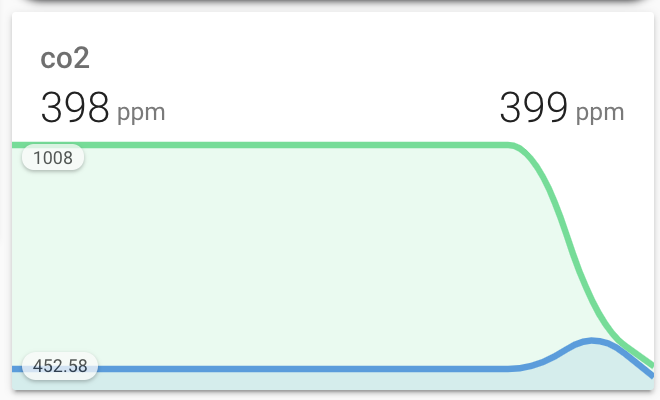
Here's the config for that:
type: 'custom:mini-graph-card'
name: co2
style: |
  ha-card > div:nth-child(-n+2) {
    padding: 0 16px 0 16px !important
  }
  ha-card > .info {
    padding: 0 16px 0px 16px !important
  }
show:
  name: true
  icon: false
  legend: false
  labels: true
  state: true
  indicator: true
font_size: 70
height: 200
entities:
  - entity: sensor.co2_aqs_blue
    color: '#439ce0'
  - entity: sensor.co2_aqs_green
    color: '#43e091'
    show_state: true
you can re-add vertical padding in the .info part for when you need that text that appears when hovering to have space
 heikomat
on 4 Apr 2020
heikomat
on 4 Apr 2020
We should skip one of those paddings, will update the style.
kalkih
on 4 Apr 2020
@heikomat Awesome, that helped me get there. Thanks!
ACrazyConcept
on 5 Apr 2020
I feel that there is still too much white space regardless of the updates and the card styling combined and that this issue should be reopened. What do you think @kalkih ?
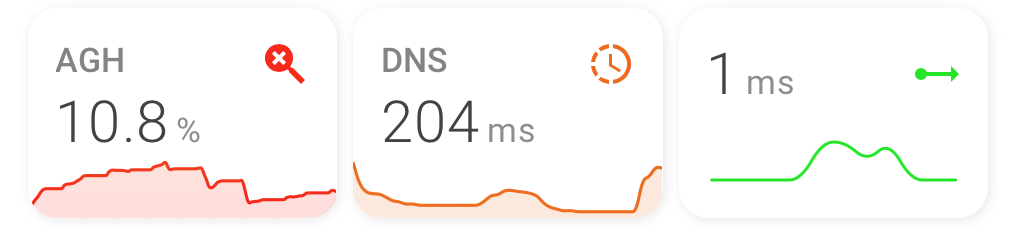
Expand code
cards:
  - color_thresholds:
      - color: '#ff0000'
        value: 10
      - color: '#e1e700'
        value: 15
      - color: '#04e700'
        value: 20
    decimals: 1
    entities:
      - entity: sensor.adguard_dns_queries_blocked_ratio
        name: AGH
        state_adaptive_color: false
    font_size: 85
    hours_to_show: 168
    line_width: 5
    points_per_hour: 1
    show:
      fill: true
      icon_adaptive_color: true
      labels: false
      points: false
    style: |
      ha-card > div:nth-child(-n+2) {
        padding: 0 14px 0 14px !important
      }
      ha-card > .info {
        padding: 0 14px 0px 14px !important
      }
    type: 'custom:mini-graph-card'
  - color_thresholds:
      - color: '#ff0000'
        value: 250
      - color: '#e1e700'
        value: 150
      - color: '#04e700'
        value: 100
    decimals: 0
    entities:
      - entity: sensor.adguard_average_processing_speed
        state_adaptive_color: false
    font_size: 85
    hours_to_show: 48
    icon: 'mdi:progress-clock'
    line_width: 5
    name: DNS
    points_per_hour: 1
    show:
      fill: true
      icon_adaptive_color: true
      labels: false
      points: false
    style: |
      ha-card > div:nth-child(-n+2) {
        padding: 0 14px 0 14px !important
      }
      ha-card > .info {
        padding: 0 14px 0px 14px !important
      }
    type: 'custom:mini-graph-card'
  - align_icon: state
    animate: false
    color_thresholds:
      - color: '#ff0000'
        value: 15
      - color: '#e1e700'
        value: 10
      - color: '#04e700'
        value: 5
    decimals: 0
    entities:
      - entity: sensor.speedtest_net_latency
    font_size: 85
    hours_to_show: 6
    line_width: 6
    name: Latency
    points_per_hour: 2
    show:
      fill: false
      icon_adaptive_color: true
      labels: false
      name: false
      points: false
    style: |
      ha-card > div:nth-child(-n+2) {
        padding: 0 14px 0 14px !important
      }
      ha-card > .info {
        padding: 0 14px 0px 14px !important
      }
    type: 'custom:mini-graph-card'
type: horizontal-stack
 agneevX
on 19 Aug 2020
agneevX
on 19 Aug 2020
Related issues
 WhistleMaster
·
3Comments
WhistleMaster
·
3Comments
 balloob
·
4Comments
balloob
·
4Comments
 pejotigrek
·
6Comments
pejotigrek
·
6Comments
 xstrex
·
7Comments
xstrex
·
7Comments
 tomlut
·
4Comments
tomlut
·
4Comments
Most helpful comment
@ACrazyConcept it works with card-mod when using
!important:Here's the config for that:
you can re-add vertical padding in the
.infopart for when you need that text that appears when hovering to have space