Minetest_game: Add heart_gone.png and bubble_gone.png
I suggest to add heart_gone.png and bubble_gone.png (see lua_api.txt).
Make these images grayed-out versions of heart.png and bubble.png.
This simple change makes the statbars so much more user-friendly.
 Wuzzy2
All 8 comments
Note that this should be done after #2655 is worked out, because heart.png and bubble.png might need to change.
I decided to try it out; with a bit of grayscale conversion and 'Color to Alpha' to give it some transparency:

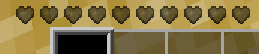

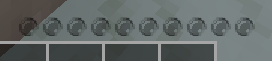
It needs to also work well at night; which my ones don't do at 50% screen brightness, if that means anything :P

 An0n3m0us
on 25 Apr 2020
An0n3m0us
on 25 Apr 2020
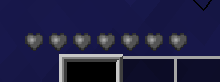
I went with less alpha and got this result:
Day:

Night:

I'm not too keen on how the heart gone icon look like at night; but at least they are visible.
An0n3m0us
on 25 Apr 2020
Why have transparency at all?
 sfan5
on 25 Apr 2020
sfan5
on 25 Apr 2020
Well, a solid color would look a little odd, wouldn't it? It's not too bad; but for some reason it just looks like a texturepack rather than an empty health bar.
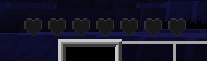
Actually, it probably needs a different icon rather than a grayscale of the current heart icon.
Maybe like this:
An0n3m0us
on 25 Apr 2020
Attend to this after #2655 EDIT: That issue is now resolved.
Solid textures seem ok to me as long as they are suitably designed (dark , greyscale), it will be obvious they are 'gone' due to the presence of the 'not gone' textures.
 paramat
on 25 Apr 2020
paramat
on 25 Apr 2020
I'm just creating a few examples for now.
Yeah they need to be obvious, unlike the first grayscale ones I showed.
An0n3m0us
on 26 Apr 2020
Feel free to “steal” from [hudbars].
Wuzzy2
on 26 Apr 2020
'Gone' icons should be derived from the new textures added in #2669
'Gone hearts' should probably be opaque but 'gone bubbles' should probably have transparency.
paramat
on 1 Sep 2020
Related issues
paramat
·
64Comments
 ghost
·
100Comments
paramat
·
71Comments
ghost
·
100Comments
paramat
·
71Comments
 Ezhh
·
45Comments
Ezhh
·
45Comments
 Fixer-007
·
55Comments
Fixer-007
·
55Comments
Most helpful comment
Note that this should be done after #2655 is worked out, because
heart.pngandbubble.pngmight need to change.I decided to try it out; with a bit of grayscale conversion and 'Color to Alpha' to give it some transparency:


It needs to also work well at night; which my ones don't do at 50% screen brightness, if that means anything :P
