Minetest_game: Distorted player model
See
https://github.com/minetest/minetest_game/pull/1392#issuecomment-262688551
https://github.com/minetest/minetest_game/pull/1392#issuecomment-262831291
https://github.com/minetest/minetest_game/pull/1392#issuecomment-262843921
"- The head is 4 blender units high, and 8 pixels, so 1 pixel is 0.5 blender unit
- The body is 4 blender units wide x 2 deep. It is 8 x 4 pixels so unsurprisingly the pixel size is also 0.5
- The arms and legs are 2 x 2 blender units, and 4 x 4 pixels, so unsurprisingly the pixel size is also 0.5
However
- The height of the arms, legs and body is 6.75 blender units each, and 12 pixels, so the pixel height is 0.5625 instead of 0.5."
The limbs and body are stretched to 13.5 pixels in length but textured with a 12 pixel length.
The pixels are therefore rectangular on most of the player model.
I suggest the player model is re-proportioned so that the limbs are 4x4x12 and the body 4x8x12, to then be consistent with player skin textures and have square pixels throughout.
I assume Minecraft proportions their model correctly?
This would change the player height so the whole model would have to be scaled slightly larger.
@Jordach i'm interested in the reason for the stretch.
 paramat
All 71 comments
Regular model and shortened model:


Edit: added two even shorter models
 Rogier-5
on 26 Nov 2016
Rogier-5
on 26 Nov 2016
Interesting, the current model looks stretched and skinny, the shorter one is cute and has the better looking square pixels, but may take some getting used to.
I'll look at a MC player to measure proportions.
paramat
on 26 Nov 2016
Interesting discussion in IRC http://irc.minetest.net/minetest/2016-11-26#i_4750184
We should consider the model from BFD which is apparently much improved.
paramat
on 26 Nov 2016
the shorter one is cute
Of course it is cute: with the bigger head (in proportion), it is more child-like. And children (and young animals) are meant to be cute, so that adults will care for them, and be nice to them. And that's how it should be, but I don't think the minetest character model should be a child.
Added two even smaller models above, for comparison. Note that all the heads are the same size. The only difference is that they are progressively shorter (respectively by 1.5, 1 and 1 units (= 3, 2, 2 pixels' worth).
... but IMO there's no reason why there shouldn't be a child-model as well. And models that are more feminine for that matter.
Will have a look at BFD model later.
Rogier-5
on 27 Nov 2016
Well, i don't see the correctly proportioned model as unsuitably child like, it's not that extreme, it just looks stocky next to the current model.
paramat
on 27 Nov 2016
BFD's default model has a few differences, but in all, I don't see any major advantages:
- Body and leg pixels are rectangular, just like the model from minetest_game. The legs, arms and body are even a bit longer: 7 units instead of 6.75 (but still 12 pixels).
- Arm rotation problem is fixed. Same as, or comparable to the fix I made.
- Leg rotation is changed, comparable to new arm rotation. Improves the sitting animation, but looks ugly when moving legs sideways (e.g. current lie animation).
- Lie animation has straight legs.
- Stand animation:
- Current model's arms remain vertical, BFD model has arms swinging with elbow at center of rotation.
- BFD head turns one direction while the body swings backward, the other direction while it swings forward. Doesn't look nice IMO. Current model's head turns right with one swing, and left with next swing of the body.
- Digging animation looks more like waving: arm moves up and down only (not inward), and is actually directed a bit outward altogether.
Re: more or less child-like: I suppose it's a matter of personal perference. And indeed: it's not extreme or unacceptable. But then, the rectangular pixels are not bothersome either IMO.
Rogier-5
on 27 Nov 2016
Hm not as Jordach described then, doesn't sound good.
Thanks for checking it.
paramat
on 27 Nov 2016
I suppose it's a matter of personal perference. And indeed: it's not extreme or unacceptable.
But then, the rectangular pixels are not bothersome either IMO.
That pretty much sums up my feelings too so I am neutral on this. Interestingly, looking at some older screenshots it seems that Sam was once a squatter model with square looking pixels.
 stujones11
on 27 Nov 2016
stujones11
on 27 Nov 2016
FWIW I have adjusted the model so that the body pixels are square, this does however make the model slightly shorter but I kinda like it that way. Scaling by 1.125 theoretically gives you back the original height but does make the model look a bit chunky.
Short version: https://github.com/stujones11/minetest-models/tree/master/character/shorty
Chunky version: https://github.com/stujones11/minetest-models/tree/master/character/chunky
The chunky version does have the advantage of reducing the discrepancy in pixel size compared to nodes.
stujones11
on 19 Jul 2017
Thanks will try these.
paramat
on 19 Jul 2017

Chunky version that keeps same height, but is wider than before and has a bigger head.
paramat
on 19 Jul 2017
Yeah, you definitely don't wanna mess with Sam now :D
stujones11
on 19 Jul 2017
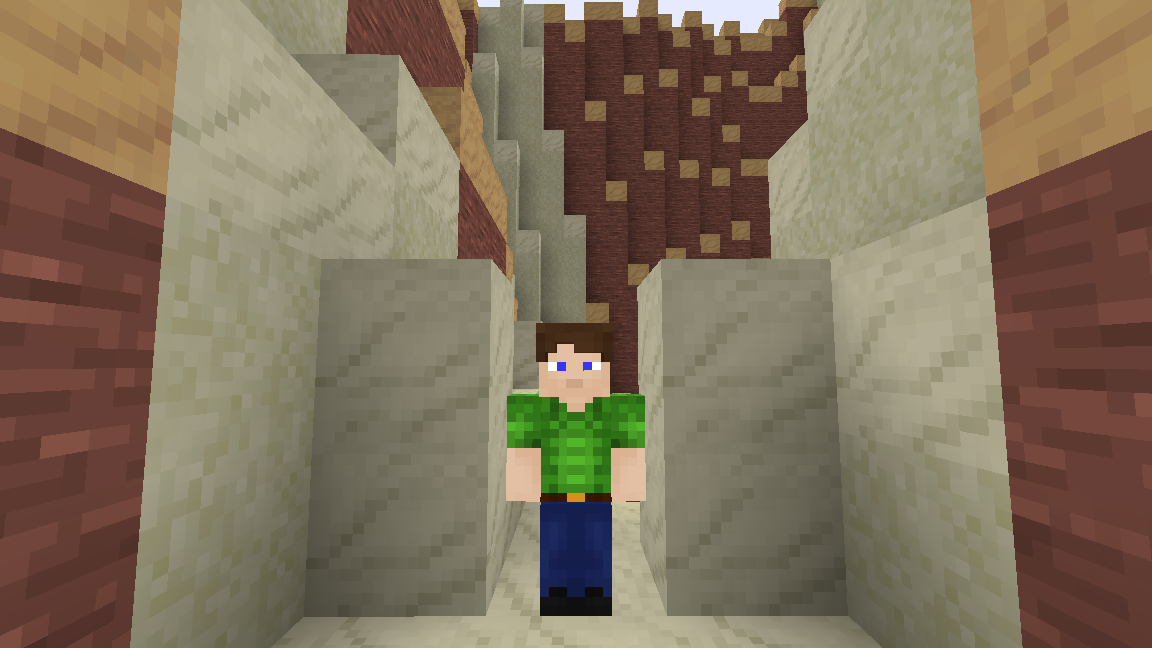
Short version that keeps same head size and body width but is shorter.
This is more suitable if we consider nodes to be 1 metre in size, and seems better scaled compared to doorways and passageways. Doorways are generally considered to be 2m high, this model is a more suitable height in comparison for an average height human.
Yeah i certainly prefer this one.
paramat
on 19 Jul 2017
I find these 'square pixel' models look fine proportionally. We could then reduce collisionbox height and camera level to match eyelevel.
paramat
on 19 Jul 2017
Incidentally, the correct collision-box height should be 1.62 for the shorter model, inclusive of hair, 1.6 otherwise.
stujones11
on 19 Jul 2017
1.62m, a more reasonable average human height than 1.77m.
paramat
on 19 Jul 2017
I would like to consider this. It will be a matter of taste so if we use it we should provide the classic model too to be easily used, maybe as a setting.
The chunky version does have the advantage of reducing the discrepancy in pixel size compared to nodes.
It's still a mismatch so doesn't seem an advantage.
paramat
on 19 Jul 2017
I just calculated my own height in meters for the first time ever to be 1.778 but then I am male and Sam, apparently, is genderless.
Providing other models is another possibility but will make life a bit awkward for modders, but that's mostly just going to be me having to supply alternative armor models as well :-/
stujones11
on 19 Jul 2017
1.62m is quite short for an average, but we can always consider nodes to be slightly larger than 1m.
The shorter model is well scaled to a 2x1 node passagway, and i like how the head has not changed size and how the body is no wider.
paramat
on 19 Jul 2017
We can always compromise somewhere in between but I've had enough blender for tonight. If we can agree upon a height I can easily adapt the model to suit.
You can use scale to experiment but it does tend to push the player into the ground so you need to use fly to see the proper effect.
stujones11
on 19 Jul 2017
Only the body and limbs were stretched so i assume you did not squash the head vertically.
paramat
on 19 Jul 2017
No, the head was already correct in that sense, I merely shortened the body to the same pixel scaling.
The chunky model is simply that scaled by 1.125 on all axis, which should be correct if you want to keep the pixels square, unless I got my sums wrong :)
stujones11
on 19 Jul 2017
You can use scale to experiment but it does tend to push the player into the ground
Unrelated to this ticket, but i'd say that's a bug. Wasn't there a ticket about how the model has an offset and isn't really stepping on the 0,0 plane?
 Ferk
on 20 Jul 2017
Ferk
on 20 Jul 2017
Maybe you mean the collisionbox offset by 1 node, relevant to the 'settable collisionbox' feature?
Not sure if that will alter how visual scale works.
paramat
on 20 Jul 2017
So, i like the short version, it is well scaled to a 1x2 node passageway, has a head no larger and a body no wider (any wider may cause issues with armour mods).
I feel we should consider it as an optional model chosen using a setting, i would prefer enabled by default, as a 'breaking change' for 0.5.
In the engine we would need to set a camera height that is a compromise between the 2 models (currently camera height is actually a little too high for player eyelevel).
We would also then use the 'custom player collisionbox' feature to choose between 2 collisionboxes.
paramat
on 20 Jul 2017
Note #1785 will be merged soon which reworks the player model due to the offset, so this proportion change will have to wait until after that (or be combined with it).
paramat
on 20 Jul 2017
It would be good to see if after #1785 the visual scale will work without sinking the player.
If the origin of the model is used as the center for the scaling, that would explain the bug, since the feet would have then grown below the offset.
Ferk
on 20 Jul 2017
Well I'd obviously prefer to stick with a single model for the selfish reasons I already stated but it's not that big a deal. However, I am wondering if a player scale setting could work if the offset issue is fixed as @Ferk suggests, of course this would need to be tied to settable collision boxes. This would give players even more control without breaking mods.
stujones11
on 20 Jul 2017
It seems best that the new model is default to encourage modders to adapt to it, otherwise they may not change their mods and the new model may not get far.
paramat
on 20 Jul 2017
Okay, I am happy to rescale the model and submit a PR once #1785 is merged.
As with any change, it is sure to upset some people but I think it's completely justified, having different pixel sizes on the same model does look kinda sloppy.
stujones11
on 20 Jul 2017
1785 is merged.
paramat
on 21 Jul 2017
Wow, that was quick! I will get on to that right away then, just need to rebuild MT first. We are agreed on the 1.62m version, right? I can always make it a bit bigger if there's an outrage :)
stujones11
on 21 Jul 2017
Yes 1.62 node height, same head size and body width/depth.
paramat
on 21 Jul 2017
Gah! build just failed with some undefined json reference...any idea? sorry for off-topic, just thought you might know.
stujones11
on 21 Jul 2017
No idea but have heard JSON mentioned recently, maybe open an issue?
paramat
on 21 Jul 2017
Seems like a debian issue that was supposedly fixed https://github.com/minetest/minetest/issues/4306
stujones11
on 21 Jul 2017
Never mind, I can still work on the new model, just wont be able to test right now. However, I need to set the new collision box height somewhere in the game yet the new feature seems to lack documentation. I assume it's just a matter of including a collision box property somewhere in player.lua?
stujones11
on 21 Jul 2017
Okay, new model is here https://github.com/stujones11/minetest-models/tree/master/character/offset_1.62
Feel free to make the PR yourself, needs testing though.
stujones11
on 21 Jul 2017
The collisionbox is actualy set as a default in the engine, that's just been updated so don't worry about that. Thanks i will test, discuss and make the PR.
paramat
on 21 Jul 2017
The collisionbox is actualy set as a default in the engine
This really should be done in game now and also documented. I've been looking at player.lua and I think this needs to be included in default.player_register_model for a proper api.
The only problem with you making the PR is that you forfeit your approval and I suspect you are one of the few devs that care about this sort of stuff, though I guess if it's that unpopular it shouldn't be merged anyway.
Also, I think documenting and updating the api should be a separate commit from the model change.
stujones11
on 21 Jul 2017
Yes collisionbox should be set in MTG now, i can do that too.
When a core dev makes a PR their approval still counts as 1 of the 2 needed.
paramat
on 22 Jul 2017
See #1842
paramat
on 23 Jul 2017
FWIW I have re-exported the offset_1.62 model to work with the advanced lighting PR
https://github.com/stujones11/minetest-models/tree/master/character/offset_1.62
stujones11
on 26 Jul 2017
1863 merged.
paramat
on 6 Aug 2017
I'm ready to work on this now, and have thought of a way forward.
We want to mnimise the reduction of height and minimise the increase in width, so let's do this mathematically, lets reduce height by the same factor as the increase in width, by sqrt(1.125), this minimises the changes of both (is the factor correct?). @stujones11 if you're happy with this idea could you scale the new model this way?
I prefer to have only one model, as keeping the old one as an option might reduce use of the new model and prevent people getting used to it, also of course because of causing problems and complications for mods and MTGame.
This will be for 0.5.0 after all, so now's the time to make such a change.
It might take a little getting used to for some but consider it will now be identical in proportions to Minecraft, so there's no argument that it looks wrong or too wide, because MC players look fine.
Anyone desperate to use the old model can use a mod.
EDIT: It will also look identical to what the modder creates in an image editor, or the appearence on a skin website.
paramat
on 25 Aug 2017
I had not considered that the pixels on the head would be a different shape to the pixels on the body, that's really sloppy and another good reason for a change.
Also i realised that what a modder creates when working on the skin texture is not what appears because the body pixels are stretched. Any skin shown on a skin website is not what appears in MT either for the same reason.
paramat
on 27 Aug 2017
@stujones11 ^^
Let me know if you're too busy to rescale the model.
paramat
on 25 Sep 2017
@Rogier-5 would you be able to rescale the model as stujones11 is absent?
paramat
on 3 Oct 2017
@paramat Sorry, I didn't see this issue had been updated. I can do this over the weekend, possibly even tonight, although I am not sure what you mean by sqrt(1.125). Given the existing height is 1.77, what would be the desired height?
How about I make it 1.70, that's roughly in between 1.62 & 1.77? I'll make one anyway to see how it looks.
stujones11
on 13 Oct 2017
@stujones11 Good to hear from you, give me an hour and i'll double check my request and describe it clearer.
paramat
on 13 Oct 2017
Ok my scaling factor is wrong, as i forgot about the head not being stretched.
We're trying to decide what scaling to use, the short version has the same head dimensions and body/limb width and just removes the body/limb stretch. The chunky version, i assume, is the short version x 1.125:
Scaling by 1.125 theoretically gives you back the original height but does make the model look a bit chunky.
It won't be the same height as the original because the head was not stretched.
Both height reduction and width increase should be minimised, so my idea is to work out mathmatically the scaling where the reduction factor for height equals the increasing factor for width. This will take some maths to work out due to the head not being stretched.
Do you know by how many head pixels the 'hair' layer is above the head? Or maybe we can ignore that in the calculation.
paramat
on 13 Oct 2017
Do you know by how many head pixels the 'hair' layer is above the head?
~Right now it's approximately 1.5 pixels. 0.125 blender units == 1 pixel here, actual difference is 0.2 but~ I'll let you do the maths ;-)
Edit: That's not right, 0.5 blender units == 1 pixel. Head is 4bu and 8px therefore the gap should be less than half a pixel.
To clarify, the current model is actually 17.7 blender units while we were previously talking in metres, this is where I got mixed up, sorry.
stujones11
on 13 Oct 2017
@stujones11
Width x Height x Depth all in blender units (bu)
Current
Head 4 x 4 x 4 1 pixel is 0.5bu
Torso 4 x 6.75 x 2
Arms 2 x 6.75 x 2 All 3 should be 6 in height as
Legs 2 x 6.75 x 2 are textured with 12 pixels
Total height 4 + 6.75 + 6.75 = 17.5
Total width 2 + 4 + 2 = 8
Short corrected version
Head 4 x 4 x 4
Torso 4 x 6 x 2
Arms 2 x 6 x 2
Legs 2 x 6 x 2
Total height 4 + 6 + 6 = 16
Total width 2 + 4 + 2 = 8
Mid version
Scale up short version by 's'
Height 16 * s
Width 8 * s
Height reduction factor equal to width increase factor
17.5 / (16 * s) = (8 * s) / 8
17.5 / (16 * s) = s
17.5 / 16 = s * s
s = sqrt(17.5 / 16) = 1.045825033
////////////
I have ignored the hair/hat layer for simplicity, it would only make a tiny difference.
Please scale up the short version by 's', but to avoid excessive decimal places in the model files how about 1.046 or even 1.05? Not sure which, the difference is 0.004 in 1.05 = 1 in 262.5 or 0.38% or 0.12 pixels, barely noticeable. I think perhaps 1.05?
paramat
on 14 Oct 2017
Okay, so scaling the corrected model up by 5% would make it 17.01 so my guess at 1.70m was not too far away :) I will upload a test model later today.
stujones11
on 14 Oct 2017
Here is the newly adjusted model for testing: https://github.com/stujones11/minetest-models/tree/master/character/offset_1.70
With this version there are now 0.525 blender units per pixel which keeps the vertex coords to a maximum of 2 decimal places, I don't think we can get much better without distorting the pixels.
I personally quite like the look of this model proportionally, it's still a little on the stumpy side but I don't really mind that. I would also suggest that we drop support for the cape and update the skin format but that's another issue ;¬)
This model should be a drop-in replacement for the current 0.5.0-dev model, however, the collision box will need to be adjusted accordingly.
stujones11
on 14 Oct 2017
Thanks.
Does this model support cape or not? I suggest we take this opportunity to drop cape support, something i very much want to do. Please could you also provide a version without cape support?
Then i'll make a PR.
paramat
on 14 Oct 2017
Please could you also provide a version without cape support?
No problem, I will also make a format 1.8 version just for the lulz but this will likely be tomorrow. I'd like to get some feedback from other devs/players regarding the size reduction, my only concern is that altering the collision-box significantly might affect certain parkor style maps but perhaps this is acceptable for 0.5.0?
PS. I just pushed a slight modification to the .blend file, however, the export is unchanged.
stujones11
on 14 Oct 2017
Shortening the collisionbox seems a reasonable change for 0.5.0, as collisions caused by the top of the collisionbox are rarely critical.
paramat
on 14 Oct 2017
collisions caused by the top of the collisionbox are rarely critical.
I completely agree, I was thinking more about the gain in width, though this is likely a non-issue really.
PS. Test model does still have cape support for now.
stujones11
on 14 Oct 2017
Here is a version without the cape, though I have a feeling this will be unpopular with some. FWIW my own multiskin and clothing mods will continue to provide this option even if it is removed from MTG
Model files: https://github.com/stujones11/minetest-models/tree/master/character/offset_1.70-cape
Update: I just pushed a small armature fix, widening it caused the arms to detach when rotated 90 degrees to the body. Although this is not used in any of the stock animations I have moved the arm bone tops to the new optimal position. Both versions of the model have been updated.
stujones11
on 15 Oct 2017
Thanks, yes we may have to keep the cape.
paramat
on 15 Oct 2017
Thanks, yes we may have to keep the cape.
I am neutral on the cape thing only that it would need to be dropped to properly support the version 1.8 skin format. I can create a 1.8 compatible version if I can get at least one dev approval on that, I don't want to waste my time otherwise, I will have enough models of my own to update after this :D
stujones11
on 15 Oct 2017
MC 1.8 format has been discussed a lot but is controversial, see the issue #1235
I do like the ability to have separately texturable left/right arms/legs.
Full body overlays can be done in a simpler way with a skin change, personally i'm not keen on chunky MC type armour layers, best leave those to mods i feel.
So i actually prefer we have our own new skin format, that has per-limb texturing but not full body overlays.
Any skins mod has to store skin textures and preferably many of them, full body overlays increases the file space taken by the skins.
So i disapprove of MC 1.8 format (as does sofar), i think we can do better with something simpler and specifically suited to MT.
Existing MT skins could be updated just by copy-pasting an arm and a leg.
Also i would like to remove the cape.
paramat
on 16 Oct 2017
@paramat, I'm fine with all of that except 'increases the file space taken by the skins', seriously?
Anyway, If we are keeping the existing skin format then I feel there is little point in removing the cape at this late stage. I am not sure how much simpler or specifically suited the model could be, however, to avoid mirroring, the textures will need to double in size irrespective of the extended 'accessory' layer.
stujones11
on 17 Oct 2017
Consider a skins mod that adds a choice of 100 skins, that causes a significant amount of extra media data to download to a client. It's not a major issue though.
paramat
on 17 Oct 2017
I do respect your conservatism most of the time but we are talking about 64x32px vs 64x64px images here, after optimisation there is very little difference in file-size, probably in the order of a few kB for 100 images. Never mind, it's off topic for this particular issue, I get your point :)
stujones11
on 17 Oct 2017
Sorry i didn't mean for the exact same skin, where i would agree, i mean if all the overlays are added, which in time would tend to happen. Anyway it's still minor.
paramat
on 17 Oct 2017
I must admit, I did not initially consider the media download aspect and thought you were referring to server HDD space, however, I think we both agree the difference would not be great, even with 100 or more skins using the full 64x64 canvas.
stujones11
on 17 Oct 2017
Back on topic, the more I notice it, the mixed pixel sizes on the model do look a bit sloppy, especially at this resolution. I do think this should be fixed at the very least.
stujones11
on 17 Oct 2017
PR #1928
paramat
on 27 Oct 2017
1928 merged.
stujones11 thanks for your excellent help on this one.
paramat
on 3 Nov 2017
Related issues
 cdqwertz
·
6Comments
cdqwertz
·
6Comments
 sofar
·
5Comments
sofar
·
5Comments
 Wuzzy2
·
4Comments
Wuzzy2
·
4Comments
 benrob0329
·
4Comments
benrob0329
·
4Comments
 TekhnaeRaav
·
5Comments
TekhnaeRaav
·
5Comments
Most helpful comment
Short version that keeps same head size and body width but is shorter.
This is more suitable if we consider nodes to be 1 metre in size, and seems better scaled compared to doorways and passageways. Doorways are generally considered to be 2m high, this model is a more suitable height in comparison for an average height human.
Yeah i certainly prefer this one.